
Grinding Noise From Dyson Vacuum? Diagnose And Fix It Fast
This post contains affiliate links. As an Amazon Associate, we earn from qualifying purchases.
A Dyson vacuum making a grinding noise means a physical obstruction is jamming the brush bar or airflow. The sound is metal or plastic parts scraping under motor strain. Unplug the machine immediately, flip it over, and manually rotate the brush roll to check for tangled hair, string, or debris wrapped around the ends.
That immediate stop-and-check is non-negotiable. Running the motor against a jam for more than a few seconds overheats the windings and can trip the thermal cut-out. If that happens, the manual says to leave it unplugged for a full hour before you even look for the blockage. The noise itself points to the problem’s location: a rhythmic grind from the floor head is a brush bar jam; a constant, deeper grind from the main body is something stuck in the hose or cyclone.
What follows is the sequence Dyson’s own service manuals prescribe, starting with the most likely culprit and moving to less common but critical failures. We’ll cover the three specific parts that break when ignored, the one cleaning product Dyson explicitly tells you to avoid, and how to tell if the grinding noise just cost you a repair bill.
Key Takeaways
- Unplug the vacuum the second you hear grinding. Continuing to run it can permanently score the brush bar axle or overheat the motor, triggering a thermal cut-out that requires a 60-minute cooldown.
- The cone seal on older models like the DC01 must sit over the rim of the yellow bin inner. If it’s tucked inside, it causes a pre-filter clog that sounds like a distant grind and leads to motor damage.
- Dyson’s operating manual states filters “must be replaced at least every 3 months” and warns that using carpet fresheners drastically shortens filter life and contributes to blockages.
- A rhythmic grinding from the floor head is almost always hair or string wound around the brush bar ends. A constant grind from the machine’s body points to a solid object lodged in the hose or wand.
- Clearing blockages is not covered under Dyson’s warranty. The DC01 manual from the early 2000s listed a £35 charge for a “blockage only” repair.
What a Dyson Grinding Noise Actually Means
You hear a harsh, mechanical scraping. It’s not a whine or a whistle, it’s the sound of something that should move freely being forced. In a vacuum cleaner, only a few parts move: the motor fan, the brush bar, and the ball joint on upright models. The motor itself doesn’t grind; it hums or whines under load. So when you get a grind, you’re listening to a secondary component being dragged against its housing.
A grinding noise in a Dyson vacuum indicates a physical obstruction causing friction between moving parts and stationary surfaces. The three primary sources are a jammed brush bar, a foreign object in the hose or wand, or a failed bearing in the motor or brush bar assembly. Immediate cessation of use is required to prevent scoring of shafts, overheating of the motor windings, or clutch failure.
The type of grind gives away the location. A rhythmic, cyclic grinding that matches the brush bar’s rotation speed comes from the cleaner head. Something is wrapped around the bar’s ends, forcing the plastic bearing or the bar itself to rub against the soleplate. A constant, deeper grinding or rumbling from the main body of the vacuum points to a larger object, a Lego, a rock, a chunk of plaster, lodged in the hose, wand, or the cyclone inlet. That object gets pulled against the walls by the airflow, creating a sustained drag.
Ignore either one, and the motor works harder. It draws more current, heats up, and eventually the thermal cut-out switch trips. That’s the safety feature that shuts the motor off to prevent a burnout. If your vacuum suddenly goes silent after a period of grinding, you’ve likely hit the cut-out. The Dyson DC01 manual is explicit: “If the vacuum cleaner suddenly stops working… Leave your vacuum cleaner unplugged for 60 minutes and then try using it again.” That full-hour cooldown isn’t a suggestion. It’s the time needed for the internal thermal protector to reset.
The 3 Most Likely Causes (and How to Test Them)
You don’t need to guess. A systematic check of three areas will find 95% of grinding noise sources. Start with the simplest, most accessible part and work inward.
1. A Jammed or Obstructed Brush Bar
This is the overwhelming favorite. The brush bar is the rotating cylinder with bristles on the bottom of the cleaner head. Its ends sit in plastic bearings or bushings. When hair, string, or carpet fibers wrap around the ends, they build up between the spinning bar and the stationary housing. The bar starts to wobble, and the metal shaft grinds against the plastic.
To check it, unplug the vacuum and flip it over. Try to spin the brush bar by hand. It should rotate freely with a soft, smooth resistance. If it’s stuck or moves in jerky, rough increments, you’ve found the jam. Look closely at both ends of the bar, right where it disappears into the cleaner head housing. Use a seam ripper, utility knife, or small scissors to cut away the material. Pull the debris out; don’t just yank on it.
Where this goes sideways: Cutting the debris away without clearing the bearing channel. If you leave fragments packed into the bearing, the grinding will return on the next use and wear the plastic into an oval shape. That creates permanent play and a recurring noise.
2. A Blockage in the Hose, Wand, or Airway
If the brush bar spins freely, the noise is coming from upstream. A blockage in the airflow path forces the motor fan to work against a sealed system, which can cause cavitation and vibration that sounds like grinding. More commonly, a solid object is rattling around in a tube.
Follow the air path: 1. Remove the cleaner head. 2. Detach the wand from the hose. 3. Look through each component toward a light source. You should see a clear circle of light. Any shadow is a blockage. 4. For the hose, flex it along its length while looking through it. Debris often hides in the bends.
The Dyson DC01 manual has a specific test: “Look down wand and check for daylight. Remove any blockage with a stiff wire.” Use a straightened coat hanger or a long, flexible brush. Never push a blockage deeper toward the motor. If it’s stuck, work from the other end.
3. Worn Bearings or a Damaged Brush Bar
When the first two checks come up clean, the problem is internal wear. The brush bar bearings can wear out, especially if the vacuum has frequently been used on high-pile carpet or has endured previous jams. The bearings become loose, allowing the bar to move laterally and grind.
A damaged brush bar is less common but happens. The plastic drive dog or the ends of the metal shaft can become scored or deformed from running while jammed. Run your fingers along the shaft. If you feel deep grooves or rough patches, the bar itself is the noise source. Compare its spin to a new one, a worn bar will have noticeable play.
| Symptom | Probable Cause | Test & Immediate Fix |
|---|---|---|
| Rhythmic grind from floor | Hair/string on brush bar | Hand-spin brush bar; cut debris from ends. |
| Constant rumble from body | Object in hose/wand | Look for daylight through tubes; use a retrieval tool. |
| Grind only on certain floors | Worn brush bar bearings | Check for lateral play in the bar; replace bearings. |
| Grind after recent filter change | Misplaced cone seal (DC01) | Verify seal sits over yellow bin rim, not inside. |
Step-by-Step Fix for a Grinding Dyson Vacuum
Grab a Phillips screwdriver, a pair of scissors, a stiff wire (like a coat hanger), and a flashlight. Clear a workspace. This takes 20 minutes if the blockage is simple.
Before you start: Unplug the vacuum and leave it unplugged. The brush bar can be driven by the motor even with the power switch off if the cleaner head is depressed. Beware of sharp objects like staples or glass shards when clearing blockages.
Step 1: Isolate the Noise Source.
Turn the vacuum on its back. Remove the cleaner head. Turn the vacuum on (while still unplugged, just press the switch). If the grinding noise is gone, the problem is 100% in the cleaner head or brush bar. If the noise persists, it’s in the main body, hose, or wand.
Step 2: Clear the Brush Bar.
If the head is the culprit, locate the soleplate screws. On most Dysons, there are two to four screws holding the black plastic soleplate to the red cleaner head. Remove them. Lift the soleplate off to fully expose the brush bar. Cut away all wound debris. Manually rotate the bar to ensure it spins freely along its entire length. Before reassembling, quickly check the belt if your model has one, a shredded belt can cause slipping that sounds like grinding.
Step 3: Clear the Hose and Wand.
For body noises, disconnect the hose from the ball socket. On a DC01, you press the yellow button behind the bin cavity. Look through the hose. Use your stiff wire to gently probe and hook any blockage. Reattach the hose, ensuring it clicks firmly. Next, remove the wand and repeat the daylight check. A common spot for a loss of suction and noise is where the wand handle connects.
Step 4: Reassemble and Test.
Put everything back together, ensuring all connections click. Plug the vacuum in. Turn it on and listen. If the grind is gone, you’ve solved it. If a faint rumble remains, you may have a worn bearing that only manifests under full suction load.
The One Part Everyone Forgets: The Filters and Cone Seal
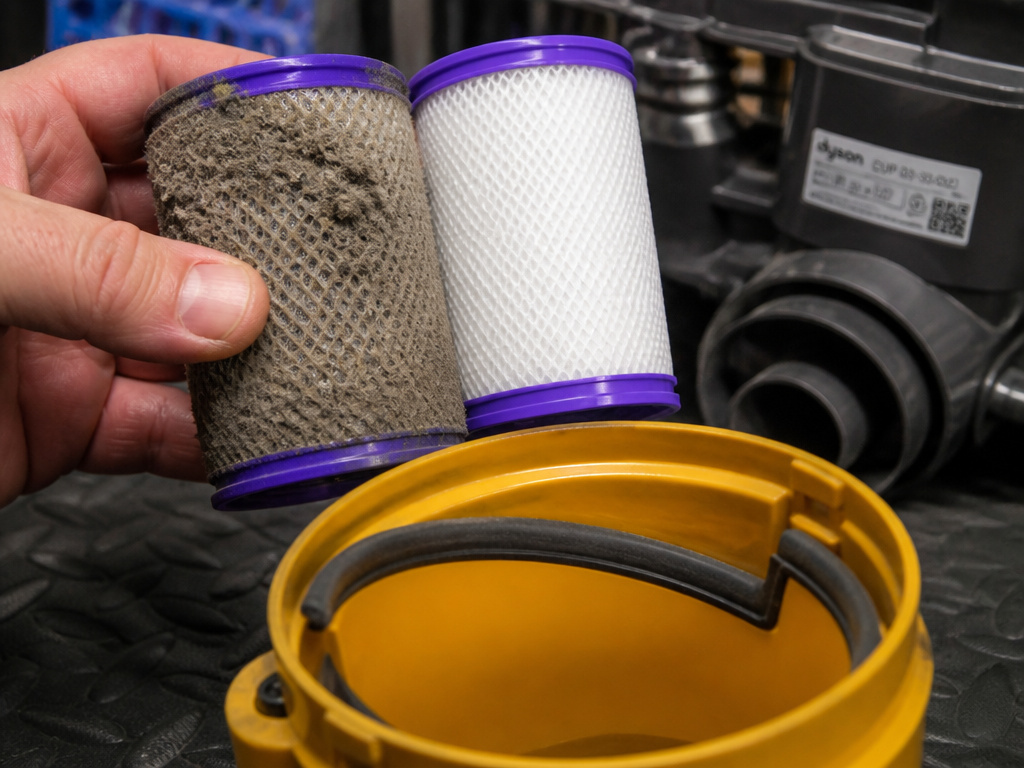
A grinding noise isn’t always about a physical jam. Sometimes it’s the sound of a motor straining against a massive airflow restriction. That’s where your filters, and one specific seal on older models, come in.
Dyson filters are not lifetime parts. The DC01 operating manual states it plainly: “Filter life is dependent on the amount the vacuum cleaner is used but they must be replaced at least every 3 months.” It even gives the exact part number: DUP 03-33-002 for the submicro filters. A clogged filter chokes the motor. The fan works harder, the pitch of the motor changes, and it can produce a stressed, groaning sound that borders on a grind.
Common mistake: Washing filters and putting them back in damp. The DC27 manual insists filters must be “completely dry before refitting.” A wet filter is as restrictive as a dirty one and can cause mold growth that leads to a high-pitched whistle.
Then there’s the cone seal. This is a critical piece on the DC01 and similar early cyclones. It’s a rubber seal that fits between the bin and the cyclone. The manual includes a specific warning with an illustration: “The lip of the cone seal should sit over the rim of the yellow bin inner. Failure to do so could result in clogging of the pre-filter and damage to the motor.” If this seal is tucked inside the bin rim, it creates a small but devastating air leak. Dust bypasses the cyclone and packs directly into the pre-filter, causing a blockage that strains the motor. The sound is a distant, labored grind that gets progressively worse. It’s a five-second check that prevents a $200 repair.
When the Grind Means a Professional Repair
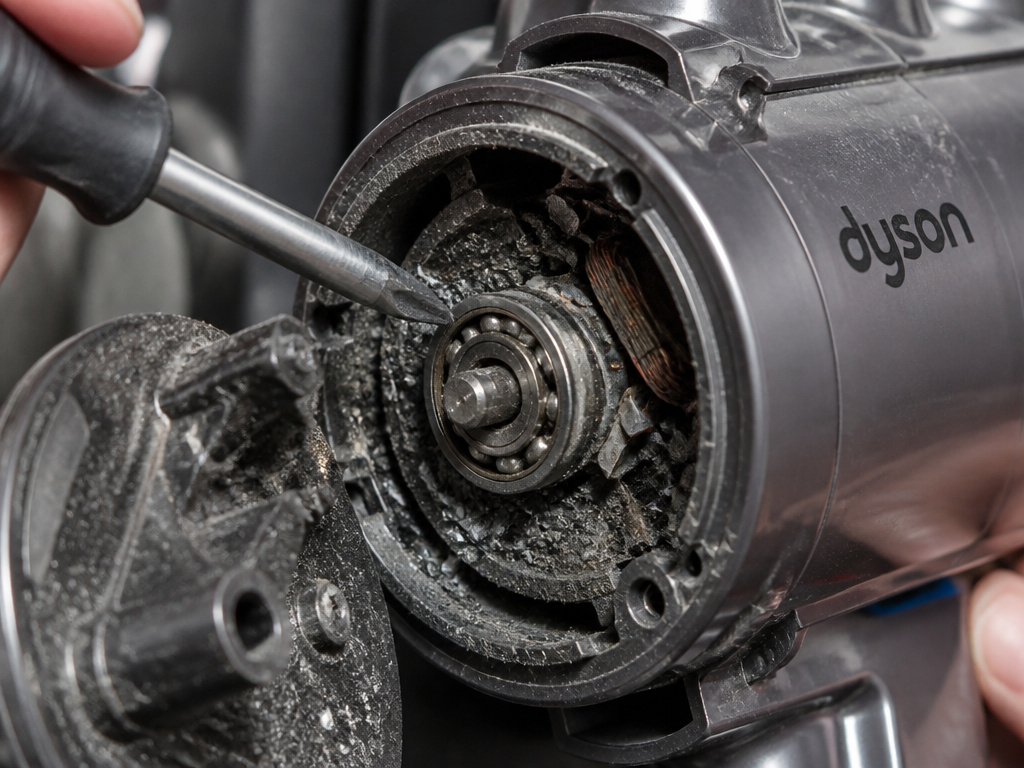
You’ve cleared every tube, replaced the filters, verified the cone seal, and the grind remains. Or the vacuum shut off and won’t come back on even after an hour. Now you’re likely looking at a component failure.
The thermal cut-out has failed. If the motor overheated repeatedly, the thermal protector itself can fail in the “open” position. The vacuum is dead. This requires a motor replacement. The brush bar clutch or drive motor is damaged. On models with an electronically controlled brush bar, the clutch that engages it can wear out. You might hear a grinding from the head even with the brush bar removed. This is a classic Dyson ball brush issue. A bearing in the main motor has disintegrated. This is a less common but serious failure. The grind will be loud, metallic, and coming from the very center of the vacuum’s body. It may be accompanied by a burning smell.
Dyson’s warranty does not cover blockages. The manual for the DC27 and others states clearly: “Clearing blockages is not covered by your vacuum’s limited warranty.” If the damage was caused by a blockage you missed, the repair is on you. This is why that initial, immediate troubleshooting is so important.
Before you call for service, check for any error codes on a cordless model. A persistent grind might trigger a fault code that points directly to the brush head motor.
How to Prevent Grinding Noises for Good
Maintenance is cheaper than repair. Build these three habits.
- Pre-Check the Floor. Do a quick visual sweep for loose strings, hair ties, and small toys before you vacuum. These are the prime culprits for brush bar jams.
- Maintain the Filters on Schedule. Mark your calendar. Every three months, wash the filters (with cold water only, no detergent) and let them air-dry for a full 24 hours. Or replace them.
- Avoid Carpet Fresheners. Dyson’s official stance is in the manual: “Dyson does not recommend the use of carpet fresheners.” The fine powder clogs filters and can cement itself into the cyclone, creating a gradual blockage that strains the motor.
Also, store the vacuum indoors. The CY22/CY23 manual warns not to use or store it below 3°C (37.4°F). Cold plastic becomes brittle and bearings can contract, changing tolerances and potentially creating noise.
Frequently Asked Questions
Why does my Dyson sound like it’s grinding rocks?
This almost always means a hard, granular object is in the cleaner head or hose. Common items are dry pet food, gravel tracked in from outside, or chunks of hardened mud from a plant pot. Unplug the vacuum, remove the cleaner head, and empty the soleplate cavity. Check the hose for the object.
Is it safe to use my Dyson if it’s making a grinding noise?
No. Unplug it immediately. The grinding indicates friction that generates excess heat. Continuing to run it risks scoring the brush bar shaft, melting plastic bearings, or overheating the motor to the point of triggering the thermal cut-out or causing permanent damage.
Can a full bin cause a grinding noise?
Not directly. A full bin reduces suction dramatically but won’t create a grinding sound. However, if the bin is so overfull that debris is pulled into the cyclone outlet, it could cause a blockage there. The resulting strain on the motor might change its sound to a labored groan, but a true grind points to a mechanical jam.
How much does it cost to fix a grinding Dyson vacuum?
If the fix is clearing a simple blockage you can do yourself, it costs nothing but time. If the grinding has damaged the brush bar, clutch, or motor, the repair cost involves parts and labor. A new brush bar assembly might run between $30 and $70. A full motor replacement is a major repair often costing $150 or more. Since clearing blockages isn’t warranty-covered, a professional “blockage only” inspection historically had a flat fee, the DC01 manual listed it as £35.
The grinding stopped, but now my Dyson has no suction. What happened?
The sequence here is classic. The grinding was a blockage. The blockage caused the motor to overheat. The thermal cut-out tripped to save the motor, shutting the vacuum off. After cooling, the motor restarts, but the blockage remains. So now you have a silent motor but no airflow. You must still find and clear the original obstruction. Refer to the step-by-step guide for checking the hose, wand, and cleaner head.
The Bottom Line
A grinding Dyson vacuum is a machine telling you to stop. Listen to it. The fix is almost always physical: a jammed brush bar, a blocked hose, or a choked filter. Start with the simple, free checks, the brush bar ends and the hose daylight test. Remember the three-month filter rule and the warning on carpet fresheners. That routine care prevents most of the problems that lead to expensive sounds. If you hear that grind, unplug it, flip it over, and get your scissors. Twenty minutes now beats a dead motor next week.