
Dyson Vacuum Brush Not Spinning: Quick Repair Steps to Try
This post contains affiliate links. As an Amazon Associate, we earn from qualifying purchases.
A Dyson vacuum brush not spinning is a mechanical failure with three common roots: a physical clog jamming the roller, a worn-out clutch (on DC14/DC33/DC07 models), or a failed electrical connection. The fix depends on your model year, pre-2005 uprights use a belt-driven clutch, post-2005 uprights have a dedicated brush motor, and cordless sticks use a direct-drive system. Start by checking for blockages, which are not covered under Dyson’s 5-year warranty.
That last point changes the economics of the repair. A clogged airway or hair-wrapped brush bar is considered owner maintenance, so a service call for what is essentially a cleaning job costs you out of pocket. The Dyson DC42 manual states it plainly: “Clearing blockages is not covered by your warranty.”
What follows is a model-by-model breakdown. We’ll walk through the universal first checks, then dive into the specific repairs for belt-driven clutches, brush bar motors, and the quirky electrical gremlins in cordless sticks. By the end, you’ll know whether you’re looking at a five-minute clean-out or a parts-order afternoon.
Key Takeaways
- Model year dictates the fix. Vacuums made before 2005 (like the DC07, DC14, DC33) use a belt-driven clutch that wears out; models after 2005 have a separate brush bar motor.
- Blockage repairs are on you. Dyson’s 5-year limited warranty explicitly excludes clearing blockages and brush bar obstructions.
- Thermal cut-outs need a full cool-down. If the machine overheats from a clog, the automatic thermal cut-out requires a 1-2 hour rest, unplugged, before it will reset.
- Cordless models fail differently. Low battery, dirty pin connectors between the wand and head, and clogged air passages in turbine heads are the prime suspects.
- Test the clutch with hand pressure. On a working DC14/DC33/DC07, pressing on the spinning brush should produce a loud clicking sound as the clutch engages. Silence means it’s worn.
The First Thing to Check (Is It a Simple Clog?)
Power off and unplug the vacuum. This isn’t just a safety slogan, it’s a requirement before you touch anything. Tilt the machine back to expose the cleaner head.
Look at the brush bar. Wrap a towel around your hand and rotate the roller manually. It should spin freely. If it binds or won’t turn, you have a physical jam. The usual suspects are hair, string, and carpet fibers wound tightly around the ends of the roller or packed into the bearings.
Common mistake: Yanking tangled hair out by hand. This can damage the brush bristles or the bearing seals. Use scissors or a seam ripper to cut the strands parallel to the roller before you pull them free.
Clearing this is straightforward but meticulous. Many heads have end caps that pop off with a coin twist, allowing you to slide the entire brush bar out. For a deep clean, check our guide on how to clean Dyson brush head. If the roller spins freely by hand but not under power, the problem is deeper in the drive system.
| If the Brush Bar… | The Likely Cause Is… | Next Step |
|---|---|---|
| Won’t turn by hand | Physical clog/jam | Remove brush bar, cut away debris |
| Turns freely by hand but not with power | Drive failure (clutch, belt, motor) | Identify your model year (see next section) |
| Spins intermittently or weakly | Electrical connection issue or partial clog | Check pin connectors and air passages |
What Kind of Dyson Do You Have? The Model Year Split
Dyson changed its brush bar drive system around 2005. This split determines your repair path.
Pre-2005 Uprights (DC07, DC14, DC33): These use a mechanical clutch system. The main vacuum motor drives a belt, which turns a clutch, which drives another belt to the brush roller. The clutch is a wear item designed to slip if the brush bar jams, protecting the motor. When it wears out, it slips all the time.
Post-2005 Uprights (DC15, DC41, etc.): These models have a separate, dedicated electric motor just for the brush bar. It’s mounted in the cleaner head. Problems here are usually motor failure, a tripped thermal reset button, or bad wiring.
Cordless Stick Vacuums (V8, V10, V15): The brush head has its own direct-drive motor. Issues are often related to battery charge, dirty electrical contacts where the head attaches, or the unit being in “hard floor” mode.
Canisters with Turbine Heads: These heads use airflow from the vacuum’s suction to spin the brush. They are incredibly sensitive to any hose or airway blockage. If your Dyson lost suction, the turbine head will stop first.
Step-by-Step Fix for a Worn Clutch (DC14, DC33, DC07)
If you have a pre-2005 upright and the brush bar spins freely by hand, the clutch is the most common failure point. A repair guide from Vacuums R-Us notes the clutch replacement is a medium-difficulty job taking about 30 minutes.
First, confirm the diagnosis. Plug in the vacuum and turn it on. Carefully press your hand against the spinning brush bar (use a rag for safety). On a good clutch, you’ll feel strong resistance and hear a distinct, loud clicking or ratcheting sound as the clutch mechanism engages. If the brush stops easily with little noise, or the motor whirs but the brush never moves, the clutch is shot.
Tools you’ll need: Phillips screwdriver, flat-head screwdriver, T15 Torx driver, hammer, needle-nose pliers.
- Unplug and disassemble. Remove the vacuum’s bin/canister. Flip the machine onto its back.
- Remove the bottom plate. Use a flat-head screwdriver to pop off the plate covering the brush bar and clutch assembly.
- Cut the old belt. You’ll see a belt connecting the clutch to the brush bar. Cut it; a new one comes with the replacement clutch kit.
- Access the clutch. Remove the three T15 screws holding the plastic motor shroud in place. Lift the shroud away to reveal the clutch, a gray or black plastic assembly with a colored knob.
- Remove the old clutch. Firmly tap the colored knob with a hammer to dislodge it. Push the clutch from behind while pulling the belt to work it free from its mount.
- Install the new clutch. Align the ridge on the new clutch with the slot on the gray mounting bracket. Wiggle it into place until it seats fully. Press the colored knob back on.
- Reassemble. Replace the motor shroud and screws. Use a large flat-head screwdriver to lift the new belt and hook it over the end of the brush bar as you reinstall the roller.
- Test. Before replacing the bottom plate, plug in the vacuum and turn it on briefly. The brush should spin strongly. Press on it, you should hear that definitive click.
Troubleshooting the Brush Bar Motor (Post-2005 Uprights & Sticks)
When a dedicated brush motor fails, you’ll often hear it trying to run, a humming or whirring sound, but the brush won’t turn. Sometimes it trips a thermal cut-out.
The part nobody mentions: The automatically resetting thermal cut-out. The Dyson DC42 manual specifies that if a blockage causes overheating, you must “switch ‘OFF’ and unplug. Leave to cool down for 1-2 hours before checking filters or for blockages.” Rushing this step means it won’t reset.
Check the reset button. On many uprights like the DC15, there’s a small red reset button on the cleaner head near the motor. Press it after ensuring all blockages are clear.
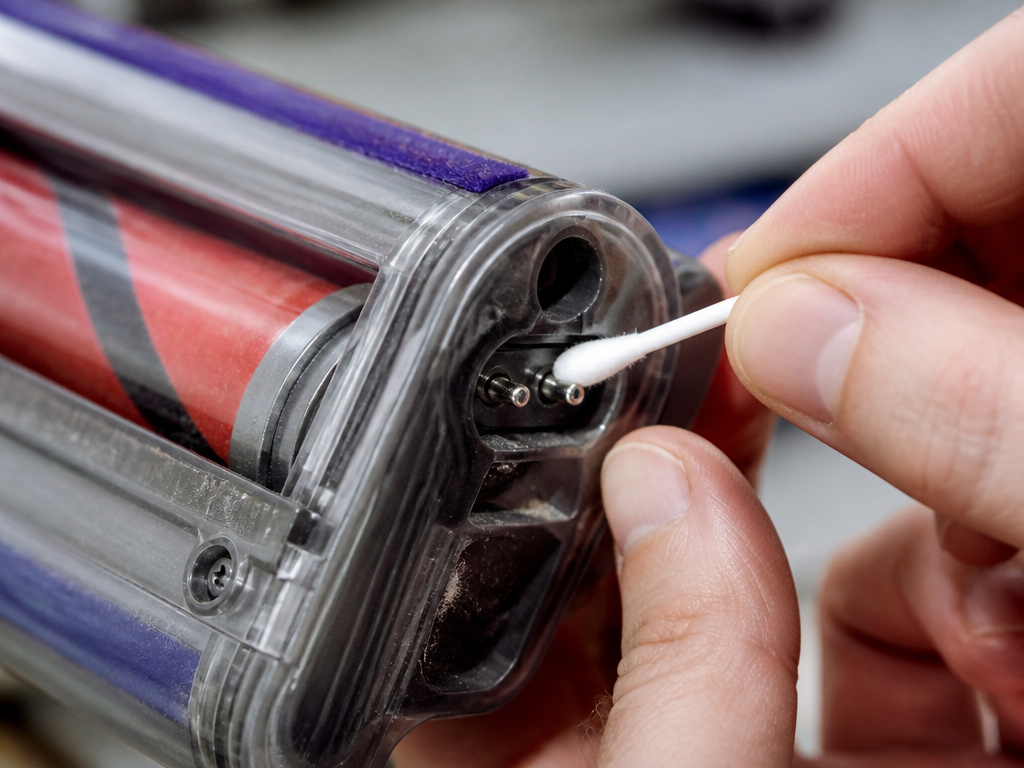
Inspect electrical connections. This is critical for Dyson stick vacuum models. Detach the head from the wand. Look for two small metal pins or a multi-pin connector. These get dirty. * Clean the pins on both the head and the wand with a dry cotton swab or a dab of isopropyl alcohol on a cloth. * Check the connection at the base of the wand where it meets the main body, and where the body meets the charging dock. A dirty connection anywhere in this chain can kill power to the head.
Verify the mode. Make sure the vacuum isn’t in “hard floor” or “low-pile” mode, which deactivates the brush bar on some models. Also, ensure the machine is fully reclined; most have a switch that disables the brush when upright.
When It’s Not the Brush: Airflow and Systemic Issues
Sometimes a non-spinning brush is a symptom of a larger problem. Two key areas often get overlooked.
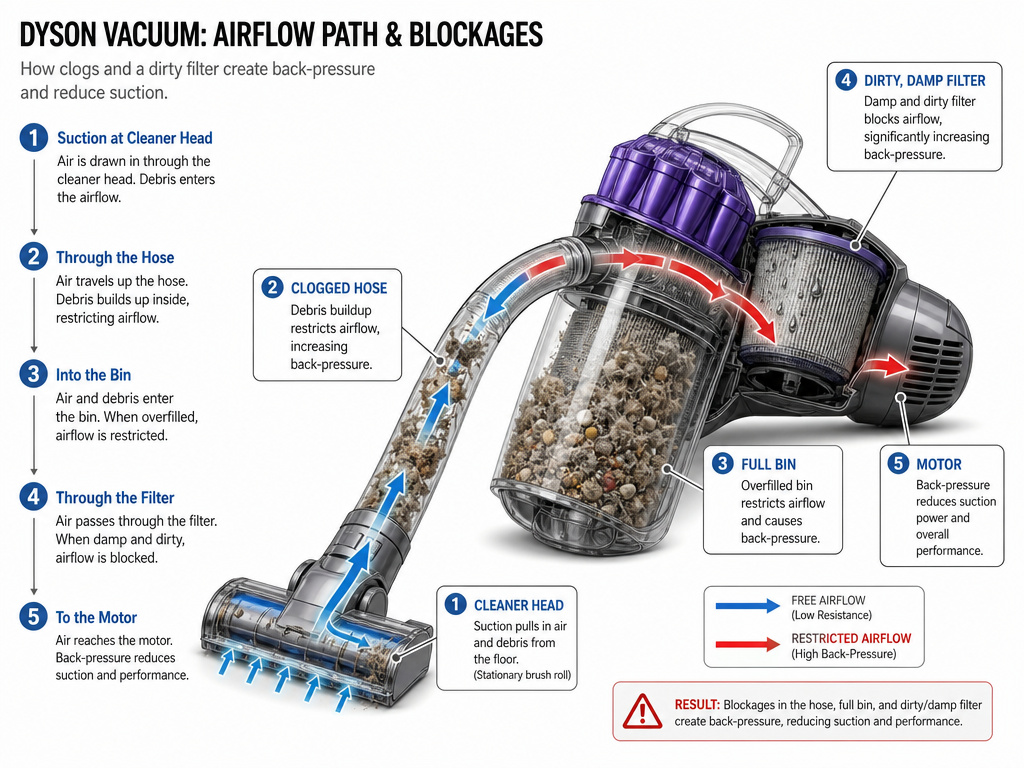
Clogged Air Passages (Turbine Heads): If you have a canister with an air-driven turbine head, it needs maximum suction to spin. A single sock or large debris chunk in the hose will kill it. Stretch the entire hose out and look through it. Check the wand, the cleaner head inlet, and the post-motor filter.
Dirty Filters or Full Bin: A clogged filter or an overfilled bin creates back-pressure, reducing airflow. On turbine heads, this directly saps power. On motorized heads, it can cause the main unit to overheat and shut down. Regular Dyson maintenance tips always include filter checks for a reason.
If you’ve recently washed a filter and the vacuum now acts up, ensure it is completely, bone-dry before reinserting. A damp filter can mimic a severe blockage. For more on this, see our article on a Dyson vacuum not working after filter wash.
How to Decide: Repair or Replace?
Fixing a non-spinning brush is almost always cheaper than buying a new vacuum, but your time has value.
Repair if: You have a pre-2005 upright with a bad clutch (a $20-$40 part). You have a simple clog or dirty connector. You’re comfortable with basic disassembly.
Consider replacement if: The dedicated brush bar motor on a post-2005 model has failed. Replacement motors can cost $60-$100, and the job is complex. If your vacuum is also showing other age-related issues like a Dyson grinding noise from the main motor, it might be time to retire it.
Consult a pro if: You’re unsure after diagnosis. A local vacuum repair shop can often give a free estimate. For persistent electronic issues, check if your model is displaying any Dyson error codes.
Frequently Asked Questions
Why did my Dyson brush bar suddenly stop spinning?
Sudden stop is almost always a physical obstruction. A large clump of hair, a piece of string, or a small toy part has jammed the roller or the drive mechanism. Immediate loss of power points to a clog before it points to a mechanical part failure.
Is a broken brush bar covered under Dyson’s warranty?
No. Dyson’s 5-year limited warranty covers defects in materials and workmanship. It explicitly excludes “normal wear and tear,” which includes the brush bar, belt, and clutch. It also does not cover any repairs needed due to blockages.
Can I run my Dyson without the brush bar spinning?
You can, but you shouldn’t. On carpet, a non-spinning brush bar provides only suction cleaning, which removes surface dust but does not agitate and lift embedded dirt, pet hair, or sand. You are essentially turning your vacuum into a glorified dust-buster, and your carpets will not get clean.
How do I know if my Dyson clutch is bad?
On a DC14, DC33, or DC07, run the vacuum and press firmly on the spinning brush bar with a rag. A good clutch will produce a loud, rapid clicking or ratcheting sound as it slips. A worn clutch will allow the brush to stop silently or with a faint groan, offering little resistance.
Why does my cordless Dyson brush head work sometimes and not others?
Intermittent operation on a cordless model is a classic sign of a dirty or loose electrical connection. The pins connecting the head to the wand are the prime suspect. Clean them with isopropyl alcohol. Also, check the battery contacts and ensure the head is clicked fully into place.
Before You Go
Start with the free fixes: hunt for blockages, clean the electrical pins, and let an overheated unit cool for two full hours. For the common DC14/DC33/DC07 clutch failure, the repair is a defined, half-hour job with a predictable part. The complexity jumps with modern dedicated brush motors, but even then, a systematic check of connections and resets solves more problems than you’d think. Your vacuum is a machine, not a mystery. One of these steps will get it spinning again.