
Decode Dyson Vacuum Error Codes: Thermal Limits & 3 Fixes
This post contains affiliate links. As an Amazon Associate, we earn from qualifying purchases.
Dyson vacuum error codes signal a specific failure in the motor, battery, filter, or temperature sensor. Codes like F, F2-F7, and P2C require targeted fixes, resetting the machine, cleaning a clog, replacing a filter, or warming a cold battery. A code isn’t a death sentence; it’s a diagnostic starting point.
That diagnostic starting point is physical. Every letter and number corresponds to a sensor reading voltage, a temperature threshold, or a communication handshake that failed. Treating a P2C code the same way you treat an F4 code wastes an hour and might kill a recoverable battery.
What follows: a breakdown of the major code families, the one reset sequence that works when others fail, and the two environmental rules, temperature and moisture, that void every other fix if you ignore them. By the last section you’ll match a code to a subsystem in under a minute.
Key Takeaways
- Error codes are subsystem-specific: F-series codes point to filter, motor, or airflow issues; P-series codes indicate battery or communication faults; thermal shutdown is its own protective circuit.
- Temperature locks out operation: Dyson SV23/SV24 models will not start or charge below 5°C (41°F). Bringing the machine to room temperature for two hours fixes this.
- A damp filter destroys motors: Reinstalling a washable filter before it’s fully dry for 24 hours lets moisture into the motor chamber, causing corrosion and error codes within weeks.
- Battery storage matters: Storing a lithium-ion battery at 100% charge at 77°F loses 20% capacity in a year. Store at a 40% charge for 96% retention.
- The V11/V15 body matters: Early V11 (SV11/SV14) uses a clip-in battery; later V11/V15 (SV15/SV17) uses a screw-in battery. They are not interchangeable.
What Your Dyson’s Error Code Actually Means
Dyson error codes are not random. They are generated by the machine’s onboard diagnostics when a sensor reads outside its expected range for a set period, usually two to three seconds. The code tells you which subsystem failed its check.
The most common Dyson cordless vacuum error codes belong to three families: F for filter and motor, P for power and battery, and thermal overload which often flashes lights without a letter code. A blinking red light is usually the thermal cutoff telling you the motor got too hot.
The part nobody mentions: The machine’s logic runs a self-test each time you press the trigger. If you get an error immediately, the fault is present at startup, like a disconnected battery. If the error appears after 10 seconds of runtime, the fault developed under load, like a clog that overheated the motor.
Decoding the Major Code Families
This table breaks down the primary code groups and their most likely root cause. Use it to narrow your search.
| Code Family | What It Monitors | Immediate Action | If That Fails |
|---|---|---|---|
| F, F2, F3, F7 | Filter blockage, motor current | Check & clean both filters. Ensure 24hr dry time. | Inspect for hose/clog; motor may need service. |
| F4, F5, F6 | Electrical communication, power supply | Unplug machine for 60 seconds. Try a different outlet. | Faulty charger or internal PCB. |
| P, P2C | Battery communication, voltage | Remove & reseat battery. Check charger contacts. | Battery likely needs replacement. |
| Thermal (flashing light) | Motor temperature | Turn off, let cool for 60+ minutes. Check for clogs. | Persistent overload indicates bearing wear. |
| No Code / No Power | Main power circuit | Check battery charge. Verify temperature >5°C (41°F). | Faulty power trigger or main board. |
For model-specific nuances, like those on Dyson Animal vacuum error codes, the principle is the same, the code points to a subsystem. The fix is in the details of accessing that part.
The 7-Step Diagnostic Reset (Works in Under 5 Minutes)
Before you deep-dive into disassembly, run this sequence. It clears transient errors and forces the machine’s diagnostics to restart. This fixes most error codes on cordless models that appeared suddenly.
- Power down completely. Hold the power trigger for 20 seconds until all lights go out. For corded models, unplug from the wall.
- Remove the power source. Take the battery out of cordless machines. This discharges residual current from the mainboard.
- Check the ambient temperature. Is the room or garage below 5°C (41°F)? Move the machine to a warmer spot for two hours. This is a hard lockout in newer models.
- Inspect the primary filter. Remove the washable pre-motor filter. Is it damp or dirty? If dirty, rinse under cold water. Set it aside, you will not reinstall it now.
- Clear the airway path. Detach the wand and cleaner head. Look through the clear bin opening toward the motor intake. Shine a light. Use a long, flexible tool (a straightened coat hanger works) to gently dislodge any packed debris in the cyclones.
- Reassemble dry. Put the machine back together without the pre-motor filter. Ensure the HEPA filter at the back is fully seated.
- Reconnect power. Insert the battery or plug in the cord. Press the power trigger.
If the error code clears, the fault was a clog, a loose connection, or a cold battery. If the same code returns, the problem is persistent and lives in the subsystem the code indicates. Now you troubleshoot that specific system.
Where this goes sideways: Reinstalling a damp filter. The filter housing leads directly to the motor. Moisture promotes mold and degrades the motor’s internal lubrication seals. You might not see an error for two weeks, but the corrosion has already started. Always air-dry for a full 24 hours.
Troubleshooting Persistent F-Series & Airflow Codes
F codes relate to airflow, the motor, or the filters. The machine measures pressure drop across the filter or monitors the motor’s current draw. Too much resistance or too high a current triggers the code.
Fixing “Clean Filter” and “Airway Blocked” Errors
A persistent clean filter warning or airway blocked error means the machine still detects high resistance after your basic reset.
- Washable Pre-Motor Filter: Clean it under cold running water until the water runs clear. Do not use soap. Squeeze gently, don’t wring. Let it air-dry for a full 24 hours away from direct heat. A hairdryer warps the material.
- Post-Motor HEPA Filter: This filter is not washable. Tap it gently to dislodge dust. If it’s dark grey and heavily loaded, it needs replacement. A clogged HEPA filter doubles the air resistance, forcing the motor to work harder.
- Deep Airway Blockage: The most common hidden clog is in the cyclone shroud, right where the bin empties. Use a thin tool to probe the small openings around the central cone. A YouTube user cleared a Dyson vacuum airway blocked warning by removing a compacted wad of hair and dust from this port.
If both filters are clean, dry, and the airway is clear, but an F2, F3, or F7 code remains, the motor’s current sensor may be faulty or the motor itself may be failing. This often requires professional service.
When F4, F5, or F6 Appear
These codes often point to an electrical communication fault. According to a Dyson AM09 manual, the first step is to unplug the appliance for 30-60 seconds and try a different wall socket. This resets the internal logic board.
If the code returns, the issue could be a failing charger, a problem with the dock’s connections, or an internal PCB fault. For cordless vacuums, try a different charger if possible.
Solving P-Series, Battery, and Power Issues
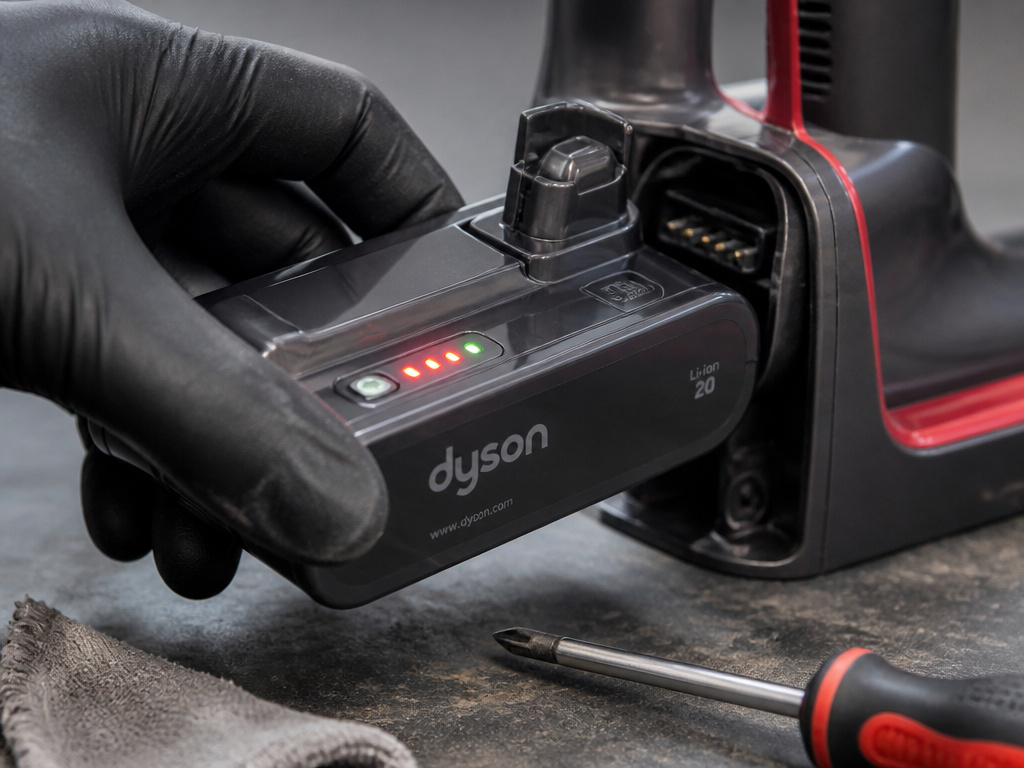 P codes are about power delivery. The machine isn’t getting the correct voltage from the battery, or the battery can’t communicate with the main board.
The Battery Not Holding Charge Dilemma
A Dyson vacuum battery won’t hold charge is a classic symptom of age. Lithium-ion batteries degrade after 300–500 full charge cycles, typically within 3–5 years. The runtime just gets shorter.
Battery Storage Science: Storing a battery at full charge (100%) at 77°F causes it to lose about 20% of its capacity in one year. Storing the same battery at a 40% charge results in only 4% loss. If you’re storing the vacuum for a season, charge it to about two bars on the gauge.
First, clean the metal charging contacts on both the battery and the machine with a dry cloth. Corrosion breaks the connection. If the battery is old and the machine shuts off abruptly at 20% charge, the battery is finished. Replace it with a genuine Dyson battery, third-party cells often lack the proper communication chip and can trigger P2C codes.
Dealing with Intermittent Power and No-Starts
A machine that shows intermittent power or a Dyson cordless vacuum cycles on and off is often fighting a temperature lockout or a bad connection.
- Temperature Check: This is critical. The Dyson SV23/SV24 compliance leaflet states the machine will not operate or charge if the ambient temperature is below 5°C (41°F). This protects the battery and motor. Warm the machine up.
- Battery Seating: Know your model. Early Dyson V11 models (SV11, SV14) have a battery that clips in. Later V11 and V15 models (SV15, SV17) have a battery that screws in. Ensure it’s fully secured.
- Power Trigger: Listen for a faint click when you press the trigger. If it feels mushy or silent, the microswitch inside may be broken. This requires disassembly to fix.
If you’ve warmed the machine, reseated the battery, and the trigger clicks but nothing happens, the main board or a wiring harness may have failed.
The Two Environmental Killers: Temperature and Moisture
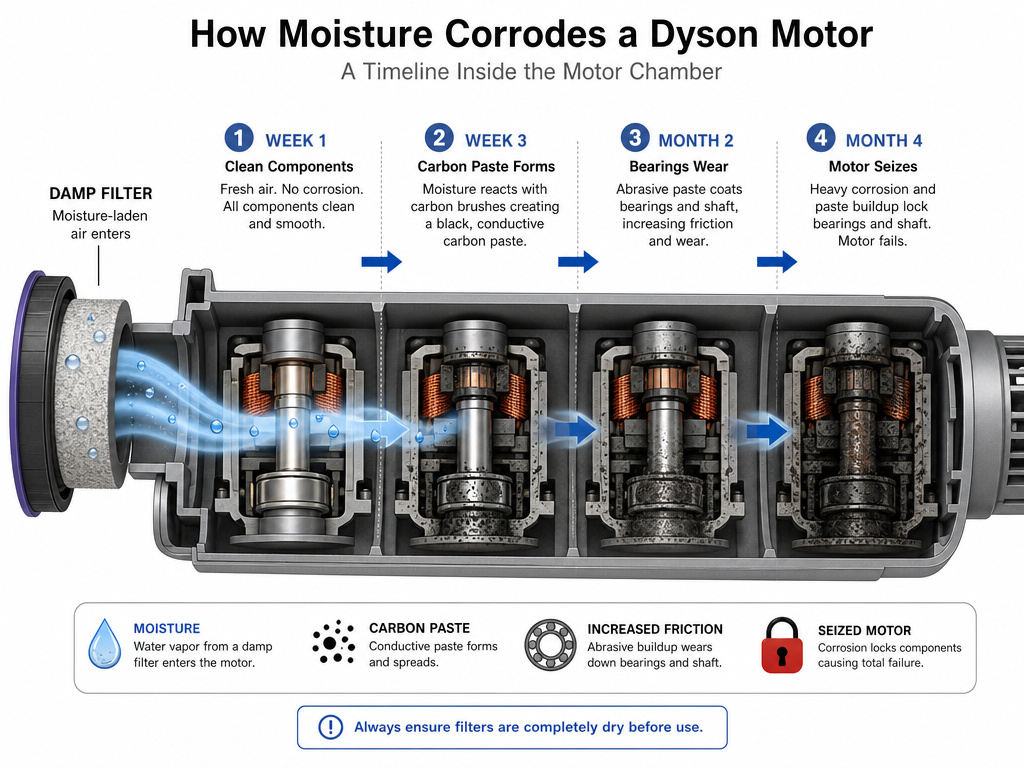 You can follow every step perfectly and still fail if you ignore the machine’s operating environment. Two factors cause more long-term damage than any single clog.
The Cold Lockout (Below 5°C / 41°F)
This isn’t a suggestion. Dyson engineers a hard stop into newer models. If the machine’s internal sensor reads below 5°C, it will not start or charge. Period. Storing it in an unheated garage over winter is the fastest way to confuse an owner with a “dead” vacuum that works perfectly after a warm afternoon indoors.
The Damp Filter Corrosion Timeline
Here is the specific consequence most guides skip: Reinstalling a damp filter doesn’t just cause a temporary error. Water vapor enters the motor chamber. * Week 1: The machine runs. Maybe it sounds a bit strained. * Week 3: You get your first unexplained F code. The moisture has begun to mix with carbon dust from the motor brushes, forming a paste. * Month 2: The paste accelerates wear on the motor bearings. The sound becomes a whine. * Month 4: The motor seizes or shorts. The repair cost often exceeds the value of an older machine.
The fix is simple. Wash the filter. Then walk away for a day. It’s the cheapest insurance you can buy.
When to Stop Troubleshooting and Call for Service
Some problems are not user-serviceable. Dyson’s official manuals advise contacting a service centre if the machine has been dropped, damaged, left outdoors, or submerged.
Stop and seek professional help if: * You see physical damage to the main body or a cracked cyclone. * An error code returns immediately after a full diagnostic reset and part replacement (like a new filter or battery). * You smell burning plastic or see smoke. Unplug immediately. * The machine has gotten wet beyond a damp filter. * The repair requires soldering or opening the sealed motor unit.
For persistent Dyson stick vacuum error codes or issues with older ball models, the same rule applies. If the fix isn’t in the user manual and you’re not comfortable with advanced electronics, professional service is the correct next step. It prevents turning a $150 repair into a $500 paperweight.
Frequently Asked Questions
What does the red flashing light mean on my Dyson?
Flashing red light indicates the thermal cutout has engaged. The motor got too hot. Turn the vacuum off and let it cool for at least 60 minutes in a well-ventilated area. Before restarting, check for and clear any blockages in the hose, wand, or cleaner head that would cause the motor to overwork.
How do I reset my Dyson vacuum error code?
For cordless models, hold the power trigger down for 20 seconds until all lights turn off. Remove the battery, wait 30 seconds, and reinsert it. For corded models, unplug from the wall for 60 seconds. This clears the temporary memory and resets the diagnostic system.
Why does my Dyson keep saying the airway is blocked after I cleaned it?
You likely missed a compaction point deeper in the airway. The most common spot is in the cyclone assembly, just behind the clear bin’s opening. Detach the bin and use a long, thin tool to gently clear the small ports around the central cone. Also, ensure the post-motor HEPA filter is not completely saturated.
Is a P2C error code a bad battery?
Usually, yes. A P2C code typically indicates a communication fault between the battery and the main board. First, try removing and firmly reseating the battery. If the code persists, the battery’s internal management chip may have failed, requiring a replacement. Always use a genuine Dyson battery for compatibility.
Can cold weather really stop my Dyson from working?
Yes. Officially. Dyson’s SV23/SV24 compliance documentation states the machine will not operate or charge if the ambient temperature is below 5°C (41°F). This is a protective feature for the lithium-ion battery and motor. Bring the vacuum to room temperature for a couple of hours and try again.
Before You Go
Dyson error codes are specific. An F code points to airflow, a P code points to power. Start with the full seven-step diagnostic reset, it solves more problems than people expect. Remember the two silent killers: temperature lockouts below 41°F and the slow corrosion from a filter that went back in damp. If your code returns after a reset and a part replacement, the machine is telling you the fault is deeper. That’s when you call a technician. For most owners, the fix is a clean filter, a warm room, and a fully seated battery.