
Quick Solutions for a Dyson Stick Vacuum Head That Won’t Spin
This post contains affiliate links. As an Amazon Associate, we earn from qualifying purchases.
A Dyson stick vacuum head won’t spin because of a physical blockage, a jammed brush bar, a dead battery, or an activated hard floor/upright switch. The motor will pulse six times and cut out if it detects a blockage, per Dyson’s manual. For cordless models made after 2005, the brush roll has its own dedicated motor, so belt failure is not the issue.
That pulsing motor is your first clue. It’s the machine’s overload protection kicking in because something is physically stopping the brush bar from turning. The fix isn’t about force; it’s about finding the single point of resistance.
What follows is a diagnostic path that moves from the five-second checks to the full teardown. We’ll cover the specific failure points for models from the V6 to the latest Gen5detect, how to clean the electrical contacts that nobody mentions, and when you’re better off replacing the head entirely.
Key Takeaways
- The motor will pulse and shut off if it detects any blockage, this is a designed safety cut-out, not a motor failure.
- For Dyson stick vacuums (V8 and later), the brush bar is directly driven by a motor in the head; there is no belt to replace.
- A jammed brush bar from hair and string is the most common cause, especially in homes with pets or long hair.
- Always check the hard floor setting and ensure the vacuum is reclined; an upright-position switch will disable the brush bar.
- On older V6/V7 models, corroded or dirty electrical connectors between the wand and head are a frequent, hidden culprit.
The 7-Step Diagnostic Path (From Simple to Serious)
Start here. Work through each step in order before moving to the next. Most problems stop at step three.
- Check the Power Source. Is your cordless vacuum charged? Plug it in for at least an hour. Some models cut power to the brush head motor if the battery is below a certain voltage, even if the main suction still works.
- Check the Mode and Position. Is the hard floor setting activated? This setting turns off the brush roll. Also, most Dyson stick vacuums have a switch that disengages the brush bar when the machine is in the upright storage position. Recline the vacuum fully.
- Listen for the Pulse. Turn on the vacuum with the head on the floor. If you hear the motor pulse six times and then stop, you have a confirmed blockage. The machine has detected an obstruction and shut down to protect the motor.
- Clear the Main Airway. Disconnect the head from the wand. Remove the clear bin and check the inlet where the head attaches, the wand itself, and the bin inlet for clogs. A blockage here can starve the head of airflow, especially on older air-turbine models.
- Inspect the Brush Bar Manually. Turn the cleaner head over. Can you spin the brush bar freely with your fingers? If it’s stuck or gritty, it’s jammed. This is where 80% of problems live.
- Check for Temperature Warnings. Is the LCD screen showing a “Machine too cold” or “High temperature detected” icon? Dyson motors will disable if stored or operated outside their temperature range. Move the vacuum to a room-temperature environment and let it sit for an hour.
- Test Electrical Continuity. If all else is clear, the issue may be electrical. This is common on V6 and V7 models where the wiring connectors between the wand and head get dirty or corroded.
Where this goes sideways: Assuming the head is broken because the motor pulses. That pulse is the diagnostic. It means the motor is trying but can’t move. A dead motor is silent.
When the Head Is Jammed: Hair, String, and Bearings
A brush bar loaded with hair and thread doesn’t just stop spinning. It creates enough drag to trip the motor’s thermal protection. On direct-drive heads (V8 and later), the motor is in the head itself. On older air-turbine heads, the clogged bearings rob the airflow of its driving force.
To clear a jammed brush bar:
- Turn the head over and locate the sole plate. There’s usually a coin-slot fastener.
- Turn the fastener a quarter-turn counter-clockwise and remove the sole plate.
- Pull out the brush bar. You may need to remove an end cap first.
- Use scissors or a seam ripper to cut away all hair and string wrapped around the ends and the bearing housings. Don’t pull hard, you can cut the bristles.
- Check the bearings at each end of the brush bar slot. Spin them with your finger. They should turn smoothly and silently. Grit or resistance here means hair is packed inside the bearing.
- For a deep clean on a V6/V7 head, you may need to remove the T8 screws holding the housing together to access the internal bearing on the motor drive shaft. A single hair wrapped around that internal shaft is enough to stall the whole head.
Common mistake: Only cleaning the center of the brush bar. The hair that binds the bearings is always wound tightly around the very ends, right where the bar rotates in its housing. Miss that, and the head still won’t turn.
If the bearings are noisy or rough after cleaning, they are likely worn. A replacement brush bar is often more cost-effective than trying to salvage worn parts.
The Electrical Connector Problem (V6 & V7 Specific)
The Dyson V6 and V7 direct-drive heads have a known weak point: the thin electrical cable that runs from the wand connector into the head. This cable flexes every time you maneuver the vacuum, and it can fatigue and break internally. More commonly, the metal connector pins at the joints get fouled with dust and lose contact.
How to clean the connectors:
- Disconnect the head from the wand, and the wand from the main body.
- Look for the small metal pins and sockets at each connection point. They will be dusty.
- Dip a cotton swab in isopropyl alcohol (rubbing alcohol) and scrub each pin and socket until the swab comes away clean.
- Use a dry swab to remove any residual moisture and let the connectors air-dry for five minutes.
- Reassemble and test.
If the cable is physically broken, often right where it bends into the head, the head is a candidate for replacement. The repair requires soldering and is not trivial.
| Symptom | Likely Cause | Next Step |
|---|---|---|
| Motor pulses 6x and stops | Physical blockage detected | Clear brush bar jam and check airway for clogs |
| Head silent, no pulse | No power to head | Check battery charge, hard floor mode, and clean electrical connectors |
| Brush bar spins weakly | Weak battery or clogged bearings (air-turbine models) | Charge fully, then inspect and clean brush bar end bearings |
| Head works then dies quickly | Overheating motor or bad bearing creating excess drag | Let motor cool, then check for smooth brush bar rotation; feel motor for heat |
| Intermittent spinning | Dirty/failing electrical connection | Clean all metal connector pins between wand and head with isopropyl alcohol |
Different Heads, Different Drives: Know Your Model
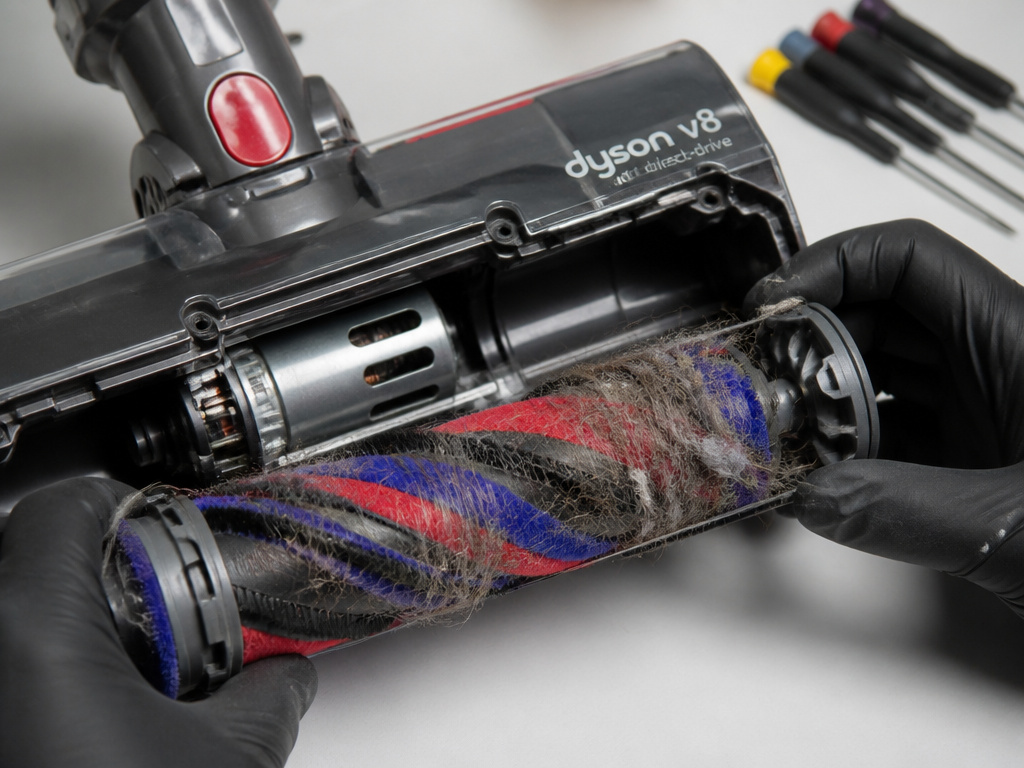
Not all Dyson stick vacuum heads are the same. The drive mechanism changed over the years, which changes your troubleshooting focus.
- Dyson V8, V10, V11, V15, Gen5detect: These use a direct-drive motor housed inside the cleaner head itself. There is no belt. Problems are almost always jams, bearing failures, or internal motor issues.
- Dyson V6 & V7 Direct Drive: Also uses a motor in the head, but with a thinner, more failure-prone cable. Jams and broken internal cables are the primary issues.
- Older Canister Stick Models (pre-2016): Some used air-turbine driven heads. These have no motor or wires in the head; the brush bar is spun by suction power alone. They are extremely sensitive to clogs in the hose or at the head’s air inlet. A full suction pathway is critical.
I prefer the direct-drive heads for carpet, but the Fluffy™ roller head for hard floors. It’s not motorized, so it can’t jam, and it’s far more durable for daily use on tile and hardwood. If your motorized head is dead and you mostly have hard floors, that’s the swap to make.
Tools You’ll Actually Need
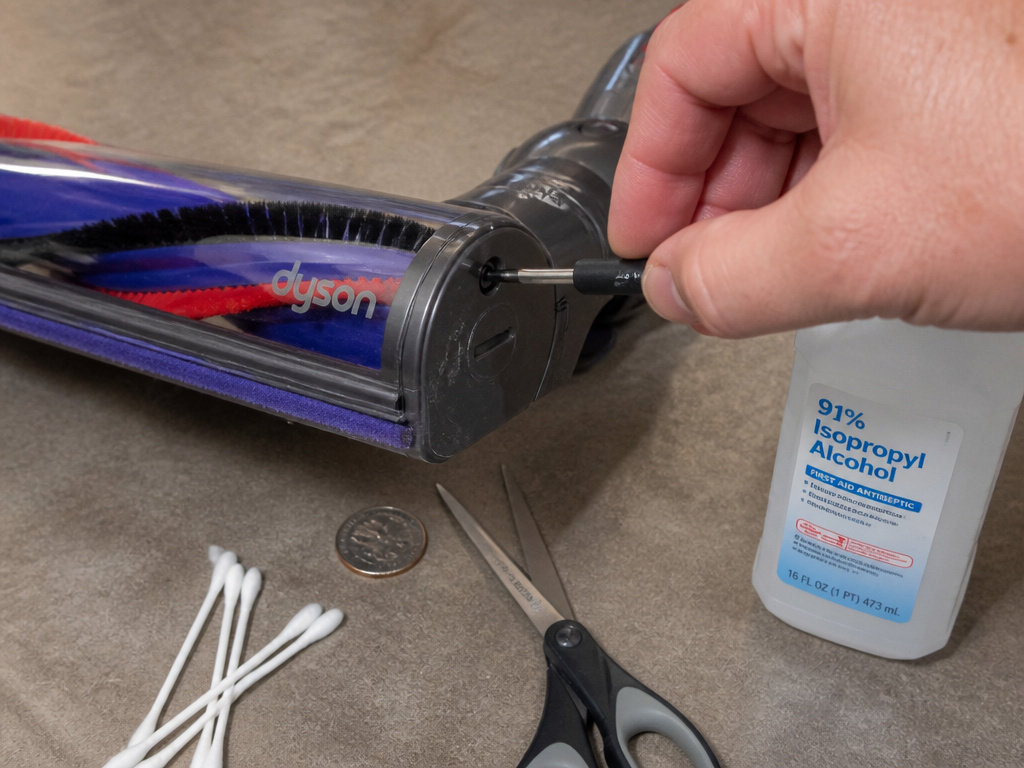
You don’t need a full workshop. These four tools handle 99% of repairs. * Coin or Flathead Screwdriver: For releasing the sole plate fastener. * Scissors or Seam Ripper: For cutting away wrapped hair and thread. * Isopropyl Alcohol & Cotton Swabs: For cleaning electrical contacts. * Torx T8 Screwdriver: For opening the head housing on V6/V7 models to access internal bearings or the motor. A T10 is less common but used on some variants.
Keep your tools simple. The goal is to remove material causing friction, not to rebuild the motor.
When to Repair vs. When to Replace the Head
This is a cost-benefit decision. Use this table to guide it.
| Scenario | Verdict | Reason |
|---|---|---|
| Brush bar is jammed, but cleans up easily and spins freely | Repair | The fix is free and takes 10 minutes. |
| Electrical connectors are dirty, cleaning restores function | Repair | Again, a free fix. This is routine maintenance. |
| Internal cable on a V7 head is visibly broken | Replace | The soldering repair is finicky and time-consuming. A refurbished head is often a better investment. |
| Motor smells of burnt plastic or gets extremely hot without spinning | Replace | The motor is fried. Replacement motors exist but require full disassembly; a new head is simpler. |
| Bearings are gritty and noisy even after cleaning, or brush bar is wobbly | Replace | Worn bearings mean the entire brush bar assembly is failing. A new brush bar may help, but if the housings are worn, replace the head. |
The bottom line: If the fix is just cleaning, always repair. If it requires a new motor or internal cable on an older model, price a refurbished head. For a V8 or newer, a replacement Motorbar™ cleaner head from Dyson is the standard path.
Frequently Asked Questions
Why does my Dyson head spin for a second then stop?
This is classic overload behavior. The motor starts, encounters immediate resistance from a jammed brush bar or clog, and the protection circuit cuts power. The problem is mechanical, not electrical. Clear the brush bar jam.
Can I use my Dyson if the brush head isn’t spinning?
You can, but you’ll lose all agitation cleaning. It will only suction surface debris. On carpets, this is ineffective. On hard floors, you can switch to a Fluffy™ cleaner head (which has no motor) or activate the hard floor mode to disable the brush roll intentionally.
How do I know if my Dyson vacuum head motor is bad?
Failed motor is often silent, no pulse, no sound at all when the trigger is pulled. It may also hum but not turn. If you’ve eliminated a dead battery, clean connectors, and confirmed there are no jams, and the head gets power (you can test with a multimeter), the motor is likely dead. A burnt electrical smell is a sure sign.
Is a non-spinning head covered under Dyson’s warranty?
It depends. If the head failed due to a manufacturing defect, yes. If it failed because of a jam from normal use (hair, string, a clog), that is considered user maintenance and is not covered. Clearing blockages is explicitly listed as the user’s responsibility in the manual.
What’s the difference between the Motorbar and Fluffy heads?
The Motorbar™ cleaner head has a motor-driven brush bar for agitating carpets. The Fluffy™ cleaner head uses a soft, static-dissipating roller for hard floors and has no motor. They are designed for different surfaces. Using a Motorbar on hard floors can scatter debris and damage delicate surfaces.
Before You Go
Start with the simple stuff: charge the battery, check the hard floor switch, and recline the vacuum. Listen for that telltale motor pulse, it’s your guide. Then, get your hands dirty and pull the hair out of the brush bar ends. That fixes most problems.
For the persistent electrical gremlins in older V6/V7 models, a bottle of isopropyl alcohol and some cotton swabs are your best friends. Clean every metal pin you can find.
When the cost of parts and your time approaches the price of a refurbished head, make the swap. For hard-floor homes, consider jumping to a non-motorized Fluffy roller head. It’s one less moving part to break.