
Hoover E5 Error Code | Decoding Air Duct & Wheel Blockages
This post contains affiliate links. As an Amazon Associate, we earn from qualifying purchases.
A Hoover E5 error code signals a physical blockage that the vacuum’s safety system has detected. The specific meaning changes by model: for Hoover HF9 uprights, it’s an air duct clog; for Hoover robot vacuums, it’s a stuck right drive wheel. The fix is always to locate and clear the named obstruction, then reset the unit.
That air duct or wheel isn’t just jammed, it’s overloaded. The machine’s motor sensors detect abnormal resistance and shut the system down to prevent a burn-out. This isn’t a software glitch you can ignore.
What follows: a breakdown of what “E5” means across five major brands, the physical steps to clear each type of blockage, and the one storage mistake that can mimic this error on cordless models.
Key Takeaways
- The Hoover E5 error code is not universal, it means an air duct blockage on Hoover HF9 uprights but a right drive wheel overload on Hoover robot models.
- Other brands like iRobot and Bissell use “Error 5” for entirely different issues, from a stuck wheel to a floor that’s too dark for its sensors.
- Always disconnect the vacuum from power before investigating any blockage, especially around moving parts like the brush roll or wheels.
- For cordless stick vacuums like the Hoover H Free 500, a persistent “cleaner stops working” error after long storage often points to a dead battery, not a simple clog.
- If clearing the obvious blockage doesn’t resolve the error, a hard reset by holding the power button for 10+ seconds can clear the sensor’s memory.
The Hoover E5 Error Code Means Different Things
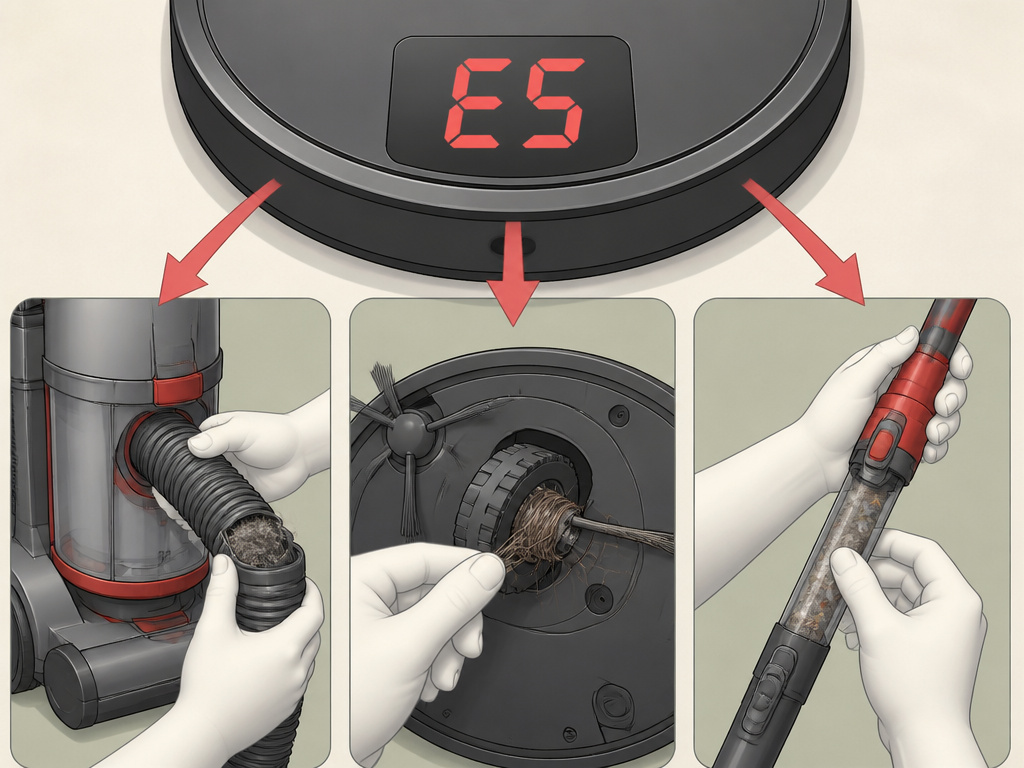
You cannot fix Error 5 until you know which Error 5 you have. Hoover, iRobot, and Bissell all use this code, but their engineers mapped it to different sensor failures. Your first step is to match your vacuum’s model number to the correct diagnosis.
The right drive wheel has become overloaded. Check that debris has not been tangled around it. This is the official definition for Error 05 on Hoover’s RBC-series robot vacuums, directly from the manufacturer’s advice centre.
For a Hoover HF9 series upright (models HF910H, HF920H, etc.), an E5 code with a flashing red triangle light means one thing: an air duct blockage. The suction path from the nozzle to the dust cup is sealed shut. The machine stops because running the motor against a total seal would overheat it in minutes.
Switch to a Hoover cordless stick vacuum like the H Free 500, and the language changes. The manual doesn’t call it “Error E5.” Instead, it describes the symptom: “Cleaner stops working.” The cause is identical, “an obstruction in air inlet or in the tube.” Clear it, turn the unit off, then back on. The underlying safety logic is the same; only the user interface differs.
How Other Brands Use “Error 5”
Hoover doesn’t own this code. You will see it on machines from other manufacturers, each with their own internal logic.
- iRobot Roomba e Series: Here, Error 5 means the right wheel is stuck. The robot may spin in circles or stop dead. The fix is to remove hair and string wrapped around the wheel axle.
- Roborock E5: For this robot vacuum, Error 5 indicates the main brush may be entangled with debris. The process is to flip the unit and cut away hair wound around the brush core.
- Bissell DigiPro Robotic Vacuum: This is the outlier. A Bissell Error E5 is triggered because the color of the floor is too dark. The vacuum’s cliff sensors mistake a dark rug or floor for a drop-off. The solution is to move the vacuum to a lighter surface or use a boundary strip.
| Brand & Model Type | What “Error 5” Means | Primary Sensor Trigger |
|---|---|---|
| Hoover HF9 Upright | Air duct blockage | Loss of airflow in suction path |
| Hoover Robot Vacuum | Right drive wheel overload | Wheel motor resistance |
| iRobot Roomba e5 | Right wheel stuck | Wheel encoder failure |
| Roborock E5 | Main brush entanglement | Brush motor resistance |
| Bissell DigiPro | Floor too dark | Cliff sensor reflection |
This table is your quick-reference decoder. If your vacuum isn’t a Hoover HF9, the standard “check the hose” advice will lead you nowhere. You need the right map.
Step-by-Step: Fixing an Air Duct Blockage
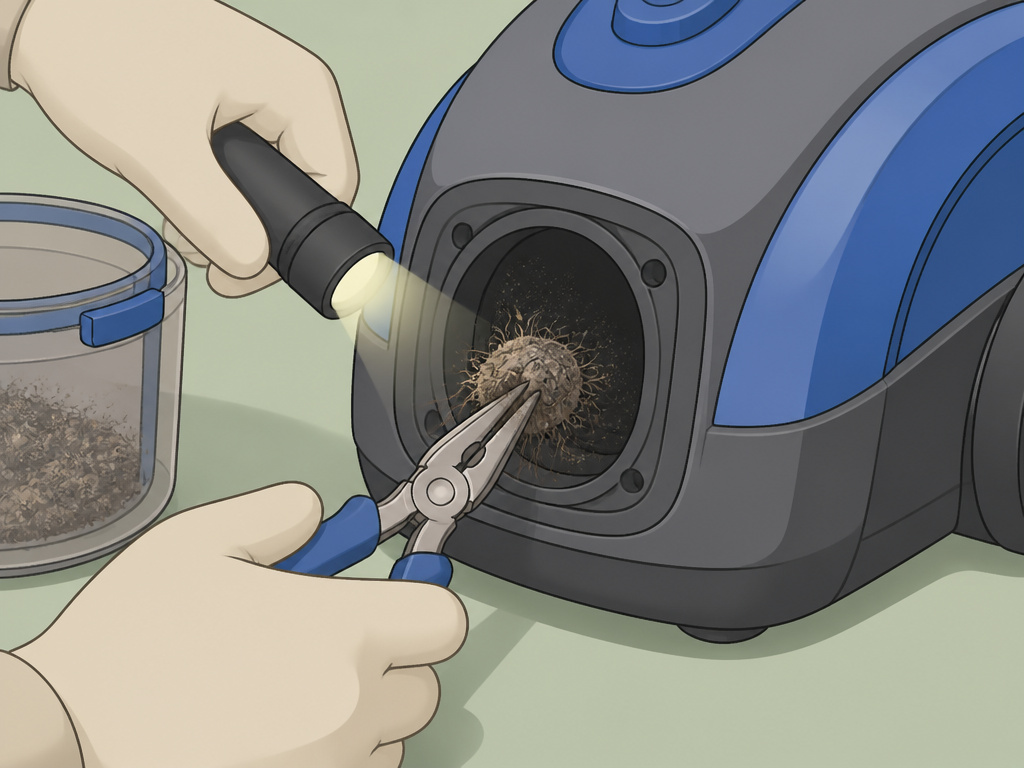
This is the most common scenario for a Hoover HF9 series vacuum throwing an E5 code. The air duct is the sealed pathway that carries dirt from the cleaning head, through the machine’s body, and into the dust container. A single sock, a large debris wad, or a compacted dust plug can seal it shut.
Before you start: Unplug the vacuum from the wall outlet. The blockage clearance process involves reaching into areas with electrical contacts and moving parts. A live machine could start automatically if a sensor resets, posing a pinch hazard.
Start at the farthest point from the motor: the floor nozzle. Detach it from the hose or wand. Look into the nozzle’s suction opening. Use a flashlight to check for blockages right at the inlet. A common culprit is a tangled mass of hair and fibers wrapped around the agitator brush, which then acts as a net catching larger debris.
If the nozzle is clear, work your way backward. Detach the hose from the vacuum body. Peer through it toward a light source. If you can’t see through, you’ve found the clog. A long, flexible tool like a plumbing snake or a straightened coat hanger (with the hook carefully bent straight) can dislodge it. Avoid sharp edges that could puncture the hose lining.
Where this goes sideways: Forcing a blockage deeper into the machine. If the clog is a solid object like a Lego, pushing it can wedge it into a narrower internal pipe. Always pull debris back toward the larger opening you came from.
Next, check the vacuum body’s inlet where the hose attaches. Remove the dust container or bag. Shine your light into the cavity where the hose connects. This chamber often has a bend or a grate that can catch objects. Use needle-nose pliers to extract anything lodged here.
Finally, inspect the exhaust filter. A fully saturated, damp filter can restrict airflow enough to mimic a blockage. Tap it out over a trash can or replace it if it’s worn. Reassemble the vacuum in reverse order, ensuring every latch clicks into place. A loose hose connection will leak air and cause poor suction, but it won’t trigger the E5 error.
Plug the vacuum back in. The error code should clear. If the E5 and the red flashing light persist, the pressure sensor itself may be faulty. At that point, the repair shifts from cleaning to component replacement.
Step-by-Step: Fixing a Drive Wheel or Brush Overload
For robot vacuums and some uprights, Error 5 points to a mechanical overload on a moving part. The wheel or brush motor is drawing too much current because it’s physically bound. The machine stops to protect the motor windings from burning out.
The process is more hands-on but follows a similar logic. Turn the vacuum off and flip it over to access its underside. You’re looking for the wheels and the main brush roll.
Right Drive Wheel (Hoover/iRobot Robots): Manually spin the right wheel. It should turn freely with a slight gear-like resistance from the motor’s gearbox. If it’s locked solid or grinds, the issue is internal. First, check the perimeter of the wheel. Use tweezers to remove hair and string wound tightly around the axle between the wheel and the chassis. If the wheel spins but is jerky, the axle bearings may be packed with grit. A blast of compressed air can clear this.
Main Brush Roll (Roborock/Agitator on Uprights): Remove the brush roll cover, typically held by clips or screws. Pull the brush roll out. You will likely find a solid cylinder of hair, thread, and carpet fibers wound around each end of the brush. This acts like a brake. Cut through these windings with scissors or a seam ripper, never pull, as you can damage the brush bearings. Clear all debris from the brush chamber before reinserting the brush.
The part nobody mentions: After clearing a wheel or brush blockage, manually rotate the part a dozen times. This redistributes any residual lubricant in the bearings that may have been squeezed out by the pressure. A dry bearing will fail quickly.
Reassemble the vacuum. Place it on the floor and power it on. The error should be cleared. If the code returns immediately, the overload sensor or motor may have been damaged during the blockage event. For robot vacuums, a system reset (often holding the “Clean” and “Home” buttons for 10 seconds) can clear the error from its memory.
When the Error Persists: Next-Level Diagnostics
You cleared the obvious clog. The wheels spin freely. You even did a hard reset. The dreaded E5 light is still glowing. Now you move from routine maintenance to diagnostic troubleshooting. The problem is likely a failed sensor, a wiring fault, or a deeper system issue.
First, rule out the simple. For cordless vacuums like the Hoover H Free 500, a battery issue can manifest as sudden stopping. The manual states batteries may not charge after “very long storage periods (over half a year).” If your vacuum was in storage and now stops with an error, the battery might be incapable of delivering the required current, triggering a low-power fault that the display codes as E5. Try a known-good, fully charged battery.
For plugged-in models, listen. When you turn the vacuum on, do you hear the motor attempt to spin up for a split second before stopping and displaying the error? That points to the sensor circuit working correctly, it’s detecting a real-time overload. If you hear nothing at all, the error might be pre-loaded in memory from a past event, or the main control board is faulty.
A system reset may resolve some problems. This is the official line from the Roborock E5 manual for internal errors. It’s good advice for any smart vacuum. Find the reset procedure for your model (usually a specific button hold sequence) to wipe the error state from the machine’s memory.
If a reset fails, you’re likely dealing with a hardware fault. Common culprits include:
* Failed Pressure Sensor (HF9 models): This small device measures airflow. If it’s broken, it may report a constant “blocked” state.
* Damaged Wheel Encoder (Robot Vacuums): A small plastic disc inside the wheel gearbox tells the robot how far the wheel has turned. If cracked or dirty, it sends false “stalled” signals.
* Worn Motor Brushes: In older vacuum motors, worn carbon brushes can cause erratic current draw that the system interprets as an overload.
At this stage, you need your model’s service manual or a reliable repair guide. You’ll be testing components with a multimeter. For most homeowners, this is the point to call a Hoover vacuum repair technician or weigh the cost of repair against a new unit.
How to Prevent the E5 Error Code
This error is almost always a maintenance warning, not a random failure. A few consistent habits will stop it from appearing.
Empty the Dust Cup Before It’s Full. This is the number one rule. A dust cup filled to the lid creates a solid plug. On bagless models, empty it after every major cleaning session. For robots, ensure the bin is emptied after each run. A full bin is the fastest route to an air duct blockage.
Perform Pre-Cleaning Sweeps. Before you send out a robot vacuum or push an upright across a room, do a quick visual scan. Pick up loose cords, clothing, socks, and large debris piles. String, hair ties, and carpet fringe are the primary agents that bind drive wheels and brush rolls.
Establish a Cleaning Schedule for the Vacuum Itself. Your vacuum needs cleaning too. Every month, detach the hose and check for airflow. Every three months, remove the brush roll and cut away any wrapped fibers. Every six months, check the wheels of robot vacuums for winding. This routine prevents the slow buildup that leads to an overload.
Store Cordless Vacuums Correctly. The Hoover H Free 500 manual warns that batteries may not charge after storage over six months. If you’re storing a cordless vacuum, charge the battery to about 50% first. Store it in a cool, dry place. Plug it in and recharge it for a full cycle every three months to keep the battery chemistry active. This prevents a whole class of power-related faults that can mimic blockage errors.
Stick to this regimen, and the E5 code becomes a rare sight. It shifts from a frustrating breakdown to a simple reminder that a quick clearance is due.
Frequently Asked Questions
Does the Hoover E5 error code mean my vacuum is broken?
Not usually. It’s a protective stop. The vacuum has detected a condition, like a total blockage or a bound wheel, that could damage the motor if it continued running. Fixing the physical obstruction almost always resolves it. It becomes a breakage issue only if the sensor itself has failed or the motor was damaged before the safety system triggered.
Can I reset the E5 code without fixing the blockage?
You can sometimes clear the display with a reset, but it’s a temporary fix at best. If the physical blockage remains, the vacuum will either trigger the error again immediately or, worse, attempt to run and risk overheating the motor. Always locate and clear the cause first. The reset is the final step, not the first.
Why does my Hoover vacuum keep showing the E5 error after I’ve cleared it?
Recurring E5 errors point to a few possibilities. First, you may have missed a secondary blockage further down the line. Second, the overload sensor might be overly sensitive or faulty. Third, for cordless models, a weak battery can cause voltage drops that the system misreads as motor overload. Check the battery’s age and performance. Finally, a worn motor with high internal resistance can draw excessive current, tripping the sensor under normal load.
Is the E5 error covered under warranty?
It depends on the cause. If the error is due to a normal wear item like a clogged filter or a wound-up brush roll, that’s considered user maintenance and is not covered. If it’s caused by a defective sensor or motor under the warranty period, that should be covered. Always check your warranty booklet and have your proof of purchase ready when contacting Hoover customer service.
How do I find my Hoover model number to diagnose the error?
The model number and product code are crucial. On upright vacuums, look on a sticker or plate on the back or underside of the main body. On cordless stick vacuums, check the battery pack area or the main handle. On robot vacuums, the label is almost always on the underside. This number (like HF920H 001 or RBC090/1 001) is what you’ll use to look up the exact error code definition in the official Hoover advice centre.
The Bottom Line
A Hoover E5 error code is a specific conversation between your vacuum and you. It’s saying, “I can’t breathe,” or “My leg is stuck.” Your job is to listen to which model is speaking. For an HF9 upright, clear its lungs, check the hose, nozzle, and dust cup. For a robot, free its right wheel. The fix is mechanical, not magical.
Prevention is straightforward. Empty bins before they’re full, clear floors of cords, and clean the machine’s moving parts regularly. That stops most errors before they start. If the code returns after a proper clearance, the diagnosis shifts from a clog to a component, a sensor, a battery, or a motor. That’s when you decide between a repair ticket and a replacement. Start with the simple clearance. It works more often than not.