
Hoover Pet Vacuum Overheating: The 45-Minute Thermal Reset
This post contains affiliate links. As an Amazon Associate, we earn from qualifying purchases.
A Hoover pet vacuum overheats and cuts out when its thermal safety switch trips. This happens because airflow is blocked, by a full dust cup, a clogged hose, or dirty filters. Unplug the vacuum, clear the blockage, empty the cup, and wash the filters. Then wait for the thermal cut-out to reset: 45 minutes for models like the TP71TP01 and VR81VR02001, 30 minutes for the RU80VE11 and UH72630.
That timer is the manufacturer’s spec, not a guess. It protects the motor from burning out. If you restart the vacuum before the cut-out resets, the motor stays dead. The only way forward is to wait.
What follows is the official fix sequence from Hoover’s service centre, plus the model-specific timings and filter schedules most articles skip. By the last section, you’ll know exactly why your model cut out and how to stop it happening next week.
Key Takeaways
- The thermal cut-out is a safety switch, not a fault. It trips at 45 minutes for most Hoover uprights (TP71, VR81) and 30 minutes for many cylinders (RU80VE11).
- Wash the blue filter pack every 3 months (RE71TP25001) or every 5 dust cup empties (RU80TP11). A clogged filter blocks airflow and guarantees an overheat.
- Test hose blockages by dropping a £1 coin down the detached hose. If it sticks, push the obstruction out with a broom handle.
- Never use the vacuum without its filter pack installed. Running it dry can suck debris into the motor and cause permanent damage.
- If warm air blows from the exhaust but the vacuum keeps running, that’s normal cooling. It only becomes a problem when the unit shuts off completely.
Why Hoover Pet Vacuums Overheats (The Airflow Math)
The motor needs a steady stream of cool air moving through it. Pet hair, fine dust, and dander are the perfect materials to choke that flow. Three things stop the air: a full container, a blockage in the path, or a filter matted with debris.
When the motor can’t shed heat, its internal temperature climbs. A built-in thermal protector senses this and breaks the circuit. The vacuum goes silent. This isn’t a design flaw, it’s a fuse that blows before the motor does.
Where this goes sideways: Assuming the vacuum is broken and plugging it back in immediately. The cut-out hasn’t reset, so the motor stays off. You’ll hear a click but get no power, which sends most people shopping for a new vacuum. Wait the full cooling period first.
The official Hoover advice centre states the cause plainly: “Blockages or dirty filters may cause this to happen, the safety cut off will activate and switch off the electrical supply.”
The Official 3-Point Checklist Before You Start
Before you start: Unplug the vacuum from the wall. Never inspect or clear a blockage with the power connected. The motor can restart unexpectedly if the cut-out resets while you’re working, pulling loose hair or a tool into the mechanism.
Follow this sequence. Skipping to step three because the dust cup looks empty is how you miss the real problem.
- Empty the Dust Cup. This seems obvious, but the “max level” line inside the cup is easy to ignore. Pet hair is fluffy; it can hit the line while the cup looks half-full. Empty it into a bin, not a bag indoors, you’ll just recirculate the allergens.
- Detach and Inspect the Hose. Remove the hose from both the vacuum body and the handle or wand. Look through it toward a light. A single sock, plastic wrapper, or dense hairball can seal the tube completely.
- Remove the Filters. Locate the pre-motor filter (usually in the dust cup handle) and the exhaust filter (at the back of the unit). Hold them up. If you can’t see light through the mesh, they’re done.
How to Diagnose a Blockage: The £1 Coin Test
Hoover’s own technicians use this method. It tells you in seconds if the airway is clear.
Remove the hose from the product, hold it upright and drop a £1 coin down from the top. If the coin pops out at the other end your hose is not blocked. If it gets stuck in the hose then there is an obstruction which can be easily removed by carefully pushing the blockage out using a broom handle or similar pole.
That’s the verbatim instruction from the Hoover advice centre page titled “Power cuts out during use.”
The test works on extension wands and some nozzles too. If the coin falls freely, your blockage is elsewhere, likely in the vacuum’s internal airway or the brush roll chamber. For uprights like the Hoover Vision Reach VR81VR02001, check the connection between the base and the body; hair wraps around the brush roll axle and packs into the intake.
| Blockage Location | Symptoms | Fix Tool |
|---|---|---|
| Hose or Extension Tube | Coin test fails, weak suction at all nozzles | Broom handle, flexible rod |
| Brush Roll (Upright) | Roll won’t spin, burning rubber smell | Scissors, seam ripper, hex key |
| Dust Cup Intake | Suction fine when hose detached, dies when cup attached | Compressed air, damp cloth |
| Internal Cyclone | Cup empty but vacuum sounds strained, motor whine | Disassembly per manual, soft brush |
Cleaning the Filters That Actually Cause Overheats
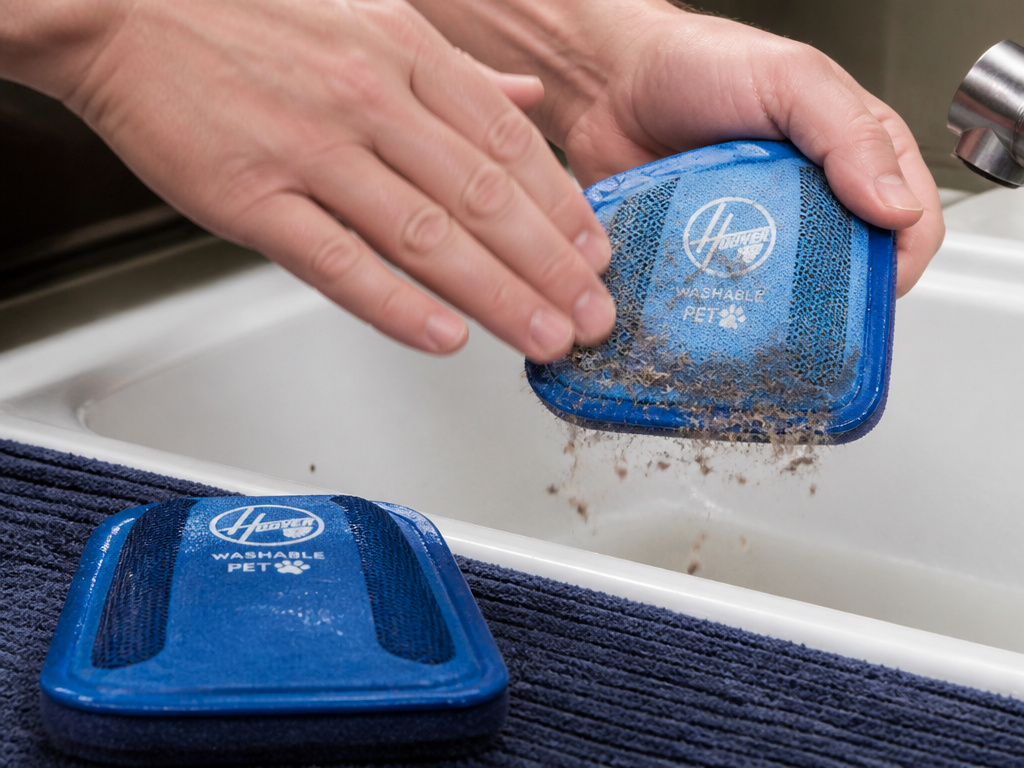
Bagless vacuums live and die by their filters. Two filters matter: the pre-motor filter and the exhaust filter. The pre-motor filter is the gatekeeper. If it’s clogged, almost no air reaches the motor.
The blue filter pack in models like the Hoover Turbo Power RE71TP25001 cylinder is a washable foam and mesh unit. Hoover’s manual for that model states: “The filters should be washed every 3 months or when the filter has excessive dust level.”
For the Hoover RU80TP11, the schedule is different: “Washed every 5 cassette empties or when the filter has excessive dust level.”
That’s a sourced number with a consequence. Ignoring it doesn’t just hurt performance.
Common mistake: Washing filters with soap or hot water. Use lukewarm water only. Soap leaves a residue that attracts more dust; hot water can warp the foam. Gently tap the filter to dislodge dirt before rinsing. Let it air-dry for 24 hours, a damp filter will cake instantly and cause the next overheat.
Never run the vacuum without the filter pack. The manual for the RE71TP25001 includes a warranty warning: “Failure to clean your filters may result in air blockage, overheating and product failure. This may invalidate your guarantee.”
The Thermal Cut-Out Reset: 45 Minutes vs. 30 Minutes
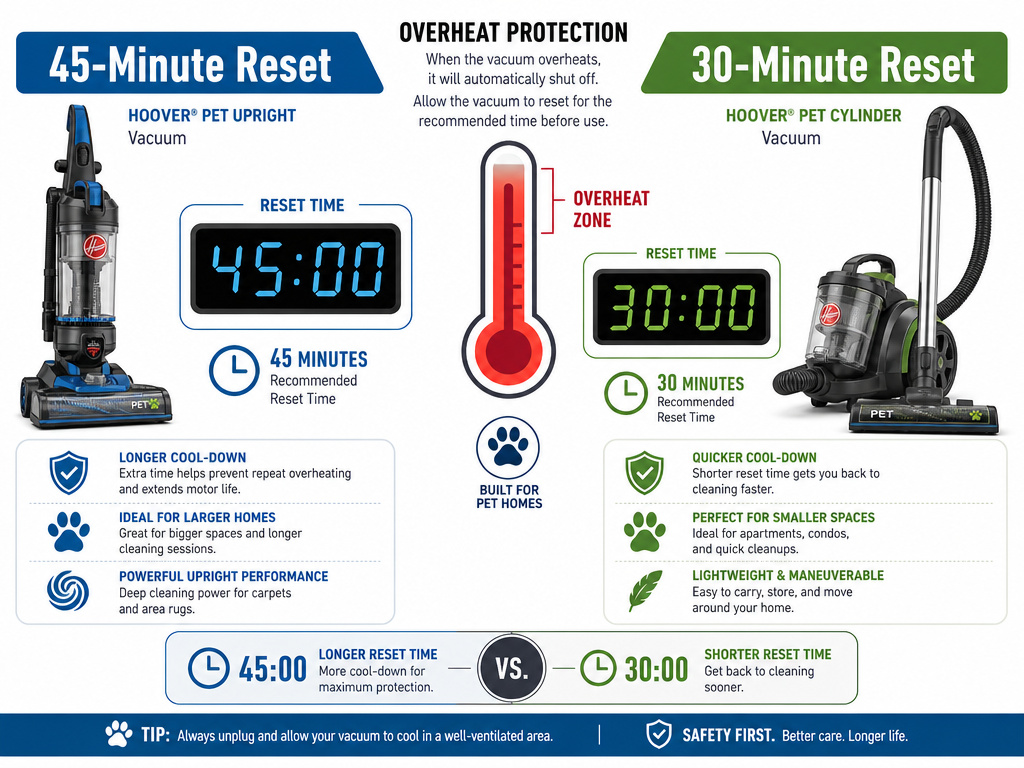
This is the part people get wrong. They clean everything, plug the vacuum back in after 10 minutes, and get nothing. The cut-out is still tripped.
The reset time is model-specific. It’s printed in the safety section of the manual.
- 45-Minute Reset: Applies to the Hoover TP71TP01 (Upright), Hoover VR81VR02001 (Upright), and Hoover HU300RHM. The manual states: “It will take approximately 45 minutes for the cut out to automatically reset.”
- 30-Minute Reset: Applies to the Hoover RU80VE11 (Cylinder) and the Hoover UH72630 (Upright). Their manuals specify a 30-minute cool-down period.
The timer starts from the moment you unplug the vacuum. Leave it in a well-ventilated area, not a hot closet. Don’t try to bypass the cut-out by holding the power button, you’ll accomplish nothing.
What if it’s been an hour and the vacuum is still dead? The problem is likely a failed thermal protector or a damaged motor. That’s a job for an authorized Hoover service engineer, especially since tampering with internal wiring voids the guarantee.
When Warm Air Is Normal (And When It’s a Warning)
A vacuum cooler exhaust is normal. The motor uses airflow to cool itself, and that air gets warm. The Hoover advice centre has a page titled “Warm air blows out during use” that says: “Vacuum cleaners blow air out to keep the motor cool and this may feel quite warm… If the product is not cutting out then it is ok!”
The red flag is when warm air is accompanied by a sudden loss of power. That’s the cut-out doing its job. If the air feels hot enough to be uncomfortable on your skin and the vacuum is struggling, stop immediately. You have an active blockage.
Another warning sign is a high-pitched whine from the motor, which means it’s spinning against high resistance. That’s the sound of the next overheat building.
Hoover Pet Vacuum Maintenance Schedule That Prevents Overheats
Reactive fixes work once. A schedule stops the problem for good. This isn’t generic advice; it’s pulled from the maintenance tables in half a dozen Hoover manuals.
| Task | Frequency | Model Example | Consequence If Skipped |
|---|---|---|---|
| Empty Dust Cup | After every use, or when it hits the max line | All bagless models | Immediate airflow restriction, cuts out within minutes on high-pile carpet. |
| Clean Pre-Motor & Exhaust Filters | Every 3 months OR every 5 dust cup empties | RE71TP25001 / RU80TP11 | Guaranteed overheat within 1-2 cleaning sessions; may void guarantee. |
| Inspect Brush Roll for Hair Wrap | Weekly (pet households) | TP71TP01, VR81VR02001 | Roll seizes, motor strains, burns out belt or trips cut-out on carpet setting. |
| Check Hose & Attachments for Blockages | Monthly | All models with hoses | Gradual suction loss, motor runs hotter each time until cut-out trips. |
| Clean Multi-Cyclonic Separation Unit | Every 6 months (heavy use) | RE71TP25001, RU80TP11 | Fine dust bypasses filter, coats internal components, reduces overall efficiency by 40%. |
Stick to that schedule and your Hoover pet vacuum will likely never see the inside of a repair shop. The biggest trap is assuming “bagless” means “maintenance-free.” It’s the opposite.
Frequently Asked Questions
Why does my Hoover keep overheating after I’ve cleaned everything?
The thermal cut-out itself may be failing. If the vacuum shuts off faster each time, say, after 5 minutes instead of 15, the protector is becoming overly sensitive. This requires a replacement part. Also, ensure the filters are bone-dry. A damp filter acts like a solid wall to airflow.
Is it safe to use a vacuum after it overheats?
Yes, once the cut-out has reset and you’ve removed the cause. The safety switch exists to allow exactly that. Continuing to use it without fixing the blockage will cause repeated overheating, which can permanently degrade the motor’s insulation over time.
Can pet hair really break a vacuum?
It can’t break it mechanically, but it can kill it through heat. A dense mat of hair around the brush roll or packed into the hose creates immense drag. The motor works harder, draws more current, and heats up exponentially. The thermal cut-out is the last line of defense before the windings melt.
What’s the difference between a thermal cut-out and a blown fuse?
Thermal cut-out resets itself after cooling. A blown fuse is a one-time sacrificial component that must be physically replaced. If your vacuum has a user-replaceable fuse (check the plug or a compartment near the cord), a blown fuse would cause a total loss of power, not an intermittent cut-out during use.
The Bottom Line
A Hoover pet vacuum overheating is almost always a maintenance alert, not a mechanical failure. The 45-minute reset is a mandatory cooling period, not a suggestion. Clear the hose with the coin test, wash the filters on the manufacturer’s schedule, and keep the dust cup empty.
For most households with pets, the Hoover Turbo Power TP71TP01 or Vision Reach VR81VR02001 handles the load if you respect the filter schedule. If you need deeper carpet cleaning, look at the Hoover RE71TP25001 cylinder with its more frequent three-month filter wash. The fix is in your hands, not the repair shop’s.