
Roomba S9 Vacuum Motor Replacement Guide | Full Tutorial
This post contains affiliate links. As an Amazon Associate, we earn from qualifying purchases.
Replacing the Roomba S9 vacuum motor is a seven-step disassembly that hinges on one component: the plastic baffle inside the vacuum module. Misalign it during the swap and the robot will map your floor but not clean it, a failure that feels identical to a dead motor. The official part is a sealed module you swap as a unit, not a bare motor you rebuild.
That baffle is the difference between a 45-minute fix and a two-hour headache. The rest of the process, popping the bottom cover, unplugging the old module, seating the new one, follows the logic of any modern appliance repair. But skip the baffle check and you’ll reassemble a perfectly good $150 part inside a robot that still has no suction.
What follows: the symptoms that actually point to the motor, the tools that aren’t a Phillips head, and the post-installation test that catches a pinched cable before you screw the plate back on.
Key Takeaways
- The S9 uses a sealed vacuum module (part #4800856); you replace the entire unit, not an internal motor.
- Loss of suction with normal brush movement is the primary symptom; if the brushes don’t spin, the problem is likely the cleaning head module.
- The plastic baffle inside the module must stay seated in its slot during the swap; dislodging it blocks airflow.
- Always test the motor spins freely before final reassembly to check for internal debris obstruction.
- If a new motor doesn’t restore suction, check the metal bin contacts for corrosion, they deliver power to the module.
What a Dead Roomba S9 Vacuum Motor Actually Does (and Doesn’t Do)
The motor doesn’t drive the brushes. It creates suction by spinning an impeller fan inside the sealed vacuum module. When it fails, the Roomba S9 will still navigate, map, and spin its side brush and rollers. It just won’t pick anything up. You might hear a faint whirring or clicking instead of the normal vacuum hum, or hear nothing at all.
A Roomba S9 with a failed vacuum motor will complete its cleaning cycle, return to its dock, and report a successful job, leaving all the debris it drove over still on your floor. The error is silent in the app.
This is distinct from a general suction problem in an upright vacuum. Here, the failure is isolated to one electromechanical component. Other issues can mimic it, though. A fully clogged filter or bin can also cause weak suction. So can a faulty connection at the bin contacts. Rule those out first with a visual inspection and a filter swap before you open the robot.
| Symptom | Motor Likely | Not the Motor |
|---|---|---|
| Brushes spin, robot moves, zero pickup | Yes | |
| Unusual grinding/clicking from robot’s center | Yes | |
| Complete silence during cleaning run | Yes | |
| Weak suction, improved with filter change | No | Clogged filter |
| Intermittent suction | No | Bin contact issue |
| Brushes do not spin | No | Cleaning head module or error code |
The Tools and Parts You Actually Need
You don’t need a full electronics toolkit. The S9’s modular design means you’re unclipping and unplugging, not soldering.
The Non-Negotiable Tool:
- A T8 Torx Security screwdriver (with the pin hole in the tip). Every screw on the S9’s bottom plate uses this head. A standard T8 will not fit.
The Helpful Extras:
- A plastic spudger or guitar pick for prying clips.
- A small container for screws.
- A can of compressed air.
- A clean, well-lit workspace.
The Replacement Part:
You need the official iRobot Vacuum Module, part #4800856. This is the complete assembly. Don’t try to source a generic brushless motor, the housing, connectors, and baffle are specific. For context, other models like the Roomba i7 motor replacement use a different, incompatible module.
The 7-Step Bump-Feed Replacement (and the One Step Nobody Skips)
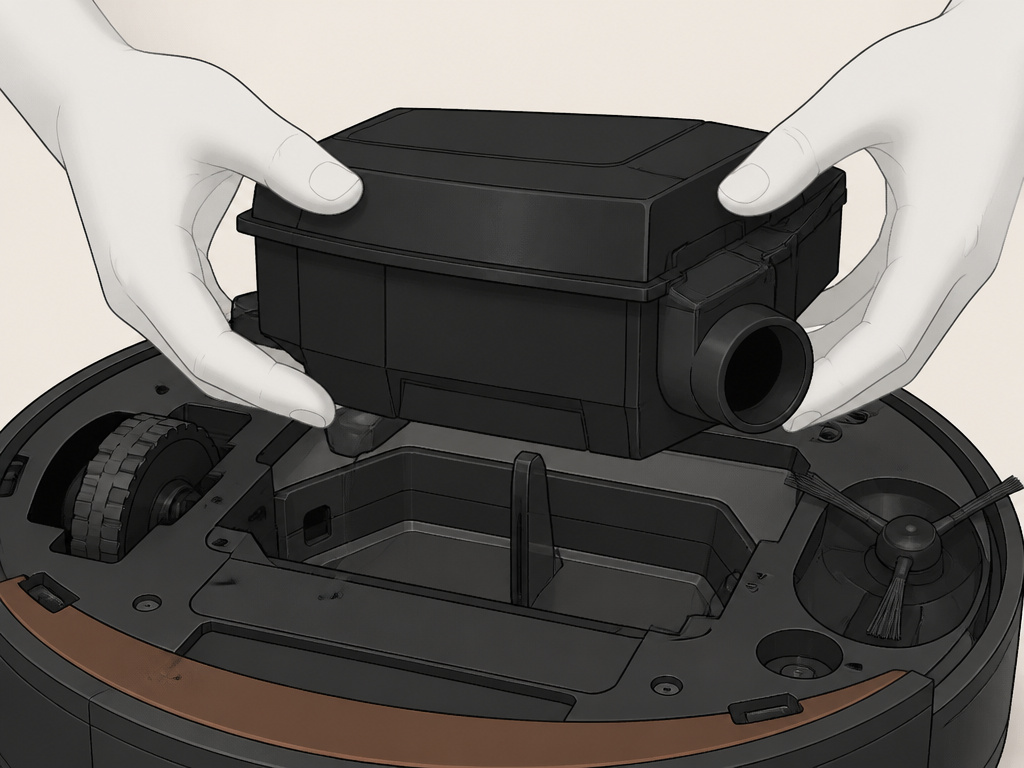
Before you start: Power off the robot and remove it from the Clean Base. Remove the bin and the filter. This isn’t just for safety, it’s how you access the first screws.
Step 1: Remove the Bin and Cleaning Head Module
Pull out the bin. Then, flip the robot over. Press the two yellow tabs on the cleaning head module (the roller assembly) and lift it out. This exposes the first two T8 Security screws.
Step 2: Remove the Bottom Cover
Unscrew all eleven T8 Security screws holding the bottom cover. They are not all the same length. Note where the longer ones come from near the wheel modules. Once unscrewed, gently pry the plastic cover off starting at the rear. It’s held by plastic clips.
Step 3: Disconnect the Battery (Optional but Recommended)
Locate the battery connector near the rear caster wheel. It’s a white plug. Use a spudger to gently lever the locking tab and pull the connector apart. This eliminates any risk of shorting the main board during the motor swap.
Step 4: Remove the Vacuum Module
The vacuum module is the large black plastic unit in the center. You’ll see a multi-wire harness plugged into it. 1. Carefully unplug the wire harness connector by pulling the plastic lock tab. 2. Remove the two T8 Security screws securing the module to the chassis. 3. Lift the module straight up and out.
The part nobody mentions: As you lift the module, look inside the empty cavity in the robot. You’ll see a small, vertical plastic baffle still seated in a slot. This must stay put. If it comes out with the old module, you must transfer it to the new module in the exact same orientation.
Step 5: Install the New Vacuum Module
- Check the baffle. Ensure the baffle is correctly seated in the robot’s chassis slot. If it’s missing or loose, retrieve it from the old module.
- Seat the new module. Lower the new module into place, ensuring the hole in its housing slips over the baffle. You should feel it settle without force.
- Reconnect. Plug the wire harness back in until it clicks. Hand-tighten the two mounting screws.
- Critical cable check. Before moving on, verify the wiring harness is routed cleanly and is not pinched between the module and the chassis.
Step 6: Reassemble in Reverse Order
- Reconnect the battery (if disconnected).
- Snap the bottom cover back on, ensuring all clips seat properly.
- Insert and tighten all eleven screws. Don’t overtighten, snug is enough.
- Snap the cleaning head module back into place.
- Insert a clean filter and the bin.
Step 7: Post-Replacement Test (Don’t Skip This)
Do not start a full cleaning job yet. 1. Place the Roomba on a hard floor. 2. Hold the robot down with one hand and press the CLEAN button. 3. Listen and feel. You should hear the distinct sound of the vacuum motor spinning up. Place your hand over the bin intake on the robot’s top. You should feel strong suction. 4. Check for obstruction: If the motor sounds strained or doesn’t start, immediately power off. The motor may be obstructed by debris that shifted during installation, or the baffle may be binding.
Why a New Motor Sometimes Doesn’t Fix the Problem
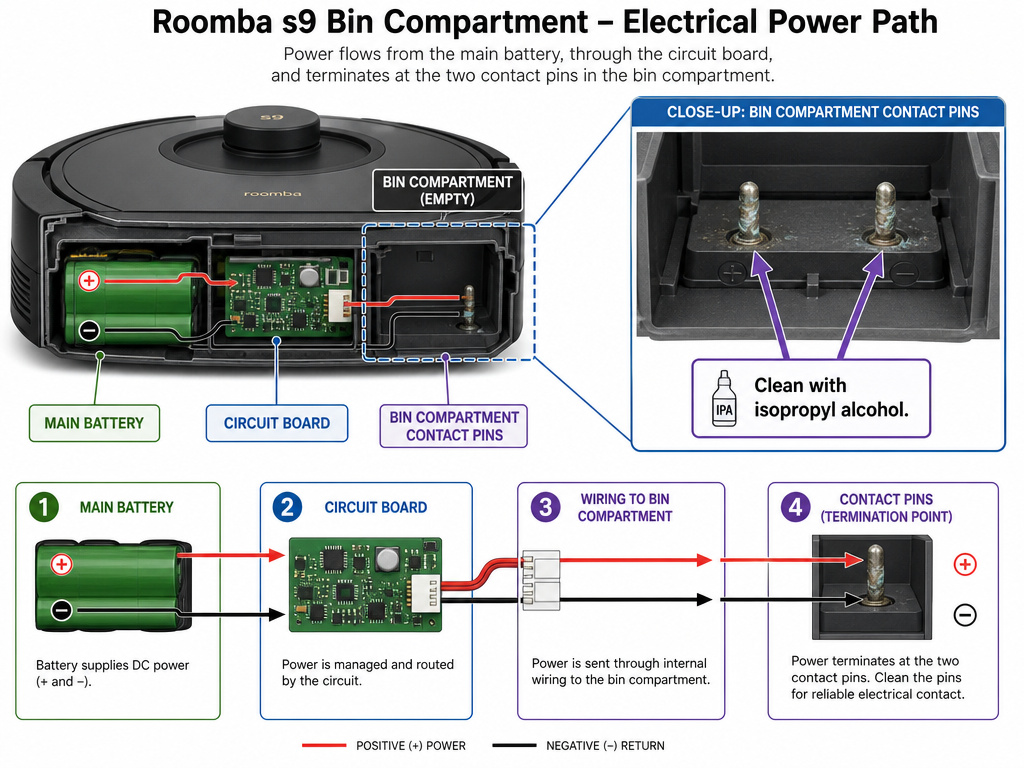
You can follow every step perfectly and still have a Roomba with no suction. The motor needs power, and that doesn’t come from the main battery directly. Power is delivered through the metal contacts inside the bin compartment.
When you insert the bin, it presses a set of contacts that complete the circuit to the vacuum module. If these contacts are corroded, bent, or covered in grime, the new motor gets no juice. This is a known failure point that a simple Roomba not vacuuming guide might miss. Clean these contacts with isopropyl alcohol and a cotton swab.
The other culprit is software. A motor replacement is a hardware fix. If the robot’s software has flagged a persistent error, it may refuse to activate the new motor. After the swap, try a hard reset by holding the CLEAN button for 20 seconds until the robot plays a tone. This clears temporary error states and is a good step before diagnosing deeper Roomba error codes.
Roomba S9 Vacuum Motor vs. Other Model Replacements
The S9 process is more involved than some earlier models. It’s a sealed module swap, similar in concept to the Roomba i3 motor replacement but with a more complex chassis. The older i7 uses a different part number but a comparable procedure. The newer j7 series simplified some aspects of the Roomba j7 motor replacement, but the core principle, access from the bottom, mind the connectors, remains.
If you’re comfortable with the S9, you can handle an i3 or i7. The reverse isn’t always true, because the S9 adds steps like the baffle and more screws.
Maintenance to Delay the Next Replacement
A vacuum motor is a wear item, but you can extend its life. The enemy is fine dust and hair bypassing the filter and coating the motor internals.
- Replace the filter every two months. This is the single biggest factor. A clogged filter makes the motor work harder and sucks debris past it.
- Clean the bin seals and contacts monthly with a dry cloth.
- Avoid vacuuming fine debris like drywall dust or fireplace ash with your Roomba. Use an upright with a bag.
- Listen for changes in pitch. A rising whine means the bearings are wearing.
Routine care like replacing your Roomba filter is preventative maintenance for the motor. It’s cheaper than the module.
Frequently Asked Questions
How long does a Roomba S9 vacuum motor last?
With proper filter maintenance, the vacuum module should last 3 to 5 years in a typical household. Without regular filter changes, fine dust can kill it in under 18 months.
Can I clean the S9 vacuum motor instead of replacing it?
No. The iRobot vacuum module is a sealed, non-serviceable unit. There are no user-serviceable parts inside. Attempting to open it will almost certainly break the housing and void any chance of a working repair.
Where can I buy a genuine Roomba S9 vacuum motor?
Purchase the official iRobot Vacuum Module (Part #4800856) directly from the iRobot website or from authorized parts dealers like iFixit. Avoid generic modules from third-party sellers on Amazon or eBay, they often have fitment or power issues.
What if my Roomba still has an error code after replacing the motor?
New motor fixes the hardware. If an error code like Error 43 persists, the problem is elsewhere in the system, often related to the battery or charging circuit. The motor swap and error diagnosis are separate tracks.
Is replacing the S9 motor worth it, or should I just buy a new robot?
Given the S9 is a retired, premium model, a $150 motor replacement is almost always worth it compared to the $800+ cost of a comparable new robot. It becomes less worthwhile if multiple other components (battery, wheels) are also failing simultaneously.
Before You Go
The Roomba S9 vacuum motor replacement is a logical, if detailed, repair. Its success depends on three things: using the correct T8 Security bit, preserving the alignment of the internal baffle, and verifying power at the bin contacts after the swap. If your robot maps and rolls but doesn’t clean, this guide walks the fix. If it won’t charge or move at all, your problem is likely the battery or wheels. Start with the symptom, match it to the part, and the S9’s modular design will see you through.