
Fixing a Dyson Stick Vacuum Overheating Problem For Good
This post contains affiliate links. As an Amazon Associate, we earn from qualifying purchases.
Your Dyson stick vacuum is overheating because its built-in thermal protection has triggered. This automatic cut-out shuts the motor off to prevent damage, typically due to a blocked airway, a dirty filter, or the machine being used below its specified temperature threshold. Clear the blockage, wash the filter, and let the unit cool for 1–2 hours before restarting.
That cut-out is a safety feature, not a defect. It means the motor or battery is reaching a temperature the engineers decided was unsafe. The machine is doing its job, but the underlying cause is almost always a restriction in airflow or an environmental condition the manual warned about.
What follows: the three distinct triggers that cause a shut-off, the step-by-step clearance procedure that actually works, and the long-term reliability data from Consumer Reports that explains why this problem feels so common after the two-year mark.
Key Takeaways
- The thermal cut-out activates at around 60°C (140°F) inside the motor due to blocked airflow; the low-temperature cut-off engages if the battery is below 3°C (37.4°F) for models like the DC45 and V6.
- Consumer Reports data shows nearly half of Dyson stick vacuums develop problems within five years, with battery and brush bar failures being the most frequent issues after year three.
- Wash the main filter with cold water only and let it dry for a full 24 hours. A damp filter restricts airflow and guarantees another overheat cycle within minutes.
- Never store a just-charged vacuum in a cold garage or car. Moving it from a warm charge to a sub-3°C environment can lock the battery out until it warms up.
- If the machine pulses and dies within seconds on a full charge, the fault is likely a failed capacitor on the motor control board, not the battery.
The Three Automatic Shut-Off Triggers
Your Dyson is hitting a precise electronic limit and shutting down to protect itself, which is why it gets hot. There are three separate systems that can cause this, and each has a different symptom.
Common mistake: Assuming every shut-off is an “overheat.” The machine has a thermal cut-out for motor safety and a separate low-temperature cut-off for battery protection. Treating a cold-battery lockout as a clog will waste an hour.
The first is the classic thermal cut-out. This is a resettable fuse wired to the motor. If restricted airflow causes the motor windings to approach 60°C (140°F), the circuit opens and kills power. The DC45 manual states this requires a 1–2 hour cooldown before the circuit will reset and allow operation. This is the “overheating” most owners experience.
The second is the low-temperature battery protection. Dyson manuals for the DC45, V6, and DC35 explicitly warn the appliance will switch off if the battery temperature is below 3°C (37.4°F). The SV15 model uses a slightly higher threshold of 10°C (50°F). This is the battery management system refusing to operate in conditions that can cause permanent cell damage. The machine will not restart until the battery warms above that threshold.
The third is a blockage detection algorithm. On newer models with an LCD screen, the machine can sense a severe drop in airflow and will flash a blockage warning before pulsing and cutting out. Older models without a screen will just pulse and die. This is still the thermal cut-out doing its job, but the trigger is an immediate, severe blockage rather than gradual filter clogging.
| Shut-Off Trigger | Primary Symptom | Time to Reset | Model Examples |
|---|---|---|---|
| Thermal Cut-Out | Motor stops, body feels very warm | 1–2 hours (cooling) | DC45, DC35, V6, V8 |
| Low-Temp Battery Cut | No power, possible flashing light | Until battery warms >3°C (37.4°F) | DC45, V6, DC35 |
| Immediate Blockage | Motor pulses rapidly, then stops | 1–2 hours (cooling) | V8, V10, V11 with LCD |
Why Does My Dyson Stick Vacuum Keep Overheating and Shutting Off?
A single overheat event is usually a clog. A repeating cycle points to a chronic airflow restriction or a failing component. The pattern tells you what to check.
If it runs for a few minutes then dies every time, the filter is the culprit. A dirty filter passes just enough air to start but not enough to keep the motor cool. After shutdown, the thermal cut-out resets during the cooldown. You restart, and the cycle repeats. The filter isn’t necessarily filthy, it might be damp. Even slightly moist filter material dramatically increases air resistance.
If it overheats almost immediately on every use, you have a major blockage in the main air path. This is often in the cyclone shroud, the wand, or where the floor tool connects. Something like a compressed dust bunny, a small toy, or a sock fragment is acting as a valve, letting almost no air through.
There’s also a known failure mode for older models. A failing capacitor on the motor control board can cause the motor to cut out erratically, mimicking an overheat. The symptom is a machine that runs fine for 5 seconds, dies, then works again after a brief pause, regardless of filter condition or blockages. This is a circuit fault, not a temperature issue.
Where this goes sideways: Immediately recharging a hot, fully discharged battery. The DC45 manual advises against this to prolong battery life. The heat from discharge combined with charge current stresses the cells, which can accelerate the battery problems reported by nearly 20% of owners in Consumer Reports’ survey.
Step-by-Step: How to Fix an Overheating Dyson Stick Vacuum
Switch the vacuum off and disconnect it from the charger. Let it sit for at least an hour, the thermal cut-out needs time to reset. Rushing this guarantees the next step fails.
Step 1: Empty and Inspect the Bin
Remove the bin and empty it completely. Dirt packed above the MAX line can spill into the cyclone chamber during emptying, creating a new blockage. Hold the bin over a trash can and press the release button firmly until the base swings fully open.
Look inside the empty bin cavity on the main body. Shine a light into the cyclone shroud, the plastic cone assembly inside. Use a long, thin object like a straightened coat hanger (carefully) to dislodge any compacted dust wedged in the cyclone fins. This is a prime blockage location most people miss.
Step 2: Wash the Filter. The Right Way
Locate and remove the main filter. It’s usually a cylindrical unit at the top of the handle or behind the bin.
- Tap it gently to remove loose dust.
- Wash only with cold water. Do not use detergent, soap, or warm water.
- Rinse the pleated paper element first, holding the foam side up so dirty water doesn’t soak into it.
- Then rinse the foam element.
- Repeat until the water runs absolutely clear.
This is the critical part. Shake out excess water and leave the filter to air dry in a well-ventilated area. The manual mandates at least 24 hours for complete drying. Putting in a damp filter is the same as installing a blockage. If you need to clean the filter more than once a month, you’re vacuuming fine dust like plaster or flour, which requires more frequent maintenance.
Step 3: Clear the Brush Bar and Airway
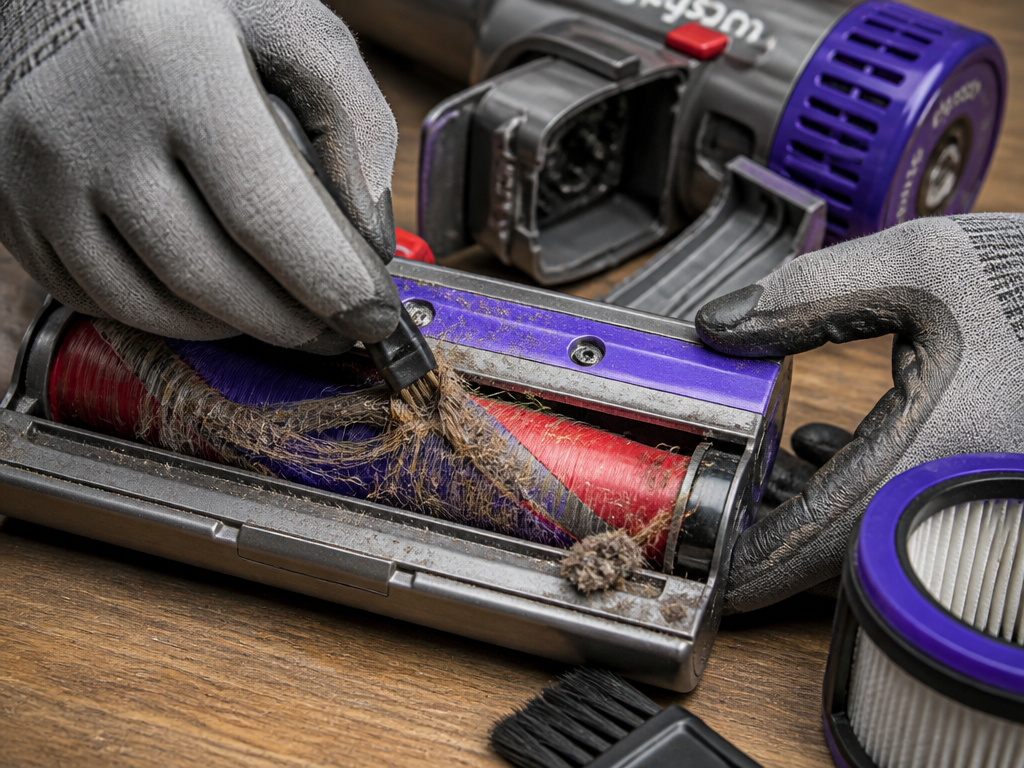
Detach the floor tool or cleaner head. Manually spin the brush bar. It should turn freely without grating or catching. If it’s jammed, use a coin to unlock the end cap, slide the brush bar out, and cut away any wound hair, string, or carpet fibers. A seized brush bar creates massive drag and can overheat the head motor on models that have one.
Next, check the airway in the wand and the tool connector. Look through them toward a light. A common hiding spot for blockages is the flexible joint where the wand attaches to the main body or the floor tool. A small object can get stuck there, acting as a one-way valve.
Step 4: Check the Battery and Environment
Is the vacuum stored in a garage, car, or porch where temperatures drop near freezing? If the battery is below its cut-off temperature, the machine will not start. Bring it indoors and let it acclimate to room temperature for a few hours.
If the battery is old and the vacuum runs for only seconds even after a full charge, you may have a Dyson stick vacuum not keeping charge. This is a different fault from overheating, but the symptom, rapid shutdown, can feel similar. A genuine battery failure usually means the machine won’t restart at all until placed back on the charger.
The Long-Term Reliability Context
 A one-time overheat is a maintenance issue. A pattern of problems as the machine ages is a design reality. In February 2019, Consumer Reports removed all Dyson stick vacuums from its recommended list due to reliability data.
Their survey of over 51,000 vacuums found Dyson stick vacs were as reliable as other brands for the first two years. By year three, they fell below average. By year five, they were the least reliable stick vacuums in the survey. Nearly half developed problems within that five-year window.
The Consumer Reports reliability investigation detailed two main failure points: batteries (19% of units at least 3 years old) and brush bars (12%, a rate “significantly higher than most other stick vacs”). This data is aggregated from owners like John from Ontario, who reported a battery failure after only four months on a 2018 model.
This doesn’t mean your vacuum is doomed. It means the Dyson stick vacuum overheating you’re experiencing is part of a broader pattern of wear. Proactive filter washing and brush bar cleaning are not just about preventing a shut-off; they directly address the two most common longevity issues.
When It’s Not a Simple Fix
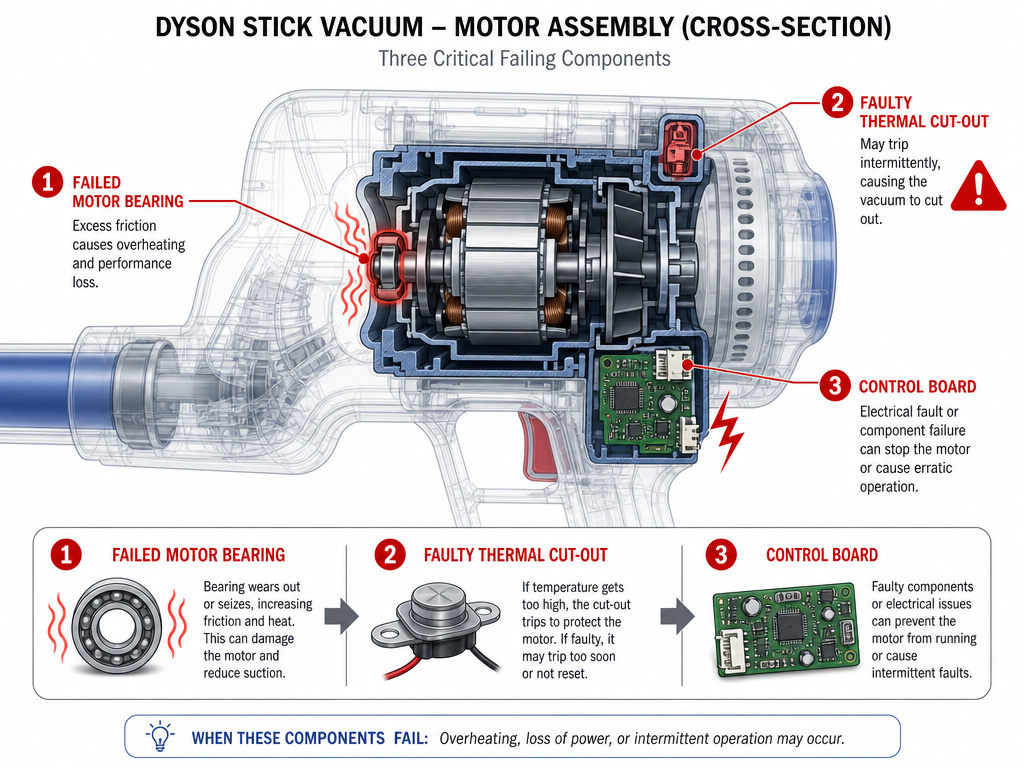 If you’ve cleared every possible airway, installed a bone-dry filter, and the machine still overheats within a minute, the problem is likely internal. A failed motor bearing creates friction and heat independently of airflow. A faulty thermal cut-out itself can get stuck in the tripped position. On models with a revving noise preceding the shut-off, the motor’s Hall sensor or control board may be failing, causing it to draw excessive current.
For these issues, you’re looking at a component replacement. Dyson’s two-year limited warranty does not cover blockages, but it would cover a genuine motor defect within that period. After the warranty, the cost of an official motor or main body assembly often approaches half the price of a new vacuum, which is why many owners turn to third-party repair guides.
The part nobody mentions: The warranty explicitly states that “clearing blockages is not covered by your guarantee.” If you force a blocked vacuum and burn out the motor, that repair is on you. The thermal cut-out is there to make you stop before that happens.
Frequently Asked Questions
Can a Dyson stick vacuum overheat damage the motor?
Yes, if repeatedly ignored. The thermal cut-out is designed to prevent damage, but if you constantly trigger it by running a blocked machine, the extreme heat cycles can degrade motor insulation and solder joints over time. The cut-out is a last resort, not an operating mode.
Why does my Dyson pulse then stop?
Rapid pulsing is the motor trying to start against a severe blockage or a failing electronic component. The machine detects high current draw or no airflow and cycles the power to protect itself. This is distinct from the steady run followed by a silent shut-off of a thermal cut-out.
Is it worth repairing an overheating Dyson stick vacuum?
It depends on the model and the fault. Replacing a $30 third-party battery or spending an hour cleaning a deeply lodged blockage is absolutely worth it. Paying $200 for an out-of-warranty official motor replacement for a five-year-old V6 is harder to justify. Compare repair cost to the current price of a newer model.
How can I prevent my Dyson from overheating?
Adopt a strict maintenance schedule. Empty the bin before it reaches the MAX line. Wash the filter every month with cold water and allow a full day to dry. Clear the brush bar of hair and debris every few weeks. Never store the vacuum in sub-freezing temperatures, and avoid recharging it immediately after it has fully discharged and is warm to the touch.
What do Dyson overheating error codes mean?
Models with an LCD screen may display a specific warning. A thermometer icon or a “motorhead blocked” message points to a thermal cut-out or airflow blockage. A flashing red battery light can indicate a temperature fault. Our guide to Dyson stick vacuum error codes breaks down each symbol and the required action.
Before You Go
An overheating Dyson is usually telling you to clean it. The fix is almost always in the filter, the bin, or the brush bar. Follow the cooling period, methodically clear each airway, and never reassemble with a damp filter.
Remember the two temperature limits: the motor protects itself at around 60°C, and the battery protects itself below 3°C. If your machine is stuck in a cycle of shutting off, you’ve likely missed a restriction in the cyclone or the wand. If it’s dead in a cold garage, just warm it up.
For all their suction power, these machines are fundamentally air pumps. Keep the air flowing, and they’ll run cool.