
Decoding Dyson’s Blinking Red Light Error Codes for Vacuums
This post contains affiliate links. As an Amazon Associate, we earn from qualifying purchases.
A Dyson vacuum blinking red light is a battery fault warning. The machine’s diagnostics have detected the battery cannot deliver the required voltage, usually because the cells are worn out after 2-4 years. A flashing red light more than 12 times when you try to power on confirms a dead battery.
That flashing code isn’t a suggestion. It’s a hard stop. The vacuum’s internal computer won’t let the motor run because a weak battery can’t maintain the consistent power a brushless motor needs.
What follows is the decoding: what each flash pattern means, the one reset that sometimes works, the hidden mechanical failure that mimics a battery fault, and the decision between a $30 generic battery and a call to Dyson.
Key Takeaways
- A flashing red light more than 12 times means the battery is failing and needs replacement. If it flashes 32 times during charging, the conclusion is the same.
- Dyson batteries have a 2-4 year functional lifespan, which often falls just outside the standard 2-year warranty. The red light at year 3 is normal wear, not a defect.
- The thermal cut-out engages below 3°C (37.4°F). If you store the vacuum in a cold garage, it will flash and refuse to operate until it warms up.
- Before replacing the battery, try the 20-second trigger reset and inspect the plastic trigger inside the handle, a snapped piece is a common misdiagnosis.
- Wash the filter monthly with cold water. A clogged filter overheats the motor, which can trigger protective amber or red flashing lights.
What a Flashing Red Light Actually Means
The red light is the vacuum’s final warning level. It’s not a low charge alert, that’s a flashing blue light. It’s not a temperature warning, that’s amber. Red means the onboard diagnostics have detected a fault that prevents safe operation, and for cordless Dysons, that fault is almost always battery-related.
The machine checks battery voltage the moment you pull the trigger. If the voltage sags below a threshold (around 18V for a nominal 21V system), the controller interprets it as a dead cell. It flashes red and locks out the motor to prevent damage from unstable power.
A flashing red light on the handle when the trigger is pressed indicates a fault. According to the Dyson V6 manual, this requires calling the Dyson Helpline, as the machine will not operate.
This is where the 12-flash rule comes from. Community teardowns and repair logs note that if the red LED flashes more than 12 times consecutively at power-on, or 32 times while on the charger, the battery management system has permanently flagged the pack. The run time in regular mode will also drop to less than 3 minutes. These are the three confirmations you need before spending any money.
Where this goes sideways: Assuming all red flashes are equal. A V6 with a dead battery and a V11 with a faulty temperature sensor both flash red, but the fixes are different. The model number changes the diagnosis.
Decoding the Other Lights: Blue and Amber
Red is the main event, but the other colors tell you what happened before the final failure. Ignoring them is how you replace a battery only to have the red light come back in a month.
| Light Color & Behavior | What It Means | Immediate Action |
|---|---|---|
| Solid Blue | Normal operation. | None. |
| Flashing Blue (trigger pressed) | Battery is depleted. | Charge the vacuum. |
| Fast Flashing Blue | No power or temporary fault (e.g., clog). | Check for blockages, reseat the filter. |
| Solid Amber (charging) | Charging paused; battery too hot/cold. | Move vacuum to room temperature (15-24°C). |
| Flashing Amber (trigger pressed) | No power or temporary fault (overheating). | Let vacuum cool for 60+ minutes, check filter. |
| Flashing Red | Battery fault or serious system error. | Proceed with troubleshooting below. |
The amber light is your last chance to avoid a red light. A flashing amber light when using the vacuum almost always points to overheating. The motor draws more current as it struggles, the battery heats up, and the thermal sensor trips. The number one cause is a dirty filter.
A solid amber light on the charger means the battery is outside its safe temperature range. The Dyson DC35 manual explicitly states the machine will not operate below 3°C (37.4°F). If you charge it in a warm house then move it to a cold car or garage, it will flash and be unusable until it warms up. This is a protection feature, not a defect.
Step-by-Step Troubleshooting Before You Buy Anything
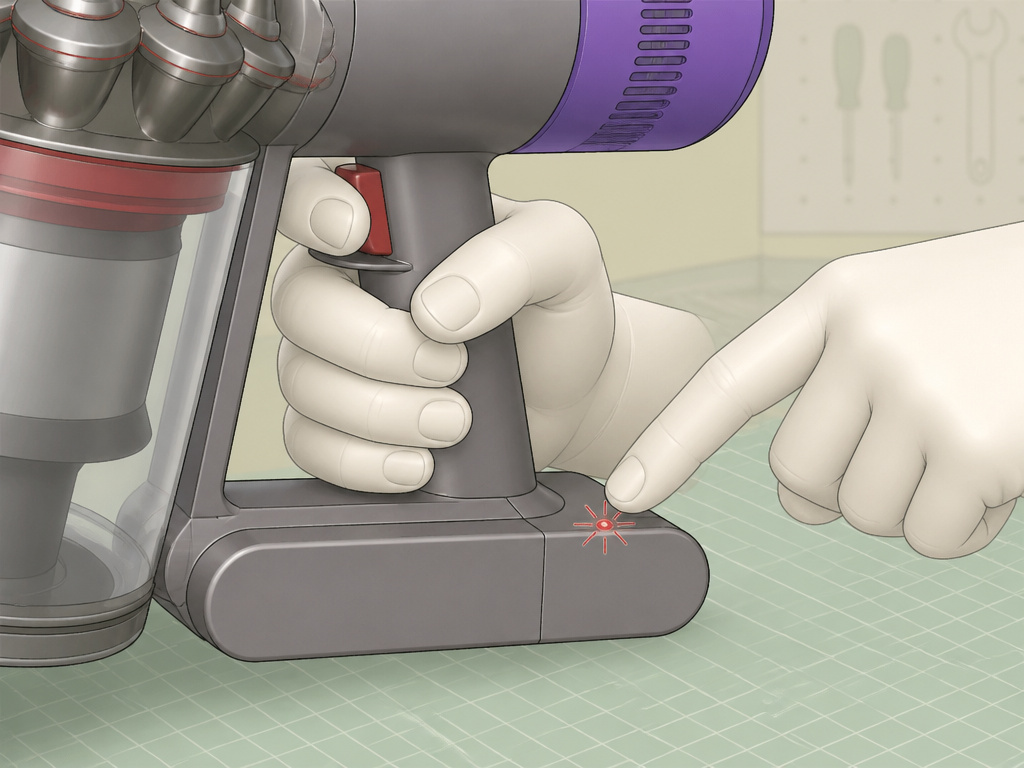
Don’t order a battery at the first red flash. Follow this sequence. It takes ten minutes and rules out the simple, free fixes.
1. Perform the 20-Second Battery Reset.
Unplug the charger from the wall for 30 seconds. Plug it back in and connect it to the vacuum. Now, pull and hold the power trigger for a full 20 seconds, then release. This forces a hard reset of the battery management system. If the red light was a temporary glitch, this can clear it.
2. Check for Blockages and Clean the Filter.
A full blockage makes the motor labor, overheat, and shut down. The vacuum might pulse or make a strained sound before the light goes red. * Empty the bin completely. * Detach the wand and look through it for obstructions. * Remove the cleaner head and clear hair wrapped around the brush bar. * Wash the filter under cold water until it runs clear. Squeeze, don’t wring, and let it dry for at least 24 hours. A damp filter will instantly trigger a fault.
3. Inspect the Internal Trigger Switch (V6/V7/V8 Models).
This is the most common misdiagnosis. The plastic lever inside the handle that presses the actual power switch can snap. * Remove the bin and look into the handle slot where the trigger moves. * Use a flashlight. If the plastic looks broken or isn’t fully engaging a small black button, the switch is dead. * A replacement trigger costs a few dollars and fixes the “red light” without touching the battery.
4. Rule Out Temperature Extremes.
Has the vacuum been in a car, garage, or porch overnight? Let it sit at room temperature for two hours. Try it again. If it was below 3°C, this will solve it.
Common mistake: Recharging immediately after a full discharge. The battery is hot. Let it cool for 15 minutes before plugging it in. Charging a hot battery accelerates cell degradation.
If you’ve done all four steps and the red light still flashes more than 12 times on startup, the battery is finished.
When to Replace the Battery vs. When to Call Dyson
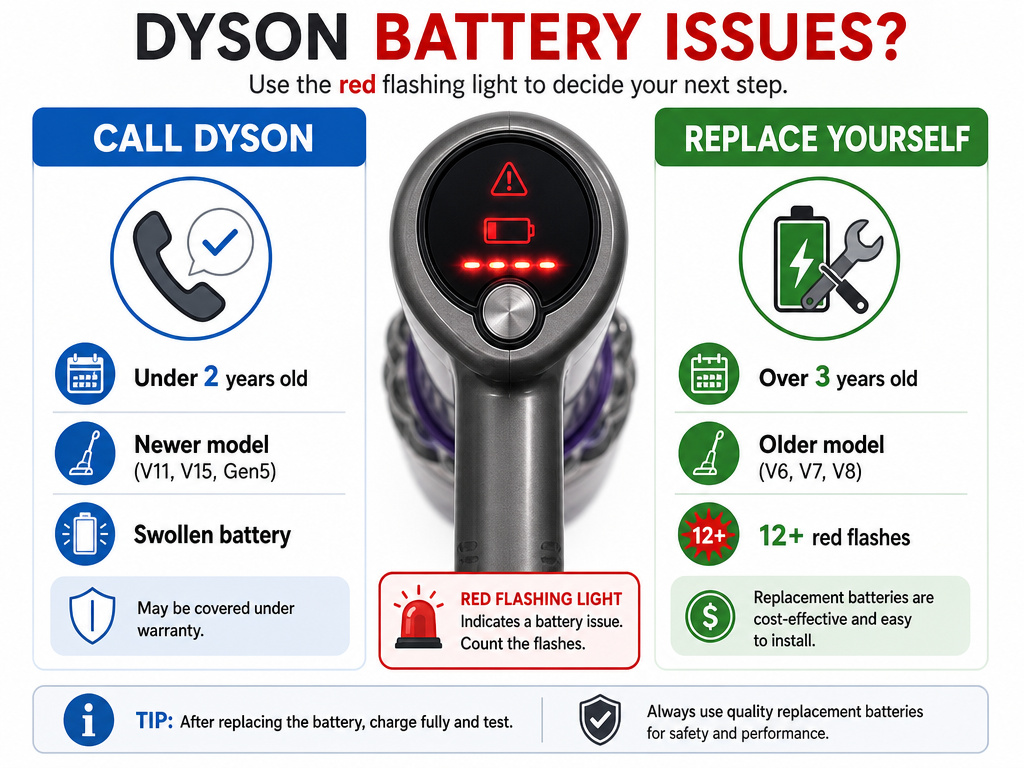
The decision hinges on two things: your model’s age and your warranty status.
Call Dyson Helpline If:
- Your vacuum is under two years old (check your purchase date).
- The vacuum is a newer model (V11, V15, Gen5).
- You see any sign of a swollen battery pack. Dyson’s standard warranty covers defects in materials and workmanship for two years. A battery failing in 18 months is their problem. Have your serial number ready.
Replace the Battery Yourself If:
- The vacuum is over three years old.
- It’s a V6, V7, V8, or older DC-series model.
- The 12+ flash count and 3-minute run time confirm failure. Manufacturer batteries are expensive. A generic replacement from a reputable supplier like BatteryMate costs less and often comes with a kit that includes a new filter. For an older vacuum, this is the economical choice.
| Scenario | Likely Cause | Best Action |
|---|---|---|
| Red light, vacuum under 2 years old | Defective battery or other component. | Call Dyson. Covered under warranty. |
| Red light, vacuum 3-4 years old | Normal battery end-of-life. | Self-replace with generic battery. |
| Red light after storage in cold | Thermal cut-out protection. | Warm vacuum to room temperature. |
| Red light, but trigger feels loose | Broken internal trigger switch. | Replace trigger switch ($5 part). |
The warranty doesn’t cover reduction in battery discharge time due to age or use. That’s the clause that makes the 3-year failure your responsibility.
How to Replace a Dyson V6/V7/V8 Battery
You need a Phillips #1 screwdriver, a new battery, and about 15 minutes.
- Remove the bin. Press the red bin release button and pull the clear bin away from the main body.
- Detach the cyclone. Press the red button above where the bin was and slide the cyclone assembly upward off the motor body.
- Unscrew the battery pack. Three Phillips screws secure the battery to the motor body. They can be tight. Apply firm pressure and turn counter-clockwise.
- Disconnect and swap. Lift the old battery out. Connect the new battery, ensuring the alignment tabs slide into the slots.
- Reassemble. Screw the new battery in place. Slide the cyclone back on until it clicks. Snap the bin back into place.
Charge the new battery fully before first use. The red light should be gone. If it isn’t, the problem is likely a deeper electrical fault in the motor or main board, a job for a professional.
Frequently Asked Questions
Why did my Dyson battery only last 2 years?
That’s the lower end of the typical 2-4 year lifespan for lithium-ion batteries under regular use. Frequent full discharges, charging in hot environments, or storing the vacuum with a fully depleted battery all shorten life. The warranty covers defects, not normal wear.
Can I use a generic battery, or does it have to be Dyson?
You can use a high-quality generic battery from a supplier like BatteryMate. Avoid the cheapest no-name options. Ensure it matches your model’s voltage (21V for V6/V7/V8) and physical shape. Using a non-Dyson battery voids any remaining warranty.
What does it mean if the red light flashes while charging?
Flashing red light on the charger indicates the battery cannot accept a charge. The fault is the same: a failed battery pack. Try the 20-second reset with the charger connected. If it persists, replacement is the only fix.
Is it safe to use my vacuum with a flashing red light?
No. The machine is designed not to operate with a red light fault. Forcing it by holding the trigger or attempting bypasses could damage the motor or pose an electrical risk. Diagnose and fix the problem first.
My Dyson flashes red, then works for a minute, then stops. What’s wrong?
This is classic battery failure. The remaining cells provide a brief burst of voltage, which then sags under load, triggering the fault cutoff. The battery is done. Replacing it will restore normal run time.
The Bottom Line
A blinking red light on your Dyson isn’t a mystery. It’s a specific diagnostic: the battery can’t do its job anymore. Count the flashes, over 12 means shop for a replacement. Check the simple things first: reset it, clean the filter, warm it up, and peek at the trigger switch. For a V6 that’s seen four years of service, a $30 generic battery and a fresh filter give it another few years of life. For a newer model under warranty, let Dyson handle it. The red light means stop, but it doesn’t always mean the end.