
A Step-by-Step Guide on How to Clean a Hoover Vacuum Hose
This post contains affiliate links. As an Amazon Associate, we earn from qualifying purchases.
To clean a Hoover vacuum hose, first check for a full dirt cup and dirty filters, those cause most suction loss. For a physical blockage, disconnect the hose at both ends and use a long, flexible object like a broom handle to push debris through. Never use sharp tools. Wash removable tools in warm water, but only wipe the hose and powered hand tool with a damp cloth.
That sequence fixes 90 percent of hose problems. The other 10 percent involve the thermal protector, a safety switch that shuts the motor off if it overheats from a blockage. Once it trips, the manual says you must unplug the vacuum and wait 30 minutes (45 minutes on a HU300RHM) for it to reset. Trying to restart it before then does nothing.
What follows is the breakdown most guides skip: the specific Hoover model differences, the two tools you must never submerge, and the weekly filter habit that prevents hose clogs in the first place.
Key Takeaways
- The thermal protector needs 30 minutes (UH708xx models) or 45 minutes (HU300RHM) to reset after tripping. Plugging it back in early won’t work.
- Never use a coat hanger or sharp object to clear the hose. You’ll puncture the interior lining and create a permanent suction leak.
- You can wash the crevice tool and dusting brush, but only wipe the main hose and powered hand tool with a damp cloth. Submerging them ruins the electrical connections.
- Empty the dirt cup when it’s two-thirds full. Letting it reach capacity is the fastest way to overwork the motor and lose suction.
- Clean the main filters once a week and wash them once a month. A clogged filter makes the vacuum work harder, pulling more debris into the hose.
Why Hoover Hoses Clog (It’s Usually Not the Hose)
A blocked hose is often a symptom, not the root cause. The vacuum’s suction has to pull air through the entire system. When the path of least resistance is blocked elsewhere, debris has nowhere to go but jam in the hose.
The two most common upstream blockers are a full dirt cup and a loaded filter. Hoover’s official advice is to empty the bagless vacuum cup at the two-thirds full mark. Wait until it’s packed, and the cyclonic action fails, sending clumps straight toward the hose inlet. Similarly, a vacuum filter that hasn’t been cleaned in a month acts like a closed window, no air gets through, so nothing moves.
Where this goes sideways: Using the hose on a pile of fine debris like fireplace ash or drywall dust without a clean filter. The particles bypass a full dirt cup, coat the filter instantly, and the sudden loss of airflow causes whatever is in the hose to stop dead.
The 5-Step Hose Blockage Check (Before You Disconnect)
Before you detach the hose, run through this sequence. It’s the official troubleshooting flow from the Hoover UH708xx manual and often solves the problem without further disassembly.
- Turn off and unplug the vacuum. This is non-negotiable. You’re about to check electrical components.
- Empty the dirt cup completely. Don’t just glance at it. Take it off, open it over a trash can, and tap it to dislodge compacted dust.
- Remove and inspect the filters. Check the primary rinsable filter and the final HEPA filter. Hold them up to a light. If you can’t see light through the mesh, they’re the culprit. Clean them now.
- Check the brushroll. Turn the vacuum on its side. Manually spin the brushroll. If it doesn’t turn freely, hair and string are wound around the ends. This restriction strains the motor and reduces suction at the source.
- Listen at the hose inlet. With the vacuum still off, detach the hose only from the nozzle end. Hold it up to your ear and listen while you gently blow through the other end. If you hear a faint whistle, the hose is likely clear. If you hear nothing or a rustling sound, the blockage is further down.
Following these steps isolates the issue. If suction returns after cleaning the filters and brushroll, your hose was never blocked. If it’s still weak, the blockage is in the hose or the duct between the dirt cup and motor.
How to Clear a Blocked Hoover Hose
Once you’ve confirmed the hose is blocked, the goal is to push the debris through, not pull it back. Pulling often wedges it tighter.
A Thermal Protector has been designed into your cleaner to protect it from overheating. When the thermal protector activates the cleaner will stop running. If this happens proceed as follows: 1. Turn cleaner OFF and unplug it from the electrical outlet. 2. Empty dirt cup. 3. Inspect and remove blockage along the dirt path… 4. When cleaner is unplugged and motor cools for 30 minutes, the thermal protector will deactivate and cleaning may continue. Hoover UH70816/19/00/01PC/05 Owner’s Manual, Page 10
Step 1: Disconnect the hose at both ends. Unclip it from the nozzle or floor head first, then release it from the connection point on the upright vacuum body or dirt cup. Most use a simple latch or button.
Step 2: Choose your clearing tool. The manual explicitly says not to use sharp objects. A straightened metal coat hanger will scratch or puncture the plastic interior. Use a long, flexible rod like a fiberglass driveway marker, a slender broom handle, or a specially designed vacuum hose cleaning wand.
Step 3: Push from the top end. Insert your tool into the end that connected to the nozzle. Gently push the debris down and through the hose toward the wider end that connects to the vacuum body. Gravity is your friend here.
Step 4: Inspect and flush. Once the obstruction is out, look through the hose toward a light to check for remaining dust. For a dusty hose, you can run water through it from the top end only, never submerge it, and hang it vertically to dry for 24 hours.
Step 5: Reconnect and test. Before snapping the hose back into the vacuum, do a quick suction test. Plug in the vacuum, turn it on, and place your hand over the end of the hose. You should feel strong, immediate pull. If not, the blockage might be in the vacuum’s internal duct behind where the hose connects.
| Blockage Location | Symptoms | Tool to Use |
|---|---|---|
| Nozzle End of Hose | Suction loss only with floor head, tools work fine | Long, flexible rod |
| Vacuum Body End of Hose | Weak suction with all tools, possible overheating | Flexible rod, visual inspection |
| Internal Duct (Past Hose) | No suction at all, thermal protector trips quickly | Compressed air, may require service |
How to Wash Hoover Hose Tools (And Which Ones You Can’t)
Not all attachments are created equal. Getting this wrong can short-circuit a motor or rust internal components.
To clean Hose and Powered Hand Tool, wipe with a damp cloth. DO NOT submerge in water. Other cleaning tools may be washed in warm water with a detergent. Rinse and air dry 24 hours before using. Hoover UH70816/19/00/01PC/05 Owner’s Manual, Page 9
The rule is simple: if it has moving parts or electrical connections, you wipe it. If it’s a static plastic or metal tube, you can wash it.
Wipe Only (Damp Cloth):
- The Main Hose: Submerging it can force water into the latch mechanisms or the interior lining, leading to mold or electrical shorts at the connector.
- Powered Hand Tool (Motorized Brush): Water will destroy the electric motor inside. Wipe the exterior casing and use scissors or a seam ripper to cut hair and fibers from the rotating brush.
Can Wash (Warm, Soapy Water):
- Crevice Tool
- Dusting Brush
- Upholstery Tool
- Extension Wands (if solid plastic/metal)
After washing, the air dry 24 hours part is critical. Reassembling a vacuum with a damp tool sends moisture directly into the motor or filter, which is a recipe for mildew and another thermal protector trip.
The Weekly Filter Habit That Prevents Clogs
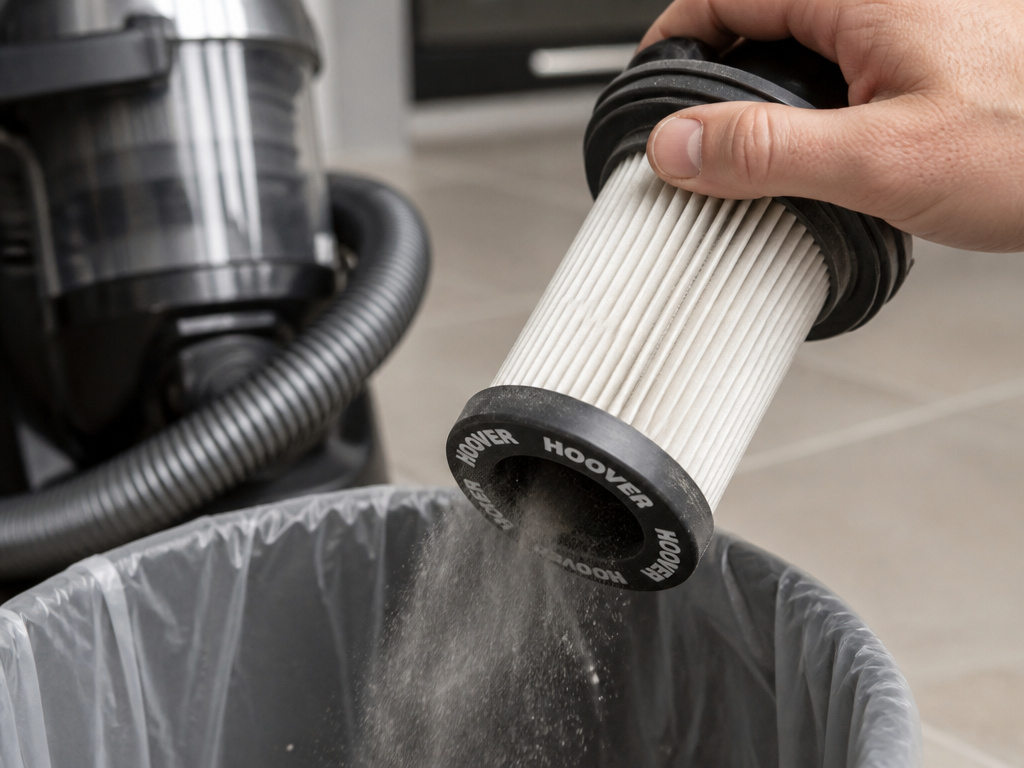
Hose blockages are often a failure of maintenance, not a freak accident. The best fix is a routine that never lets the system get stressed enough to jam.
Hoover’s advice centre recommends a two-tier schedule: clean filters once a week, wash them once a month. The weekly clean is a quick, dry tap over a trash can to dislodge surface dust. The monthly wash is a full rinse under lukewarm water until it runs clear, followed by a full 24-hour dry.
Why both? A filter that looks clean can still be clogged with microscopic dust. That increases air resistance. The motor has to work harder to pull the same suction, which draws debris into the hose with more force, and that force can jam a clump against a bend. A clean filter keeps airflow easy and steady.
This is doubly important for pet vacuum filter models. Pet hair is fine and oily. It coats a filter faster and acts like a paste when combined with dust, creating a near-solid barrier.
Common mistake: Washing a HEPA filter. Most Hoover HEPA filters are not washable; they’re made of a paper-like media that disintegrates when wet. You clean them by gently tapping or using a soft brush. Always check your manual. Putting a washed-and-soggy HEPA filter back in is a guaranteed way to burn out the motor.
When Cleaning Isn’t Enough: Troubleshooting Persistent Problems
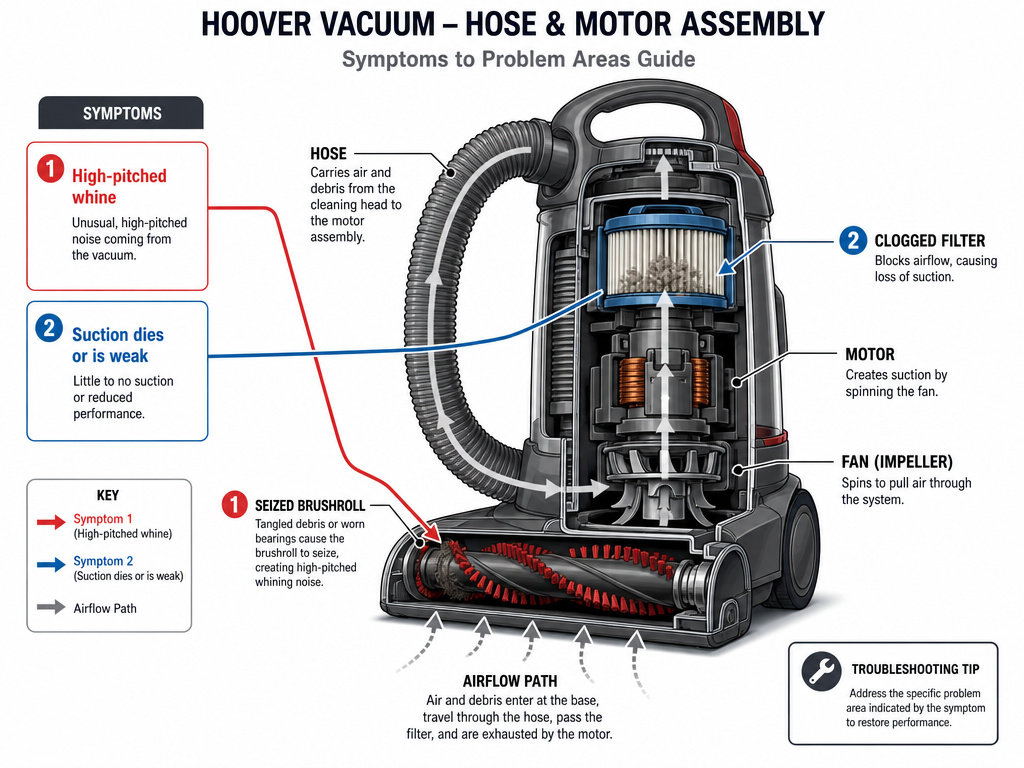
Sometimes, a hose that seems blocked points to a deeper issue. If you’ve cleared the hose, cleaned the filters, and suction is still weak or the thermal protector keeps tripping, the problem is elsewhere.
The vacuum makes a high-pitched whine. This is often a brush not spinning. A seized brushroll creates immense drag on the motor and belt. The motor overheats trying to turn it, the thermal protector trips, and suction plummets. Fix the brushroll first.
Suction is strong for a minute, then dies. This is classic filter blockage. As soon as you turn on the vacuum, remaining dust in the system is pulled onto the already-dirty filter, sealing it shut. The solution is a full filter wash and dry cycle.
The thermal protector trips immediately every time. After the mandated 30- or 45-minute cool-down, if the vacuum shuts off again within seconds, there is a severe motor obstruction or the motor itself is failing. This is the point where the manual states “your cleaner needs servicing.” Continuing to reset it risks burning out the motor windings.
| Symptom | Likely Cause | Next Step |
|---|---|---|
| Weak suction, no overheating | Dirty filter or full dirt cup | Clean filter, empty cup |
| No suction, thermal protector trips | Solid hose or internal blockage | Clear hose, check internal ducts |
| Intermittent suction, rattling noise | Object lodged in impeller fan | Professional service required |
| Strong suction but brushroll doesn’t move | Broken vacuum belt or tangled brush | Replace belt, clear brushroll |
Frequently Asked Questions
Can I use a plumbing snake to clean my vacuum hose?
No. A metal plumbing snake is far too abrasive and will damage the interior of the hose. It can also get stuck on bends. Use a long, smooth, flexible rod designed for the purpose or a stiff yet smooth material like fiberglass.
How do I know if my Hoover hose is cracked and not just clogged?
Do the blow test. Detach the hose, hold one end to your mouth, and blow air through it while running your hand along its length. You’ll feel air escaping from any crack or puncture. A visual check in good light can also reveal splits, especially at the ends where the hose bends.
My hose is clear, but my Hoover still has no suction. What now?
The blockage is likely in the vacuum itself. Check the path after the hose connection: the inlet to the dirt cup, the cyclonic chamber, and the duct leading to the motor. Also, ensure the Hoover HEPA filter and pre-motor filter are both correctly seated and not damaged. A missing or torn filter will kill suction.
Is it safe to use a compressed air duster to clear the hose?
Yes, but with caution. Use low-pressure air from a distance. Don’t insert the nozzle directly into the hose, as the concentrated blast can force debris deeper or damage seals. Wear a dust mask and do it outdoors, as you’ll be aerosolizing whatever is inside.
Before You Go
Cleaning a Hoover vacuum hose boils down to three rules: never use sharp objects, always let the thermal protector cool for its full 30 or 45 minutes, and keep the filters clean weekly so the hose never has to handle a traffic jam of debris. Most clogs start with a full dirt cup or a loaded filter, fix those first. If you need to push something through, a broom handle works better than a coat hanger every time. And remember, the hose and powered hand tool get a wipe, not a wash. Do that, and your hose will last as long as the vacuum itself.