
How to Empty Your Hoover Pet Vacuum to Prevent Motor Damage
This post contains affiliate links. As an Amazon Associate, we earn from qualifying purchases.
To empty a Hoover pet vacuum, press the bin release button, lift the dust canister, hold it over a trash bin, and press the door release trigger. The critical step everyone misses is checking the filters every five empties. Skipping that burns out the motor in under a month on carpet.
That five-empties rule is printed in the manual for a reason. Bagless vacuums rely on clear filters to move air. When the pre-motor filter clogs, the motor starves for cooling airflow. It overheats, a thermal cut-out trips, and you’re left waiting 30 to 45 minutes for it to reset. Do that enough times and the windings cook.
What follows is the full sequence: locating your model’s release, the right way to handle the cyclone unit, and the filter maintenance schedule that actually prevents breakdowns. We’ll also cover what to do when the vacuum stops working mid-job, it’s usually one of three simple fixes.
Key Takeaways
- Empty the canister before dust reaches the “max” line to maintain suction and prevent overheating.
- Wash the pre-motor filter every five canister empties for models like the Vision Reach and Velocity. Let it dry for 24 hours.
- A clogged filter triggers a thermal cut-out. The Hoover Blaze resets in 30 minutes; the Hurricane Power takes 45.
- Never use soap or detergents on filters or the plastic cyclone unit. Lukewarm water only.
- Always check for blockages in the hose, wand, and nozzle if suction drops suddenly.
Why Your Hoover Pet Vacuum’s Manual Says “Every 5 Empties”
The instruction isn’t a suggestion. It’s a load calculation. Hoover’s engineers sized the filter surface area against the dust volume of five full canisters. Go past that, and fine dust, especially pet dander and litter, packs into the filter’s foam pores.
A clogged pre-motor filter restricts airflow to the vacuum’s motor. The motor then overheats trying to pull air through the blockage, which triggers a built-in thermal safety switch called a thermal cut-out.
This is a direct quote from the Hoover Blaze manual. The motor isn’t designed to run hot. Each overheating cycle degrades the insulation on its internal wires. Do it repeatedly, and the motor eventually fails. The warranty won’t cover that.
The reset time is your clue. If your Hoover pet vacuum suddenly shuts off and won’t turn back on, you’ve likely hit the cut-out. Let it sit, unplugged, for the full duration, 30 minutes for the Blaze, 45 for the Hurricane Power upright. That’s how long it takes for the internal components to cool enough for the switch to reset. Using it before then just retriggers the fault.
The 5-Step Emptying Process for Most Models
While designs vary slightly between cylinder and upright models, the core steps are the same. The goal is to remove dirt without creating a cloud of dust or damaging the internal cyclone.
Before you start: Unplug the vacuum. This seems obvious, but it’s the only way to guarantee the motor won’t accidentally turn on while your hands are near moving parts or electrical contacts.
-
Locate and Press the Bin Release. On cylinder models like the Velocity or Vision Reach, this is a button or latch on the main body, usually near where the canister connects. Slide or press it to unlock the dust container.
-
Lift the Canister Away. Hold the handle and lift the entire dust canister straight off the vacuum’s body. Carry it directly to a trash bin.
-
Open the Trap Door. With one hand over the bin, use your other hand to press the door release trigger or button on the canister. The bottom or side door will spring open, dumping the contents. Avoid shaking or tapping it vigorously, this can force fine dust up into the cyclone assembly.
-
Close and Re-seat. Close the trap door firmly until it clicks. Listen for the latch. Then, align the canister back onto the vacuum body and push down until it locks into place. A proper seal is essential for suction.
-
Check the Filter Level. This is the maintenance step. If this is your fifth empty since the last filter wash, or if you see a heavy dust coating on the filter through the plastic, it’s time to clean it. Don’t wait.
| Model Type | Bin Release Location | Key Difference |
|---|---|---|
| Cylinder (e.g., Velocity, Vision Reach) | Button on main body, near canister | Canister removes completely. |
| Upright (e.g., Hurricane Power) | Button on top or front of dirt cup | Dirt cup tips forward or slides out. |
| Stick / Cordless | Button on dust cup itself | Cup is smaller, often transparent. |
Where Owners Go Wrong: The Two Filter Mistakes
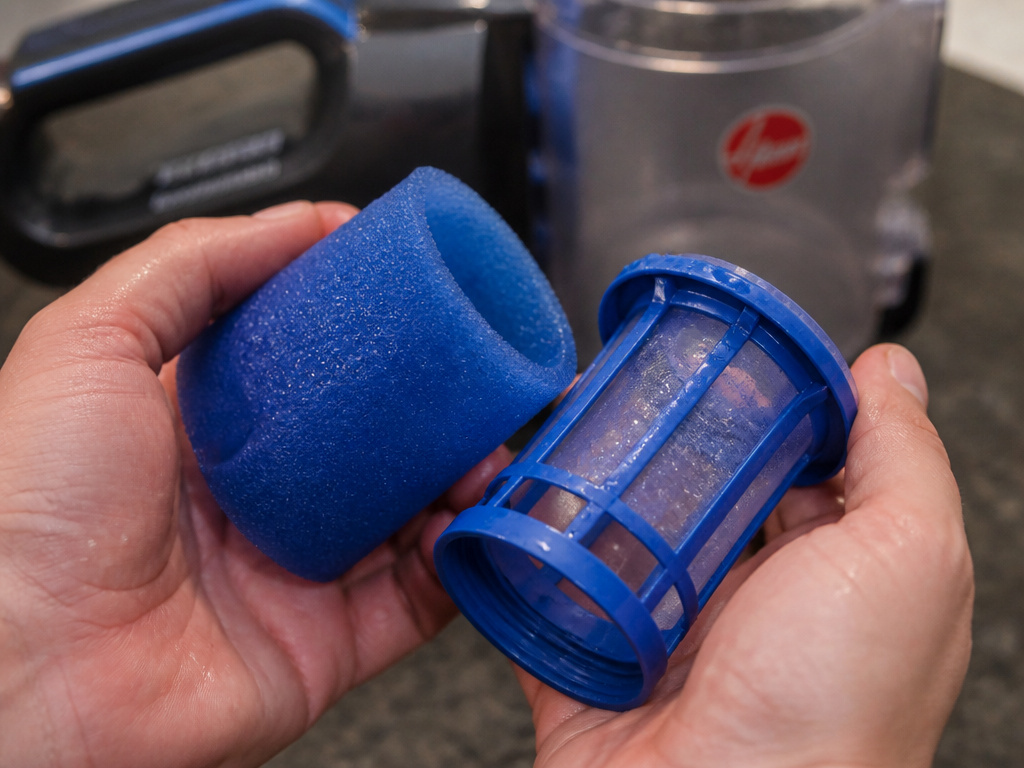
Suction loss usually points here. The pre-motor filter lives in the handle of the dust canister. The exhaust filter is a separate foam pad at the back of the vacuum’s body. Both need care, but on different schedules.
Common mistake: Washing filters and reassembling them damp. The Hoover Hurricane Power manual states filters require 24 hours to dry completely. A wet filter is a clogged filter. It blocks airflow instantly and can mildew.
Mistake One: Ignoring the Pre-Motor Filter. This blue, cylindrical filter pack is your vacuum’s first line of defense. It catches the fine dust that gets past the cyclone. When it’s clogged, the motor strains. To clean it: Remove the canister, unscrew the handle, and pull out the blue filter pack. Separate the foam sleeve from the plastic cage. Rinse both under lukewarm water only. No soap. Gently squeeze out water, don’t wring, and let it air dry for a full day.
Mistake Two: Forgetting the Exhaust Filter. This filter cleans the air after it passes through the motor, protecting you from blown-out dust. It clogs slower but still needs washing. Find it on the rear grille of the vacuum body. Unclip it, rinse it under lukewarm water, and dry it fully. The Hoover Turbo Power model recommends washing this exhaust filter every three months.
What to Do When Suction Is Still Weak After Emptying
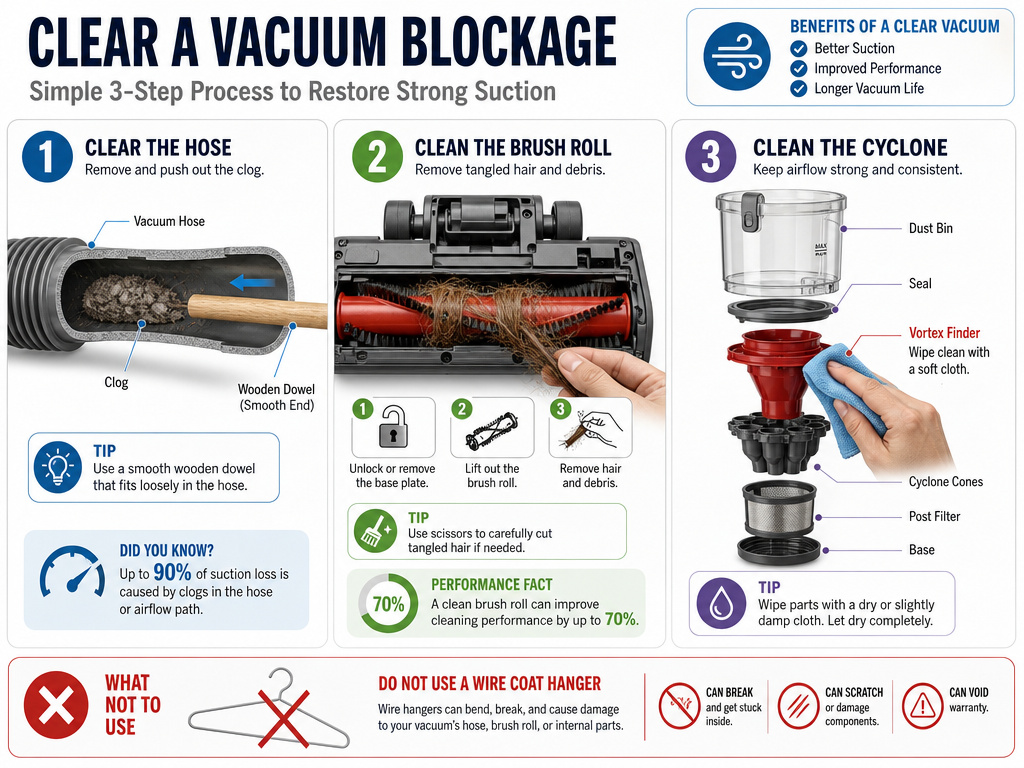
You’ve emptied the bin and cleaned the filters. The vacuum still feels anemic. The problem is now almost certainly a physical blockage. The air path has several choke points.
Follow this diagnostic order. It’s the same sequence a repair tech would use:
- Check the Hose. Detach it from both the vacuum body and the wand. Look through it toward a light. Use a long, flexible object like a broom handle or a plumbing snake to gently push any clog through.
- Inspect the Wand and Nozzle. Look through the extension tubes. Clear any debris. For motorized nozzles, check that the brush roll spins freely and isn’t tangled with hair or string.
- Examine the Cyclone Unit. Some dirt can stick to the red plastic vortex finder inside the canister. Remove it (usually by pulling a tab) and wipe it clean with a dry cloth. You can rinse the plastic bin with water, but let it dry completely before reassembly.
Where this goes sideways: Using a wire coat hanger to clear blockages. The metal can scratch the interior plastic hose lining, creating rough spots that catch future clogs. Use a wooden dowel or a dedicated vacuum cleaning wand.
If you’ve checked all three areas and suction hasn’t returned, the issue may be a failing motor or a leak in the air system. That’s when you start looking at Hoover pet vacuum reviews for a replacement or seek professional service.
Hoover Pet Vacuum vs. Other Bagless Models: The Emptying Difference
The process is similar across brands, but Hoover’s pet models have specific design choices that matter. Their cyclones are tuned for high volumes of pet hair and dander, which is why the filter maintenance rule is so strict.
The real difference is in the filter access and the thermal protection. A standard bagless vacuum might run poorly with a dirty filter. A Hoover pet model is more likely to shut itself off completely to prevent a vacuum overheating catastrophe. This is a feature, not a flaw, it saves the motor.
When comparing the best vacuums for pet hair, look at how easy it is to access and clean the pre-motor filter. On the Hoover Vision Reach, it’s in the handle. On some competitors, you need a screwdriver. Ease of access directly correlates to whether you’ll actually maintain it.
Frequently Asked Questions
Can I use my Hoover pet vacuum without the filter?
No. Running the vacuum without the pre-motor filter will suck debris directly into the motor, causing immediate and catastrophic damage. The manual for every model states this will void your guarantee.
How do I clean the plastic cyclone part?
You can rinse the plastic dust canister and the red vortex finder with lukewarm water. Do not use detergents. Dry every component thoroughly with a towel and let it air dry for a few hours before reassembly. Any leftover moisture will turn incoming dust into mud.
Why does my vacuum smell bad after emptying?
Persistent musty smell usually means a filter was put back damp and has developed mildew. Wash both filters again and let them dry for a full 48 hours in a well-ventilated area. If the smell remains, the mildew may be in the hose or ductwork, which is harder to clean.
Is it better to empty the canister outside?
Yes, if possible. Emptying into an outdoor trash bin prevents fine dust from recirculating in your home. This is especially helpful for households with allergy sufferers, as pet dander is a common allergen.
Before You Go
Emptying your Hoover pet vacuum is simple: release, lift, dump, and reseat. The longevity of the machine hinges on what you do next. Mark your calendar or set a reminder to wash that blue pre-motor filter every fifth empty. Let it dry for a full day. That single habit prevents the majority of suction loss and overheating complaints. When you’re ready for a deeper clean, our guide on how to clean a Hoover pet vacuum filter walks through the disassembly. For now, keep the air flowing and the motor cool.