
Why Is My Dyson Vacuum Beeping? Main Triggers & How to Fix
This post contains affiliate links. As an Amazon Associate, we earn from qualifying purchases.
A Dyson vacuum making a beeping noise is a programmed alert for three specific conditions: a thermal cut-out from an overheating motor, a brush bar obstruction, or a low-temperature battery lockout on cordless models. The sound is a warning to stop use, unplug the machine, and diagnose the cause before permanent damage occurs.
That programmed alert is the machine protecting itself. The beep isn’t random; it’s tied to a sensor reading, temperature, physical resistance, or voltage, that has crossed a safety threshold. Ignoring it and continuing to run the vacuum risks burning out the motor, stripping a drive belt, or permanently degrading the battery.
What follows is a breakdown of the three triggers, the diagnostic steps to pinpoint which one you have, and the repair sequence that resets the system. You’ll also see where the Dyson warranty stops covering you and which fixes are strictly do-it-yourself.
Key Takeaways
- The beep is a thermal cut-out warning on upright models, signaling an overheated motor that needs a 1-2 hour cool-down before you can even check for blockages.
- Cordless Dyson models like the V11 will beep and refuse to operate if the ambient temperature is below 5°C (41°F), a battery protection feature, not a fault.
- Clearing blockages is explicitly not covered under the Dyson limited warranty, making a systematic DIY approach your first and best option.
- Always unplug the vacuum before inspecting any part of the airway, from the hose to the brush bar. The thermal cut-out can reset unexpectedly.
- Washing the pre-motor and post-motor filters every 3 months is non-negotiable for airflow; clogged filters are the most common cause of overheating.
The Three Triggers Behind the Beep
Your Dyson isn’t trying to annoy you. That repetitive beep is a targeted alarm. The machine’s internal logic is designed to detect specific failure states and shut down before a minor issue becomes a catastrophic repair. The sound itself may be generic, but the causes are distinct.
Where this goes sideways: Assuming the beep means “low battery” on a corded model. That misdiagnosis leads owners to ignore a growing blockage until the thermal cut-out trips repeatedly and the motor windings sustain heat damage.
The origin point depends entirely on your model type. Corded uprights and canisters beep for different reasons than cordless stick vacuums. The first step is to silence the alarm in your head and listen to what the machine is telling you about its condition.
What Does the Beeping Sound Mean?
For corded Dyson uprights like the DC27, DC33, or DC41, a beeping noise is almost exclusively the sound of the thermal cut-out. This is an automatically resetting safety switch that trips when the motor temperature climbs too high.
The appliance is fitted with an automatically resetting thermal cut-out. If any part of the vacuum becomes blocked, it may overheat and automatically cut-out. Switch ‘OFF’ and unplug the vacuum and leave to cool down before checking filters or for blockages. Dyson CY22/CY23 Operating Manual
The sequence is consistent: a blockage or restricted airflow causes the motor to work harder, generating excess heat. The thermal cut-out triggers, power is cut, and the beeping alert sounds. The machine will not restart until it has cooled sufficiently, often for one to two hours.
For cordless models like the Dyson V11, V15, or V10, a beep often pairs with a flashing LED. This usually indicates a low-temperature lockout or a battery/communication error. The V11 manual is explicit: the machine will not operate or charge if the ambient temperature is below 5°C (41°F). This is a lithium-ion battery protection circuit, not a fault you can fix beyond bringing the vacuum to a warmer room.
Trigger 1: Thermal Cut-Out and Overheating
This is the classic cause for a beeping corded Dyson. The thermal cut-out is a good thing, it prevents your $500 vacuum from becoming a smoking paperweight. But it only reacts to the symptom: heat. Your job is to find and remove the source.
The heat comes from friction and electrical resistance. When the motor sucks air through a clogged pathway, it strains. That strain turns into heat. The three primary heat generators are, in order of likelihood: 1. Clogged Filters: The pre-motor and post-motor filters are the first line of defense. When they’re packed with fine dust, airflow strangles. 2. A Major Airway Blockage: A compacted wad of hair, a Lego, or a sock fragment lodged deep in the hose, wand, or cleaner head. 3. A Seized Brush Bar: A wound-up rug fringe, string, or hair binding the brush bar so tightly it can’t spin, causing the drive motor to stall and overheat.
The machine’s response is the same for all three. It beeps, shuts off, and enters a cooling period. Attempting to restart it immediately is pointless. You must let it sit, unplugged, for at least an hour.
Trigger 2: Brush Bar Obstruction
On models with a powered cleaner head, the brush bar has its own protection system. The DC27 manual states the brush bar “will automatically stop if it becomes obstructed.” Some older models, like the DC07, produce a loud ‘ratchet’ warning noise.
A stopped brush bar alone might not cause a beep. But when the main motor continues running against the blocked airflow created by a stationary brush bar, the combined strain often trips the main thermal cut-out. Then you get the beep.
The fix is mechanical. You must physically remove whatever is binding the brush bar, typically thread, hair, or carpet fibers wound around the ends of the roller. This is a warranty-excluded activity. Dyson’s warranty terms are clear: “Blockages – refer to the Dyson User manual for details on how to look for and clear blockages.” They expect you to do this yourself.
Trigger 3: Low-Temperature Lockout (Cordless Models)
This one catches people who store their cordless vacuum in a garage or porch. The Dyson V11’s compliance leaflet specifies a recommended operating temperature range of 18°C to 28°C (64°F to 82°F). It will not function below 5°C (41°F).
If your Dyson stick vacuum starts beeping and won’t turn on after a cold night, it’s not broken. It’s in a protective hibernation. The battery management system has halted all activity to prevent damage that can occur from charging or discharging lithium-ion cells in freezing conditions.
The fix is simple: bring the vacuum into a warm room for several hours. Let the battery core temperature rise naturally. Do not try to charge it until the beeping stops and the power trigger responds normally.
| Trigger | Primary Models | Root Cause | Immediate Action |
|---|---|---|---|
| Thermal Cut-Out | Corded Uprights (DC27, DC41, etc.) | Blocked airflow from clogged filters or airway obstruction. | Unplug, let cool 1-2 hours. |
| Brush Bar Obstruction | Models with powered cleaner heads. | Hair/string wound around brush bar ends. | Unplug, inspect and clear brush bar ends. |
| Low-Temp Lockout | Cordless Stick Vacuums (V11, V15, etc.) | Ambient temperature below 5°C (41°F). | Bring vacuum to a warm room (>18°C) for several hours. |
Step-by-Step Diagnostic and Fix
Diagnosis is a process of elimination. You start with the simplest, most common fix and work toward the more involved. Always begin with the machine unplugged (or battery removed for cordless) and completely cooled down.
Before you start: The thermal cut-out can reset while you work if the vacuum is plugged in. Always unplug first. Beware of sharp objects like staples or broken glass when clearing blockages. Wear gloves if needed.
Step 1: The 90-Second Filter Check and Wash
This is the number one fix. Clogged filters cause over 70% of overheating incidents. Your Dyson has at least two: a pre-motor filter (protects the motor) and a post-motor filter (cleans exhaust air). The pre-motor filter is the critical one for airflow.
Locate them. On uprights, the pre-motor filter is often at the top of the clear bin or behind a latch on the body. On cordless sticks, it’s usually at the top of the cyclone assembly. Remove them according to your manual.
Do not just tap them out. Take them to a sink and rinse under cold running water until the water runs clear. Squeeze gently, don’t wring, and let them air-dry for a full 24 hours. No shortcuts. A damp filter will choke airflow faster than a dirty one.
Step 2: The Full Airway Blockage Hunt
If clean, dry filters don’t stop the beep, you have a physical blockage somewhere in the suction path. You need to dismantle the vacuum in sequence.
- Remove the clear bin and cyclone assembly. Shine a flashlight into the inlet on the machine body. Look for debris.
- Detach the hose. Check both ends. A common blockage point is where the hose connects to the wand or cleaner head.
- Inspect the wand. Look through it toward a light. Use a long, flexible object like a straightened coat hanger (with a soft hook bent at the end) to gently probe and dislodge any clogs.
- Check the cleaner head. Remove it from the wand. Look at the opening. On models with a brush bar, you may need to remove the soleplate to see the airway underneath.
The goal is a clear, open path from the cleaner head opening all the way to the motor inlet. If you find and remove a blockage, reassemble and test. The beeping should stop.
Step 3: Brush Bar Inspection and Clearing
If airflow is clear but the beep persists, or the brush bar doesn’t spin, this is your next step. Turn the cleaner head over. You’ll see the brush bar running from side to side.
On most models, the soleplate is held by a series of screws. Remove them and set the plate aside. You now have direct access to the brush bar ends. Look for dense mats of hair and string wound around the bearings. Use scissors or a seam ripper to carefully cut and remove all material.
Manually spin the brush bar. It should rotate freely with a soft whirring sound. Any grinding, grating, or resistance means the bearings are damaged or a foreign object is inside the housing. A damaged brush bar assembly needs replacement.
Step 4: Cordless-Specific Reset and Battery Check
For a beeping cordless vacuum that’s at room temperature, try a hard reset. Remove the battery from the main body if possible. For sealed units, hold down the power trigger for 20 seconds. Then, reattach the battery or attempt to turn it on.
If the beep continues, it may be signaling an error code. Models like the V11 will flash a sequence of LED lights. Refer to a guide for Dyson cordless vacuum error codes to decode the pattern. A persistent error code often indicates a faulty battery or motor, which requires professional service.
When the Beep Signals a Bigger Problem
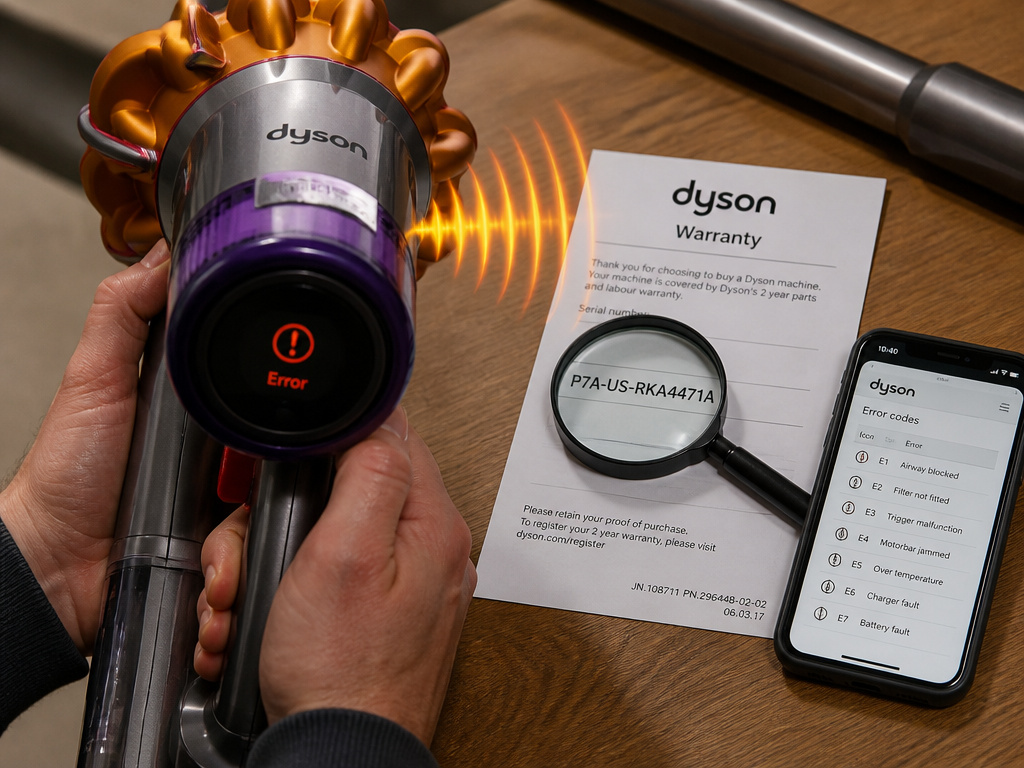 Sometimes, the beep is the symptom, not the disease. You can clear every filter and airway, and the noise returns on the next use. That points to a component failure.
Motor Failure and Warranty Reality
A motor on its last legs will overheat rapidly, tripping the thermal cut-out almost immediately after startup. You’ll get a beep within 30 seconds of use on a perfectly clear machine. This indicates worn motor bearings or failing windings.
Is it covered? Maybe. The Dyson limited warranty covers “defects in materials and workmanship” for two or five years. However, it excludes damage due to blockages and “negligent use… Not in accordance with the Dyson User manual.” If Dyson’s service center determines the motor burned out because you ran it with clogged filters for months, that’s a denied claim.
Your proof of purchase is critical. Without it, your warranty starts 90 days from the manufacture date per Dyson’s records. Always call the Dyson Helpline with your model and serial number first.
The Error Code Connection
Modern Dysons, especially cordless ones, use beeps and lights to form an error code. A single beep might mean nothing, but a pattern of beeps is a diagnostic message.
For example, a Dyson stick vacuum making a revving noise followed by a beep sequence could indicate a failing motor or a communication error between the battery and the main board. This is where your troubleshooting shifts from physical cleaning to electronic diagnosis. Searching for your specific model’s error codes is the next step.
Preventing the Beep: A Maintenance Schedule
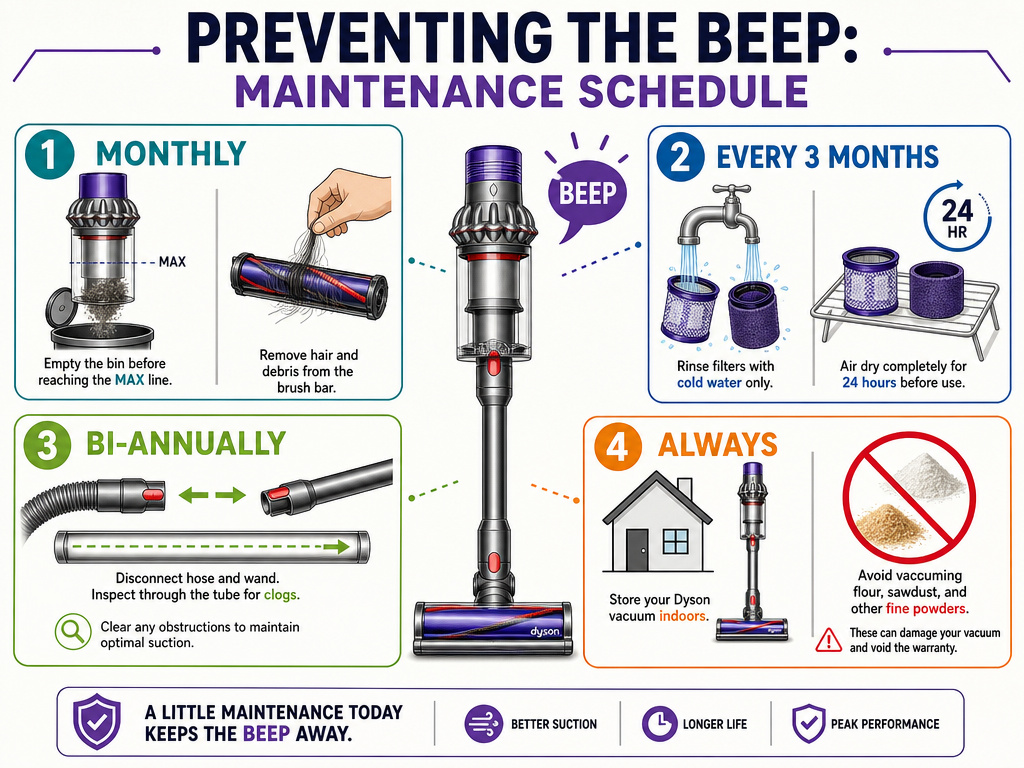 Prevention is quieter and cheaper than repair. A few routine habits will keep your Dyson running silently for years.
- Monthly: Empty the clear bin before it reaches the MAX line. Check the brush bar for winding debris.
- Every 3 Months: Wash both filters with cold water. Let them dry for 24 hours. Mark your calendar.
- Bi-Annually: Perform a full airway check. Disconnect the hose and wand, inspect for hidden clogs.
- Always: Store your cordless vacuum indoors, within its recommended temperature range. Avoid vacuuming large amounts of fine dust like plaster or flour without pausing to empty the bin.
This schedule addresses the root causes of most Dyson suction problems and overheating. It turns the beep from a common annoyance into a rare event.
Frequently Asked Questions
Why does my Dyson beep 3 times and then shut off?
Three-beep pattern on a cordless Dyson typically indicates a battery-related error or a thermal cut-out on the motor. The shutdown is protective. Let the machine cool, ensure it’s at room temperature, and try a battery reset. If it repeats, consult a guide for Dyson cordless vacuum error codes.
Is a beeping Dyson covered under warranty?
The sound itself is not a defect. The underlying cause might be. Blockages and filter maintenance are explicitly excluded from warranty coverage. If the beep is traced to a faulty thermal cut-out switch or motor defect under normal use, it would be covered within the warranty period, provided you have proof of purchase.
Can I stop the beeping noise permanently?
You can’t disable the alert without disabling the safety feature. The permanent solution is to address the root cause: maintain clean filters, clear blockages promptly, and store cordless models in a climate-controlled space. A well-maintained Dyson rarely beeps.
What does it mean if my Dyson beeps but has power?
It means the machine has power but a safety sensor has tripped. On corded models, this is almost certainly the thermal cut-out. On cordless, it could be a low-temperature lockout or a battery communication fault. The beep is telling you to stop and diagnose before proceeding.
How do I reset my Dyson after it beeps?
For a thermal cut-out, the reset is automatic but time-based. Unplug the vacuum and let it sit for one to two hours. For a cordless model, remove the battery for a minute or perform a hard reset by holding the power trigger. The machine will reset itself once the underlying condition (overheating, low temperature) is resolved.
The Bottom Line
A beeping Dyson vacuum is a talking one. It’s telling you it’s too hot, too clogged, or too cold. The fix isn’t mysterious, it’s a systematic check of filters, airways, and temperature. Start with the simple 24-hour filter wash. Move to the physical blockage hunt. Understand that the warranty won’t save you from a neglected machine.
For the majority of owners, a beep is a one-time reminder to do the maintenance the manual already prescribed. For the rest, it’s a clear signal that a component, like a brush bar motor or the battery, is reaching its end. Listen to the beep. It’s cheaper than the sound of a new vacuum hitting your credit card.