
Stop Dyson Ball Vacuum Overheating With This Critical Cool-Down
This post contains affiliate links. As an Amazon Associate, we earn from qualifying purchases.
Your Dyson ball vacuum overheats and shuts off because a blockage has starved the motor of airflow, triggering a built-in thermal cut-out. The fix is not force. Unplug it, walk away for a full 1-2 hours to let it cool, then methodically check and clear clogs in the hose, wand, changeover valve, or pre-filter. Rushing this burns out the motor.
That mandatory cool-down period is printed in every Dyson manual for a physical reason. The cut-out is a bimetallic strip that bends when the motor housing hits a critical temperature, breaking the circuit. It only resets after the metal cools and snaps back into place, a process that takes time. Trying to restart a hot machine does nothing but strain the components.
What follows is the sequence that actually works, pulled from service manuals and repair logs. We’ll cover the three most common clog locations, the one filter mistake that mimics a total failure, and what to do when the vacuum is cold and clear but still won’t run.
Key Takeaways
- The thermal cut-out is a safety feature, not a defect. It activates at a specific temperature and requires a full 1-2 hour cool-down to reset, trying to restart sooner can damage the motor.
- Clearing blockages is explicitly not covered by the Dyson guarantee. Doing it correctly yourself avoids a costly service call.
- Overheating is caused by restricted airflow. The main suspects are the internal hose, the wand, the changeover valve, or a clogged pre-filter/cyclone.
- Storage temperature matters. Operating or storing a Dyson ball below 3°C (37.4°F) for some models, or 10°C (50°F) for others, can affect performance and potentially trigger protective shut-offs.
- If the vacuum is cool, clear, and still dead, the issue may be a failed thermal cut-out itself, a separate electrical fault, or a severely overheated motor, professional diagnosis is needed.
Why Dyson Ball Vacuums Overheat (It’s Almost Never the Motor)
The motor is rarely the first thing to fail. It’s a victim. The root cause is almost always a physical obstruction that chokes the airflow. With nowhere to go, the heat generated by the motor builds up inside the sealed unit until it hits a safety tripwire.
This appliance is fitted with an automatically resetting thermal cut-out. If any part becomes blocked the appliance may overheat and automatically cut-out. Leave to cool down for 1-2 hours before checking the filter or for blockages.
That quote is verbatim from Dyson operating manuals. The thermal cut-out is a simple, resettable safety switch. It’s designed to save the £200+ motor from burning itself out when it’s running hot with no airflow. Your job is to find the blockage that caused the trip.
The airflow path is a closed loop. A clog anywhere in it creates the same result. Think of it like breathing through a straw, if you pinch the straw, you have to work harder. The motor works harder, heats up, and the cut-out kicks in. The three most common pinch points are the internal hose, the wand, and the changeover valve.
The Step-by-Step Unblocking Process
Switch the vacuum off and unplug it. Do not skip this. Then walk away. Set a timer for 90 minutes. This cool-down is non-negotiable. Once it’s cool, you can start the hunt.
What You’ll Need
- A dry cloth.
- A coin (for brush bar fasteners).
- A long, flexible object like a straightened coat hanger or a plumbing snake. Avoid sharp ends.
- Good lighting.
Step 1: Empty and Inspect the Clear Bin
Start with the easiest access point. Press the red button to release the cyclone and clear bin unit. Empty it. Look inside the cyclone shroud, the part the bin slides onto. Lint and hair can wrap around the top, narrowing the airway.
Run the brush attachment from your tools around the shroud to clean it. A clog here means dirt gets sucked straight into the pre-filter, which is your next stop.
Step 2: Check and Wash the Pre-Filter
This is the filter inside the top of the clear bin assembly. On most ball models, you lift it straight out. It might not look dirty, but fine dust can create an invisible barrier.
Common mistake: Washing the filter and refitting it damp. This sends moisture into the motor and can cause immediate overheating or corrosion. Dry it for a minimum of 24 hours.
Wash the filter under cold running water until the water runs clear. Squeeze and twist, don’t wring, to remove excess water. Let it dry completely on its side for a full day. If you need to vacuum sooner, you must use a spare, dry filter. Running without any filter will also cause overheating, as unfiltered debris enters the motor.
Step 3: The Wand and Hose Check (The Usual Suspects)
Reattach the clean, dry bin. Now test the suction path. With the vacuum upright, turn it on and place your hand over the hose end. You should feel strong suction. If you don’t, the blockage is between the hose and the bin.
First, detach the wand. Look through it for obstructions. The most common jam point is the bottom bend.
| Blockage Location | How to Check | Tool to Use |
|---|---|---|
| Wand (lower bend) | Look for light through the tube. | Long, flexible rod or reverse suction. |
| Main Hose | Feel for bulges; detach from machine to inspect. | Coat hanger, careful hand pressure. |
| Changeover Valve | Located under the bin; check for debris hindering the flapper. | Flashlight and long-nose pliers. |
If the wand is clear, detach the hose. On most Dyson ball models, the hose clips in behind the clear bin. Press the plastic latch and pull the hose free. Inspect its entire length. A split or hole in the internal hose, especially the end that connects under the machine, will kill suction to the floor head. You’ll have good hose suction but none at the cleaner head.
Step 4: The Changeover Valve and Cleaner Head
The changeover valve is the mechanical gate that directs suction from the hose to the floor tool when you tilt the vacuum. It’s a small plastic flapper inside a housing under the bin. Debris like a pen cap or a large piece of cereal can jam it open or closed.
If your vacuum has suction in one position but not the other, this valve is the prime suspect. Access usually requires removing a few screws on the underside of the vacuum. If you’re not comfortable with this, it’s a key point for a professional vacuum cleaner tips call.
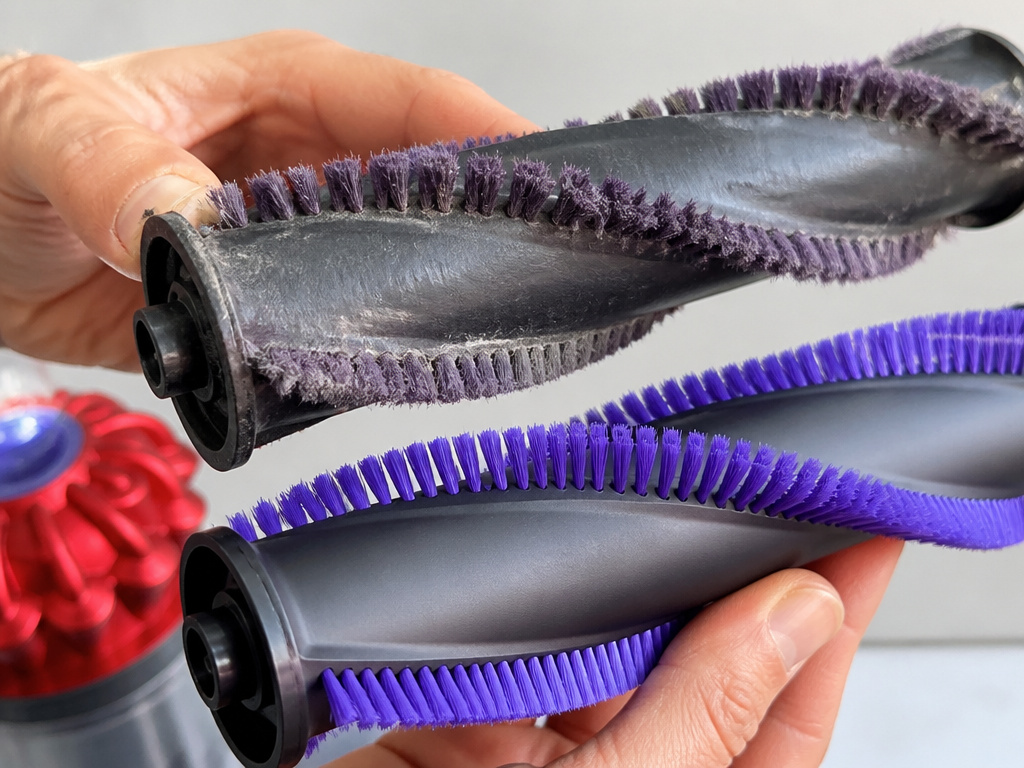
Finally, check the cleaner head. Remove it from the machine. Clear any wrapped hair or string from the brush bar. Use a coin to unlock the fastener marked with a padlock to remove the brush bar for a thorough clean. A brush not spinning creates drag and heat, contributing to overload.
When Overheating Isn’t a Blockage
 You’ve cleared everything, the filter is bone-dry, and it still overheats in minutes. Now you look at secondary causes.
Storage Temperature: Dyson manuals specify hard limits. The DC58 should not be used or stored below 3°C (37.4°F). The Big Ball CY23 model’s limit is 10°C (50°F). Using a cold vacuum can affect battery performance (on cordless models) and may trigger protective circuits. Let the appliance reach room temperature before use.
Carbon Fibre Brushes: Some models, like the DC35, have brushes made of carbon fibre. The manual notes these can cause minor skin irritation. More relevantly, if they are severely worn or damaged, they can create excessive friction and heat.
Electrical Faults: In rare cases, the thermal cut-out itself can fail in the “open” position, or a wiring fault can cause resistance and heat. If the motor seems to struggle or sounds strained before shutting off, this is possible. This is when knowing about Dyson error codes (for cordless models) or general vacuum not sucking diagnostics helps narrow it down.
Battery Issues (Cordless Ball Models): For cordless variants like the DC58, an old or faulty battery can cause rapid overheating. The battery management system will shut it down. This is a distinct problem from an airflow blockage. If your battery is getting hot independently, the battery itself needs attention.
How to Prevent Future Overheating Shutdowns
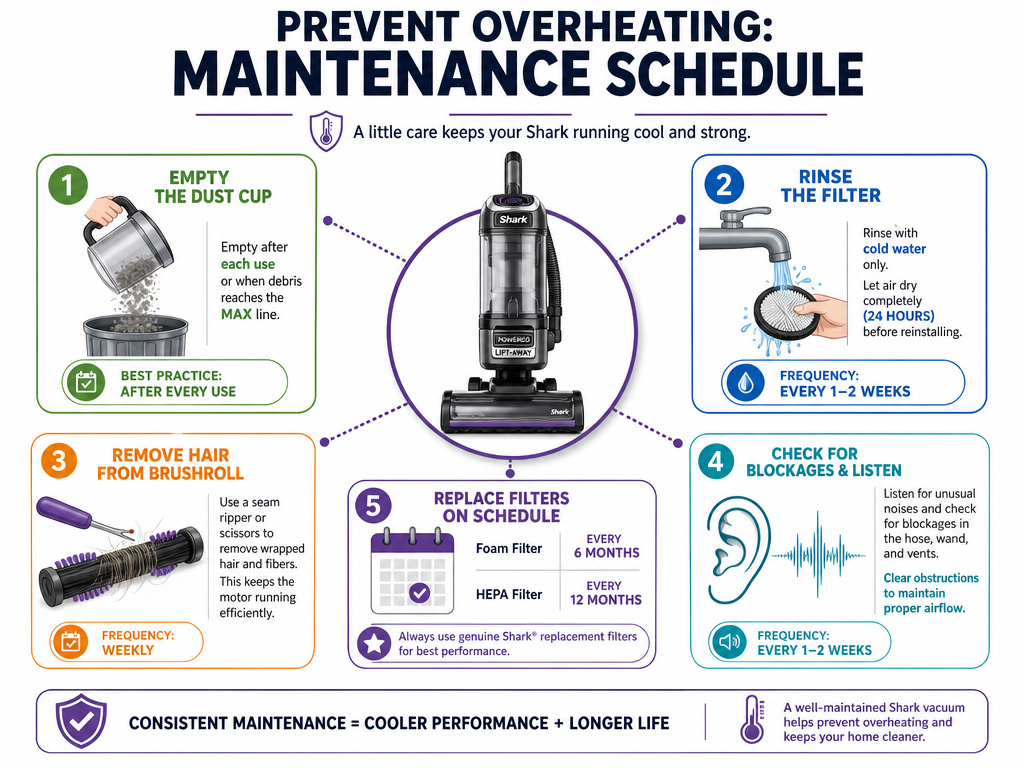 Maintenance is cheaper than repair. A few habits stop most problems before they start.
- Empty the bin before it reaches the MAX line. Overfilling forces dirt into the cyclone and filter.
- Wash the pre-filter every 1-3 months, depending on use. Set a calendar reminder.
- Clear the brush bar after every use, especially if you have long hair or pets.
- Avoid vacuuming large debris like broken glass, plaster dust, or entire cereal piles. These are common causes of internal hose splits and valve jams.
- Store the vacuum indoors at room temperature, not in a freezing garage or shed.
This routine prevents the classic vacuum keeps overheating cycle. It also maintains suction, so you’re not dealing with a Dyson lost suction problem on top of heat.
Frequently Asked Questions
Why does my Dyson overheat on carpet but not on hard floor?
This points directly to a cleaner head or airflow issue specific to the floor tool circuit. A severely tangled brush bar creates massive drag on carpet, overloading the motor. It could also be a partial blockage in the hose under the machine that only affects suction when the changeover valve tilts down. Check the brush bar first, then the internal hose connections.
Is it safe to use my Dyson if it keeps shutting off?
No. Repeated thermal cut-out cycles stress the motor and electrical components. Each overheating event degrees the motor’s insulation and windings slightly. You are marching toward a complete motor failure. Find and fix the root cause, be it a clog, a filter not sealed properly, or a mechanical fault, before using it again.
How long should a Dyson vacuum last before overheating problems start?
With proper maintenance, a Dyson ball should run for 7-10 years without major issues. Overheating problems that start early (within 2-3 years) are almost always maintenance-related: unwashed filters, constant overfilling, or vacuuming inappropriate materials. Sudden onset in an older machine often indicates a wear-and-tear failure like a split internal hose or a failing cut-out switch.
My Dyson is cool and clear but won’t turn on at all. What now?
The thermal cut-out may have failed permanently, or a separate electrical fault has occurred. Check that the filter is seated perfectly, an unsealed filter can prevent some models from starting. Check the power cord and outlet. If those are fine, the internal thermal fuse or a wiring connection may be broken. This requires professional diagnosis, similar to resolving a brush bar stopped issue that isn’t a simple tangle.
Are some Dyson ball models more prone to overheating?
Models with more complex airflow paths, like the earlier Animal models with their tangle-free turbine tools, can be slightly more susceptible to blockages. However, the core design is similar across the line. The bigger factor is use. A Dyson Animal overheating is often because it’s used for heavy pet hair, which clogs filters and brush bars faster. Any model subjected to poor maintenance will fail. The principles for fixing an overheating upright model are nearly identical.
The Bottom Line
A Dyson ball vacuum overheating is its way of crying for help. The motor is protecting itself. Listen to it. Give it the full 1-2 hours to cool that the manual demands. Then, act like a detective tracing the airflow from the cleaner head back to the bin. Ninety percent of the time, you’ll find a physical clog in the wand, hose, or valve. Clear it, ensure the filter is dry and sealed, and the machine will reward you with years more service. Ignore the cool-down or the clog, and the next stop is a repair bill for a new motor.