
Stop Your Dyson Vacuum from Overheating With These Repairs
This post contains affiliate links. As an Amazon Associate, we earn from qualifying purchases.
Your Dyson vacuum keeps overheating and shutting off because a thermal cut-out is tripping. This safety feature activates when the motor gets too hot, almost always due to a physical blockage, a filter that needs washing, or the machine being used outside its temperature range. Clear the blockage, wash the filter in cold water, and let it dry for 24 hours.
That cut-out is there for a reason. It stops the motor from cooking itself when airflow chokes off. The fix isn’t complicated, but the timing is specific, most manuals say to let it cool for at least an hour, not the 30 minutes you’ll see on forums. Skip that full hour and you risk the cut-out tripping again the second you restart.
What follows: a diagnostic tree to find your exact blockage, the real numbers on filter drying and cold-weather operation, and the one warranty clause that means Dyson won’t pay for this fix if you do it wrong.
Key Takeaways
- The thermal cut-out needs a full 60 minutes to reset properly after an overheat. Restarting sooner can cause immediate re-tripping.
- Wash the main filter monthly with cold water only. Let it air-dry completely for 24 hours, a damp filter will choke airflow and cause overheating.
- Dyson vacuums will not operate if the battery temperature is below 3°C (37.4°F) for older models or 5°C (41°F) for newer ones like the Gen5detect.
- Clearing blockages is not covered under the Dyson limited warranty. If you damage something during the process, the repair is on you.
- For persistent overheating after clearing blockages and cleaning the filter, the motor itself may be failing, a job for Dyson Customer Care.
Why Your Dyson Vacuum Overheats: It’s a Physics Problem
A vacuum motor is an air pump. It pulls air through the machine to carry away dirt. Restrict that airflow, and the motor has to work harder to pull the same volume. That extra work creates excess heat.
If any part of the Dyson vacuum becomes blocked the machine may overheat and automatically shut off. If this happens, switch ‘OFF’ the Dyson vacuum and allow to cool before attempting to check the filter or for blockages.
Dyson’s thermal cut-out is a simple switch that breaks the circuit when a certain temperature is reached. It’s a fuse against motor death. The three things that most commonly choke airflow are a full bin, a clog in the airway, and a dirty filter. Environmental extremes, very hot or very cold storage, can also trigger protection circuits that look like overheating.
The smell is often the first warning. You might notice a faint burning-dust odor a minute before the machine dies. That’s the heat hitting accumulated debris inside. Ignore that smell, and the next stop is the cut-out clicking off.
The Step-by-Step Diagnostic Tree
Don’t just start taking things apart. Follow this sequence to isolate the problem with the least effort. Always start with the machine powered off and unplugged or with the battery removed.
- Let It Cool. Completely. The thermal cut-out needs time to reset. Per the Dyson DC35 manual, you must leave it to cool for at least an hour. This isn’t a suggestion. The internal component has a thermal mass that holds heat.
- Empty the Bin. This seems obvious, but a bin filled past the MAX line drastically reduces airflow. Empty it after every use, especially if you’re vacuuming fine debris like plaster dust or pet hair.
- Isolate the Motor. This is a pro tip from repair forums. Remove every accessory, the floor head, the wand, the hose, and the bin. Now, turn on just the main body. If it runs without shutting off, your problem is a blockage downstream. If it still overheats, the issue is likely internal to the motor body or the filter.
- Inspect the Primary Airway. With the machine isolated, work backward:
- Check the Bin Inlet: Look inside the empty bin cavity on the vacuum body. Debris can get lodged in the cyclone shroud.
- Check the Wand and Hose: Shine a flashlight through them. A common culprit is a compacted wad of hair, string, or a small object.
- Check the Floor Tool/ Brush Bar: Manually spin the brush bar. It should move freely. If it’s jammed with wound hair or string, it will strain the motor. Use scissors to cut and remove the debris.
Where this goes sideways: Using tools to poke at blockages. A wire hanger can puncture a hose or dislodge an internal seal. Use a long, flexible brush or a pipe cleaner instead.
| Symptom | Most Likely Cause | Immediate Action |
|---|---|---|
| Shuts off after 2-3 minutes on carpet | Clogged brush bar / full bin | Clear hair from brush bar; empty bin. |
| Shuts off within 30 seconds on any surface | Major airway blockage | Isolate motor; check hose and wand. |
| Runs fine cold, then overheats | Dirty main filter | Remove and wash filter with cold water. |
| Won’t turn on at all (flashing light) | Battery temperature too low (<3°C/5°C) | Bring vacuum to room temperature for 1-2 hours. |
If you’ve cleared a visible Dyson vacuum clog and the problem persists, the filter is your next stop.
The Monthly Filter Wash (And Why It’s Non-Negotiable)
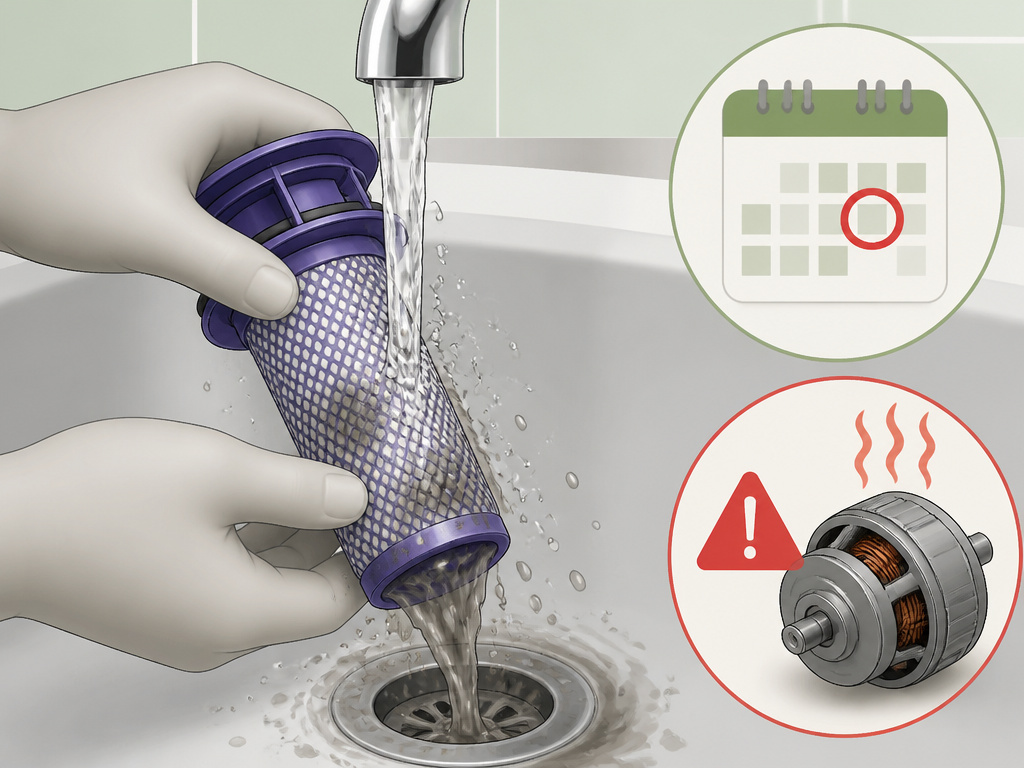
The filter is your Dyson’s lung. It catches the finest dust to protect the motor. When it’s clogged with that dust, air can’t pass through. The motor strains, heats up, and the cut-out trips.
This is not an optional clean. The Dyson DC35 manual states you must wash the filter at least every month. If you vacuum fine dust like flour, or use the machine on its lowest “MIN” power setting, wash it more often. Low power means less airflow, which lets dust pack into the filter more densely.
Here’s the correct, manual-specified process: 1. Remove the filter. It’s usually located at the back of the main body or behind the bin. 2. Rinse it under cold running water. Use only your hands to gently agitate it. Do not use detergents, soaps, or cleaners. 3. Rinse until the water runs clear. You’ll be shocked how much grey water comes out of a seemingly clean filter. 4. Shake out the excess water. 5. Let it air-dry naturally for at least 24 hours. Do not use a heater, hair dryer, oven, or microwave. Do not put it back in the machine damp.
Common mistake: Putting a damp filter back in the machine. Even slightly damp fibers will restrict airflow more than a dirty filter. The Dyson Gen5detect manual explicitly warns that a damp filter can damage the machine. That 24-hour dry time is a hard floor.
A clean, dry filter is the single best thing you can do to prevent a Dyson vacuum lost suction cycle that leads to overheating. For a visual guide, our Dyson filter cleaning guide walks you through it for upright models.
Environmental Triggers: Cold, Heat, and Battery Quirks
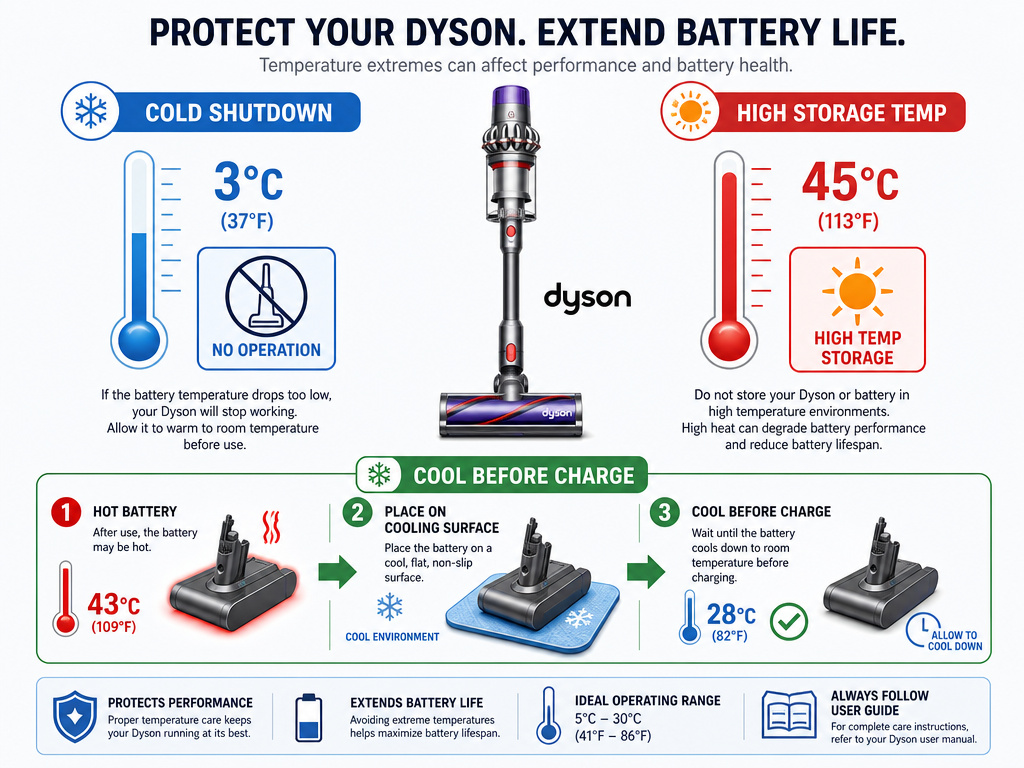
Your Dyson’s brain protects its battery and motor from temperature extremes. These safeguards can look like overheating faults.
Cold Temperature Shutdown:
- Dyson DC35/DC31: The vacuum will turn off if the battery temperature is below 3°C (37.4°F). This is a battery protection feature.
- Dyson Gen5detect: It will not operate or charge below 5°C (41°F). If you store your vacuum in a cold garage or car, bring it to room temperature for a few hours before trying to use or charge it. The indicator light will usually flash to signal a temperature error.
High Storage Temperature:
The Gen5detect manual also lists “High storage temperature” as a reason the machine may not operate. If left in a hot car or direct sunlight, move it to a cooler place and allow it to normalize.
Battery Cooling Post-Use:
The DC35 manual offers a specific tip: after a full discharge, let the battery cool for a few minutes before recharging. This helps prolong overall battery life. Also, avoid using the machine with the battery flush against a surface (like a carpet), as this traps heat.
These aren’t malfunctions. They’re designed responses. If you see a clean filter warning or other Dyson vacuum error messages alongside temperature issues, address the temperature first.
When It’s Not a Simple Fix: Motor Issues and Warranty Reality
You’ve cooled it for an hour, cleared every possible Dyson vacuum clogging issue, and installed a bone-dry filter. If it still overheats within minutes, the motor itself may be failing. Worn bearings or internal debris can cause friction and heat.
Before you assume the worst, double-check for an airway blocked error that might point to a sensor issue rather than actual heat.
Now, the warranty talk. This is critical. From the Dyson DC35 manual: “Clearing blockages is not covered by your Dyson vacuum’s limited guarantee.”
If you puncture a hose while digging out a blockage, or break a clip on the floor tool, that repair is out-of-pocket. The warranty covers defects in materials and workmanship for two years, but not damage from maintenance you perform. Be gentle during inspection.
When to call Dyson Customer Care (1-866-693-9766):
- After completing all diagnostic steps with no improvement.
- If you suspect an internal motor fault.
- For clarification on warranty coverage before attempting a risky disassembly.
This applies whether you have a Dyson stick vacuum overheating, Dyson upright vacuum overheating, or Dyson Ball vacuum overheating issues. The principles are the same across the line.
Frequently Asked Questions
Why does my Dyson keep overheating after I clean it?
You likely put the filter back in while it was still damp. Even a slightly moist filter dramatically restricts airflow. Remove it and let it dry for a full 24 hours in a warm, dry place. Also, ensure you reassembled everything correctly; a misaligned bin or hose connection can create a new blockage.
Is it bad if my Dyson vacuum overheats?
The occasional overheat and shut-off is the system working as designed to prevent permanent motor damage. However, repeatedly triggering the thermal cut-out stresses the electrical components and battery. It’s a sign that a maintenance task is overdue, usually filter washing or blockage clearing.
How long does a Dyson vacuum need to cool down?
The official guidance from Dyson manuals is at least one hour. This allows the thermal cut-out switch inside the motor to fully reset. Cooling for only 30 minutes, as often suggested online, may result in the vacuum cutting out again almost immediately upon restart.
Can a bad battery cause a Dyson to overheat?
Indirectly, yes. A degraded battery may not deliver consistent voltage, causing the motor to work erratically and generate excess heat. More commonly, the battery’s own temperature protection will shut the unit off entirely if it’s too cold (below 3-5°C), which can be mistaken for an overheating fault.
The Bottom Line
A Dyson vacuum that keeps overheating is almost always begging for routine maintenance. The process is straightforward: cool it for a full hour, find and clear the blockage, and wash the filter in cold water, then wait a full day for it to dry. Remember the temperature limits and that the warranty won’t cover any accidents during your repair.
The machine is telling you it can’t breathe. Listen to it. That thermal cut-out saved you a $200 motor replacement. A clean filter and clear airways are the cheapest insurance you can buy.