
Dyson Cordless Vacuum Won’t Open | The Two-Step Latch Fix
This post contains affiliate links. As an Amazon Associate, we earn from qualifying purchases.
A Dyson cordless vacuum won’t open for two mechanical reasons: a physical jam in the latch path, or the bin is too full and pressing against the release mechanism. The fix is to clear debris from around the bin’s seal and latch with a thin, rigid tool, then press the release button firmly while pulling the bin straight off. Forcing it breaks the plastic tabs.
That “full bin” lockout isn’t a design flaw. It’s a failsafe. When the bin fills past its 0.76-liter capacity, the compacted debris pushes outward against the bin walls and the internal seal. That pressure physically blocks the latch from sliding back into its open position. You can press the button all day, but the mechanism is pinned.
The rest of this guide walks the two-step diagnostic: first, rule out a simple jam. Second, understand the electronic lockouts that mimic a stuck latch. We’ll name the specific tool Dyson includes for this job and the one mistake that permanently damages the housing.
Key Takeaways
- The bin release button on top of the handle and the suction release slider on front of the bin are the only two opening mechanisms, forcing anything else breaks it.
- Use the Dyson Awkward Gap Tool (the long, skinny one with the 22-degree twist) to clear packed debris from the bin’s sealing edge; a coat hanger shreds the gasket.
- A bin that’s overfilled by about 20% will mechanically lock the latch, you must empty it through the bottom slide gate first.
- If the filter LED is flashing, the machine is in a safety lockout and won’t open until the filter is completely dry for 24 hours.
- Never wash the cyclone assembly or motor bin with water; moisture in the latch channel swells and warps the plastic, causing a permanent stick.
The Two Main Reasons Your Dyson Won’t Open
Every Dyson cordless vacuum from the V7 to the V15 Detect uses one of two opening systems. Identifying yours is the first step.
The first is a bin release button located on the top of the handle, just behind the cyclone. Press it and pull the bin downward. The second is a suction release slider on the front face of the bin itself, below the clear plastic. Slide it forward to unlock the bin. If you’re pressing or sliding the correct part and nothing moves, the problem is downstream.
Common mistake: Pulling or twisting the bin without fully depressing the release. This torques the plastic locking tabs and shears them off inside the housing. You’ll hear a sharp snap, and the bin will then rattle loose forever.
The failure is almost always physical, not electronic. The latch is a simple spring-loaded plastic hook that engages a slot inside the main body. Three things block its retraction: debris packed into the channel around the bin’s top seal, a warped bin from a drop, or a swollen latch from liquid damage.
Step-by-Step: Clearing a Jammed Latch
This process requires a thin, rigid tool. The Dyson Awkward Gap Tool is engineered for it. If you don’t have one, a long, flat-head jeweler’s screwdriver works. Do not use anything that bends or sheds bristles.
Before you start: Unplug the charger. Remove the vacuum from any dock. Turn the machine off. Work on a clean, well-lit surface.
- Remove the cleaner head and wand. Detach everything from the main body so you can hold the vacuum comfortably. This gives you a clear view of the bin-to-body seam.
- Inspect the seal. Look closely where the colored bin meets the gray cyclone body. You’re looking for hair, carpet fibers, or a line of fine dust packed into the gap. This is the primary jam point.
- Insert your tool. Gently work the tip of the Awkward Gap Tool into the seam, running it around the entire circumference. You’re not prying, you’re scraping debris out of the channel that the latch retracts into.
- Clear the latch slot. Focus on the area directly behind the release button or slider. There’s a specific opening there. Insert the tool and hook out any compacted material.
- Attempt the release. Hold the main body firmly with one hand. With the other, press the release button fully and hold it. While holding the button, pull the bin straight down with steady pressure. Do not rock or twist.
If the bin still won’t budge, the jam is internal. Stop. Forcing it now will break the latch posts. The next step is to empty the bin through the bottom slide gate, if your model has one.
| Tool to Use | Why It Works | Risk If You Use Something Else |
|---|---|---|
| Dyson Awkward Gap Tool | 22-degree angled tip fits the seam; rigid plastic won’t scratch. | A metal coat hanger can gouge the plastic seal, creating a permanent suction leak. |
| Flat Jeweler’s Screwdriver | Thin, stiff blade reaches packed debris. | If too wide, it can spread the housing and crack the cyclone assembly. |
| Plastic Spudger | Non-conductive and soft. | Can snap under pressure, leaving plastic shards inside the mechanism. |
Where this goes sideways: Using compressed air to blow out the jam. You’ll just force the debris deeper into the cyclone or past the filter seal. That leads to a total loss of suction and a motor overheating error within two cleaning cycles.
When “Full” Means “Locked”
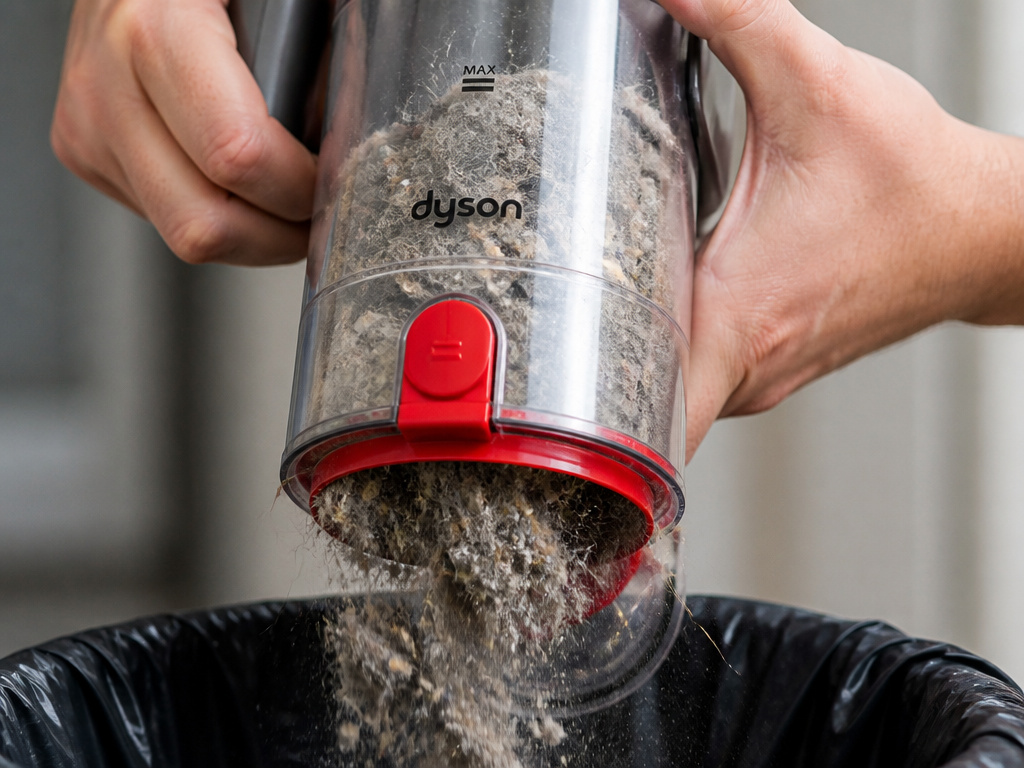 Dyson’s bins have a maximum fill line for a mechanical reason. The 0.76-liter bin in a V15 can only hold so much before the contents compress.
Here’s the mechanism: as dust and debris pile up, they press against the bin’s walls. Past capacity, that pressure transfers to the bin’s top rim, the very surface that seals against the cyclone body. The latch hook slides in a channel right behind that seal. When the rim is pushed outward, it narrows the channel and pinches the latch.
The machine isn’t judging you. It’s physically stuck.
The fix is to empty the bin through the bottom slide gate. Turn the vacuum upside down. Locate the red slider on the bottom of the bin. Slide it open and let the contents fall out into a trash bag. You may need to tap the bin to dislodge compacted clumps. Once emptied, the pressure releases and the main latch should operate normally.
What most people get wrong: Trying to open the bin when it’s overfull by pressing harder on the release. That extra force goes straight into the plastic latch arm. It’s the most common cause of a broken latch mechanism that requires a full bin replacement.
Electronic Lockouts That Feel Like a Stuck Latch
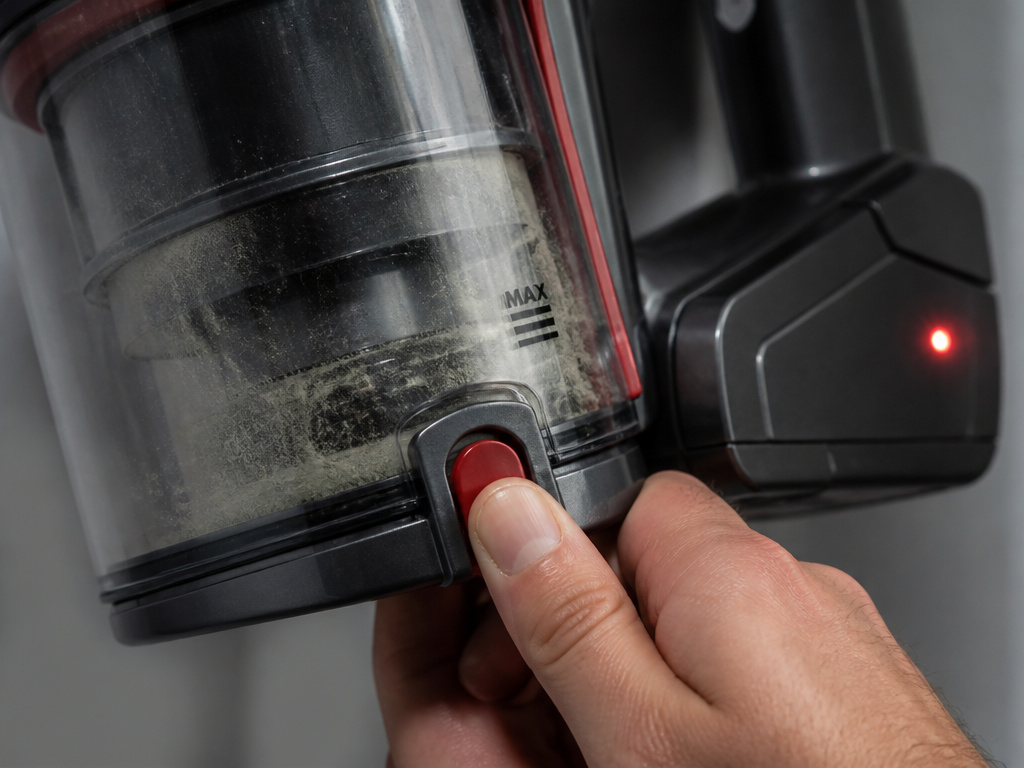 Sometimes the latch isn’t jammed, the vacuum’s software has disabled it. Two system errors present exactly like a physical jam.
First is the filter maintenance lockout. If you wash the filter and put it back in damp, the machine knows. The moisture sensor triggers a fault. On models with an LCD screen, you’ll see a flashing filter icon. On others, the filter LED on the battery will flash. In this state, the vacuum may refuse to open as a safety precaution to prevent you from operating it with a wet filter, which can damage the motor.
The filter must dry for at least 24 hours. Not 12, not overnight. A full day in a warm, ventilated area. No hair dryers, no microwaves.
The second is a thermal cut-off. If the motor overheats, often from a clog or a full filter, the system shuts down. Part of that shutdown can include locking the bin release to prevent user intervention while components are hot. Let the vacuum cool for 30-60 minutes. The latch should re-engage.
If you see other alerts, like a blinking red light or an error code, the issue is broader. Our guide to Dyson cordless vacuum error codes breaks down each one.
The One Repair You Might Need
If the latch button feels loose, clicks without resistance, or the bin simply falls off, the internal plastic hook has broken. This is a component failure, not a jam.
For a Dyson V8 or V10, the latch is part of the bin assembly. You replace the entire bin. For a Dyson V11 or V15 Detect, the latch is part of the main cyclone body, a more involved fix. The official Dyson service manual for compatible models (SV23) states these parts are user-replaceable but require disassembly.
Before you order parts, verify the diagnosis. Remove the bin. Look inside the empty socket on the main body. You should see a small gray or black plastic hook. Press the release button. That hook should retract. If it doesn’t move, or if it’s visibly snapped, that’s your culprit.
A machine with a stuck vacuum latch is frustrating. A machine with a broken latch is a parts order.
Dyson Model-by-Model Release Guide
The location and feel of the release mechanism changed across generations. Here’s what to expect from your model.
| Dyson Model | Release Type | Unique Quirk | Most Common Jam Point |
|---|---|---|---|
| V15 Detect / V12 Detect Slim | Top button on handle. | Button has a two-stage feel; press until the second click. | Hair wrapped at the top of the bin, near the cyclone inlet. |
| V11 | Top button on handle (LCD models). | Requires a firm, deliberate press. | Fine dust packed in the seam from frequent hard-floor use. |
| Cyclone V10 | Suction release slider on bin face. | Slider must move fully forward; often stiffens with age. | The slider track itself gets clogged with debris. |
| V8 | Suction release slider on bin face. | Smaller, less robust slider than V10. | Slider mechanism breaks internally; bin won’t open even when clear. |
| V7 / Digital Slim | Suction release slider on bin face. | Most basic mechanism; prone to sticking if not kept clean. | General debris in the channel; requires most frequent cleaning. |
If your Dyson stick vacuum won’t open and it’s not the V8 or V10, you’re likely dealing with the top-button style. The fix is the same, but access to the seam is easier.
Preventing the Problem
A latch jam is a maintenance issue. Three habits stop it from happening.
- Empty the bin before it hits the max line. Don’t wait for the “full” indicator. When debris reaches the clear plastic window, dump it. This prevents the pressure lock.
- Monthly seam cleaning. As part of your regular filter wash, take the Awkward Gap Tool and run it around the bin seam. This clears the channel before anything has a chance to compact.
- Keep the filter dry. A damp filter doesn’t just cause an error code. The increased humidity inside the bin can swell the plastic latch components over time, leading to a permanent stick. Always ensure 24-hour dry time.
This routine takes two minutes. It prevents the twenty-minute fight with a vacuum won’t open scenario and avoids a broken latch.
Frequently Asked Questions
Why is my Dyson bin release button not clicking?
The button isn’t clicking because the internal latch hook is already jammed in the forward or rear position. The click comes from the hook snapping over its stop. If debris is blocking its travel, you get mush, not a click. Clear the jam first, then test the button feel.
Can I use WD-40 on a stuck Dyson latch?
No. WD-40 is a solvent and degreaser. It will degrade the plastic latch and surrounding seals, making the problem worse and potentially damaging the plastic. It also attracts more dust, creating a gummy residue that guarantees future jams. Use only mechanical cleaning.
How do I open my Dyson if the release button is broken?
If the button mechanism is broken, you must manually retract the latch. This requires partial disassembly. Remove the bin by locating the small access holes on the main body (often under a rubber plug). Insert a thin tool to push the latch hook back while pulling the bin. Consult your model’s service manual; forcing it can destroy the housing.
Why does my Dyson open by itself?
If the bin falls off during use, the latch hook is broken or worn. The spring that holds it in the “locked” position may have failed, or the plastic hook has sheared. This is a parts replacement issue. Continuing to use it can cause the bin to detach and crack when it hits the floor.
Will Dyson fix a vacuum that won’t open?
Yes, if under warranty. Dyson’s standard service guarantee is 12 months for the V15, V12, and V11, and 24 months for the Cyclone V10. A stuck latch from a manufacturing defect or part failure is covered. A latch broken by user forcing or clogged by neglect is not. Contact Dyson Support with your serial number.
The Bottom Line
A Dyson that won’t open is telling you it’s either clogged or overheated. Your job is to listen. Start with the simple, mechanical fix: clear the seam with the right tool. Rule out a full bin. Then check for electronic warnings.
The default pick for clearing the jam is the Dyson Awkward Gap Tool. It’s the one they include for a reason. For most households, a monthly pass around the bin seam with that tool, combined with emptying before the bin is crammed full, stops the problem before it starts.
If the latch is broken, that’s a component failure. For a V8 or V10, order a new bin. For anything else, weigh the cost of the cyclone assembly against the age of your machine. Sometimes the repair bill clarifies when it’s time for an upgrade.