
Dyson Stick Vacuum Not Keeping Charge? Diagnose & Fix It Now
This post contains affiliate links. As an Amazon Associate, we earn from qualifying purchases.
A Dyson stick vacuum not keeping a charge typically stems from one of three core issues: the battery is too cold (below 41°F/5°C for most models), the machine’s internal runtime algorithm hasn’t learned from full charge cycles, or the filter is clogged, often with damp debris that hardens like cement. The fix is diagnostic, not guesswork.
That temperature spec is a hard electronic cutoff written into the protection circuit for the lithium-ion cells and the digital motor. If your garage or porch drops below that threshold overnight, the machine will refuse to operate or charge until it warms up, mimicking a dead battery.
What follows is the breakdown you won’t get from a support chatbot: the exact model-by-model temperature limits from the OEM manuals, the physical reason a damp filter kills power, and the step order that isolates the real problem in under ten minutes.
Key Takeaways
- Temperature is the first check. Most Dyson V11, V12, and SV2x models lock out below 41°F (5°C). Older SV15/SV16 models cut off at 50°F (10°C). This is factory protection, not a battery fault.If you only do partial top-ups, the remaining runtime display becomes inaccurate, making a healthy battery look like it’s failing.
- A clogged filter doesn’t just reduce suction. On Dyson cordless models, a severely blocked filter, especially one washed and not fully dried, triggers an automatic motor cut-out to prevent overheating. The machine will pulse or shut off entirely.
- MAX mode is a battery killer. Using Boost or MAX suction for entire cleaning sessions can cut rated runtime by 75% or more. It also accelerates long-term battery wear.
- Third-party batteries are a gamble. Generic replacements often lack the proper battery management system (BMS) to communicate accurately with the Dyson’s motherboard, leading to early failure and sometimes damaging the vacuum.
The 41°F (5°C) Rule That Locks Your Battery
Check the room temperature before you check the battery. This is the single most overlooked cause of a Dyson that seems dead overnight.
Dyson’s user manuals state the cutoff plainly. For the V11, V12 Detect Slim, SV23, SV24, and Digital Slim models, the machine will not operate or charge if the ambient temperature is below 41°F (5°C). The SV12 has a slightly lower threshold at 37.4°F (3°C). The older SV15 and SV16 series have a higher cutoff of 50°F (10°C).
The machine won’t operate or charge if the ambient temperature is below 41°F (5°C). This is designed to protect both the motor and battery. Dyson V11 User Manual
This is a lithium-ion chemistry safeguard. Charging a cold battery causes lithium plating on the anode, which permanently reduces capacity and can create internal shorts. The motor protection is separate, cold, thick grease in the bearings increases startup amperage, straining the electronics.
The fix is simple: bring the vacuum to room temperature for at least an hour. Don’t try to charge it on a cold floor in a drafty space. If it powers up after warming, the battery is fine. The problem is your storage location.
| Dyson Model Series | Temperature Cutoff (No Operate/Charge) | Manual Source |
|---|---|---|
| V11, V12, SV23, SV24, Digital Slim | 41°F (5°C) | V11, V12, SV24 Manuals |
| SV12 | 37.4°F (3°C) | SV12 Manual |
| SV15, SV16 | 50°F (10°C) | SV15, SV16 Manuals |
| SV25 | 41°F (5°C) | SV25 Manual |
If warming the vacuum doesn’t work, the issue is either the battery’s charge state or the charger itself. Move to the next check.
How the Battery’s “Learning” Algorithm Skews Runtime
Your Dyson runs a software algorithm that predicts remaining runtime based on past performance. The manuals for the V11 and V12 Detect Slim explicitly state this.
It’s important to fully charge your new machine before using it for the first time, and after every clean. This is because the battery and monitoring system’s algorithm ‘learns’ over time, and fully charging your machine helps it to more accurately calculate and display remaining run time. Dyson V12 Detect Slim User Manual
If you habitually grab the vacuum for a five-minute spot clean and plug it back in, you’re only giving the algorithm data from shallow discharge cycles. It has no reference for a full discharge, so its runtime estimate becomes progressively more inaccurate. The battery might be at 80% health, but the display thinks it’s at 40%.
Reset the algorithm with two complete cycles. First, run the vacuum on a medium setting until it completely dies. Then, charge it uninterrupted with the original charger until the display shows 100% and the blue LEDs stop flashing (this takes 4.5 hours for models like the SV25). This recalibrates the battery management system.
Where this goes sideways: Using a fast charger or a third-party charger that doesn’t follow Dyson’s specific voltage curve. The battery might seem full, but the onboard chip didn’t record the correct data, so the runtime display stays broken.
Check the Filter, But Do It Right
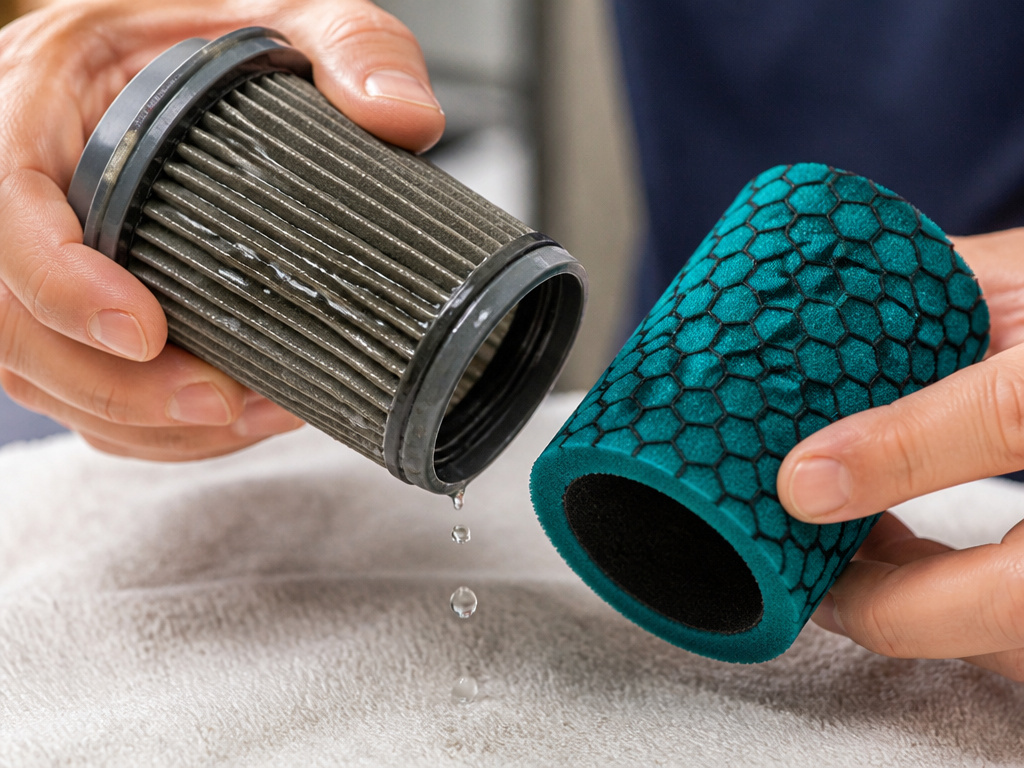
A dirty filter is the second most common culprit for a Dyson not holding charge. But the real problem is damp dirt.
The HEPA filter in Dyson stick vacuums is a two-part assembly: a pleated paper cylinder surrounded by a foam sleeve. When you wash it, water forces fine dust deeper into the paper pleats. If you don’t let it dry for a full 24 hours in good airflow, that damp dust mixture hardens as it dries.
The result is a near-solid block. Airflow drops to zero. The digital motor, sensing extreme load from the lack of airflow, triggers an automatic thermal cut-out to prevent burnout. The vacuum will pulse on and off or shut down completely after a few seconds, mimicking a dead battery.
The correct filter wash procedure is non-negotiable:
- Tap the filter over a trash can to remove loose dust.
- Wash the pleated paper element first under cold running water, with the foam end facing down.
- Then wash the foam sleeve.
- Repeat until the water runs clear.
- Shake out excess water and let it air-dry, foam-end up, for at least 24 hours in a warm, dry place.
If your vacuum is not working after cleaning filter, a damp filter is the likely cause. Let it dry for another day before testing again. A completely clean, dry filter restores airflow and allows the motor to run within its normal power band, which preserves battery runtime.
The MAX Mode Trap and Battery Longevity
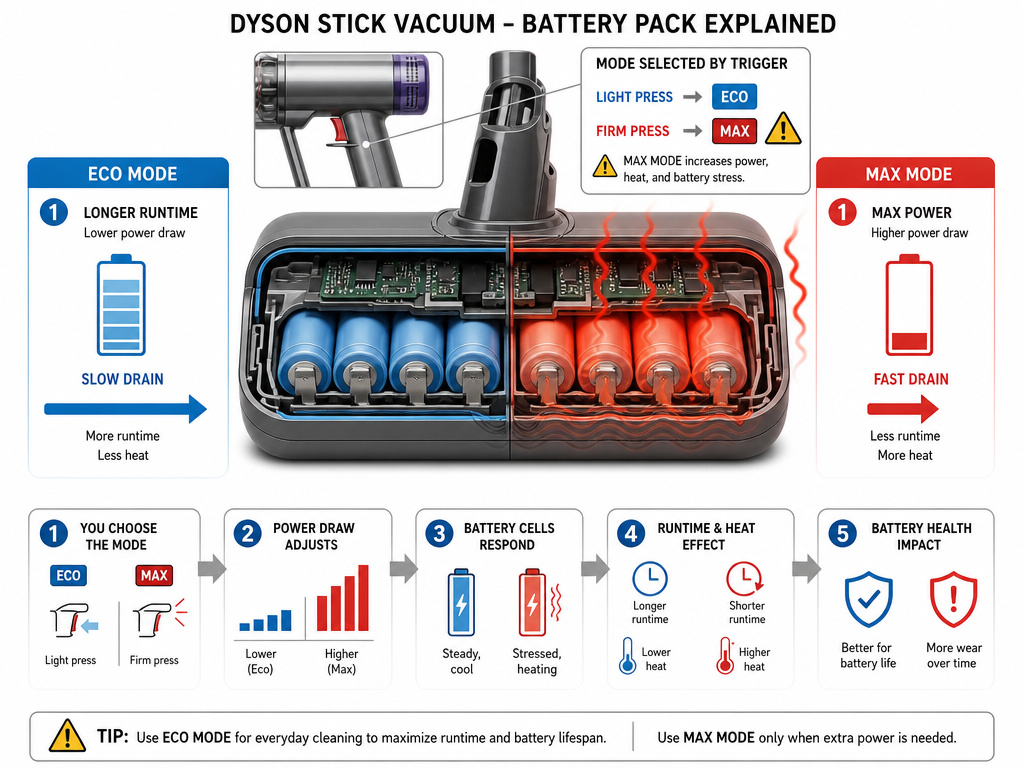
Your Dyson has multiple power modes for a reason. Eco mode on a V11 can run for up to 60 minutes. MAX mode drains the same battery in under 10 minutes.
That’s not a linear relationship, it’s exponential. MAX mode demands maximum current from the battery, which increases internal heat and accelerates the degradation of the lithium-ion cells. If you use MAX as your default setting, you’re compressing years of wear into months.
The SV15 manual advises avoiding immediate recharging after a full discharge, suggesting you “allow to cool for a few minutes.” That’s a direct nod to the heat stress placed on the battery. It also recommends not using the machine with the battery flush against a surface (like a carpet) to improve cooling.
Treat MAX mode as a 30-second trigger for stubborn debris, not a default. If you feel you need MAX to get a normal clean, your filter is likely clogged, the bin is overfull, or you have a loss of suction from a separate blockage. Solving that root cause will let you return to Eco or Auto mode, which is how the battery is rated for its advertised lifespan.
Diagnosing a Failing Battery or Charger
When temperature, algorithm, and filter are ruled out, the problem localizes to the battery or charging system. Here’s how to tell which.
Signs of a Failing Battery:
- The vacuum runs for a consistently short time (e.g., only 2 minutes) even after a full charge.
- It cuts out under load (like on a carpet) but works briefly on a hard floor.
- The battery feels unusually warm to the touch during or immediately after use.
- You’ve owned the vacuum for 3+ years with regular use.
Signs of a Charger or Dock Problem:
- The vacuum shows no signs of life when placed on the dock, but the battery has charge.
- The charging LEDs don’t illuminate at all.
- The display doesn’t show the charging animation.
- The machine works when plugged directly into the charger but not when docked (points to dirty dock contacts).
For a suspected charger issue, first clean the metal charging contacts on the dock and the vacuum with a dry cotton swab. For a battery issue, the definitive test is a swap. If you have a friend with a compatible Dyson, try their battery in your machine. If it works, your battery is done.
Common mistake: Buying the cheapest third-party battery on Amazon. As noted in the YouTube transcript from a repair tech, generic Dyson batteries “don’t last” and can sometimes damage your vacuum. The internal battery management system (BMS) is often inferior, leading to inaccurate charge reporting and poor cell balancing.
If your vacuum is within Dyson’s 2-year guarantee, contact support, they will replace the battery free. For out-of-warranty machines, a genuine Dyson replacement battery, while a significant investment, is the only reliable fix for a Dyson stick vacuum not charging.
Step-by-Step Diagnostic Flowchart
Follow this sequence to avoid replacing parts you don’t need.
- Warm It Up. Bring the vacuum to a room above 50°F (10°C) for one hour. Try to turn it on.
- Check the Filter. Remove and inspect the filter. Is it dirty or damp? Wash and dry it for 24 hours if needed.
- Reset the Algorithm. Fully discharge the vacuum, then give it a complete, uninterrupted 4.5-hour charge.
- Listen for Blockages. Run the vacuum and listen for a change in motor pitch or pulsation. Check for clogs in the cleaner head, wand, and bin inlet.
- Test with Another Charger. If possible, try a known-good Dyson charger.
- Test with Another Battery. If possible, try a known-good Dyson battery.
- Contact Support. If all else fails and the machine is under warranty, or you need a guide to Dyson error codes, reach out to Dyson.
This method isolates the variable at each step. Most cases stop at step 1 or 2.
Frequently Asked Questions
Why does my Dyson run for 10 seconds then die?
This is classic thermal cut-out behavior. The motor is overheating due to a severe blockage or a soaked filter. The most common cause is a HEPA filter that was washed and not given a full 24 hours to dry. The damp debris restricts airflow, the motor overheats, and the protection circuit shuts it off.
Can cold weather permanently damage my Dyson battery?
Yes, if you repeatedly attempt to charge it while it’s below freezing. The manual for the SV15 warns not to charge the machine and then move it to an area below 50°F (10°C) for storage. Charging a cold battery causes irreversible lithium plating, permanently reducing its capacity. Storage in the cold (without charging) is safer, but the machine won’t work until warmed.
Is it worth replacing a Dyson stick vacuum battery?
For a model less than 5 years old, usually yes. A genuine Dyson battery restores the vacuum to like-new runtime. For an older V6 or V7, weigh the cost of the battery against the value of the entire machine. Third-party batteries are cheaper but carry risk, they may not communicate properly with the vacuum’s board, leading to intermittent power issues.
How long should a Dyson battery last?
With normal use (mostly Eco/Auto mode, monthly filter cleaning, room-temperature storage), expect 2-3 years of daily use before noticeable runtime degradation. Heavy use in MAX mode or in very hot/cold environments can shorten that to 18 months. Dyson’s 2-year guarantee covers battery failure within that period.
Why does my vacuum pulse and the red light flash?
This is the automatic cut-out system activating due to a blockage. The motor pulses to try to clear it, and a warning light or icon appears. You must disconnect the charger, let the machine cool, and find the obstruction. Common spots are the cleaner head brush bar, the wand elbow, or the bin entry point. Clearing this is essential before the vacuum will run normally again.
Before You Go
A Dyson stick vacuum not keeping a charge is frustrating, but it’s rarely a random failure. The solution almost always lives in the specifics: a temperature gauge, a timer for filter drying, and a honest assessment of your power mode habit.
Start with the physical environment. If the vacuum sat in a cold garage, warm it up. If the filter looks dirty, wash it and give it a full day to dry, no shortcuts. Run the battery through one complete death-and-rebirth cycle to teach its algorithm what a full charge looks like.
Only after those three steps should you consider a hardware fault. That sequence saves time, money, and the hassle of installing a new battery only to find the problem was a fifty-degree room.