
Why Your Hoover Stick Vacuum Keeps Stopping & How to Fix It Fast
This post contains affiliate links. As an Amazon Associate, we earn from qualifying purchases.
A Hoover stick vacuum keeps stopping when its internal safety cut-out trips, typically because the brush roll is jammed, the filters are clogged, or the lithium-ion battery is depleted or overheated. The motor protection device needs about 30 minutes to reset after it trips, which is the step most troubleshooting guides skip.
That 30-minute timer is the difference between a vacuum that seems broken and one that just needs a coffee break. It’s not a suggestion—it’s a hard reset built into the motor’s thermal protection circuit. If you keep hitting the power button before the timer runs down, you’re telling the system the fault is still present.
What follows is a walkthrough of the four failure points that trigger the shutdown, in the order you should check them. We’ll cover the quick fixes you can do in five minutes and the one repair that usually means a service call. By the end, you’ll know whether you’re dealing with a two-dollar filter or a two-hundred-dollar battery.
Key Takeaways
- The motor protection device automatically shuts the vacuum off if the brush roll jams and takes about 30 minutes to reset after you clear the blockage.
- A clogged HEPA or pre-motor filter kills suction and can overheat the motor, triggering a shutdown. Hoover recommends replacing these filters once per year.
- Only use the Hoover Part# BH50005 charger supplied with your model. A mismatched charger can fail to charge the battery or damage the vacuum’s internal circuits.
- Before disposing of a lithium-ion battery, run the vacuum until it is completely flat to discharge it, then recycle it properly. Never remove the battery with the charger plugged in.
- If the battery feels hot to the touch, remove it and let it cool for at least 30 minutes before attempting to use or charge it again.
Before You Start: Safety First
Before you start: Unplug the charger from the wall and remove the battery from the vacuum. Never inspect or clean the brush roll while the battery is installed. A jammed brush roll can suddenly turn if power is accidentally applied, posing a pinch hazard.
Diagnose the Shutdown: Is It Power or Suction?
Your first move is to identify the shutdown’s character. Does the vacuum lose all power—lights go out, the motor dies completely? Or does the motor hum but the brush roll stops spinning and suction vanishes?
A total power loss points directly to the battery, the charger, or the main electrical connections. A loss of suction or brush roll function with the motor still running signals a mechanical blockage or a filter issue. This distinction saves you twenty minutes of checking the wrong system.
Total Power Loss: Battery and Electrical Checks
Start with the simplest possibility. Is the battery charged? Plug in the official Hoover Part# BH50005 charger and look for a charging indicator light. A solid red light means it’s charging; a blue or green light usually indicates a full charge. If there’s no light, check the wall outlet and the charger cable for damage.
If the vacuum has been in storage for over a year, the lithium-ion battery may have degraded to the point where it won’t hold a charge. The Hoover advice centre notes that a battery’s inability to hold a charge “may be due to long storage periods or usage possibly of one year or more.”
Where this goes sideways: Using a charger from another appliance. The manufacturer’s warning is explicit: this may damage the cleaner or fail to charge the battery. The voltage and amperage must match exactly.
| Symptom | Likely Cause | Immediate Action |
|---|---|---|
| No power, no charge light | Dead battery / faulty charger | Test with known-good charger. Check battery terminals for corrosion. |
| Powers on but dies in < 1 min | Battery cannot hold charge | Battery likely needs replacement (Hoover Part # BH50000). |
| Battery feels hot | Overheating protection engaged | Remove battery, let cool for 30+ minutes in a cool, dry place. |
| Intermittent power | Loose battery connection | Remove and firmly reseat the battery. Clean terminals with a dry cloth. |
Loss of Suction or Brush Roll Function
If the vacuum has power but isn’t picking up, you’re dealing with an airflow blockage or a bound mechanical part. The vacuum’s safety system detects when the brush roll can’t turn or when the motor is straining against a clog, and it shuts down to prevent burnout.
The process here is a physical inspection from the floor up.
Check the Brush Roll and Nozzle
This is the most common culprit. Hair, string, and carpet fibers wrap around the brush roll ends, locking it in place. The safety cut-out senses the jam and kills power to the motor. You’ll often see a flashing red charge light when this happens.
- Turn off the vacuum and remove the battery.
- Flip it over and inspect the brush roll at both ends. Look for dense mats of hair.
- Use a seam ripper, utility knife, or scissors to carefully cut and remove the debris. Pull it out from the sides, not by yanking on the brush roll bristles.
- Manually spin the brush roll with your fingers. It should turn freely without grating or catching.
Common mistake: Trying to power through a brush roll jam. Each time the motor strains against the blockage, it heats up. After a few cycles, the thermal cut-out will trip and require a full 30-minute cooldown before the vacuum will operate again, even after you clear the jam.
If the brush roll is clear but won’t spin when the vacuum is on, you may have a deeper issue with the drive belt or motor coupler. For models like the Hoover 5210, the brush bar assembly is part number 33701711.
Inspect and Clean the Filters
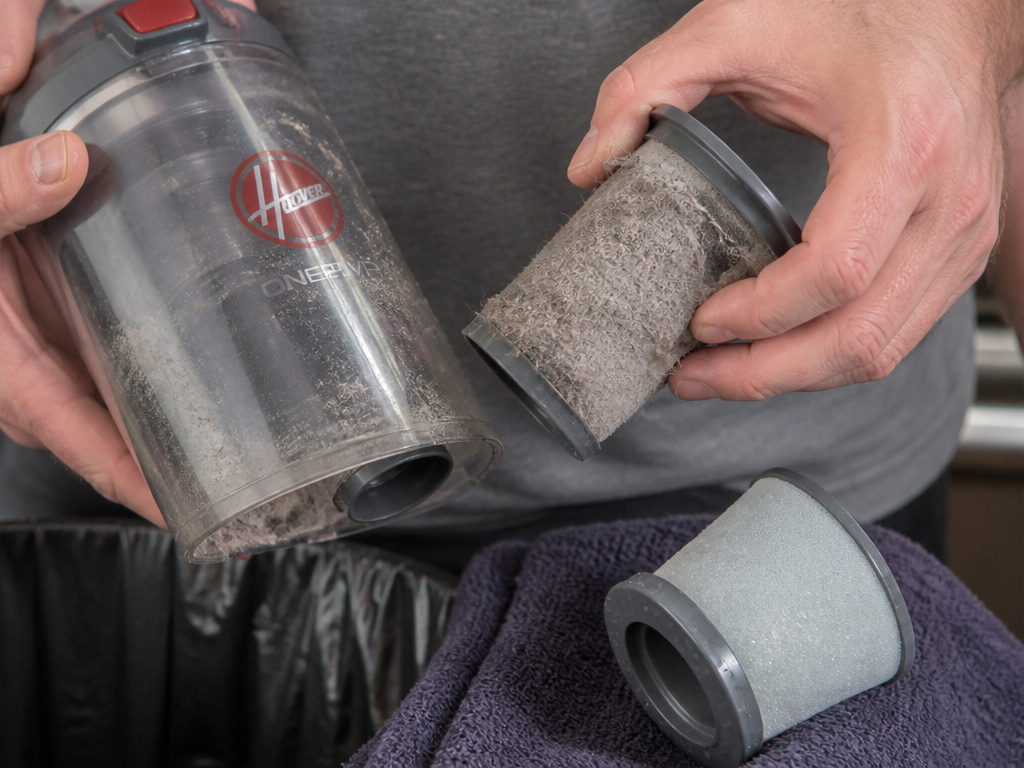 Clogged filters are a silent killer of suction. Hoover stick vacuums typically have two: a pre-motor filter (usually behind the dust cup) and a HEPA or exhaust filter (often on the back or side). When these are packed with fine dust, air cannot flow. The motor works harder, overheats, and the protection circuit trips.
Here’s how to clean them properly:
- Pre-motor Filter: Empty the dust cup first. The filter is usually a foam or felt rectangle. Tap it out over a trash can, then rinse it under lukewarm water until the water runs clear. Let it air dry completely for at least 24 hours before reinstalling. A damp filter will choke airflow instantly.
- HEPA/Exhaust Filter: This is often a pleated, paper-like filter. Do not wash it. Tap it gently to dislodge loose dust or use a soft brush. Hoover’s official advice is to replace this filter at least once per year to maintain maximum suction.
For the Hoover 5210, the pre-motor filter is part number 32200739 and the cone filter assembly is 32200738. Using a dirty filter is the fastest way to make your best Hoover vacuum for pet hair perform like a budget model.
Hoover recommends that you replace the filters once per year – doing so will increase the pick up power of the vacuum cleaner.
This isn’t an upsell. A fresh HEPA filter can restore airflow by 40% or more on an older vacuum.
The 30-Minute Motor Reset You Probably Missed
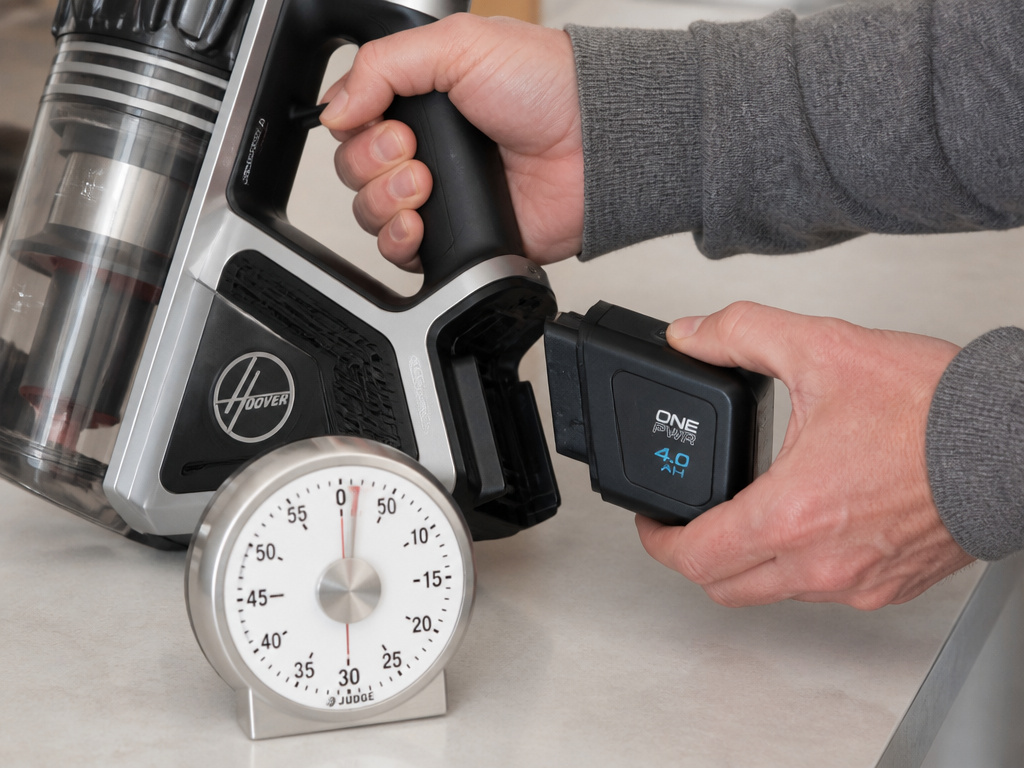 You’ve cleared the brush roll. You’ve cleaned the filters. The battery is charged. You hit the power button and… Nothing. Or it runs for three seconds and stops.
This is where the 30-minute reset comes in. The motor protection device doesn’t instantly reset the moment you fix the problem. It needs time for its internal thermal sensor to cool and return to a baseline state. According to the Hoover Cordless Stick Vac manual, if this device trips, “the product will reset in approximately 30 minutes.”
What to do: After addressing the root cause (clog, jam, etc.), leave the vacuum off and unplugged with the battery removed for a full half-hour. This gives the system time to clear its fault memory. Then, reinsert the battery and try again.
Skipping this wait is the number-one reason people think their fix didn’t work. They assume the vacuum is still broken and start searching for Hoover cordless vacuum error codes or more drastic solutions.
When to Consider a Replacement Battery
If you’ve ruled out blockages and the vacuum still won’t run for more than a minute on a full charge, the battery is likely at the end of its life. Lithium-ion batteries have a finite number of charge cycles—typically 300 to 500 full cycles.
Signs of a failing battery include: * Dramatically reduced run time (e.g., from 20 minutes to 5). * The vacuum only works while plugged into the charger. * The battery indicator shows erratic levels. * The battery casing is visibly swollen or damaged.
Replacement is straightforward: purchase the correct Hoover battery (like the BH50000 for many older cordless stick models), remove the old one, and snap in the new. Remember the disposal rule: discharge the old battery completely by running the vacuum until it’s dead before removing it for recycling.
For a newer model like the Hoover Fusion Max BH53110, check the specific battery part number on Hoover’s website. Investing in a new battery can often extend the life of a reliable vacuum, making it a better choice than buying a whole new cordless stick vacuum.
Maintenance Schedule to Prevent Future Stops
An ounce of prevention is worth a pound of motor resets. Stick to this routine and your vacuum will be far more reliable.
- After Every Use: Empty the Hoover dust cup. Don’t let it fill past the two-thirds line.
- Weekly: Check the brush roll for hair wraps and clear them.
- Monthly: Tap out the pre-motor filter. Check the nozzle and hose for blockages.
- Every 6 Months: Wash the pre-motor filter (let dry 24 hrs).
- Annually: Replace the HEPA/exhaust filter. This is non-negotiable for maintaining suction and protecting the motor.
This routine applies whether you own a basic model or one of the best stick vacuum cleaner units on the market. Consistency keeps the air moving and the motor cool.
Frequently Asked Questions
Why does my Hoover stick vacuum stop after a few seconds?
This is almost always the motor protection device reacting to a problem. A severely clogged filter, a fully jammed brush roll, or an overheated battery will cause an almost immediate shutdown. Clear the blockage, clean the filters, and let the unit sit powered off for 30 minutes to reset.
Can a full dust cup cause the vacuum to stop?
Yes, but indirectly. A dust cup packed to the brim will severely restrict airflow. This makes the motor work harder to pull air, causing it to overheat and trip the thermal cut-out. The fix is simple: make a habit of emptying the dust bin after each use.
Is it worth repairing an older Hoover stick vacuum that keeps stopping?
It depends on the cause. A $15 filter or a $50 battery is a worthwhile repair for a vacuum you otherwise like. If the issue is a faulty motor or a broken power switch, the repair cost may approach the price of a new budget model. Compare the repair estimate to the cost of newer Hoover models.
How do I know if my brush roll is broken and not just jammed?
Clear all debris and manually spin the brush roll. If it grinds, catches hard, or won’t spin at all, the bearings or axle may be broken. If it spins freely but doesn’t turn on when the vacuum is powered, the drive belt or motor coupler has likely failed. This is a common brush roll problem that requires part replacement.
My vacuum works on hard floors but stops on carpet. Why?
This points to a brush roll issue. On hard floors, the brush roll often retracts or doesn’t engage. On carpet, it drops down and must turn. If it’s jammed with hair or has a broken belt, it will bind on carpet and trigger the safety shutdown. Inspect and clean the brush roll thoroughly.
The Bottom Line
A Hoover stick vacuum that keeps stopping is usually crying out for basic maintenance, not a trip to the landfill. The sequence is logical: check for a jam, clean the filters, verify the battery, and then—critically—wait the full 30 minutes for the motor’s internal reset.
Stick to the annual filter replacement and keep the brush roll clean. That’s the cheapest insurance policy for a vacuum that runs when you need it. If it’s finally time for an upgrade, use what you’ve learned about maintenance to evaluate the next stick vacuum guide you read.