
Roomba Vacuum Going in Circles | Error 10, 7 & 1 Explained
This post contains affiliate links. As an Amazon Associate, we earn from qualifying purchases.
A Roomba vacuum going in circles is almost always a hardware fault, not a software glitch. The robot is reporting a specific error, usually Error 10, 7, or 1, which means a side wheel is stuck, a bumper is jammed, or a cliff sensor is dirty. The fix involves cleaning the wheels and sensors, checking for physical obstructions, and resetting the robot on a flat surface.
That diagnostic sequence comes straight from iRobot’s own service bulletins. The “Uh-Oh” sound and numbered error message aren’t just noise; they’re a direct translation of the robot’s internal sensor check. Ignoring them and just restarting the clean cycle will get you another five minutes of runtime before the same error shuts it down again.
What follows is a sensor-by-sensor, wheel-by-wheel breakdown. You’ll learn how to match the robot’s beeps and spoken words to the exact service manual procedure, why dark rugs cause a specific circling behavior, and the one internal spring mechanism that fails in a way basic cleaning won’t fix.
Key Takeaways
- Error 10, 7, or 1 means a physical obstruction: a stuck side wheel, jammed bumper, or dirty cliff sensor. The robot circles because one drive wheel can’t move.
- Dark-colored rugs or floors can trick cliff sensors. The Roomba backs up and turns repeatedly because it thinks it’s at a ledge, this isn’t a mechanical error.
- Dirt Detect mode on older models (500, 600 series) creates intentional back-and-forth or star-shaped circling in dirty spots. This is normal operation.
- The permanent fix requires disassembly: removing the bottom cover, extracting the wheel modules, and cleaning hair and debris from the axles.
- If cleaning doesn’t work, the wheel’s internal return spring can fail. You’ll need to replace the entire wheel module, a 15-minute job with a $20 part.
Before You Start: The 2-Minute Safety Check
Before you start: Unplug the Roomba’s Home Base and turn the robot itself off before flipping it over. The side brush can spin unexpectedly if power is connected. When removing wheels, keep track of the tiny C-clip on the axle, losing it means the wheel won’t reattach securely.
This isn’t just about avoiding a pinch. A Roomba’s bumper has micro-switches behind it that tell the robot it’s hit an obstacle. Poking around inside with a powered-on unit can trigger those switches, confusing the diagnostic system and giving you a false error code.
The 3 Error Codes That Cause Circling (and What They Mean)
Your Roomba speaks a specific language when it fails. The pattern of beeps or the spoken error number is a direct lookup in its internal fault table. Here are the three main culprits.
“Error 10” or “Error 7”: The Stuck Wheel Alert
These two codes are siblings. Both mean a drive wheel cannot rotate, but Error 7 can also point to the left main wheel.
Error 10: “Error ten. Spin Roomba’s side wheels to clean.” (Roomba 500, 600, 700, 800 series) Error 7: “Error seven. Spin Roomba’s side wheels to clean.” (Roomba 600, 700, 800 series)
The robot detects unequal rotation between its wheels. If the right side wheel seizes, the left wheel keeps turning, causing a tight, clockwise spin. The fix is mechanical: you must physically clean the offending wheel’s axle. Spinning it by hand while the robot is upside down might get you one more cleaning session, but the hair and thread wrapped inside the axle housing will jam it again.
“Error 1”: The “I’m Stuck” Signal
Error 1 often appears alongside circling. The robot says, “Error one. Move Roomba to a new location, then press CLEAN to restart.”
This code triggers when the Roomba is beached on an obstacle, like a high-pile rug edge, or when a side wheel is dangling without making floor contact. The robot tries to move, one wheel slips, and it pivots in place. It’s not that the wheel is stuck, it’s that it can’t get traction. The official fix is to simply move it to a flat, open floor and restart. If the error persists, the wheel’s spring-loaded suspension might be jammed.
Is It Actually Broken? Dirt Detect vs. Malfunction
Newer models have mapping. Older ones have Dirt Detect. This technology makes the Roomba clean a concentrated area more thoroughly when its acoustic sensors hear extra dirt hitting the brush.
| Pattern | Likely Cause | Is It an Error? |
|---|---|---|
| Repetitive back-and-forth | Dirt Detect (normal) | No |
| Star-shaped or circular path | Dirt Detect (no rear cliff sensors) | No |
| Tight, constant spin in place | Stuck wheel (Error 10/7) | Yes |
| Backing up, turning, repeating | Cliff sensor blocked | Yes (Error 6/15/26) |
If your Roomba 600 series is doing a deliberate star pattern over a dirty spot, let it finish. That’s its job. The problem is the endless, tight circling that goes nowhere.
The 5-Step Diagnostic and Fix (Start Here)
Don’t just guess. Follow this sequence. It matches the iRobot-recommended troubleshooting flow and adds the mechanical edge case their manuals sometimes miss.
Step 1: Listen and Lift
Power on the Roomba and press CLEAN. Listen for an error message or count the beeps after the “Uh-Oh” tone. Then, immediately lift the robot and place it on a bare, flat floor, a kitchen or bathroom works. Press CLEAN again.
- If the circling stops: The problem was traction. Your rug was too thick, the floor was too slippery, or the robot was hung up on a low obstacle like a floor vent.
- If the circling continues: The problem is inside the robot. Move to Step 2.
Step 2: The Manual Wheel Spin Test
Turn the Roomba off and flip it over. Firmly spin each side wheel (the smaller ones) and the main left wheel with your fingers.
Where this goes sideways: Spinning just the wheel tread. You need to feel the axle’s resistance inside the housing. A clean wheel spins freely for a second or two before stopping. A jammed wheel will stop dead after an inch of rotation or feel gritty.
Both side wheels should have identical, smooth resistance. If one is noticeably harder to turn or feels lumpy, that’s your culprit. This confirms Error 10 or 7.
Step 3: Deep Clean the Wheel Modules
This is the core fix for 80% of circling problems. You’ll need a Phillips screwdriver, a pair of tweezers, and a bright light.
- Remove the side brush (pulls straight out).
- Remove the five to seven screws on the bottom cover. Set them aside in a bowl.
- Gently lift off the bottom plastic cover to reveal the chassis.
- Locate the wheel modules. Each is held by a plastic housing with a single screw. Remove that screw.
- The module should pop out. Carefully pull the wheel assembly straight out from the chassis.
- Inspect the axle. You will find hair and thread tightly wound around it, deep inside the housing. Use tweezers to pull every strand out.
- Wash the wheel tread with mild soap and water, dry it completely, and reassemble.
Skip the full disassembly and just spray compressed air around the wheel? The debris is wound tightly against the axle seal. Air won’t budge it. You have to physically remove the module.
Step 4: Check the Wheel Spring (The Hidden Failure)
If you’ve cleaned the axle but the wheel still doesn’t spin freely or hangs limply, the internal return spring is faulty. This is a known failure point for older 500 and 600 series robots.
The spring sits inside the wheel module and ensures the wheel always makes floor contact. When it breaks or jams, the wheel retracts, loses traction, and causes Error 1-style circling. The fix is replacement. Order a “Roomba 500/600 series side wheel module”, they are universal across those models and install in five minutes.
Step 5: Sensor Check and Final Reset
Before reassembling everything, wipe the four cliff sensor windows on the underside with a dry microfiber cloth. These are the small, translucent plastic bumps. Any dust or smudge here can cause erroneous “cliff” readings, making the Roomba back up and turn repeatedly.
Reattach the bottom cover, insert the screws, and click the side brush back on. Place the Roomba on its Home Base for a full reset. The indicator lights should cycle normally. Then run a test clean on a bare floor.
When the Problem Isn’t the Wheels: Sensors and Surfaces
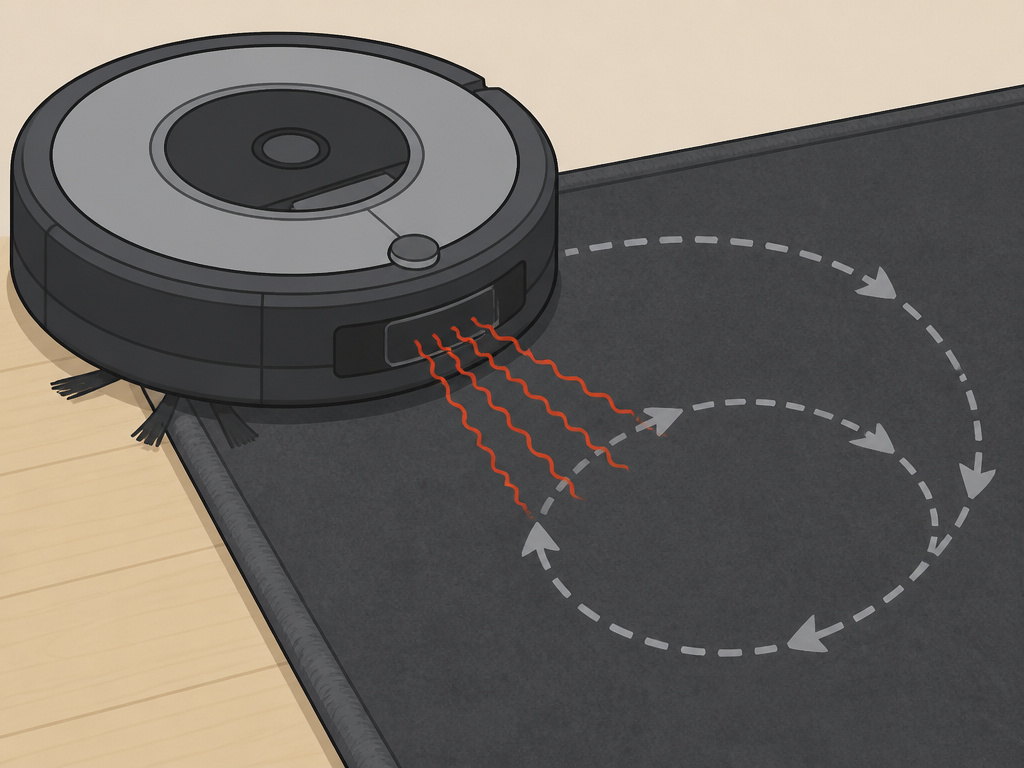 Sometimes the hardware is fine, but the robot’s “eyes” are lying to it.
The Dark Surface Problem
Roomba cliff sensors use infrared light. Very dark, non-reflective surfaces, like black rugs or dark stained wood, absorb that light. The robot interprets this as a cliff edge.
It will approach, back up, turn a little, try again, and repeat. This creates a looping, circling dance at the edge of the rug. The official iRobot stance is that this cannot be calibrated out. Your only solutions are to use a Virtual Wall to block off the area or set a Keep Out Zone in the iRobot HOME App for Wi-Fi models.
Diagnosing Other Sensor-Driven Errors
Circling can be a symptom of other failures. If you see these codes, the wheel is likely fine, but a related sensor is dirty or faulty.
| Error Code | Official Message | Relationship to Circling |
|---|---|---|
| Error 6 | “Move Roomba to a new location…” | Dirty cliff sensors cause false stops and turns, breaking navigation and creating looped paths. |
| Error 15 | Cliff sensor fault | A specific sensor is blinded, causing constant retreat-and-turn behavior in open rooms. |
| Error 26 | Right cliff sensor error | Similar to Error 15, but isolated to one side, causing unbalanced, arcing turns. |
For these, the first step is always a thorough sensor cleaning. If the error persists, the sensor itself may need replacement, a more involved repair.
Frequently Asked Questions
Why does my Roomba just spin in circles and not move?
This is the classic signature of Error 10 or 7. One side wheel is completely seized. The operable wheel turns, the stuck wheel doesn’t, and the robot pivots endlessly on the spot. It’s not navigating; it’s mechanically incapable of moving forward.
Can a dirty filter cause a Roomba to circle?
No. A clogged filter affects suction, not drive. The navigation system and drive motors are separate from the vacuum motor. Suction problems might cause a Roomba not vacuuming well, but they won’t make it spin.
How do I reset my Roomba if it’s circling?
Simple reset rarely fixes a hardware-based circling error. To try: remove the robot from the Home Base, hold down the CLEAN button for 10 seconds until it beeps, and place it back on the charger for a full reset. If the underlying wheel jam is still there, the error will return within minutes.
Is it worth repairing an older Roomba with this problem?
Almost always, yes. The side wheel modules are inexpensive and the repair is straightforward. If the robot was otherwise working well, fixing a circling issue is significantly cheaper than replacing the entire unit. Consider it routine maintenance, like replacing a belt on a traditional vacuum.
Will remapping my home fix circling?
Only if the circling is due to navigation confusion on a smart mapping model (like the i7 or s9). For the vast majority of circling issues on 500, 600, 700, and 800 series Roombas, the problem is physical, not digital. Remapping a robot with a stuck wheel is like asking a car with a flat tire to learn a new route.
The Bottom Line
A Roomba vacuum going in circles is shouting a diagnostic code at you. Error 10, 7, or 1 means “clean my wheels.” The fix isn’t software, it’s a screwdriver, ten minutes, and a pair of tweezers to pull the hair wrapped around the axle. For persistent cases, check the wheel’s internal spring or suspect a dark floor tricking the cliff sensors. This is a maintenance problem, not a terminal one. Get the wheels spinning freely again, and it’ll go back to cleaning straight lines.