
Solving a Hoover Vacuum That’s Making a High Pitched Noise
This post contains affiliate links. As an Amazon Associate, we earn from qualifying purchases.
A Hoover vacuum making a high pitched noise is almost always a bearing in the motorized brush roll wearing out or a severe restriction in the airflow path. The bearing squeal is a metallic shriek that starts within seconds of turning on the brush. The restriction whistle is an airy scream that builds as you vacuum and often comes with a loss of suction.
That distinction decides your next hour. A bearing issue means inspecting and possibly lubricating or replacing the brush assembly. An airflow blockage means a full strip-down of the hose, filters, and bag or bin.
What follows: a diagnostic table to separate the two sounds, the exact Hoover part numbers you’ll need, the one household oil that actually works on bearings, and the manufacturer’s explicit warning you should read before you reach for the lubricant.
Key Takeaways
- A sharp, metallic squeal starting immediately points to a dry or worn brush roll bearing. A steady, airy whistle that builds points to an airflow blockage in the hose, filters, or bag.
- Hoover’s official manuals state bearings are “lubricated for life” and warn against adding oil, but real-world fixes from vacuum repair forums use 3-in-1 Motor Oil for sleeve bearings, not WD-40.
- If the vacuum shuts off with a hot smell, the thermal cut-out has triggered. Unplug it and let it cool for 30 to 45 minutes before checking for blockages or dirty filters.
- For bagged Hoover models, very fine dust like drywall powder can clog the bag’s pores and cause whistling long before the bag looks full.
- Always check the simplest causes first: a full dust bin, a clogged hose, or a tangled brush roll. The official Hoover troubleshooting checklist puts these steps before any disassembly.
The Two Most Likely Causes (And How to Tell Them Apart)
You need to listen. The pitch and timing of the noise tell you which system is failing.
A bearing squeal is a friction sound. The brush roll spins at high speed on a metal shaft inside a plastic or metal housing. When the factory grease dries out or dust infiltrates the seal, metal grinds on metal. It sounds like a shrill, consistent metallic whine or screech. It starts almost the moment you turn on the brush head and doesn’t change much as you move the vacuum.
Common mistake: Spraying WD-40 into a squealing bearing. It’s a solvent and light lubricant that breaks down within days, leaving a gummy residue that can attract more dust and make the squeal return worse. Forum repairs specifically call it out as a temporary fix at best.
An airflow whistle is a pressure sound. The vacuum’s motor is a fan trying to pull a specific volume of air. If the path is blocked—by a full bag, a clogged filter, or a sock in the hose—the air has to force its way through a smaller gap. That turbulence creates a high-pitched, steady whistle or howl. This noise often builds as you vacuum and is almost always accompanied by a noticeable drop in suction power.
| Symptom | Likely Cause | Immediate Check | What Happens If Ignored |
|---|---|---|---|
| Metallic squeal/screech starts instantly with brush roll | Dry or worn brush roll bearing | Inspect brush roll for free spin and end caps | Bearing seizes, snaps the drive belt, or burns out the brush roll motor |
| Airy whistle/howls, suction drops | Airflow blockage | Empty bin/bag, check hose, inspect filters | Motor overheats, thermal cut-out trips repeatedly, eventual motor failure |
| Intermittent grinding + squeal | Debris tangled in brush roll | Turn vacuum over, remove any wrapped hair/string | Damages brush bristles, strains motor, can break the agitator fins |
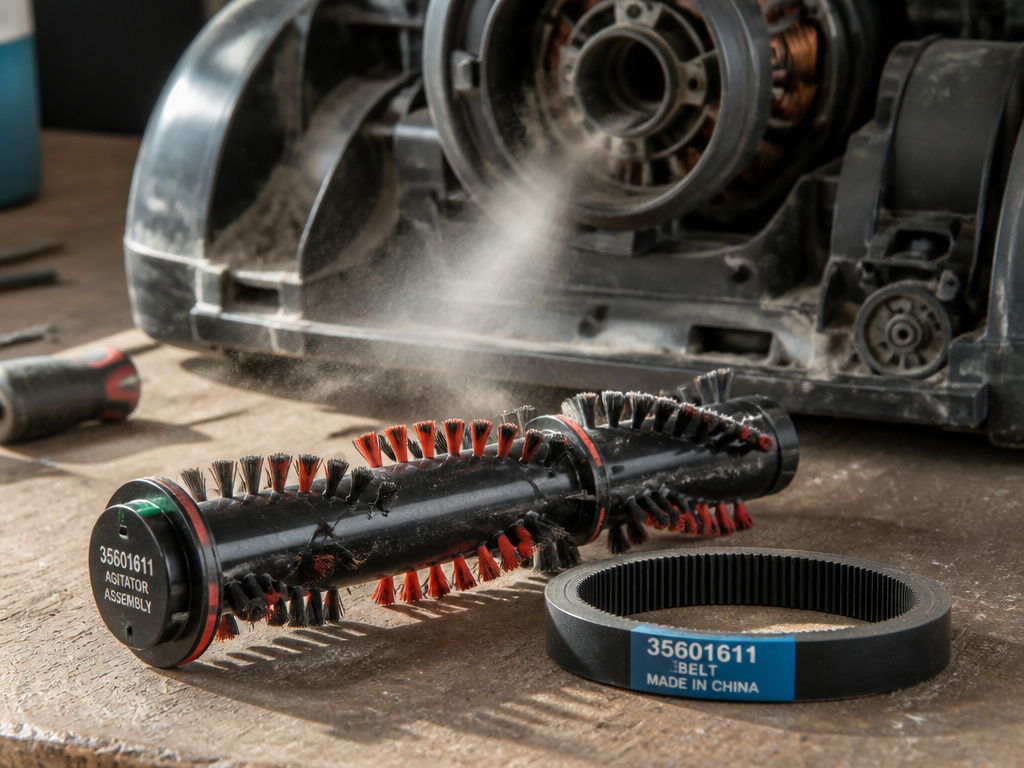
The brush roll is the agitator that beats the carpet. On a Hoover TP71TP01 Turbo Power model, the official spare part is the AGITATOR Y200E, part code 35601611. If the bearing housings on the ends of this unit are shot, lubrication is a temporary patch; replacement is the permanent fix.
The Step-by-Step Diagnostic Flow
Start here before you unscrew anything. Hoover’s own manuals structure their troubleshooting this way for a reason: 80% of noise complaints are solved in the first three steps.
- Unplug the vacuum. This is non-negotiable. You’ll be checking moving parts and electrical connections.
- Empty the dust container or replace the bag. For bagless models, take the bin outside, open it, and tap out all dust. For bagged models like the Hoover HUSHTONE, feel the bag through the door. If it’s firm, replace it. Fine dust clogs bag pores silently.
- Check the brush roll for debris. Tip the vacuum back. Manually spin the brush roll. Does it turn freely? Look for strings, hair, or carpet fibers wound around the ends. Pull them out with scissors or a seam ripper.
- Inspect the drive belt. With the brush roll clear, look at the belt. A worn belt will appear glazed, cracked, or stretched. For the TP71TP01, the genuine replacement is the BELT V200E, part code 35601615.
- Detach and check the hose. Unplug the hose from both the vacuum body and the wand. Shine a flashlight through it. Drop a small, heavy object like a marble through it. If it catches, you have a blockage.
- Remove and inspect the filters. Nearly every modern Hoover has at least two: a pre-motor filter and an exhaust filter. A clogged pre-motor filter is a prime cause of whistling and overheating. Rinse them under cold water only and let them dry for 24 hours completely.
Where this goes sideways: Reinstalling a damp filter. Even slightly moist filter paper restricts airflow massively. The motor works harder, the whistle returns, and the thermal cut-out trips within minutes. Dry them on edge so air circulates.
If you’ve done all this and the high-pitched noise persists, you’ve narrowed it down to a mechanical issue inside the brush roll or a deeper blockage.
When the Noise Is the Brush Roll: To Lube or Not to Lube?
This is where official advice and practical repair clash. The Hoover HUSHTONE commercial manual states it plainly: “The motor and brushroll are equipped with bearings which contain sufficient lubrication for their lifetime. The addition of lubricant could cause damage. Do not add lubricant to motor or brushroll.”
The manufacturer’s stance is based on sealed bearing units. Adding the wrong lubricant can break the seal, attract abrasive dust, and void your warranty.
However, vacuum repair forums are filled with successful fixes for the exact high-pitched screeching described by owners. The consensus from these communities is specific: for the sleeve bearings common in homeowner-grade vacuum brush rolls, a drop of 3-in-1 Motor Oil on each end of the brush roll shaft can quiet the squeal for months. The key is using a light machine oil designed for moving parts, not a penetrating solvent.
I won’t recommend this for a commercial HUSHTONE unit under warranty. But for a five-year-old WindTunnel making a horrible noise, a drop of 3-in-1 on each bearing cap is the difference between a $10 fix and a $80 brush roll assembly. It’s a calculated risk the manual tells you not to take.
How to do it (if you proceed):
- Unplug the vacuum and remove the brush roll. This usually involves removing a few screws from the bottom plate.
- Locate the metal shaft ends where they sit in the plastic bearing housings.
- Apply one small drop of 3-in-1 Motor Oil to each end. Rotate the shaft to work it in.
- Wipe away any excess oil. Reinstall the brush roll and belt.
- Test. The squeal should be gone or greatly reduced.
The fix isn’t always permanent. On older vacuums, the bearing or the shaft itself may be worn beyond a simple lubrication. If the noise returns in a few weeks, the brush roll assembly needs replacement.
When the Noise Is an Airflow Blockage or Overheat
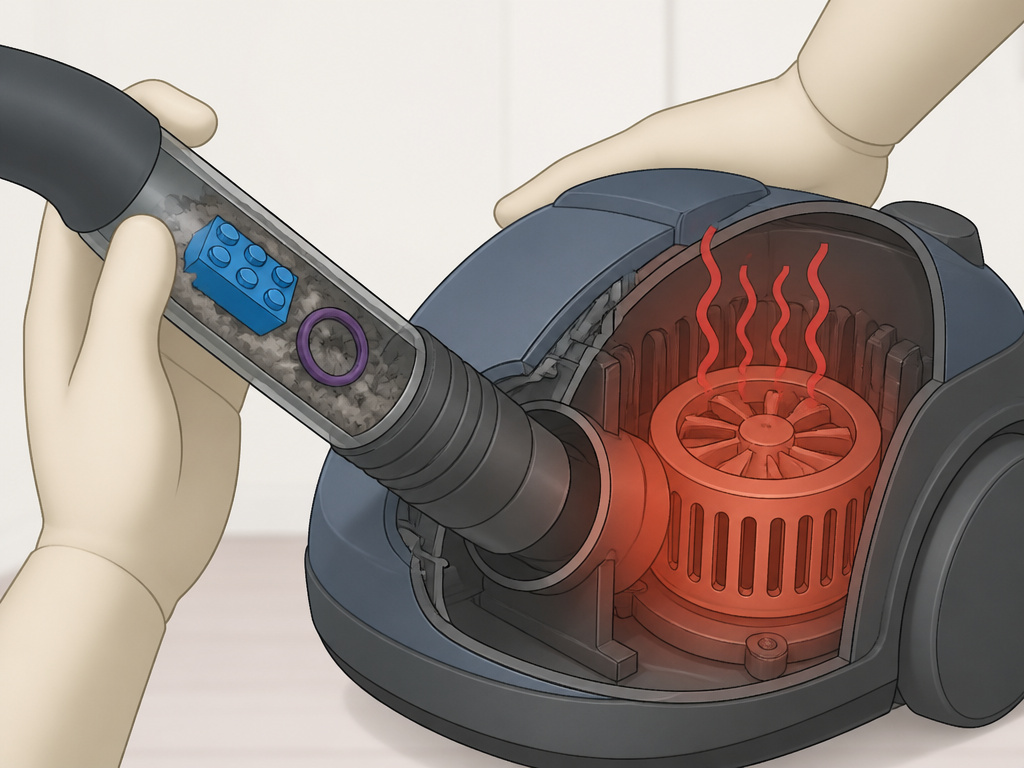
A whistle plus weak suction is a blockage. A whistle followed by the vacuum shutting off is an overheat.
Hoover models have a thermal cut-out switch to protect the motor. If the airflow is restricted (dirty filter, full bag, clogged hose), the motor can’t cool itself. It gets hot, the switch trips, and the vacuum powers down. You might smell a hot, dusty odor.
Before you start: The motor housing will be hot. Unplug the vacuum and do not touch the motor area for at least 30 minutes. The Hoover TP71TP01 manual notes a reset time of “about 30 minutes.” Other manuals cite 45 minutes. Give it time.
The fix is to find and clear the restriction: 1. Follow the air path backwards. Start at the cleaning head, move to the hose, then the hose connection, then the inlet before the filters. 2. Pay special attention to the hose handle and wand. These are common pinch points for Lego blocks, coins, and hair ties. 3. For bagless models, check the cyclonic chamber. Fine dust can pack into the plastic fins, causing a whistle. Disassemble and wipe it clean. 4. For bagged models, change the bag even if it’s not full. If you’ve been vacuuming fine ash, plaster dust, or pet litter, the bag material is likely clogged.
If your Hoover has flashing lights or has shut off, this is often the thermal protection responding to a blockage. Clearing the path and allowing a full cool-down will usually resolve it. Persistent shutdowns point to a failing motor, which is a different repair tier.
Specific Model Insights and Part Numbers
Not all Hoover vacuums are the same. Knowing your model’s specifics turns a guessing game into a targeted repair.
- Hoover TP71TP01 Turbo Power Bagless Pets: The key parts are the AGITATOR Y200E (35601611) and BELT V200E (35601615). The overheat reset time is approximately 30 minutes.
- Hoover HUSHTONE Commercial Series (CH54013, CH54115, etc.): These bagged vacuums have specific brush roll part numbers (e.g., 440007800, 44000803). The manual includes a wear test: if a business card placed under the vacuum doesn’t touch the bristles, replace the brush roll. Never lubricate these bearings.
- Bagged vs. Bagless: The noise profile can differ. A blocked bag creates a muffled whistle and loss of power. A full bagless bin or clogged cyclone creates a sharper, more turbulent howl.
Fine dust is the silent enemy of both. It bypasses cyclones to coat filters and packs into bag fibers. If your high-pitched motor noise started after a big drywall or fireplace cleaning, your filters are the first suspect.
Frequently Asked Questions
Why does my Hoover vacuum make a high pitched noise only on carpet?
This almost certainly confirms the noise is from the motorized brush roll. The brush only engages on carpet settings. The bearing squeal happens when the load is applied. Check for tangled debris first, then inspect the brush roll ends and drive belt.
Is it safe to use my Hoover if it’s making a whistling sound?
No. A whistling sound indicates restricted airflow, which causes the motor to overheat. Continuous use in this state can damage the motor windings or repeatedly trip the thermal cut-out, potentially leading to premature motor failure. Stop, unplug, and diagnose the blockage.
What does it mean if the high pitched noise comes and goes?
An intermittent squeal often points to debris partially wrapped around the brush roll shaft. As it spins, it sometimes catches and sometimes doesn’t. A fluctuating whistle suggests a loose object moving in the hose or wand, alternately blocking and freeing the airflow. Detach and inspect the hose assembly.
Can a dirty filter cause a high pitched noise?
Absolutely. The pre-motor filter is a primary guard. When it’s clogged with fine dust, it becomes the main restriction in the airflow path. This forces air through tiny remaining pores, creating a whistle and starving the motor of cooling air. Clean or replace filters regularly.
My Hoover shut off with a hot smell and now won’t turn on. What do I do?
This is the thermal cut-out in action. Unplug the vacuum and let it sit for at least 45 minutes in a cool place. After it has cooled completely, check and empty the bin/bag, clear any hose blockages, and ensure filters are clean. Then plug it in and try again. If it still doesn’t work, the cut-out may have failed or the motor may be damaged.
Before You Go
A Hoover vacuum making a high pitched noise is telling you exactly where to look. Separate the metallic bearing squeal from the airy blockage whistle. Start with the simple, free checks: empty the bin, clear the brush, and inspect the hose. For bearing squeals, know that a drop of 3-in-1 Motor Oil is the field fix that contradicts the manual. For blockages, be methodical and remember the 30-minute cooldown rule after an overheat.
Keep your model’s part numbers handy—like the AGITATOR Y200E for the TP71TP01—and understand that fine dust demands more frequent filter attention than ordinary dirt. Listen to the sound, follow the path, and you’ll silence the scream without a costly service call.