
Bissell Vacuum Brush Not Spinning: 5-Step DIY Fix That Works
This post contains affiliate links. As an Amazon Associate, we earn from qualifying purchases.
A Bissell vacuum brush not spinning is almost always a clog, a broken belt, or a jammed brush roll. Unplug the vacuum, turn it over, and manually clear any hair, string, or debris wrapped around the brush ends and axle. If it spins freely by hand, check the drive belt for breaks or stretching. If the belt is intact, the issue is likely a clogged airway or a failed motor coupler.
That manual spin test is the dividing line. A brush that won’t turn by hand is mechanically jammed. One that spins freely but won’t run under power has lost its drive.
What follows is a five-step sequence that works on Bissell uprights like the CleanView and PowerForce, plus the specific edge cases that break the standard fix. By the end, you’ll know whether you need a $10 belt, a $40 brush roll, or a deeper repair.
Key Takeaways
- The first step is always to unplug the vacuum and manually spin the brush roll. If it won’t turn, the problem is a physical jam, not an electrical one.
- A drive belt costs under $15 and is the most common fix for a brush that spins freely by hand but doesn’t run. It stretches and snaps from normal wear.
- If the brush works on hard floors but stops on carpet, your height adjustment is set too low. This over-stretches the belt every time you vacuum.
- Ignoring a stalled brush can burn out the brush-roll motor on models with a separate motor, turning a simple belt job into a $100+ repair.
- For cordless stick vacuums like the Bissell Featherweight, a stalled brush often triggers an automatic shutoff. You must clear the jam and let the unit cool down before it will restart.
The 5-Step Diagnostic Sequence for a Non-Spinning Brush
Follow these steps in order. Jumping ahead wastes time and you might replace a part that isn’t broken.
Before you start: Unplug the vacuum from the wall. For cordless models, remove the battery. The brush roll is driven by a belt connected to a motor with enough torque to break a finger if it activates unexpectedly. Never work on a powered vacuum.
Step 1: The Manual Spin Test (The 10-Second Rule)
Flip the vacuum over. Try to spin the brush roll with your hand. Apply firm pressure.
- If it won’t budge: You have a severe jam. Proceed to Step 2.
- If it spins stiffly or grinds: There’s a partial obstruction or worn bearings. Proceed to Step 2.
- If it spins freely and quietly: The mechanics are clear. The problem is in the drive system. Skip to Step 3.
This test takes ten seconds and tells you which half of the machine to focus on.
Step 2: Clear the Brush Roll Jam
A jammed brush is almost always caused by hair, string, or carpet fibers wound around the ends of the brush roll or its central axle.
- Remove the baseplate. On most Bissell uprights, this involves flipping two latches or removing a few screws. The Bissell CleanView Rewind series, for example, uses five screws (three in front, two behind the brush).
- Lift out the brush roll. You’ll see the wound debris immediately.
- Use a seam ripper, utility knife, or scissors to cut through the material. Pull it all away from the axle and end caps.
- While the brush is out, spin it by hand again. It should rotate smoothly with no grinding noise. If it still grinds, the bearings inside the end caps are likely shot and the whole brush roll assembly needs replacement.
What happens if you skip this: Running the vacuum with a jammed brush strains the drive belt or motor. On models with a separate brush motor, you can overheat and burn it out within minutes.
Step 3: Inspect the Drive Belt
The belt is a rubber loop that connects the main vacuum motor (or a dedicated brush motor) to the brush roll. It’s a wear item.
With the brush roll removed, look at the belt and the pulley it sits on. * A broken belt is obvious—it will be in two pieces or missing entirely. * A stretched belt looks loose, glossy, and may have a burnt smell. It can slip on the pulley. * A misrouted belt has jumped off its pulley track.
A stretched belt is the culprit behind a specific, common edge case: the brush spins on a hard floor but not on carpet. The extra resistance of carpet fibers is enough to make the loose belt slip completely.
If the belt is damaged, you need a new one. Bissell vacuum belts are model-specific. A belt for a CleanView will not fit a PowerForce Helix. The part number is usually printed on the old belt or listed in your manual.
Step 4: Check for Airflow Clogs
Suction and brush drive are separate systems on most vacuums, but a severe clog can still cause problems. If the brush drive is belt-driven from the main fan motor, a clogged filter or full bin can cause the motor to overheat and shut down or run slowly.
Check these points: 1. Empty the dirt tank completely. 2. Remove and clean or replace the filter. For many Bissell suction issues, a clogged filter is the root cause. 3. Check the hose and airpath for blockages.
Clear any clogs, reassemble, and test the brush again. A clean machine runs cooler and more efficiently.
Step 5: Investigate the Motor Coupler or Brush Motor
If the brush spins freely, the belt is new and correctly installed, and the airpath is clear, the problem is electrical or mechanical deeper in the drive.
- Belt-driven models: The motor coupler—a plastic piece connecting the motor shaft to the belt drive—can strip its teeth. You’ll need to open the motor housing to check.
- Direct-drive models (some cordless sticks): These have a separate, small electric motor that directly turns the brush. If this motor fails, you’ll need to replace the entire foot assembly.
This is the point where DIY gets complex. If you’re here and not comfortable with a multimeter and disassembly, a repair shop quote is the next step.
TL;DR: Jam, belt, clog, then motor. That sequence fixes 90% of non-spinning brushes.
When the Brush Works on Hard Floor But Not Carpet
This is a classic symptom with a single, fixable cause.
The height adjustment knob on your vacuum is set too low for your carpet. On the lowest setting, the brush roll is pressed so firmly into the carpet pile that it cannot turn. The motor strains, the drive belt stretches and slips, and the brush stops.
Where this goes sideways: Running the vacuum like this for even a few minutes permanently stretches the drive belt. The belt will then slip even on the correct height setting, forcing a replacement.
The fix: Turn the height adjustment dial to the highest setting (usually marked for “high pile” or has the largest gap icon). Test the brush. If it spins, lower the setting one click at a time until you find the highest setting that still allows the brush to turn while maintaining good carpet contact. This is your correct setting.
| Carpet Type | Recommended Setting | What Happens If Too Low |
|---|---|---|
| Bare Floor / Hard Surface | Highest Setting | Brush may not engage; vacuum relies on suction only. |
| Low-Pile / Office Carpet | Medium-Low Setting | Excessive wear on brush bristles; belt strain. |
| Medium-Pile Carpet | Medium Setting | Normal operation. |
| High-Pile / Plush Carpet | Highest Setting | Brush jams, belt slips and stretches, motor overheats. |
Model-Specific Notes and Failure Points
Not all Bissells are the same. The fix changes slightly depending on your series.
Bissell CleanView, PowerForce, and Rewind Uprights
These are the classic belt-driven uprights. The process outlined above is designed for them. Their belts are accessible after removing the baseplate. Always check the Bissell CleanView cleaning guide for proper filter maintenance, as suction health affects overall performance.
Bissell Featherweight and Cordless Stick Vacuums
Models like the Bissell Featherweight stick vacuum (e.g., Model 2610) have a different safety system. The brush roll is designed to shut off automatically if it becomes bound by too much hair or debris.
- The symptom: The brush stops, and the vacuum may not restart immediately.
- The cause: A thermal protector in the motor circuit has tripped.
- The fix: Unplug the vacuum or remove the battery. Clear any jam from the brush roll (often requires removing a quick-release cover). Let the unit sit for at least 30 minutes to cool down. Reassemble and power on. For ongoing care, see our guide on Bissell Featherweight cleaning.
Bissell PowerClean DualBrush and Similar 2-in-1 Models
These cordless hand vacs with motorized feet have a more complex brush system. Issues are often indicated by flashing lights on the foot. Stalling is more likely on high-pile carpets or area rugs due to increased resistance. The fix still starts with checking for jams at the brush roll, but a flashing light may indicate an electronic fault in the foot assembly itself.
The Tools You’ll Need (And the One You Can’t Skip)
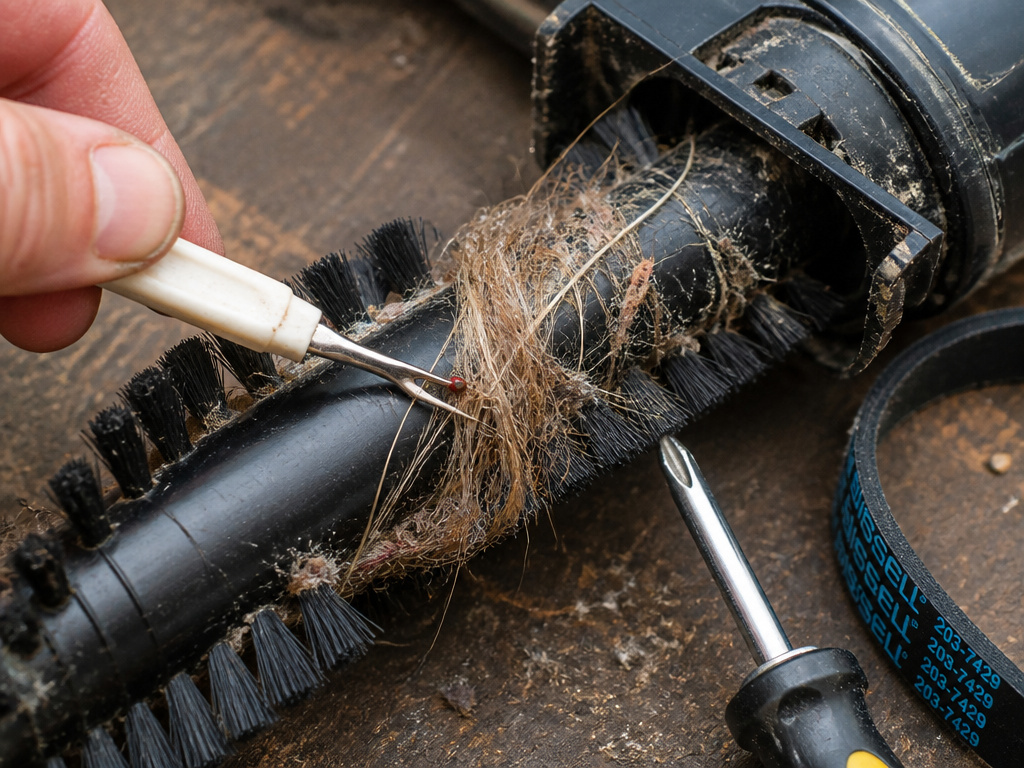 You can do the first four diagnostic steps with household tools. The fifth might require more.
- Phillips screwdriver (#2 head): For removing the baseplate.
- Seam ripper or utility knife: For cutting hair and string jams. Scissors work but are clumsier.
- Replacement drive belt or brush roll: Must be the exact part for your model.
- Multimeter (for Step 5): To check for continuity in switches and motor windings if you suspect an electrical fault.
The seam ripper is the unsung hero. It cuts through wound fibers without damaging the plastic brush roll.
Frequently Asked Questions
Why did my Bissell vacuum brush stop spinning suddenly?
Sudden stop is almost always a physical jam. You likely sucked up a sock, a rug tassel, or a large clump of pet hair that instantly wound around the brush ends and locked it. Follow the manual spin test and clearance steps.
Can I use any replacement belt, or does it have to be for my exact model?
It must be for your exact model. Belts differ in length, width, and ribbing pattern. Using the wrong belt can cause immediate slippage, poor brush speed, or damage to the motor pulley. The part number is on your old belt or in your manual.
Is it worth fixing a non-spinning brush, or should I just buy a new vacuum?
Fix it. A new drive belt costs $10-$15. A new brush roll is $30-$50. A service call for this issue often runs $80-$120. A comparable new vacuum costs $200+. The repair is almost always worth it, unless the vacuum is very old and has other major issues like a loss of suction power that you can’t resolve.
How often should I clean the brush roll to prevent this?
Check it every time you empty the dirt tank. Give it a visual once-over and pull off any obvious hair. Do a full removal and deep clean every 1-2 months, or more often if you have long-haired pets or thick carpets. This routine post-use maintenance is the best prevention.
The brush spins, but my vacuum still isn’t picking up dirt. What’s wrong?
The brush agitates the carpet, but suction lifts the dirt. If the brush works but pickup is poor, you have a suction issue. This points to a full dirt tank, a clogged filter, a blockage in the hose, or a problem with the main vacuum motor. Address those before blaming the brush.
Before You Go
A non-spinning brush is a stoppage, not a death sentence. The fix is logical: find the jam, check the belt, verify the height setting. For most Bissell uprights, the solution lives under five screws on the baseplate.
If you’ve cleared the jam and the belt looks fine, remember the carpet-height trick. That one adjustment saves more belts than any other single action.
When the repair goes beyond a simple belt—into motor couplers or direct-drive failures—you have a decision point. The cost of a professional repair versus a new vacuum is a real calculation. But for the vast majority of sudden stops, you’ll be back in business within twenty minutes and for less than twenty dollars. That’s a win.