
Why Your Dyson Vacuum Keeps Getting Clogged & How To Fix It
This post contains affiliate links. As an Amazon Associate, we earn from qualifying purchases.
A Dyson vacuum keeps getting clogged at three predictable points: the bin inlet, the wand connection, or inside the motorized cleaner head. The machine’s motor will pulse (6 times on a Digital Slim, 7 on other models) and cut out until you clear it. Forcing it to run while blocked trips the thermal cut-out, which requires a 1-2 hour cool-down before you can even start.
That pulsing is a hard stop. If you keep hitting the power button, you’re not solving the clog, you’re baking the motor.What follows is the systematic hunt. We’ll match your model’s specific alert to the blockage it found, walk the mandatory cool-down, and hit the three spots where hair and debris always collect.
Key Takeaways
- The motor’s pulse count tells you the model: a Dyson Digital Slim pulses six times for a blockage; most other models pulse seven.
- After a thermal cut-out from a severe blockage, you must wait 1-2 hours for the Dyson DC33 and similar models to cool before touching it.
- Non-genuine parts and accessories can create gaps that catch debris, void your warranty, and cause repeat clogs.
- Never vacuum fine debris like flour, plaster dust, or ash in quantity, it cakes inside the cyclones and is a guaranteed, hard-to-clear clog.
- Operating a Dyson CY28 below 3°C (37.4°F) makes plastic brittle and can crack seals, leading to internal air leaks that mimic a blockage.
What Your Dyson’s Pulses Actually Mean
Your vacuum is following a programmed protocol. When the onboard sensors detect a severe drop in airflow, the motor pulses and the machine shuts down to protect itself from overheating damage.
The number of pulses is a model-specific code straight from the Dyson engineers.
Dyson Digital Slim: Motor pulses six times when a blockage is detected. (Per Dyson Digital Slim user manual) Dyson V12 Detect Slim / Gen5detect / others: Motor pulses seven times. An LCD screen will also show a blockage icon.
Trying to restart the vacuum while it’s in this pulsed state will cause it to cut out again immediately. The only way out is to clear the physical obstruction.
Where this goes sideways: Assuming the pulsing will stop if you just “power through.” On a Dyson DC33 or CY28, that forces the thermal cut-out. The manual for the DC33 is explicit: you must then unplug the vacuum and leave it to cool down for 1-2 hours before it will operate again. Ignoring that wait risks personal injury from hot components and can permanently warp internal seals.
The 7-Step Blockage Hunt (and the 90-Minute Wait)
This is a linear path from the easiest fix to the most involved. Follow it in order.
Before you start: Unplug corded models. Remove the battery from cordless sticks. If the vacuum overheated and cut out, let it sit for at least 90 minutes, 2 hours for a Dyson DC33. The internal components hold heat.
- Empty the Bin Completely. Don’t just glance. Take the bin off, open the bottom gate, and tap it over a trash can. Look for a wad of dust blocking the inlet at the top of the bin. This is the most common culprit.
- Check the Bin Inlet Seal. That rubber seal around the top of the bin can peel up or collect a hair ring. Run your finger around it. A compromised seal kills suction.
- Detach and Peer Through the Wand. Unclick the wand from the main body and from the cleaner head. Hold it up to a light and look through it. You’d be surprised how a LEGO or a hair tie can lodge perfectly in the middle.
- Inspect the Wand Connectors. Both ends of the wand have plastic louvres or seals. Debris gets pinched here. Use a flashlight.
- Remove the Cleaner Head. Detach the Motorbar or Fluffy Optic head. Check the opening on the head itself and the port on the end of the wand. A thick hair wrap often starts here.
- Clear the Brush Bar (If Applicable). If your cleaner head has a brush bar, turn it over. Use scissors or a seam ripper to cut away hair and string wound around the ends. Don’t pull hard, you can dislodge the end caps.
- Check the Post-Motor Filter. This is the step everyone skips. If suction is weak but you find no blockage in the airway, the final filter after the motor is likely clogged with fine dust. Refer to your manual for its location, it’s often behind the bin housing.
Common mistake: Starting with step 6 or 7. Ninety percent of clogs are in the first four steps. Taking the whole machine apart first wastes time and increases the chance you’ll misplace a clip or seal.
If you’ve done all seven steps and airflow is still weak, you’re likely dealing with a lost suction issue from a failing seal or a worn main filter, not a simple blockage.
The Three Usual Suspects (And One You Never See Coming)
Clogs aren’t random. They form in specific places for specific reasons.
1. The Bin and Cyclone Pack
The bin’s job is to separate debris from the air stream. When it’s overfilled past the MAX line, or when you vacuum ultra-fine dust, that system fails.
- Fine Dust (Flour, Plaster, Ash): This is the silent killer. These powders bypass the cyclones and coat the fine mesh of the post-motor filter. The vacuum doesn’t “clog” in the traditional sense, it just can’t move air. The Dyson CY28 manual explicitly states use on “rubble, ash or plaster” is not covered by the guarantee.
- Hair and String at the Inlet: Long hair and thread get sucked into the bin inlet and form a net that catches everything else. You need to physically remove this wad.
2. The Wand and Hose Junction
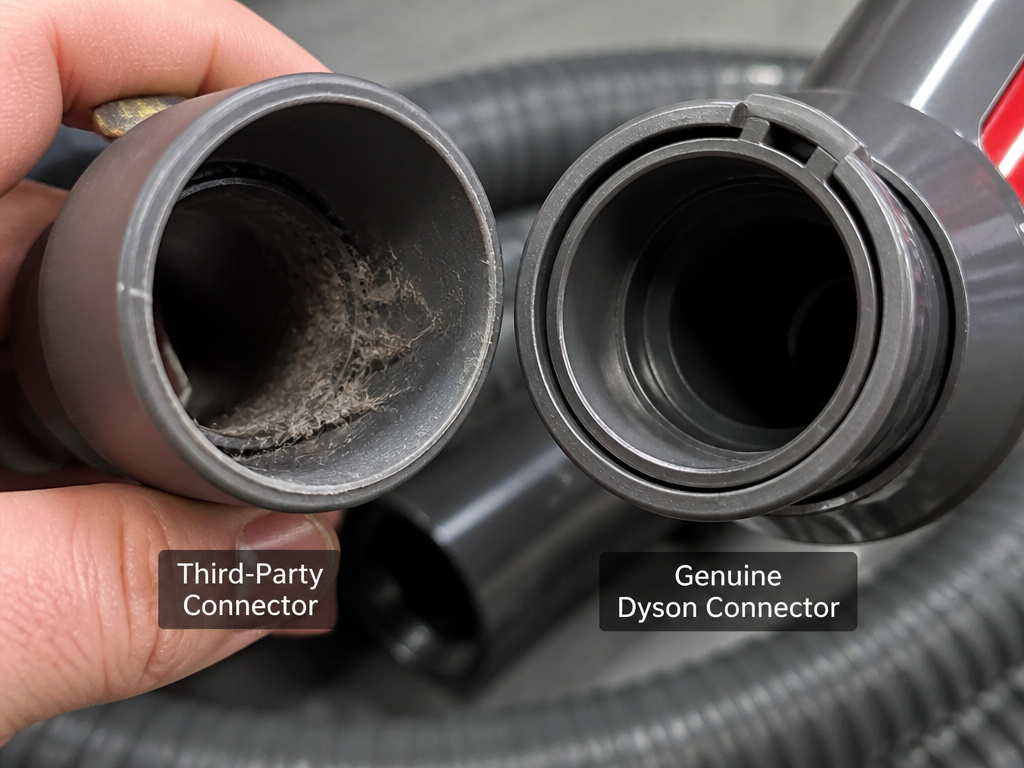
The connections are mechanical weak points. A small gap between the wand and the hose, or a worn rubber seal inside the quick-release catch, creates a tiny ledge.
Debris hits that ledge and stops. The problem feels like a blockage, but it’s really a failed connection. This is why using non-genuine parts or old tools without the proper adapter causes chronic issues.
3. The Motorized Cleaner Head
The Motorbar and Fluffy Optic heads are brilliant, until they’re not. Hair wraps around the brush bar ends, not the center. It builds up slowly, increasing resistance until the brush bar seizes entirely.
When the brush bar stops, the motor strains and airflow drops. The vacuum senses a blockage. You’ll often get a brush not spinning error alongside the clog warning on newer LCD models.
| Clog Location | Common Cause | How to Check | Fix |
|---|---|---|---|
| Bin Inlet | Overfilled bin, hair net | Remove bin, look at top opening | Empty bin, clear hair from seal |
| Wand | Small toy, compacted debris | Detach wand, hold to light | Use a long, flexible tool to push obstruction out |
| Cleaner Head | Hair wrap on brush bar ends | Turn head over, inspect ends | Cut hair away with scissors; clear exit ports |
| Post-Motor Filter | Fine dust (plaster, flour) | Locate filter per manual; check for gray cake | Wash filter, dry for 24+ hours |
Why “Clear” Isn’t Always Clear: The Hidden Clogs
 You’ve removed the obvious wad of hair. The wand is clear. The machine still pulses. Now you’re in diagnostic territory.
The Thermal Cut-Out Reset: If your vacuum overheated, the thermal cut-out needs time to reset. This isn’t a guess. The Dyson DC27 manual states the vacuum is “fitted with a thermal cut-out” that activates on blockage. For the DC33, the mandated wait is 1-2 hours. Plugging it back in early does nothing.
The Temperature Edge Case: This one catches owners in garages or cold porches. The Dyson CY28 operating manual specifies the appliance should not be used or stored below 3°C (37.4°F). Cold plastic contracts, making seals brittle and creating micro-gaps. The motor works harder to pull air through these leaks, which the sensors can read as a blockage. Let the machine reach room temperature before use.
Non-Genuine Part Fallout: That cheaper off-brand hose or tool might connect, but if the internal diameter is off by a millimeter, it creates a turbulence point where debris collects. The Dyson CY28 manual warns that using non-genuine components can invalidate your guarantee. The clog isn’t the part’s fault, the part is the reason the clog formed.
How to Stop It From Happening Again
 Maintenance is the price of admission for a high-suction machine.
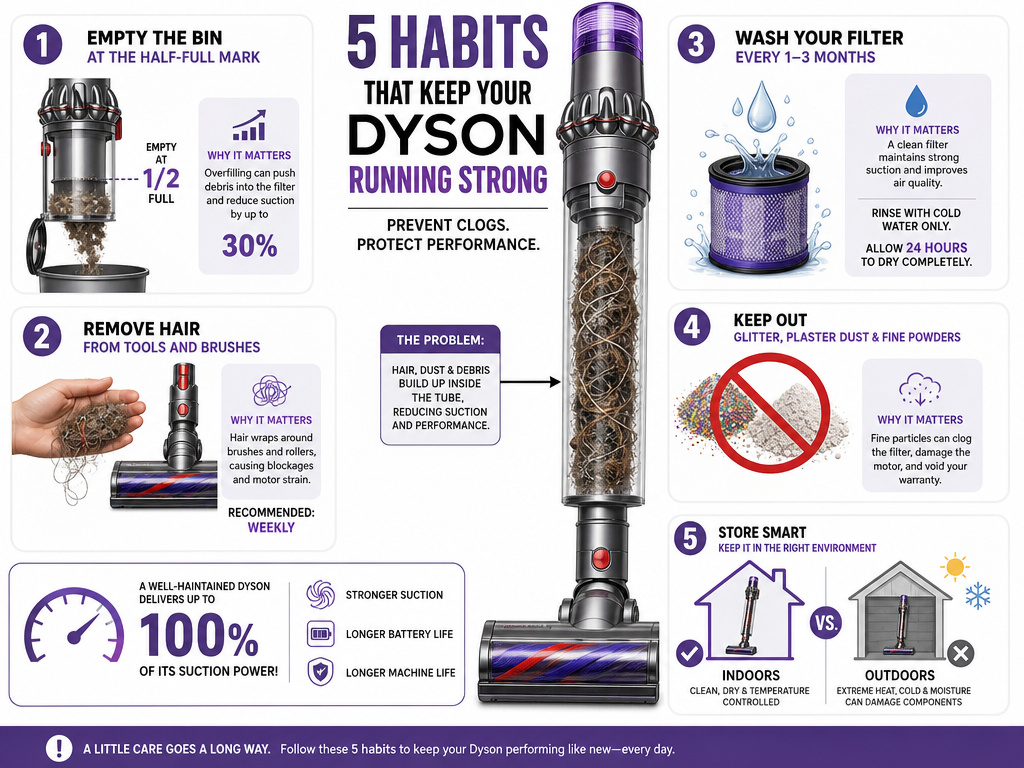
- Empty the Bin Early. Don’t wait for the MAX line. Empty it when it’s half to two-thirds full, especially if you’re vacuuming hair or litter.
- Pre-Visual Sweep. Pick up large debris, strings, and hairballs before you vacuum. You’re not a janitorial service; you’re the pre-filter.
- Wash Filters on Schedule. A clogged filter is an airflow block. Most Dyson filters need a wash every 1-3 months under normal use. If your vacuum keeps asking to clean filter, it’s because the filter is saturated and needs a full 24-hour dry cycle, not just a tap.
- Mind the Debris Blacklist. Plaster dust, ash, flour, glitter. These are not for your vacuum. Use a broom and dustpan.
- Store at Room Temperature. Keep the vacuum inside your climate-controlled home, not in a freezing garage or a scorching shed. Extreme temperatures degrade seals and batteries.
If you follow these steps and your machine still chronically clogs and keeps overheating, you may have a deeper issue like a failing motor or a cracked air duct. At that point, the error codes on newer models can point to the next diagnostic step.
Frequently Asked Questions
Why does my Dyson vacuum clog so easily?
It usually clogs easily for one of three reasons: you’re regularly vacuuming material it’s not designed for (like long hair, string, or fine powder), the bin is consistently overfilled, or a worn seal in the wand or hose is creating a catch-point for debris. Stick vacuums like the V12 are more prone to clogging from overfilling because their bins are smaller.
Can a clog ruin my Dyson vacuum?
Yes, if ignored. Continuously running the vacuum while it’s blocked forces the motor to overheat. This triggers the thermal cut-out repeatedly and can eventually lead to permanent motor failure. Severe overheating can also warp plastic internal components, creating air leaks that cause persistent suction loss.
How do I know if my Dyson filter is clogged?
The symptoms mirror a physical blockage: weak suction, the motor straining, and potential overheating. On models with an LCD screen, you’ll get a filter maintenance icon. The definitive check is to remove the filter, if it’s gray and caked with dust, or if you can’t see light through it easily after tapping it clean, it needs washing.
Is a clog covered under the Dyson warranty?
No. Every Dyson manual reviewed states that clearing blockages is not covered by the guarantee or limited warranty. This includes blockages in the hose, wand, tools, and cleaner head. Warranty coverage is for manufacturing defects, not maintenance issues or misuse.
What’s the difference between a clog and an “airway blocked” error?
There is no difference. The “airway blocked error” is the digital message (on LCD models) for the same condition that causes older models to pulse and cut out. Both mean the machine has detected a severe restriction in airflow and has shut down to protect itself.
The Bottom Line
A Dyson vacuum keeps getting clogged because it’s telling you to change your habits. Empty the bin more, avoid the debris blacklist, and clean the filters before they scream for help. The pulsing motor is a precise diagnostic tool. Listen to it, follow the cool-down rules, and hunt the blockage in order from bin to filter.That’s the difference between a five-minute fix and a weekend waiting for a repair quote.