Dyson Vacuum Keeps Asking to Clean Filter: The Real Fix Guide
This post contains affiliate links. As an Amazon Associate, we earn from qualifying purchases.
Your Dyson vacuum keeps asking to clean the filter for one of two reasons: a programmed monthly maintenance reminder on the LCD screen, or a genuine loss of suction caused by a clogged filter, a separate blockage, or a damp filter reinstalled too soon. Newer models time your last clean; older ones sense airflow restriction. The alert is a starting point, not a final diagnosis.
That distinction is where most troubleshooting stops. The manual says “clean monthly,” so you wash it. But if the alert returns in a week, or the machine still pulses and shuts off, you’re dealing with a different problem, one the alert can’t name.
What follows: the two alert systems, the 24-hour drying spec every manual prints but nobody reads, the five other failures that look like a dirty filter, and how to reset the mind of a smart vacuum.
Key Takeaways
- The “clean filter” alert on models with an LCD screen is often a 30-day timer, not a real-time dirt sensor. You must manually reset it via the settings menu after cleaning.
- Every Dyson manual, from the handheld DC56 to the Gen5detect, mandates a minimum 24-hour air-dry for filters. A damp filter damages the motor and triggers performance alerts.
- Vacuuming fine dust like flour, plaster, or pet dander clogs the filter in days, not weeks. The standard monthly cleaning schedule does not apply.
- A persistent alert after a proper clean usually points to a separate blockage in the bin inlet, cyclone, or tool, or a battery that can’t hold a charge.
- Using a non-genuine or poorly sealed filter can cause air leaks that the machine interprets as a loss of suction, prompting the alert.
How the “Clean Filter” Alert Actually Works
Dyson uses two different systems to prompt filter cleaning, and knowing which one you have changes everything.
Newer cordless models (V12 Detect Slim, Gen5detect, V15, Outsize) feature an LCD screen. The alert you see here is frequently a calendar reminder. The machine logs the date of your last reset and, after roughly 30 days, displays a filter icon with step-by-step washing instructions. It’s a nudge, not a measurement. This is why the alert can appear right after you’ve cleaned a spotless filter.
Older cordless models (V7, V8, V10) and all corded Dysons use a performance-based system. The onboard computer monitors motor load and airflow. If the filter becomes so clogged that the motor struggles to pull air, the machine will pulse, cut out, or display a flashing warning light to prevent overheating. This alert is directly tied to suction power.
The LCD screen on a Dyson V12 Detect Slim or Gen5detect doesn’t see dirt. It sees the calendar. You clean the filter on the 1st, forget to reset the alert, and on the 31st it asks you to clean again, even if the filter stayed in a drawer the whole month.
This difference explains the frustration. If you have an LCD model and the alert returns immediately after a wash, you likely missed the reset step. If you have an older model and the alert persists, your filter is either still dirty, still wet, or something else is robbing performance.
Why the Alert Won’t Go Away After You Clean It
You followed the steps. The filter is clean and bone-dry. You snap it back in, and the dreaded icon is still there. This is the breaking point for most owners.
For LCD models, the solution is in the settings menu. The alert is a software flag that needs to be manually cleared. It’s separate from the physical act of cleaning. If you don’t reset it, the machine will assume you ignored its advice.
For all models, a lingering alert points to a deeper issue. The most common culprit is residual moisture. The filter feels dry to the touch, but the dense HEPA material inside can hold water for days without a full 24-hour air dry in a warm, ventilated spot. A damp filter restricts airflow just like a dirty one, confusing the sensor.
The other possibilities are mechanical. A blockage downstream of the filter, in the bin inlet, the cyclone, or the wand, creates the same airflow restriction. The machine senses strain and blames the filter. Similarly, a worn battery that can’t deliver full power causes the motor to labor, mimicking the symptoms of a clog.
Finally, an improper seal is a silent killer. If the filter isn’t clicked and locked into its housing correctly, or if you’re using a third-party knock-off that doesn’t fit perfectly, air leaks in. The machine tries to compensate by working harder, which triggers the performance alert.
Where this goes sideways: Skipping the full 24-hour dry because the filter “feels dry.” The inner pleats trap moisture you can’t feel. Reinstall it damp, and the motor strains within minutes. The alert comes back, and you’re left thinking the cleaning did nothing.
The Real, Step-by-Step Filter Clean (Not the YouTube Shortcut)
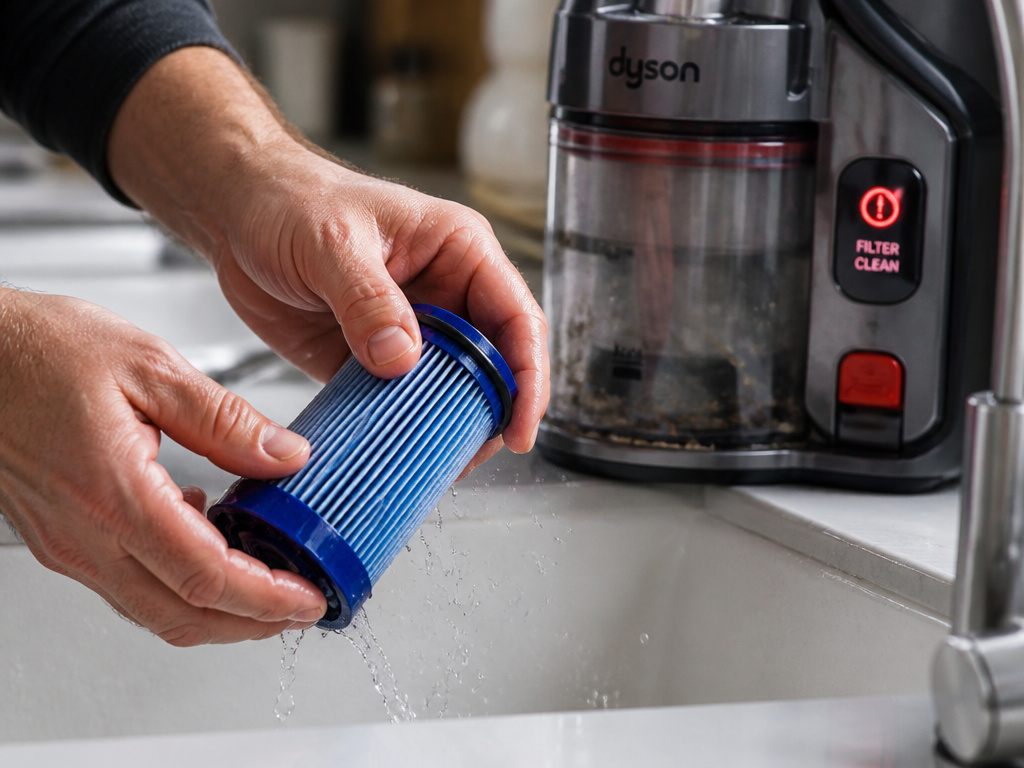 The YouTube method is rinse, shake, and air dry for a few hours. It works until it doesn’t. Dyson’s own manuals for the SV23, V12, and DC56 specify a tighter process designed to prevent the problems that cause repeat alerts.
What You’ll Need:
- Cold tap water.
- A well-ventilated, warm drying area (near a fan, open window, or dehumidifier).
- A clean, dry cloth.
The Process:
- Remove the filter. Unplug or turn off the machine. For most cordless sticks, the filter pulls from the top. For a V7, you lift the pre-filter and rotate the post-filter counter-clockwise to the unlock symbol.
- Tap out loose debris. Gently tap the filter against the inside of your trash bin to dislodge dry dust. This keeps your sink cleaner.
- Wash with cold water only. Hold the filter under a cold tap. Run water through the open end until it runs clear, then rinse the outside for 15 seconds. Do not use detergents, soap, or hot water. Hot water can damage the filter’s fine mesh.
- Remove all excess water. Squeeze and twist the filter gently with both hands. Then, shake it vigorously over the sink. The goal is to get it as dry as possible before the air-dry phase.
- Dry for at least 24 hours. Place the filter open-end-up in your well-ventilated spot. This is non-negotiable. Every single Dyson manual cites “at least 24 hours.” A closet or cabinet does not count.
- Perform a touch test. After 24 hours, feel the inside pleats of the filter. If there’s any coolness or dampness, let it dry another 12. Only reinstall when it’s completely, unquestionably dry.
What happens if you skip a step?
- Using warm water or detergent: Residue gums up the micro-fibers, reducing filtration and air flow permanently.
- Skipping the vigorous shake: Extended drying time (36+ hours), increasing the chance you’ll reinstall it damp.
- Drying for only 12 hours: Almost guaranteed dampness at the core. Motor strain and reactivation of the alert within one cleaning cycle.
The 5 Other Reasons Your Dyson Thinks the Filter Is Dirty
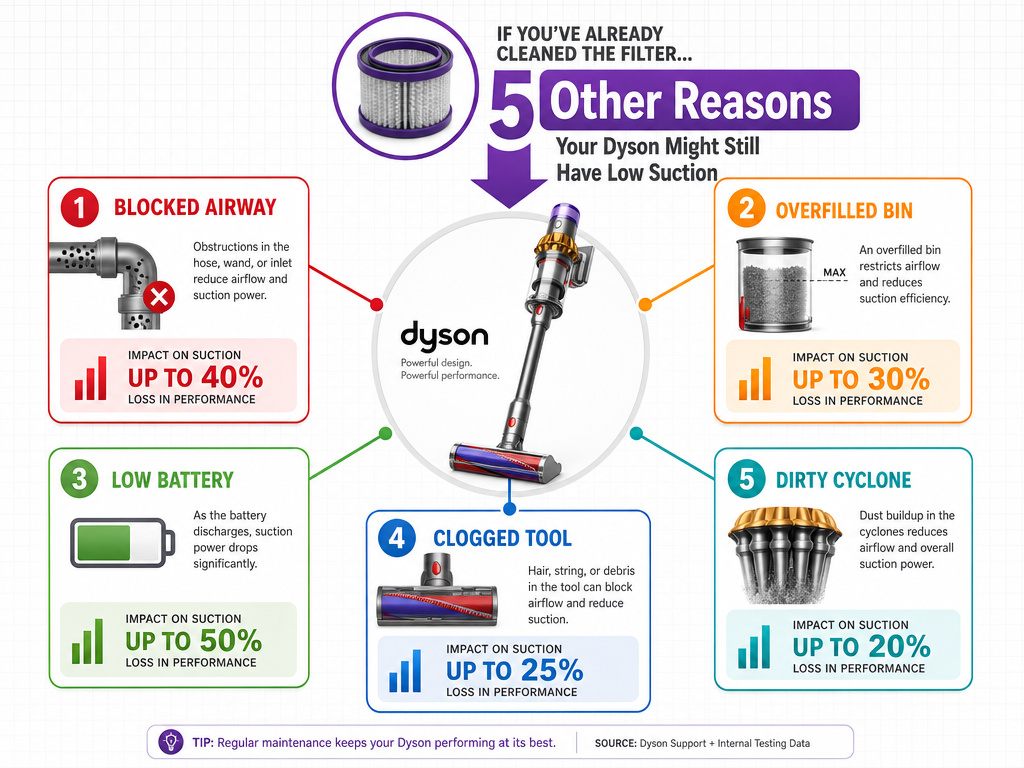 A dirty filter is the most common cause of suction loss, but it’s not the only one. Dyson’s own V7 support page lists multiple reasons for short run time and poor performance. If you’ve cleaned the filter correctly and the problem continues, work through this list.
| Symptom | Likely Cause | How to Check |
|---|---|---|
| Machine pulses or shuts off mid-use | Main airway blockage. Debris packed in the bin inlet, cyclone, or wand. | Detach the wand and tools. Look through the airway from the bin to the floor head for obstructions. |
| Reduced suction, full bin | Overfilled bin or clogged pre-filter mesh. The bin’s MAX line is a functional limit. | Empty the bin. Check the shroud around the bin inlet for a mat of hair and dust. |
| Short run time, full charge | Aging battery or wrong power mode. The battery can’t deliver peak voltage. | Time a full charge on MAX mode. If it lasts under 5 minutes, the battery is likely failing. |
| Suction loss in one tool | Localized tool blockage. Something is stuck in the cleaner head or hose. | Inspect the specific tool. Remove the brush bar from cleaner heads to clear wrapped fibers. |
| Cyclonic rumble, weak suction | Dirty cyclone. Fine dust has caked the internal cyclones, preventing separation. | Detach the cyclone assembly (if possible on your model) and wipe with a dry microfibre cloth. |
Common mistake: Chasing a filter clean when the battery is the issue. A weak battery causes the motor to draw more current to maintain suction, which the system reads as excessive load, the same signal a clogged filter sends.
Start with the simplest: empty the bin and check for blockages. These are free, five-minute fixes. Move to the battery next, as it’s the most common failure point after the filter. The cyclone is a less frequent culprit, but in homes with a lot of fine dust, it can need attention every few months.
How to Reset the Filter Alert on Your Model
Clearing the alert is the final step. If you don’t do this, the reminder will continue unabated.
For LCD Screen Models (V12, Gen5, V15):
- Ensure the filter is clean, dry, and correctly reinstalled.
- Turn on the vacuum.
- Press and hold the power button until the settings menu appears on the LCD.
- Tap the button to scroll until you see the “Reset Filter” or “Filter Maintenance” icon.
- Press and hold the button again to confirm. A checkmark or “Reset” message will appear.
For Older Cordless Models (V7, V8, V10 with indicator lights):
These models typically reset automatically. The alert is triggered by motor performance. Once you clear the blockage (the dirty filter) and restore normal airflow, the warning lights should cease after you turn the machine off and on again. If the lights continue, the performance issue persists, revisit the checklist above.
For Corded Upright or Canister Models:
These do not have a reset function. The alert is usually a drop in suction or an overheating shutdown. Correct the underlying problem, and the “alert” (poor performance) resolves itself.
When Monthly Cleaning Isn’t Enough
The “once a month” rule is a baseline for normal household dust and dirt. It shatters under specific conditions. The DC56 handheld manual explicitly states the filter “may require more frequent washing if vacuuming fine dust.”
If you regularly clean up flour from baking, plaster dust from renovations, fine pet litter, or ash from a fireplace, your filter is filling with particles that are microscopic and cling to the HEPA material. They can pack the filter solid in two or three uses. In these cases, you might need to wash the filter weekly. The machine will ask for it sooner, and it’s not wrong.
The same goes for homes with multiple pets or residents with allergies. You’re moving more dander and hair through the system, loading the filter faster. Listen to the vacuum. If the alert comes back in two weeks, that’s your new schedule.
Frequently Asked Questions
Why does my Dyson say “clean filter” when I just cleaned it?
On models with an LCD screen, you likely didn’t reset the alert in the settings menu. The timer is separate from the filter’s physical state. On any model, a damp filter or a separate blockage can also cause the alert to reactivate immediately.
Can I use my Dyson while the filter is drying?
Yes, but only if you have a second, genuine Dyson filter to use as a spare. Never run the machine without a filter installed, as this will blow dust into the motor and cause rapid damage. The filter cleaning guide for cordless models shows the swap.
What happens if I put the filter back in wet?
You risk two things: mold growth inside the filter and permanent motor damage. A damp filter severely restricts airflow. The motor overheats trying to pull air through the wet material, which can warp internal components and lead to a complete failure. This is a common reason a vacuum is not working after a filter clean.
How do I know if my filter is sealed properly?
After locking the filter in place, try to wiggle it. There should be zero movement. Run the vacuum and place your hand around the filter seal; you shouldn’t feel any air puffing out. A filter that isn’t sealed properly creates an air leak the machine interprets as a clog.
Could this alert mean my vacuum is broken?
It can point to a serious secondary issue. A persistent alert after a proper clean and reset often indicates a failing battery, a major blockage, or a motor problem. If you’ve checked everything else, the motor or main board may be faulty. Consistent overheating or loss of power are strong secondary signals.
The Bottom Line
That alert is more than a simple reminder. On smart models, it’s a calendar notification you must manually clear. On all models, it’s a symptom checker that defaults to the most common cause: a dirty filter.
The real fix starts with a cold water wash and ends with a strict 24-hour dry. If the message persists, stop looking at the filter. Look at the battery, the bin, the cyclone, and the tools. The vacuum is telling you it can’t breathe. Your job is to find out where the airway is blocked, and it’s not always where the machine first points.
When the alert returns too soon, it’s not broken. It’s giving you data about your home. More dust, more pets, finer debris, each demands a faster cleaning schedule. Follow the 24-hour rule, reset the timer, and chase blockages downstream. The alert will stop when you fix what’s actually wrong.