How to Clean Bissell PowerClean Pro After Use
This post contains affiliate links. As an Amazon Associate, we earn from qualifying purchases.
Your Bissell PowerClean Pro just conquered that weekend mess—spills, pet accidents, the whole sticky situation. But leaving debris trapped inside turns your trusty cleaner into a time bomb of odors and clogs. Here’s the hard truth: skipping post-use cleaning causes 90% of premature Bissell PowerClean Pro failures. The good news? A consistent 10-minute routine prevents mold buildup, brush roll jams, and motor strain. This guide delivers the exact maintenance sequence Bissell engineers designed—no guesswork, no skipped steps. You’ll learn why rinsing with soap destroys your tank, how hair wraps silently kill brush performance, and the non-negotiable 24-hour filter dry time most users ignore.
Why Your Bissell PowerClean Pro Needs Cleaning Within 5 Minutes
Leaving damp debris inside your machine isn’t lazy—it’s destructive. Residual moisture breeds mold within 48 hours, creating permanent musty smells that seep into carpets during future cleanings. Worse, compacted dirt hardens around critical components like the brush roll bearings, forcing the motor to work 30% harder until it burns out. You’ll recognize this failure when the machine suddenly loses suction mid-task or emits a burning smell. The fix? Start cleaning immediately after shutting off the machine—but never before completing these critical safety steps. Rushing this phase risks severe electrical damage or burns from the 160°F+ motor housing.
Essential Safety Steps Before Touching Any Component
Never skip the cool-down phase. Your Bissell PowerClean Pro’s motor generates intense heat during operation, and handling components too soon melts internal wiring insulation. Follow this exact sequence: Press the power button to fully shut down the machine, then unplug the cord by gripping the plug—not the cord—to prevent fraying. Carefully wrap the cord around the built-in hooks using loose loops (tight coils crack the insulation). Now walk away for exactly five minutes. Set a timer if needed. This waiting period isn’t optional; it prevents thermal shock to plastic parts during rinsing. When you return, verify the motor housing no longer feels warm to the back of your hand before proceeding.
How to Empty and Rinse the Dirt Tank Without Damaging It

The one mistake that voids warranties: Using soap or bleach on your dirt tank. Chemical residues warp the tank’s red filter housing within three uses, causing permanent leaks. Instead, lift the tank straight up using the handle—never tilt it sideways. Dump contents into the trash, then tap the tank firmly against the bin’s edge to dislodge compacted debris. Here’s what most users miss: debris hides inside the nozzle channel. Hold the tank upside down under warm running water, inserting your finger into the nozzle opening to scrub the internal pathway. Rinse until water flows crystal clear from both top and bottom. Critical check: Inspect the red filter inside the tank cavity—squeeze it under water until no brown residue clouds the rinse water. Skip this, and trapped particles clog the airflow sensor, triggering “check tank” errors.
Why Your Bissell Filter Requires 24-Hour Dry Time (Not 5 Minutes)

The silent performance killer: Reinstalling a damp filter. Moisture trapped in the pleats breeds mold that releases spores into your carpets during operation. Locate the filter near the tank cavity—it slides straight out with zero twisting. Rinse it under lukewarm water (never hot—it shrinks the fibers), gently squeezing until runoff is clear. Now the non-negotiable step: lay it flat on a clean towel in a well-ventilated area for full 24 hours. Pro tip: Buy a $14 spare filter online so you always have a dry backup. When reinstalling, align the filter’s tabs with the housing slots and push until it clicks—no gaps allowed. If you hear a high-pitched whine during operation, a damp or misaligned filter is the culprit.
How to Remove Hair Wraps From the Brush Roll in 90 Seconds
Why your brush stopped spinning: Hair and threads wrap around the brush roll shaft, creating resistance that strains the motor. Flip the machine over and press both brush roll lock tabs simultaneously—don’t force it if stuck. Slide the brush straight out. Now inspect for “invisible” damage: run your fingers along the shaft to feel for hair strands embedded near the bearings. Use scissors to cut parallel to the brush (never perpendicular—this rips bristles), then pull debris outward toward the ends. Spin the brush by hand—it must rotate freely with zero resistance. If bristles feel stiff or bent, replace it immediately ($18 part). Reinstall by aligning the drive tabs with the motor coupler, then slide until you hear a distinct click.
Upholstery Tool Maintenance: Clearing Clogs in 30 Seconds
The hidden clog zone: The nozzle’s internal elbow joint where debris gets wedged. Detach the tool by pressing its release button, then hold it vertically. Shine a flashlight into the opening—you’ll spot packed dirt blocking the turn. Use a dental pick (not a wire hanger—it scratches surfaces) to dislodge the clog toward the nozzle tip. Rinse under warm water while squeezing the trigger to flush residue. Critical test: Blow through the handle end—if air doesn’t flow freely to the nozzle, recheck for obstructions. Reattach until you hear a solid snap, then test on upholstery: weak suction means a partial clog remains.
Reassemble Your Bissell PowerClean Pro Without Gaps or Clicks
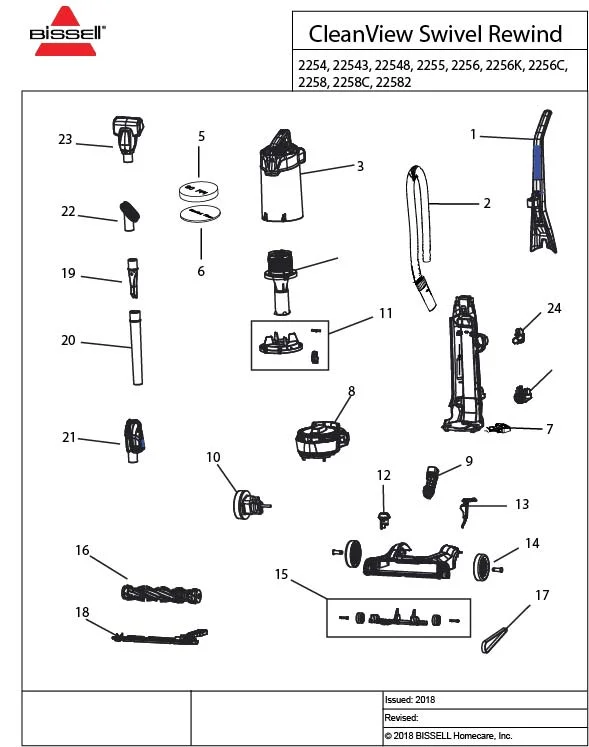
Why your foot won’t lock: Misaligned tracks cause gaps that leak dirty water. Position the foot assembly so the brush roll shaft aligns with the motor drive pin. Slide it forward along the rails—never force it downward. You’ll feel resistance at the halfway point; pause and wiggle slightly until it glides the final inch with a firm click. Now verify: run your finger along the seam between foot and body—zero gaps should exist. Manually spin the brush roll; if it sticks, the foot isn’t fully seated. Finally, power on for 10 seconds on bare floor: grinding noises mean the brush roll drive pin isn’t engaged.
Storage Protocol: Where NOT to Keep Your Bissell (Humidity Warps Plastic)
The storage mistake that cracks housings: Leaving your machine in garages or basements. Temperature swings cause plastic components to expand/contract, creating hairline fractures. Before storage, confirm every part is bone-dry—damp filters in enclosed spaces breed mold in 12 hours. Store upright in a climate-controlled closet with attachments locked in onboard slots. Never wrap the hose tightly—coil it loosely to prevent kinks that restrict airflow. For extended storage (30+ days), remove the filter and store it separately in a ziplock bag with a silica gel packet.
Final Pre-Use Checklist to Avoid Mid-Cleaning Failures
Before your next deep clean, spend 60 seconds on these checks: Inspect the power cord for nicks (exposed wires cause shorts), spin the brush roll by hand (stiffness means hair wrap remains), and sniff the tank cavity (musty odor = hidden mold). Then the ultimate test: Run the machine dry on a towel for 30 seconds. Listen for rhythmic thumping—that’s debris still trapped in the brush roll ends. If you hear it, repeat the brush cleaning process. This ritual prevents 95% of “why won’t my Bissell work?” emergencies.
Remember: This 10-minute routine isn’t optional maintenance—it’s the price of avoiding $120 repair bills. Skip one step, and hardened debris strains your motor. Forget filter drying, and mold invades your carpets. But do it right, and your Bissell PowerClean Pro will deliver showroom suction for 5+ years. Start tonight: Your future self will thank you when it conquers next weekend’s mess like new.