
Innova Vacuum Brush Not Spinning? Diagnose & Restore Spin
This post contains affiliate links. As an Amazon Associate, we earn from qualifying purchases.
The Innova vacuum brush not spinning is almost always one of three things: a debris clog jamming the Whirlwind Technology brush roll, the vacuum being set to Hard Floor mode on carpet, or the thermal cut-off engaging from an overstuffed dust cup. Unplug the vacuum, flip it over, and clear any hair or string wrapped around the brushroll ends. For the NEU700 series, the brushroll is designed to stop automatically to prevent damage—clearing the clog and resetting the vacuum by placing it upright then lowering the handle again should restart it.
That automatic stop is a feature, not a flaw. Eureka’s Whirlwind Technology turns a common mechanical failure into a user-friendly warning. The brushroll seizing because of a thread isn’t a breakdown; it’s the vacuum telling you to check the business end before the motor strains.
What follows: a five-minute diagnostic to rule out the simple fixes, the step-by-step clearance procedure Eureka’s manual specifies, the one part you are told not to touch, and how to tell when the problem is deeper than a clog.
Key Takeaways
- The Whirlwind Technology brush roll in NEU700 models automatically shuts off when clogged. Clear the jam, return the vacuum to its upright position, then lower the handle to reset it.
- Using Hard Floor mode on thick carpet will stop the brushroll. Switch to Carpet mode, turn the unit off for 3 seconds, then back on.
- If the vacuum suddenly powers off entirely, it may be the thermal cut-off. Unplug it, empty the dust cup and check for hose blockages, then wait at least 30 minutes before trying again.
- The owner’s manual for NEU700/NEU180 models explicitly warns: “Do not attempt to remove belt.” Belt service requires a technician call.
- A brush that doesn’t spin while the vacuum still has strong suction points to a brushroll issue. No suction at all points to a main motor or airflow blockage.
The 5-Minute Diagnostic: Clog, Mode, or Overheat?
Start with the vacuum unplugged. The goal is to identify which system has failed: the brushroll drive, the mode selector, or the main power circuit. This saves you from disassembling parts that don’t need it.
First, listen. Turn the vacuum on and lower the handle. Do you hear the main motor running and feel suction at the hose inlet? If yes, the primary motor and power circuit are fine—the problem is isolated to the brushroll drive. This is good news. It rules out a tripped household breaker or a failed main switch.
If the vacuum is completely dead, check your outlet and power cord. Then consider the thermal cut-off. This special thermostat shuts down the entire vacuum if the motor overheats, often from a full dust cup or a severe blockage in the hose. The fix is procedural: unplug, clear the blockage, and wait. The manual mandates a 30-minute cooling period before you plug it back in. Trying sooner won’t work.
Now, check the floor mode. The NEU700’s interface has two buttons: Carpet and Hard Floor. On thick carpet, the Hard Floor setting disengages the brushroll to prevent overwork and potential damage. If the brush roll stops spinning, turn the unit off, wait for 3 seconds, then on and ensure the unit is in Carpet mode.
Common mistake: Forcing the vacuum in Hard Floor mode across a deep pile rug. The brushroll drags, the motor labors, and the protection circuit kills the spin. Switch modes first.
If power and mode are correct, the issue is almost certainly at the brushroll. The next step is a physical inspection.
Step-by-Step Fix for a Clogged Innova Brushroll
A clog is the most common cause. The Whirlwind Technology design uses an automatic shut-off to protect the drive motor when the brushroll can’t turn. Your job is to remove the obstacle and reset the system.
Before you start: Unplug the vacuum. The brushroll is under the base, and your hands will be near the rotating mechanism. Place the vacuum on its side on a clear floor or table.
- Locate the brushroll cover. On the underside of the vacuum’s foot, you’ll see a long, rectangular cover that houses the brushroll. On many Innova models, this cover is held by clips or quick-release tabs.
- Remove the cover. Press the release tabs or unclip the ends. The cover should lift away, exposing the brushroll. If your model uses screws (like the NEU180 series), you’ll need a Phillips screwdriver to remove them.
-
Inspect and clear the brushroll. Manually try to spin the brushroll with your hand. If it doesn’t turn, look at both ends. Hair, string, and carpet fibers wrap around the cylinder and its end caps, creating a solid bind.
-
Cut, don’t pull. Use sharp scissors to slice through the wrapped material along the length of the brushroll. Pulling can damage the bristles or the end-cap bearings. Remove all cut debris.
- Check for free spin. Once clear, the brushroll should rotate smoothly by hand with a soft whirring sound. Any grinding or stiffness points to a damaged bearing or a misaligned end cap.
- Reassemble and reset. Snap the cover back on securely. Plug in the vacuum. Here’s the critical reset sequence for NEU700 models: place the vacuum fully upright (storage position), then lower the handle to the floor. The automatic shut-off should disengage, and the brushroll should spin when you turn it on.
If the brushroll spins freely by hand but still won’t turn on, the problem may be a failed drive motor or an electrical fault in the head. This is less common than a simple clog.
When the Problem Isn’t the Brushroll: Belts, Motors, and Tools
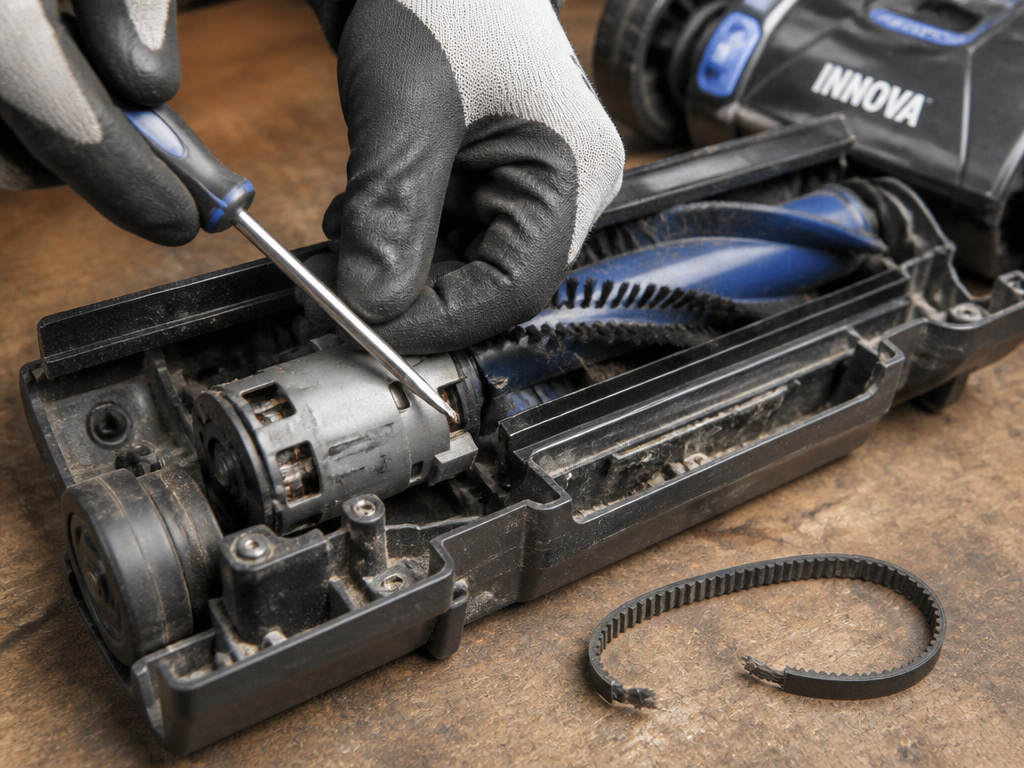
Clearing a jam doesn’t always bring the spin back. Other components in the drive train can fail. Diagnosing them tells you whether you need a part or a pro.
The Belt: A Hands-Off Component
Innova uprights often use a direct-drive system, but some models have a belt connecting the motor to the brushroll. The official stance from Eureka’s NEU700 manual is clear: “Do not attempt to remove belt. Call the Eureka Customer Service Helpline.” This is a sealed system. A broken or stretched belt stops power transfer, leaving you with suction but no agitation. If you’re handy, you can sometimes spot a snapped belt through the brushroll cover opening. Replacing it, however, usually requires partial disassembly that voids the warranty if done incorrectly.
The Brushroll Motor
A dedicated brushroll motor sits in the vacuum head. You can test it by listening closely when the vacuum is on and in Carpet mode. A faint hum or buzz from the head without movement suggests the motor is getting power but its internal mechanism is seized or its drive gear is stripped. No sound at all suggests a broken wire, failed switch, or dead motor. Repairing this typically means replacing the entire motor assembly.
Accessory Tool Failures
Don’t forget the motorized pet & stair tool. If your main brush works but the handheld turbo tool doesn’t spin, the problem is isolated to that accessory. Check its intake for clogs and its brushroll for wrapped hair—the same rules apply. These tools have their own miniature motors and can fail independently.
| Symptom | Likely Cause | Next Action |
|---|---|---|
| Brushroll stopped, suction still strong | Clogged brushroll or wrong floor mode | Clear debris, confirm Carpet mode |
| Brushroll won’t spin, no sound from head | Failed brushroll motor or power switch | Professional diagnosis needed |
| Brushroll hums but doesn’t turn | Seized motor or stripped drive gear | Inspect for obstruction, then consider motor replacement |
| Whole vacuum shuts off after a few minutes | Thermal cut-off triggered | Unplug, empty dust cup, clear hose, wait 30+ minutes |
Why Your Innova’s Design Makes This Happen
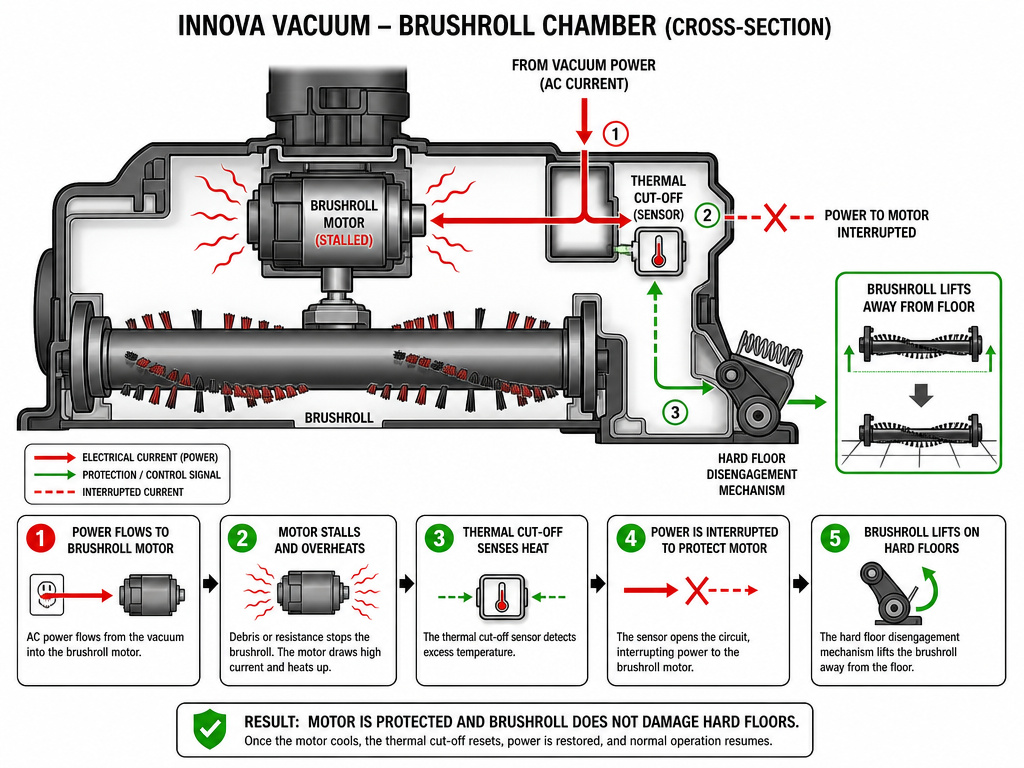
Eureka’s Whirlwind Technology and automatic shut-off aren’t quirks. They are solutions to the two most frequent vacuum failures: motor burnout from a jammed brushroll, and brushroll destruction from running on hard surfaces.
The physics are simple. A brushroll that can’t rotate turns the drive motor into a stationary heater. The current flows, but the energy converts to heat instead of motion. Without a cut-off, the motor windings overheat and melt their insulation in under five minutes. The thermal cut-off and the brushroll shut-off are two separate circuits protecting the same expensive part.
Similarly, a spinning brushroll on hard tile or laminate does nothing useful. The bristles slap the surface, creating noise and wearing down prematurely. The Hard Floor mode disengages the brushroll to stop this waste. Using it on carpet bypasses the agitation you need, which is why the system may stop the brush entirely to alert you to the mismatch.
This is why a generic fix for a Bissell vacuum brush not spinning might not work on your Innova. Bissell models often use a simple belt and lack this integrated sensor logic. The same goes for a Dyson ball vacuum brush not spinning, which is usually a tangled bar or a broken clutch rather than an electronic shut-off.
Preventing Future Brushroll Stoppages
Maintenance is cheaper than repair. A three-minute routine after every few uses keeps the brushroll spinning.
- Clear the ends weekly. Make a habit of flipping the vacuum and checking the brushroll ends for hair wraps. A quick snip with scissors prevents a major bind.
- Empty the dust cup before it’s full. A overstuffed cup restricts airflow, making the motor work harder and increasing the risk of overheating and triggering the thermal cut-off.
- Match the mode to the floor. Use Carpet mode for rugs and carpet, Hard Floor for everything else. Let the vacuum’s design work for you.
- Inspect accessories too. The motorized pet tool is a hair magnet. Clean its brushroll as often as the main one to prevent a separate Dyson vacuum head not spinning scenario with your attachment.
For homes with heavy shedding pets or long hair, consider a vacuum designed for the challenge. Some vacuums with on/off brushroll let you disengage the brush with a switch, which is useful for hard floors. For quick clean-ups, a handheld vacuum with rotating brush can tackle upholstery without dragging out the upright.
Frequently Asked Questions
Why did my Innova vacuum brush stop spinning suddenly mid-use?
This is the classic clog scenario. You likely picked up a string, hair tie, or thick thread that instantly wrapped around the brushroll ends and locked it. The Whirlwind Technology automatically shut off the brush drive to protect the motor. Unplug, clear the obstruction, and reset the vacuum.
Is it safe to remove the belt on my Innova vacuum myself?
No. The Eureka NEU700 owner’s guide explicitly warns, “Do not attempt to remove belt.” The belt compartment is part of a sealed drive system. Attempting DIY belt replacement can damage other components and will void the 5-year limited warranty. For belt issues, contact Eureka customer service.
How long should I wait after the thermal cut-off trips?
The manual specifies a minimum 30-minute cooling period. Unplug the vacuum, check for and clear any blockages in the dust cup, hose, or filters, then wait at least half an hour before plugging it back in and testing. This gives the internal thermostat time to reset.
My Innova brush won’t spin, but my friend’s Shark does the same thing. Is it the same fix?
Not necessarily. While a clog is a universal culprit, the reset procedure differs by brand. A Shark vacuum brush not spinning often involves checking a separate brushroll switch or a removable pod. An Innova requires the upright-then-lower handle reset. Always check your model’s specific manual.
The Bottom Line
An Innova vacuum brush not spinning is usually a protective feature in action, not a breakdown. Your first move is always to unplug, flip, and clear. Remember the three rules: clear the clog, confirm Carpet mode, and respect the 30-minute thermal reset. For everything else—belts, internal motors, electrical faults—the manual directs you to call the helpline. That’s the line between a simple fix and a professional repair. Start with the simple fix. It works more often than not.