
Dyson Animal Vacuum Overheating? Here Are 3 Real Solutions
This post contains affiliate links. As an Amazon Associate, we earn from qualifying purchases.
A Dyson Animal vacuum overheating is almost always a blockage, a dirty filter, or the unit being too cold. The machine has a thermal cut-out that shuts it off to protect the motor. Clear any obstruction, wash the filter with cold water and let it dry for 24 hours, and store the vacuum above 3°C (37.4°F).
That thermal cut-out is your vacuum’s fuse. It trips because something is forcing the 125,000 rpm motor to work too hard, generating excess heat. The fix isn’t about cooling the machine down; it’s about finding and removing the restriction that’s causing the heat in the first place.
What follows is the three-point diagnostic sequence that matches Dyson’s own service logic, the model-specific numbers you need, and the one mistake that turns a simple filter wash into a $200 repair.
Key Takeaways
- The thermal cut-out is an automatic, resettable safety switch. It triggers after 1-2 hours of continuous blockage.
- A damp filter installed before it’s bone-dry can damage the motor. The manual mandates a full 24-hour dry time.
- Storage below 3°C (37.4°F) will make the vacuum refuse to start. It’s not broken; it’s too cold.
- Newer models like the V10 and V11 use motor pulsing and an LED to signal a blockage before the cut-out trips.
- Clearing blockages is not covered under Dyson’s 2-year guarantee. Doing it wrong voids your warranty.
The 3-Step Diagnostic & Fix Sequence
Follow these steps in order. Jumping to step three because step one seems obvious is how people replace a battery when all they needed was a screwdriver.
Step 1: Find and Clear the Blockage (The Most Common Culprit)
Over 80% of overheating episodes start here. The airflow path is long: from the cleaner head, through the wand, into the bin, past the cyclone, and out through the filter. A clog anywhere makes the motor strain.
Start with the machine completely powered off and disconnected from the charger. Never check for blockages with the trigger live.
Where this goes sideways: Checking blockages with the power on. The brush bar can start unexpectedly, and a sharp object caught inside can become a projectile. The manual states this could result in personal injury.
First, remove the clear bin. On most Animal models, you press a red button near the bin base. Inspect the bin opening and the cyclone shroud inside the main body. Use a flashlight. Common finds are hair wraps, Lego pieces, and shredded paper.
Second, check the wand and hose. Disconnect them and look through. A popsicle stick, pen, or large chunk of debris can jam the changeover valve, which switches suction between the floor head and the hose. This causes a total loss of suction to one end and immediate motor strain.
Third, inspect the cleaner head. Use a coin to unlock the fastener on the brush bar cover. Slide the bar out. Cut away wound hair and string with scissors. This isn’t just about performance; a bound brush bar creates drag the motor fights against.
Step 2: Wash the Filter — Not When You Think, and Not How You Think
Your filter is a washable, lifetime part. It’s also the number one cause of progressive performance loss that leads to overheating. Dirt builds up and chokes airflow.
The rule is once a month, or immediately if you’ve vacuumed fine dust like plaster or flour. The V11 Animal technical spec states its filtration meets the F1977 standard and requires a monthly wash cycle.
Here is the exact Dyson-prescribed method, deviation from which causes problems: 1. Tap the filter over a bin to loosen dry debris. 2. Wash under cold running tap water. Do not use warm or hot water. 3. Rub the pleats gently with your fingers. Do not use soap or detergent. 4. Shake out excess water. Then, shake it again. And again. 5. Leave it to dry for at least 24 hours in a warm, ventilated area, open-end up.
The part nobody mentions: “Completely dry” means bone-dry. Any residual moisture will be sucked into the motor when you next use the vacuum. That moisture mixes with fine dust to create a paste that coats the motor bearings. The repair for that is a full motor replacement, and it’s not covered under warranty if they find a damp filter.
Step 3: Check the Environment (Too Cold, Not Just Too Hot)
Dyson designs these vacuums for indoor home use. The batteries and motors have strict temperature limits.
| Model | Minimum Operating/Storage Temperature | Source |
|---|---|---|
| DC58 Animal, V8 Animal | 3°C (37.4°F) | Official Operating Manual |
| V10 Animal (N248) | 5°C (41°F) | V10 ANZ User Manual |
| General Guidance | Charge above 15°C (59°F) for battery life | DC16 Manual |
If you store the vacuum in an unheated garage, shed, or car trunk in winter, it will not turn on. The battery management system locks it out. The LED may flash a temperature warning.
The fix is simple: bring the vacuum inside and let it sit at room temperature for a few hours. Do not try to charge it while it’s still cold.
What the Manuals Say (And What They Don’t)
The official Dyson operating manuals are your single best resource. They contain specific timelines and procedures that generic advice sites miss.
DC58 Animal Manual: “This appliance is fitted with an automatically resetting thermal cut-out. Leave to cool down for 1-2 hours before checking the filter or for blockages.”
That 1-2 hour cooldown is not a suggestion. It’s the time needed for the thermal switch inside the motor to reset. Trying to restart the vacuum before then does nothing.
DC16 Animal Manual: “If the motor overheats, the appliance will cut out automatically. Leave to cool down for at least an hour before restarting.”
The older DC16 model specifies a one-hour minimum. The newer manuals generalize to 1-2 hours. The takeaway is consistent: you must wait.
The manuals are also clear on what voids your guarantee. “Clearing blockages is not covered by your Dyson guarantee.” This means if you break a plastic clip while disassembling a hose to clear a jam, that repair is on you. This is why the first step should always be a non-invasive check of the bin, wand, and easy-access areas.
The LED Language: Your Vacuum is Talking
Newer cordless Animal models (V8, V10, V11) communicate via lights.
- Rapidly Flashing Light (DC35 Manual): Means “too cold/too hot. Do not use.” It’s a temperature error.
- Blockage Indicator LED (V10 Manual): A dedicated light that illuminates if the system detects an obstruction. The motor will also pulse six times as a warning.
- Filter Indicator LED: Lights up continuously when the filter needs washing. Flashes if the filter is installed incorrectly.
Ignoring these lights and continuing to use the vacuum is a direct path to a thermal cut-out event. The pulsing motor is telling you it’s struggling.
Motor Overheating vs. Battery Overheating
These are two different problems with different causes and fixes. Confusing them wastes time and money.
| Symptom | Likely Cause | Feels Like | Fix |
|---|---|---|---|
| Motor cuts out after 5-10 mins on carpet, cooldown resets it. | Blockage in airflow path (hose, brush bar, bin). | The main body, near the bin release, gets very hot. | Complete blockage clearance as per Step 1. |
| Machine runs weak, then dies; won’t power on even after hours off charger. | Battery fault or extreme cold exposure. | The battery pack itself feels unusually warm or is stone cold. | For heat: replace battery. For cold: warm unit to above 5°C (41°F). |
| Machine pulses (on/off rapidly) during use, then cuts out. | Immediate, severe blockage detected by the onboard computer. | The pulsing is distinct from normal operation. | Find and clear the acute blockage. The motor is protecting itself. |
A hot battery is a more serious concern than a hot motor. The motor is designed to get warm. If the battery pack is too hot to touch comfortably during or immediately after charging, you may have a failing cell. This ties into broader Dyson vacuum battery overheating issues that require specific troubleshooting.
When It’s Not a Simple Fix: Warranty and Professional Repair
 Dyson Animal vacuums come with a 2-year guarantee covering parts and labor for defects in materials or workmanship. This does not cover wear items like filters, brush bars, or blockages.
Before you call:
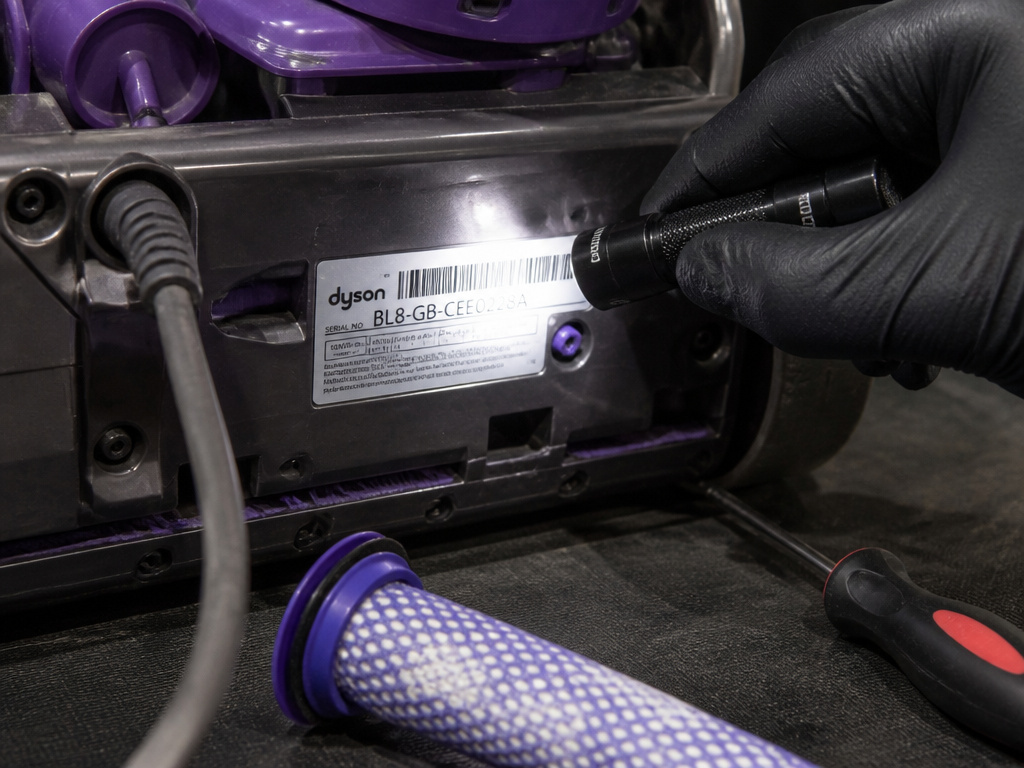
- Have your serial number ready (found on the rating plate on the base of the machine).
- Be able to describe the exact sequence: “It runs for X minutes on Y surface, then shuts off. After Z hours, it works again for X minutes.”
- Confirm you have performed the basic maintenance: cleared blockages, washed and fully dried the filter.
If your machine is still under warranty and the fault is covered, Dyson will often offer a mail-in service or direct you to an authorized service center. For older models, understanding common Dyson Animal error codes can help diagnose whether an issue is electronic.
For persistent problems, like a vacuum that keeps overheating after you’ve cleared everything, the issue could be a failing motor or a deep internal leak. At that point, professional disassembly is needed. The same diagnostic logic applies to other models; the principles behind a Dyson upright vacuum overheating or a Dyson Ball vacuum overheating are identical.
Frequently Asked Questions
Why does my Dyson Animal vacuum keep overheating on carpet?
This points to a restriction in the floorhead path. The motor works hardest on carpet. A clogged brush bar, a full bin, or a dirty filter will cause it to overheat quickly on this high-load surface. Remove the cleaner head and clean the brush bar thoroughly. Also, ensure you’re using the correct motorized head for your carpet type.
Is it safe to use my Dyson after it overheats?
Yes, but only after you have let it cool for the full 1-2 hours and identified and removed the cause of the overheating. Using it repeatedly without fixing the root cause stresses the motor and will shorten its lifespan. Continuous thermal cut-out cycles are a sign of a chronic blockage or a loss of suction from another issue.
Can a bad battery cause overheating?
Yes. A failing battery can cause poor performance, sudden shutdowns, and excessive heat. If your machine runs for a drastically reduced time and the battery pack is hot, the battery is the likely culprit. This is distinct from motor overheating and requires a different solution.
How do I stop my Dyson stick vacuum from overheating?
The process is the same for all Dyson cordless models, including stick vacuums. The core tenets are clear blockages, maintain a clean filter, and avoid cold temperatures. For stick-specific intake paths, pay extra attention to the wand joints and the cleaner head connection. Our guide on Dyson stick vacuum overheating delves into model-specific tips.
What does it mean if the brush not spinning?
Non-spinning brush bar creates immense drag on carpet, forcing the motor to work harder and overheat. This is a common mechanical failure. Check for a jammed brush bar, a broken belt, or a faulty motor in the cleaner head. You can find detailed steps for this in our article on Dyson vacuum brush not spinning, and for Ball models specifically, Dyson Ball brush not spinning.
The Bottom Line
Dyson Animal vacuum overheating is a symptom, not a disease. The machine is correctly shutting down to avoid self-destruction. Your job is to listen to it.
The answer is almost never in the motor itself. It’s in the forgotten sock in the hose, the filter washed three months ago, or the garage that drops below freezing. Follow the three-step sequence: hunt the blockage, wash the filter properly, and respect the temperature limits. That covers ninety-five percent of cases. For the rest, the manual and your 2-year guarantee have you covered. And always, always let the filter dry for a full day. That one step prevents the most expensive repair of all.