
Understanding Dyson Handheld Vacuum Error Codes and Alerts
This post contains affiliate links. As an Amazon Associate, we earn from qualifying purchases.
Dyson handheld vacuum error codes are visual or audible signals, flashing lights, a pulsing sound, or an on-screen “airway blocked” message, that point to a specific problem: a clogged filter, a physical blockage, a low battery, or an environmental lockout like cold temperatures. The most urgent code is a flashing red light, which indicates a fault requiring a call to Dyson support.
That distinction between a simple clog and a motor fault is where most owners waste time. The machine’s diagnostics are trying to isolate the issue, but if you misread a temperature lockout as a dead battery, you’ll chase the wrong fix for an hour.
What follows: a breakdown of every common signal, the exact temperature thresholds that shut down newer models, the one maintenance step that voids warranty coverage if done wrong, and the sequence that actually restores power.
Key Takeaways
- A flashing red light on the battery or body means a hardware fault, stop troubleshooting and contact Dyson support.
- Below 3°C (37.4°F) for older models, or 5°C (41°F) for newer ones like the HH15, the vacuum will not operate or charge as a battery-protection feature. Warm the unit to room temperature first.
- Clearing blockages is explicitly not covered by the Dyson limited warranty. If you damage the machine while checking for a clog, you pay for the repair.
- A filter must be completely dry, 24 hours air-dry minimum, before reinstallation. A damp filter forces the motor to work harder, triggers overheating, and can cause the thermal cut-out to engage.
- The “airway blocked” alert or a pulsing sound always means check the filter first, then the bin inlet, wand, and tool head for physical debris.
Decoding the Light Show: Charging & Operating LEDs
The lights are your first diagnostic tool. Ignoring their specific patterns is how you replace a battery that only needed to warm up.
Charging and battery LED indicators follow a standard color and flash pattern across most Dyson handheld models. A solid blue light means normal operation or a full charge; a flashing blue light often indicates a charging issue or low battery; a solid or flashing red light signals a fault requiring professional support.
The Dyson V6 manual lays out a clear matrix. On the battery, no light means fully charged. A solid blue while plugged in means charging. Flashing blue means the charger isn’t seated properly or the socket is dead. A solid amber light points to a temporary fault like the unit being too hot or too cold. That amber warning is critical, it’s the machine telling you it has shut down to protect itself, not that it’s broken.
During use, with the trigger pressed, the rules shift. A solid blue on the main body is normal. Flashing blue means the battery is too low to continue. Flashing amber again signals a temperature or temporary fault. A flashing red light is your stop sign. It indicates a fault that the machine cannot resolve, and the Dyson V6 manual explicitly says to call the Dyson Helpline.
For the DC34, DC56, and similar models, the language is simpler. A rapidly flashing light means “too cold/too hot – Do not use.” The manual states the vacuum will not operate if the battery temperature is below 3°C (37.4°F). Newer models like the HH15 and Car and Boat handheld raise that threshold to 5°C (41°F). If you store the vacuum in a cold garage or car overnight, it will be inert until it warms up.
| Light Pattern | Likely Meaning | Immediate Action |
|---|---|---|
| Solid Blue | Normal operation / Fully charged | None needed. |
| Flashing Blue (charging) | Charger not seated / Power issue | Re-seat charger, try another socket. |
| Flashing Blue (in use) | Low battery | Recharge. |
| Solid Amber / Flashing Amber | Temperature fault (too hot/cold) | Let machine cool down or warm to room temp (>5°C). |
| Flashing Red | Internal fault | Stop. Call Dyson Helpline. |
The First Thing to Check: Blockages
When suction drops or a pulsating sound starts, the machine is telling you airflow is restricted. This is the most common cause of performance issues and the “airway blocked” message.
Start with the filter. A clogged filter is the simplest fix. Remove it and wash it under cold running water until the water runs clear, as per the Dyson handheld vacuum filter cleaning guide. Then comes the non-negotiable part: dry it for at least 24 hours in a warm, ventilated place. Putting a damp filter back is a guaranteed path to motor strain and more error codes.
If the filter is clean and dry, move to the physical path. 1. Empty the bin. Overfilling past the MAX line restricts airflow at the source. 2. Detach the wand and tool. Look through the bin inlet, the wand, and the tool head for obvious debris, hair, string, cereal bits. 3. Check the small inlet port inside the bin housing. This is a classic choke point. Use a long, thin object like a chopstick or a straightened coat hanger (carefully) to gently clear compacted dust from this narrow opening.
Common mistake: Using the vacuum to try and clear its own blockage. Always switch off and disconnect from the charger before checking for clogs. Poking around a live motor with a metal tool is a fast track to injury and a voided warranty.
Clearing these blockages is basic maintenance, but note this: Dyson’s manuals for the DC34 and DC56 state that “clearing blockages is not covered by the Dyson handheld vacuum cleaner’s guarantee.” If you break a clip or scratch a cyclone while digging out a Lego, that’s on you.
When It’s Not a Blockage: Filter, Battery, and Thermal Cut-Out
You’ve cleared the obvious clogs and the error persists. Now you move to the three systemic culprits: a spent filter, a failing battery, or an overheated motor.
Filter Failure
A filter can look clean but be internally clogged with fine dust like plaster or flour. If washing doesn’t restore performance, the filter may be past its service life. For the older DC01, Dyson mandated replacing the S-level submicro filters every three months. Modern washable filters don’t have a strict calendar replacement, but they do degrade. A filter that’s been washed dozens of times may simply not flow enough air. If you’re constantly getting a filter maintenance indicator even after a proper wash, it might be time for a new one.
Battery Issues
A battery that won’t hold a charge manifests as short runtimes or a machine that dies minutes after a full charge. The Dyson vacuum battery charge problems often trace to age or heat damage. Lithium-ion batteries have a finite number of charge cycles. If your vacuum is several years old and fading, the battery is the likely suspect. A more immediate battery fault shows as a flashing red light, that’s a battery management system error, not just wear and tear.
Thermal Cut-Out
This is the machine’s self-preservation switch. If the motor overheats due to a blockage, a dirty filter, or extended use in MAX mode, a thermal cut-out will shut the motor off completely. The DC01 manual is explicit: if the cleaner stops working and there are no blockages, leave it unplugged for 60 minutes to allow the thermal cut-out to reset. Trying to restart it immediately will do nothing. Let it cool down fully.
The Low-Temperature Lockout (The Hidden “Error Code”)
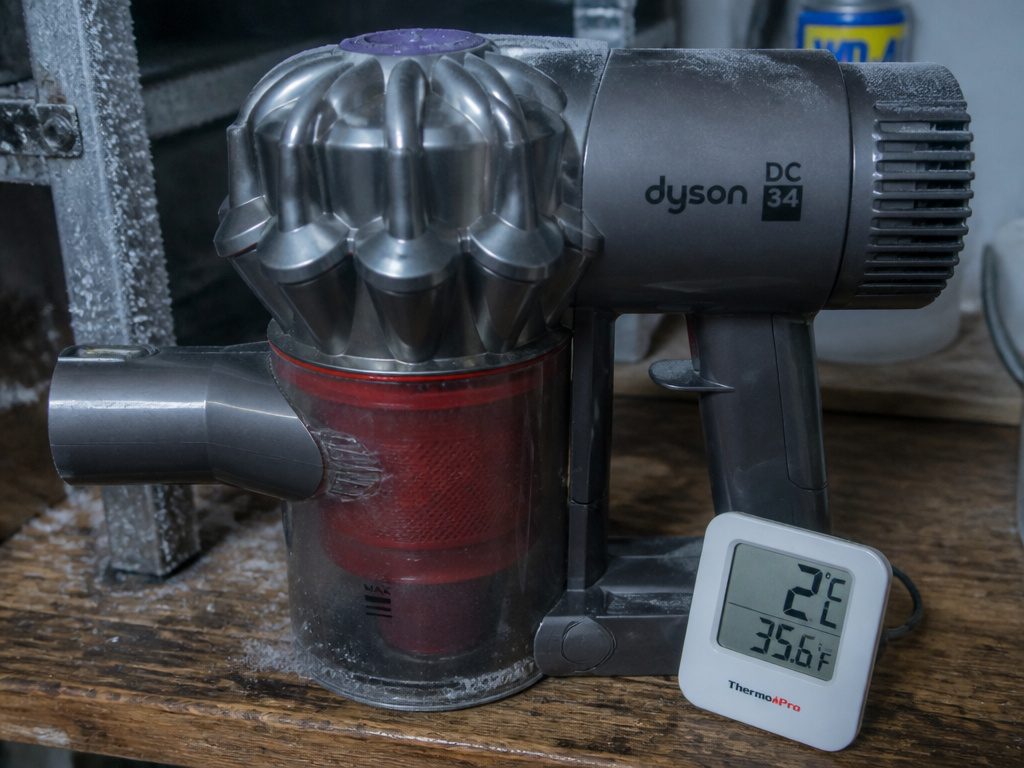 This isn’t a flashing light with a manual code, but it’s a definitive operational halt that feels like an error. Dyson engineers it to protect the lithium-ion battery.
For models like the DC34, DC31, and DC56, the cutoff is 3°C (37.4°F). If the battery temperature is below this, the vacuum will not turn on or charge. For newer models like the HH15 and the Car and Boat handheld, the cutoff is raised to 5°C (41°F). Storing the vacuum in an unheated garage, shed, or car during colder months is the usual cause.
The fix is simple: bring the vacuum indoors and let it acclimate to room temperature for a few hours. Do not try to charge it while it’s cold. This “error” is a feature, not a fault, running a lithium-ion battery at very low temperatures can cause permanent damage.
Error Code Scenarios & Fix Sequences
Stop guessing. Follow this decision tree.
Scenario 1: “Airway Blocked” Message or Pulsing Sound
- Switch off and unplug.
- Remove and wash the filter. Dry for 24+ hours.
- Empty the bin. Check the bin inlet, wand, and tool for debris.
- Inspect the small cyclone inlet inside the bin housing.
- Reassemble with a dry filter and test.
Scenario 2: No Power / Won’t Turn On
- Check battery lights. If no lights, ensure charger is properly connected to a working outlet.
- Feel the machine. Is it cold? If below 5°C (41°F), warm it up indoors.
- Try a different power outlet.
- If lights flash red, contact Dyson.
Scenario 3: Powers On But Dies Immediately or Has Very Short Runtime
- Check for Dyson cordless error codes on the display.
- Ensure the filter is clean and dry.
- Charge the battery fully (about 4.5 hours for a V6).
- If runtime is still short, the battery is likely aged and needs replacement.
Where this goes sideways: Replacing a costly battery when the real issue was a damp filter. The motor struggles against the restricted airflow, drawing more current from the battery, which makes the battery appear dead. Always confirm the filter is bone-dry first.
Professional Repair vs. DIY: The Warranty Line
Knowing when to stop is as important as knowing how to start.
Your DIY domain includes: washing filters, emptying the bin, clearing accessible blockages in the wand and tools, and replacing the battery with a genuine Dyson part. The general Dyson error codes guide can walk you through these steps.
Call a professional for: any flashing red light, a motor that makes a grinding or burning smell, or any physical damage to the cyclones or chassis. Crucially, if your vacuum is still under its 2-year limited warranty, any repair attempt beyond the approved maintenance in the manual can void that coverage. Dyson’s warranty specifically excludes damage from “careless operation… misuse and/or lack of maintenance.”
If you’ve gone through the checklist, clean dry filter, clear airways, warm battery, proper charging, and the fault remains, it’s time for the Dyson handheld vacuum experts. The cost of a professional diagnosis often beats the cost of a wrong part you installed yourself.
Frequently Asked Questions
What does a solid red light on my Dyson handheld mean?
Solid red light is less common than flashing. It typically indicates a charger fault or a severe battery fault. Unplug the charger, wait a minute, and reconnect. If the solid red light persists, try a different outlet. If it remains, the charger or battery has likely failed and needs replacement.
Why does my Dyson keep saying “airway blocked” after I cleaned it?
You probably reassembled it with a damp filter. Even slightly moist filter material severely restricts airflow, tricking the machine’s sensors. Remove the filter and let it air-dry for another full day. Ensure all other pathways, the bin inlet, the wand connection, are also completely clear of debris.
Is the “thermal cut-out” reset the same for all models?
The principle is the same, but the reset time can vary. The classic DC01 manual specifies 60 minutes unplugged. Newer models may reset sooner once they cool to a safe temperature. The universal rule: if it overheated, let it sit unplugged in a well-ventilated area for at least an hour before trying again.
Can cold weather permanently damage my Dyson handheld?
Yes, if you repeatedly try to charge or use it while the battery is very cold. More immediately, storing a lithium-ion battery at a full charge in freezing conditions can reduce its overall capacity. For winter storage in a cold place, Dyson recommends storing the vacuum with about a 50% charge and, of course, in a location above its operating temperature threshold.
Are error codes the same on Dyson stick vacuums?
The core language of lights and warnings is similar, but Dyson stick vacuum error codes may include additional alerts related to the motorized floor tool or wand connections. Always consult the specific manual for your model, like the V8 or V15.
How do I know if it’s a battery error or a motor error?
Battery error usually affects power delivery, won’t turn on, dies quickly, won’t charge. A motor error often happens during operation: strange noises (grinding, squealing), a burning smell, or a sudden stop accompanied by a hot motor housing. A flashing red light after a sudden stop often points to motor or main board failure.
The Bottom Line
Dyson handheld vacuum error codes are a logical, if sometimes frustrating, diagnostic system. A flashing blue light is a suggestion; a flashing red light is a command. The most common fix is the simplest: a filter washed in cold water and dried for a full day. The most overlooked cause is environmental: a vacuum stored in the cold that needs to warm up before it will work.
Before you consider a costly repair or replacement, run the sequence. Filter. Blockages. Temperature. Charge. That order solves eighty percent of problems. For the rest, the persistent red lights and grinding motors, the best Dyson handheld vacuum service is a phone call to the experts. Your time has value, too.