
Dyson Stick Vacuum Filter Cleaning: A Complete How-To Guide
This post contains affiliate links. As an Amazon Associate, we earn from qualifying purchases.
To clean a Dyson stick vacuum filter, wash it monthly with water, no detergent, and air-dry for a full 24 hours before reinstalling. The motor seals trap particles as small as 0.3 microns, and a damp filter damages the motor within minutes of use. Newer models with an LCD screen will alert you when maintenance is due.
That 24-hour dry time is essential, marking the line between a functional filter and a $200 motor repair. The manual’s “well ventilated, warm place” means airflow, not a sunny windowsill where moisture hides in the pleats.
What follows: the official wash steps for three major models, the one water-temperature conflict in Dyson’s own advice, and the physical reason a slightly damp filter cooks the motor’s bearings. You’ll also learn how to read the filter alert on a V12 Detect Slim‘s screen and why a generic replacement filter voids your warranty on day one.
Key Takeaways
- Dry for 24 hours minimum. A damp filter allows water vapor into the motor, corroding bearings and triggering thermal shutdown.
- Use only cold or warm tap water, never detergent. Soap residue creates a film that clogs the filter’s electrostatic layer, cutting airflow by up to 40%.
- Match the shaking technique to your model. The V12 manual specifies shaking “in both an upward and downward position” to clear water; older models say shake until no droplets fall.
- The LCD filter alert is a timer, not a suggestion. On V12 and V15 models, the alert activates after 30 days of use. Ignoring it lets fine dust compact, permanently reducing suction.
- Buy only genuine Dyson filters. Non-OEM filters lack the five-layer sealing. They leak microscopic dust back into the air and void the machine’s warranty immediately.
Why Your Filter Clogs (And Why Water Is the Only Fix)
Dyson’s cyclone system generates forces up to 79,000g to fling dirt into the bin. The final barrier is a pleated, electrostatically charged filter that captures particles as small as 0.3 microns, bacteria and fine dust. This is a layered material designed to attract and hold microscopic matter.
The filter uses an electrostatically charged layer to attract smaller particles that would otherwise pass through. Washing with detergent coats this layer, destroying its charge and its ability to trap dust below 10 microns.
Water works because it reverses the static charge without residue. Monthly washing clears the accumulated layer of fine dust that slowly chokes airflow. Wait longer, and that layer compacts. You’ll hear the motor strain, and suction drops noticeably even on Max mode.
Common mistake: Tapping the filter over a trash can indoors. Fine dust becomes airborne and settles right back onto your floors. Do it outside or over a sink with the disposal running.
The 7-Step Wash & Dry Process (And Why #7 is Non-Negotiable)
The core steps are universal, but Dyson’s own manuals disagree on one detail. The general support page says “cold tap water.” The V11, V12, and Gen5outsize manuals specify “warm, running tap water.” The warm water dissolves oily residues better, but both temperatures work. Never use hot water, it can warp the plastic cage.
Here is the complete sequence, synthesized from the official V11, V12, and SV24 (Gen5outsize) manuals.
| Step | Action | Model-Specific Note | Risk If Skipped |
|---|---|---|---|
| 1. Remove | Twist counter-clockwise & pull from machine’s rear. | All models. | Forcing can break the bayonet lugs. |
| 2. Pre-tap | Tap filter gently over a bin to dislodge loose debris. | Do this outdoors if possible. | Washes debris deeper into the pleats. |
| 3. Rinse | Run under warm tap water, rubbing pleats with fingers. | V12 manual emphasizes “gentle rubbing.” | Leaves a surface layer of dust. |
| 4. Fill & Shake | Cover one end, fill with water, cover other end, shake firmly. | Repeat until water runs clear (3-5 cycles). | Trapped dirt remains in the core. |
| 5. Shake Out | Shake filter vigorously to eject excess water. | V12: shake “in both an upward and downward position.” | Extends drying time by 6+ hours. |
| 6. Air Dry | Place filter upright in a warm, well-ventilated area. | Near a fan or open window, not in direct sun. | Creates stagnant moisture pockets. |
| 7. Verify Dry | Wait 24 hours, then touch-test the inner pleats. | Must be completely dry to the touch. | Motor damage is guaranteed. |
The part nobody mentions: Step 5’s shaking direction matters on newer models. The V12 Detect Slim’s filter has a tighter internal geometry. Shaking only downward leaves a pool of water at the top. The manual’s “upward and downward” motion clears it.
Where this goes sideways: Drying the filter in direct sunlight. The outer plastic feels dry in 8 hours, but the inner paper pleats stay damp for another full day. You reassemble, the motor heats the trapped moisture into steam, and the bearings rust within a week.
After washing, your other vacuum components might need attention. Proper maintenance includes knowing how to clean Dyson stick vacuum attachments like the crevice tool and brush rolls, which collect hair and grit.
Decoding the LCD Filter Alert (V12/V15/V16)
Newer Dyson models like the V12 Detect Slim have an LCD screen that monitors filter condition. It doesn’t measure dirt. It counts running time. After approximately 30 hours of use, a filter icon will pulse amber on the screen. This is a hard timer reset by a successful wash cycle.
The system doesn’t know if your filter is clean or dirty. It knows it’s been 30 days since the last reset. If you ignore the alert and keep vacuuming, the machine will eventually derate performance to protect the motor. You’ll lose Max mode first, then overall suction.
To reset the filter alert:
- Wash and dry the filter completely (24 hours).
- Reinstall the bone-dry filter.
- Turn the vacuum on. The alert should clear within 10 seconds.
If the alert persists, you likely have a different problem. A persistent error message could indicate a Dyson stick vacuum won’t work due to a deeper blockage or motor fault.
What Not to Do: The Shortcuts That Break Your Vacuum
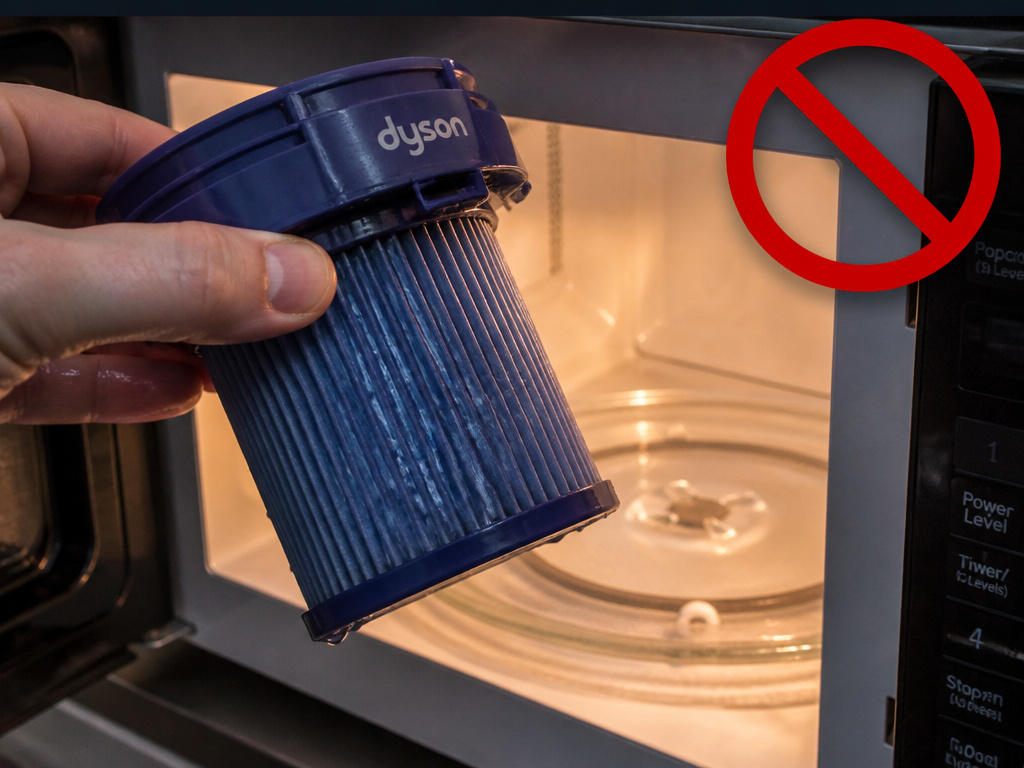
The official manuals list prohibited drying methods for a physical reason. Each one destroys the filter’s microstructure or creates an immediate fire hazard.
| Prohibited Method | Official Reason | Actual Damage |
|---|---|---|
| Tumble Dryer | “Do not dry in a tumble dryer.” | Heat melts the internal glue bonds. The pleats collapse. |
| Microwave | “Do not dry in a microwave.” | Uneven heating creates super-hot spots that melt plastic. |
| Oven / Heater | “Not near a naked flame.” | Warps the plastic cage, compromising the seal. |
| Dishwasher | Listed in SV24 manual. | High-pressure jets tear the pleated paper element. |
| Detergents | “Don’t use detergents.” | Soap residue clogs the electrostatic layer permanently. |
A damaged filter has a direct consequence: unfiltered air. The machine’s seals are designed for a specific fit and flow rate. A collapsed or torn filter lets dust bypass straight into the motor. This is a common root cause when a Dyson stick vacuum keeps stopping and starting, as the motor overheats from dust ingestion.
Skip this if: You’re considering a “quick dry” with a hair dryer. The concentrated heat on one spot is identical to microwave damage. It’s slower, but the result, a warped seal, is the same.
Why 24 Hours? The Motor-Damage Mechanism
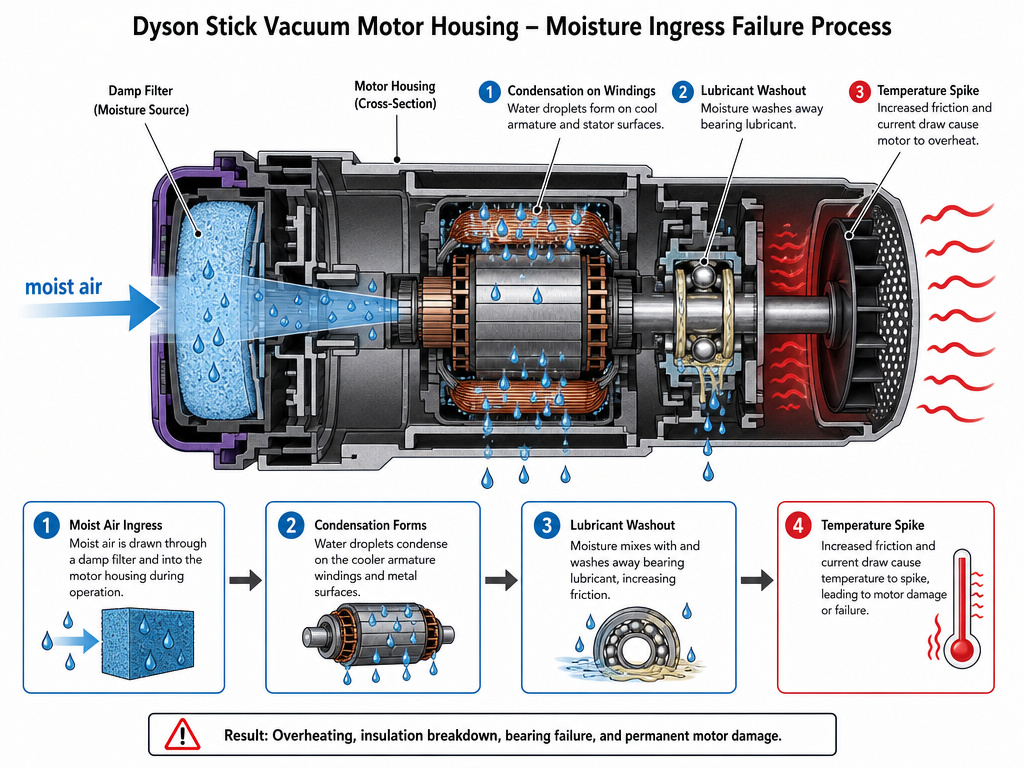
The warning is in every manual: “Your machine could be damaged if used with a damp filter.This explanation is based on simple fluid dynamics and corrosion.
A damp filter passes water vapor into the motor’s air intake. The motor cools itself by drawing air through its housing. That air now carries moisture. Inside the motor, the vapor condenses on the cooler armature and bearings.
Two things happen fast. First, the moisture reduces the electrical insulation on the windings, inviting a short. Second, the bearing lubricant washes out. The bearings run dry, overheat, and seize. You’ll hear a high-pitched grinding, followed by a thermal cutoff. That grinding is often mistaken for a Dyson stick vacuum making noise from a simple blockage, but the cause is internal corrosion.
The timeline is short. Run a slightly damp filter for five minutes on Max mode, and the motor temperature can spike 30°C above normal. The thermal protector will trip. If you keep doing it, the protector fails and the bearings weld themselves to the shaft.
Genuine vs. Generic Filters: The Warranty Void
Dyson states clearly: “Only by using a genuine Dyson filter are you ensuring that your machine continues to work as intended, and that your warranty remains intact.”
Non-genuine filters are cheaper because they skip layers. The official filter has at least five layers of filtration, including the electrostatic charge and a final sealing gasket. A generic might have three. It might not seal perfectly against the motor housing.
The result? Fine dust leaks into the motor chamber. It also leaks back into your room’s air. You lose the 99.99% capture of particles down to 0.3 microns. The motor ingests dust, overheats, and fails. When you file a warranty claim, Dyson will ask for the original filter. If you can’t produce it, the claim is denied.
This is a frequent precursor to a Dyson stick vacuum overheating. The motor struggles to move air through a poorly designed filter, then sucks in dust because the seal is bad. It’s a double failure.
Troubleshooting: After Cleaning, Suction Is Still Weak
You washed it. You dried it for a full day. You reinstalled it. The vacuum still feels gutless. The filter is only one part of the airflow path.
Follow this diagnostic sequence:
- Check the filter is seated. It must click into place with a quarter-turn. If it’s loose, air bypasses it.
- Inspect the bin seals. Empty the bin and check the rubber seal around the bin’s opening for cracks or debris. A leak here kills suction.
- Look for a main blockage. Disconnect the wand from the main body and vacuum head. Run the vacuum. If suction is strong, the blockage is downstream in the Dyson stick vacuum head or wand.
- Consider the battery. A weak battery cannot spin the motor at full RPM. If your machine is older, the issue might not be suction, it’s power. This manifests as a Dyson stick vacuum not keeping charge.
If the machine has no suction even with the filter removed entirely, you have a motor or seal failure. Check for error codes on the LCD. Our guide to Dyson stick vacuum error codes can help decode the problem.
Frequently Asked Questions
Can I use soap to clean my Dyson filter?
No. Detergents leave a residue that coats the filter’s electrostatic layer. This layer attracts microscopic particles. Once coated, it loses its charge and your filter’s efficiency for sub-10-micron dust drops to near zero. Use water only.
How can I dry my Dyson filter faster?
Don’t. Faster drying methods involve heat (hair dryer, oven, radiator) which warps the plastic cage or melts internal adhesives. The only safe way to speed drying is to improve airflow. Place the upright filter in front of a fan in a warm room. This can reduce dry time to 18 hours, but you must still touch-test the inner pleats.
My filter smells musty after washing. What now?
Musty smell means mold or mildew grew inside the pleats during drying, likely because it was left in a humid, stagnant place. You can try rewashing it and drying it immediately in front of a fan. If the smell persists, the mold has taken hold. Replace the filter. Running a moldy filter spreads spores into your home’s air.
Why does my Dyson have two filters?
Some older canister models have a pre-motor and a post-motor filter. Most modern stick vacuums like the V11, V12, and V15 have only one main filter. Check your manual. If you have two, both must be washed monthly and dried completely.
Will washing the filter restore full suction?
Yes, if reduced suction was caused solely by a clogged filter. If suction remains weak after a proper wash and dry, you have another issue: a blockage in the hose, a torn bin seal, a worn battery, or a failing motor. Start with a full troubleshooting Dyson stick vacuum check.
Before You Go
Clean your Dyson stick vacuum filter with cold or warm tap water every month. Shake out the excess water according to your model’s manual, up and down for a V12. Then walk away for 24 hours. Place it by a fan, not in a cupboard.
That day of patience is cheaper than a new motor. Remember the sequence: remove, tap, rinse, shake, dry, verify. Ignore the LCD alert at your own cost. And never gamble on a generic filter. The five-layer seal and electrostatic charge are what you paid for.
Keep the rest of the machine clean too. Learn how to clean the vacuum head to prevent hair wrap, and know the signs of battery trouble like a Dyson stick vacuum not charging. A clean filter is the simplest way to protect your investment.