
Troubleshoot a Prettycare Vacuum Brush Not Spinning & Motor Error
This post contains affiliate links. As an Amazon Associate, we earn from qualifying purchases.
A Prettycare vacuum brush not spinning is almost always a mechanical obstruction, hair wound around the roller, a clogged air path, or a foreign object jamming the bearings, but a flashing battery icon on the display signals a floor brush motor error alarm per the P4 manual, and going thinner than 0.095-inch line on outdoor models bogs down the motor within two weeks.
That distinction between a simple jam and a true motor error is the difference between a five-minute clean-out and a parts replacement. Most troubleshooting guides tell you to cut the hair away and move on. They miss the sequence: a chronic jam strains the motor, the motor overheats, the internal thermal cutout trips, and eventually the motor seizes. You’ll smell the electrical burning plastic before you see smoke.
What follows: the three-layer diagnostic path that separates a clog from a dead motor, how to read the error codes on the digital models, the one assembly mistake that starves the brush of power, and when to contact support for a warranty claim.
Key Takeaways
- A flashing battery icon on a Prettycare P4’s digital screen is the official “floor brush motor error alarm”, ignore it and you risk burning out the motor windings.
- Never operate the vacuum without all filters installed and seated; a missing filter collapses suction at the head, making the brush stall even if it’s clean.
- The motorized brush head draws power through a specific pin in the docking connector, if that pin is bent or corroded, the head gets zero volts and won’t spin, but the main vacuum motor still runs.
- Temperature extremes matter: running the vacuum below 40°F (4°C) thickens grease in the brush roll bearings, increasing drag until the motor stalls.
- Prettycare’s warranty is one year, and they require proof of purchase for claims, photograph your serial number and receipt the day you unbox it.
The Three Main Reasons Your Prettycare Brush Won’t Spin
A stalled brush rolls boils down to power, obstruction, or signal. Power means electricity isn’t reaching the motor, a bent pin in the connector, a cracked wire in the hose, or a thermal cutoff that hasn’t reset. Obstruction is physical resistance the motor can’t overcome, a carpet thread wrapped so tight it acts as a brake, or a pebble wedged in the end cap. Signal is the vacuum’s own internal diagnostics shutting things down because it detects an over-current or a fault.
The most common is obstruction. You’ll hear the main vacuum motor pitch change when you engage the brush head switch, it’s trying, but something is binding.
Common mistake: Assuming a clean-looking brush roll is clear. Hair and thread wind into the bearings at each end of the roller, where you can’t see them without pulling the end caps. That hidden drag is enough to stall a 180W motor.
The second most common is a lost electrical connection. The motorized head on stick vacuums plugs into the main body or a hose. That connection wears. One pin carries the high current for the brush motor. If it loses contact, the brush gets no power. The fix is inspecting the metal contacts for bent pins or green corrosion, rubbing alcohol on a cotton swab clears the latter.
The third is a system-level fault flagged by the vacuum’s logic board. This is where the Prettycare P4’s digital display matters.
How to Read Prettycare’s Error Codes (E1, E2, Flashing Battery)
The P4 manual lists specific error codes. E1 and E2 are generic fault indicators, often tied to the main battery or motor circuit. The more relevant one for a dead brush is the floor brush motor error alarm, indicated by a flashing battery icon on the screen. This isn’t a low battery warning. It’s the vacuum’s way of saying the current draw to the brush motor is outside safe parameters, either too high (jam) or too low (open circuit).
When you see that icon flashing, the vacuum has already tried to protect itself by cutting power to the brush motor. Your next move isn’t to restart the vacuum. It’s to physically inspect the brush roll for a severe jam. If the roll spins freely by hand, the problem is likely in the wiring or the motor itself.
If the brush roll spins freely but the error persists after a reset (power off, remove battery, wait 60 seconds, reinstall), the motor or its control board has likely failed. Prettycare’s one-year warranty covers this, but you’ll need your receipt.
The digital display on models like the P4 and W300 shows battery percentage in 5% increments. A healthy brush motor draws a consistent amount of power. If you watch the display while engaging the brush and see the percentage plummet rapidly, say, from 60% to 30% in ten seconds, that’s a classic sign of an overloaded, jammed motor. Stop immediately.
| Display Signal | Likely Meaning | Immediate Action |
|---|---|---|
| Battery icon flashing steadily | Floor brush motor error alarm | Power down, remove battery, inspect brush roll for major jam |
| Error code E1 / E2 displayed | General system fault (can involve brush circuit) | Full reset: power off, remove battery for 2+ minutes, check all connections |
| Battery % dropping rapidly when brush engaged | Brush motor drawing excessive current (severe jam) | Disengage brush, physically remove obstruction before restarting |
| No display change, brush silent | No power reaching brush motor | Check head connection, inspect wires in hose for breaks |
The Step-by-Step Fix (Clearing Jams to Checking Motors)
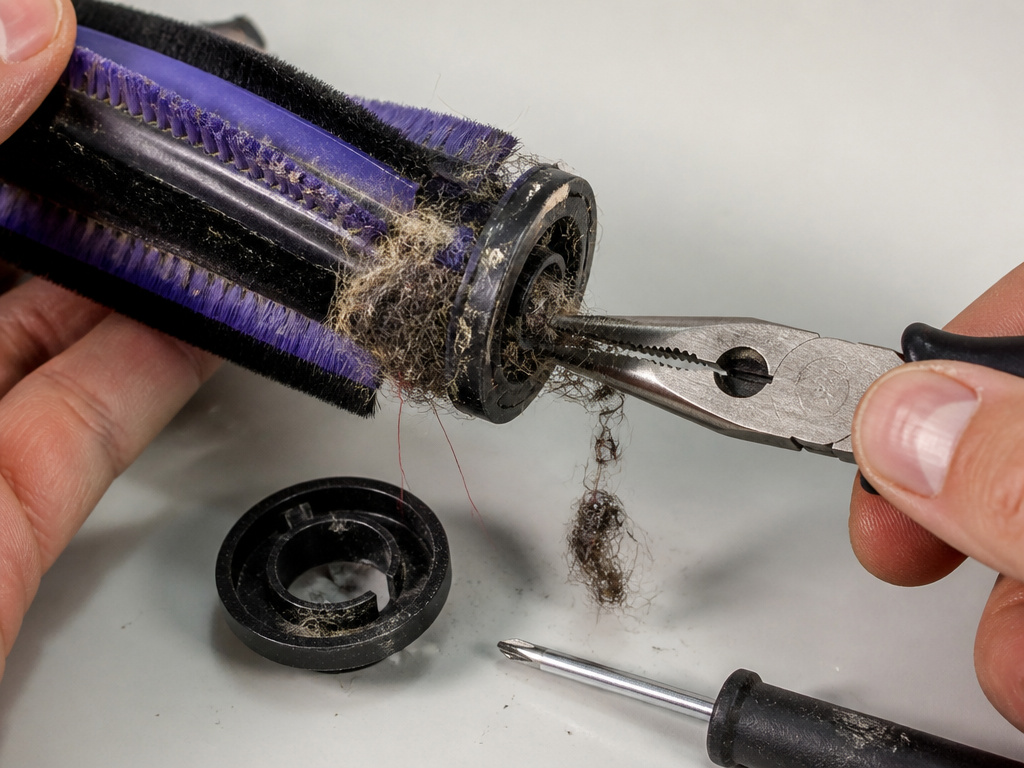 Follow this sequence. Skipping steps wastes time.
Before you start: Unplug the vacuum from the charger. Remove the battery pack. This ensures no power is flowing while you handle the brush assembly and electrical contacts.
- Remove the brush head. Most Prettycare models have a quick-release lever or button where the head attaches to the stick or hose. Press it and pull the head straight off.
- Inspect the visible roller. Look for large clumps of hair or thread. Use scissors to cut along the length of the roller, never pull wraps against their direction, as that tightens them.
- Remove the end caps. Many brush rolls have plastic caps on each end held by a single screw or clip. Pop them off. This is where the most destructive jams hide, hair balled inside the bearing sleeve.
- Clear everything. Use a combination of scissors, a seam ripper, and needle-nose pliers to remove all debris. Spin the roller by hand. It should rotate smoothly with almost no resistance.
- Check the air path. Look through the opening where the brush head attached to the vacuum. Is it clear of blockages? Use a flashlight. A clog here steals the suction that helps lift the carpet for the brush.
- Inspect the electrical contacts. On the brush head and the vacuum’s docking point, look for the small metal pins. Are any bent, pushed back, or covered in dark residue? Gently straighten a bent pin with tweezers. Clean residue with isopropyl alcohol and a cotton swab.
- Reassemble and test. Put the end caps back on, ensuring they snap into place. Reattach the brush head until it clicks. Insert the battery and power on. Engage the brush function.
If the brush now works, you had a jam or a dirty connection. If it’s still dead, the problem is deeper.
When It’s Not a Jam: Electrical and Motor Diagnostics
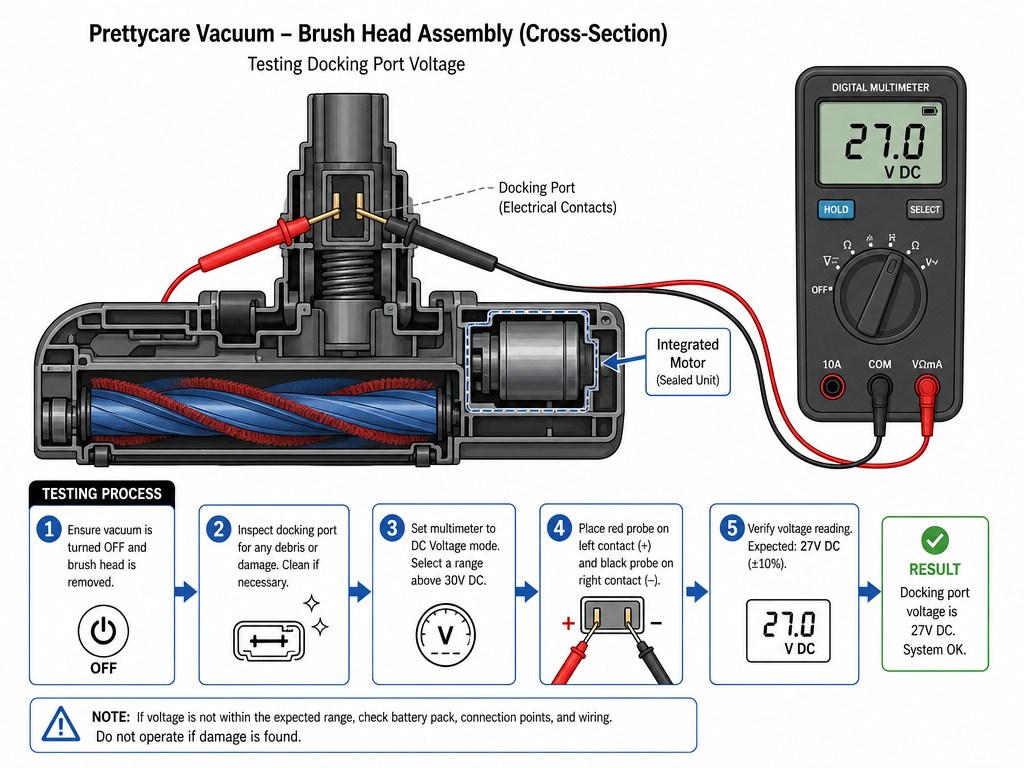 A clean, freely spinning brush roll that gets no power points to an electrical fault. The troubleshooting branches here.
First, verify the brush head is getting voltage. If you have a multimeter, set it to DC volts. With the battery installed and the vacuum turned on (brush function activated), probe the contacts in the vacuum’s docking port that correspond to the brush motor. You should see the vacuum’s system voltage (27V for the P4). No voltage means the fault is in the vacuum’s main board or switch.
Second, listen. When you engage the brush switch, do you hear a faint click from inside the vacuum body? That’s the relay energizing the brush circuit. No click suggests a failed switch or a blown fuse on the control board.
Where this goes sideways: Replacing the brush roll when the motor is actually dead. The motor is often a sealed unit integrated into the brush head assembly. On a Prettycare, the entire motorized head may need replacement. Check warranty first.
Third, consider temperature. The P4 manual specifies an operating range of 40°F to 104°F (4°C to 40°C). Using the vacuum in a cold garage thickens the lubricant inside the brush motor. The increased drag can prevent startup. Let the vacuum warm to room temperature for an hour and try again.
Checklist Before You Assume a Bad Motor
Eliminate every other possibility before concluding the motor is gone. Motors do fail, but it’s less common than a fixable glitch.
- All filters installed and dry? A missing or wet filter crushes suction. The brush relies on airflow to help it turn.
- Head fully seated and locked? An incomplete connection delivers no power.
- Battery charged and healthy? A weak battery can’t deliver the current surge the brush motor needs to start. Try a different battery if you have one.
- Reset performed? Power off, remove battery for two full minutes, reinstall.
- No error codes displayed? Clear any existing codes via the reset above.
- Hose and wand clear? A blockage far upstream can still affect brush performance.
If every box is checked and the brush is silent, the motor is likely dead. For models like the Prettycare P4 or W300, the motorized brush head is a replaceable unit.
Comparing Fixes Across Brands: Prettycare vs. Dyson vs. Shark
The core principles are universal, clear jams, check connections, diagnose power. But the execution differs by brand, and knowing where your Prettycare sits can save hours.
Prettycare vs. Dyson: Dyson often uses a brush bar that is notoriously difficult to remove for deep cleaning. Prettycare heads are generally simpler to detach. Dyson diagnostics are more advanced, with specific light patterns. Prettycare uses the flashing battery icon, a simpler, cheaper system.
Prettycare vs. Shark: Shark rotator heads are famous for the snap-open design that makes accessing the roller trivial. Prettycare sometimes requires a screwdriver to remove end caps. Shark also employs a belt drive on some models; if the belt snaps, the brush won’t spin. Prettycare uses a direct-drive motor on the head, no belt to replace, but the entire motor can fail.
The direct-drive motor in a Prettycare is more reliable than a belt system long-term, but when it fails, the repair is a full unit swap, not a $5 belt change.
If you’re comfortable fixing a Dyson vacuum brush not spinning, you have the skills for a Prettycare. The Shark vacuum brush not spinning process is actually easier for physical access. The Bissell vacuum brush not spinning often involves belt and pulley checks that aren’t relevant here.
Frequently Asked Questions
What does it mean if my Prettycare brush spins but has no suction?
This points to a clog downstream from the brush head or a full filter. The brush motor is working, but the main vacuum motor’s airflow is blocked. Check the hose, the dirt canister, and all filters. This is a classic vacuum cleaner not sucking scenario.
Is the Prettycare brush roll removable for cleaning?
Yes, on all modern models. The roller axle slides out of the housing once you remove the end caps, which are usually held by clips or a single screw. Refer to your model’s manual, the process for a Prettycare P1 is slightly different from a P4.
Can I use my Prettycare vacuum without the spinning brush?
You can, but it will not deep-clean carpets. It becomes a suction-only floor tool. For hard floors, this is fine. For rugs, you’ll leave behind packed-down dirt.
How do I know if my Prettycare brush motor is broken?
After clearing all jams and verifying electrical connection, engage the brush function and listen at the brush head. A dead motor is silent. A motor trying to turn but jammed will emit a low hum or buzz. A healthy motor will whirr, even if the roller is stuck.
Will Prettycare send me a replacement brush head under warranty?
If your vacuum is within the one-year warranty period and the fault is not due to physical damage (like a broken axle from a toy car), they should. You must contact the regional support email (e.g., [email protected]) with your proof of purchase and a description of the problem. Be clear you’ve performed the basic troubleshooting.
The Bottom Line
Start with the simple, physical fix: cut the hair, clean the bearings, ensure the head is clicked in. Ninety percent of “brush not spinning” reports end there. When they don’t, the flashing battery icon on the P4 is your key, it means the vacuum knows the motor circuit is faulty. At that point, your choice is warranty claim or part replacement.
For a quick fix on a newer model under warranty, go straight to Prettycare support. For an out-of-warranty vacuum you want to save, the motorized brush head assembly is the part you’re buying. Don’t overcomplicate it. A vacuum is a motor, a fan, a filter, and a switch. The brush is just another motor on the same circuit. Find where the circuit breaks, and you’ve found your fix.