
How To Resolve The Roomba Vacuum Problem Error 26 For Good
This post contains affiliate links. As an Amazon Associate, we earn from qualifying purchases.
Roomba Vacuum Problem Error 26 is a protective shutdown triggered by insufficient airflow to the vacuum motor. The robot’s firmware detects the motor drawing too much current as it strains against a blockage and shuts it down to prevent burnout. The fix involves clearing the restriction, which is a clogged filter 40% of the time, a failing motor impeller 36% of the time, or debris packed in the intake 24% of the time.
That current spike is the critical signal. The motor isn’t just weak; it’s working harder against a physical barrier, pulling more amps and generating heat. If you keep clearing the error without finding the restriction, you’re asking that motor to run hot repeatedly. It might last a week, or it might fail on the next cycle.
What follows is a diagnostic sequence that starts with the ten-second external check and goes all the way to motor replacement. You’ll also learn how to spot a non-modular Roomba that can’t have its cleaning head swapped, and why a weekend filter check beats iRobot’s two-month schedule if you have pets.
Key Takeaways
- Error 26 is a motor-protection shutdown, not a suggestion. Ignoring it cooks the $70 vacuum motor module.
- For homes with shedding pets, check the filter every weekend, not every two months. Hold it up to a light; if you can’t see through the pleats, replace it.
- Newer i1, i3, and i5 models are often non-modular. If your Roomba has a battery door, the bottom cover doesn’t come off and the Cleaning Head Module cannot be replaced.
- A reboot (hold CLEAN for 20 seconds) only clears the error from memory. If it returns immediately, the physical blockage is still there.
- After cleaning the filter, shine a flashlight into the robot’s intake port. Debris packs around the brush module, creating backpressure that a clean filter won’t solve.
What Does Error 26 Mean? (The Motor Protection Shutdown)
Error 26 means the Roomba’s vacuum motor is drawing too much current because its airflow is restricted. The firmware interprets this high current draw as a blockage and shuts the motor down to prevent it from overheating and burning out. This isn’t a sensor glitch. It’s the equivalent of a circuit breaker tripping.
The robot monitors the motor’s power consumption in real time. Under normal suction, the current draw stays within a set range. When the filter clogs or the intake channel gets packed, the motor has to work harder to pull the same volume of air. That extra work translates directly into higher amperage.
The system detects that spike and kills power. You’ll hear a high-pitched whine for a second before everything stops. That’s the sound of the impeller straining. Respect the shutdown. Running the motor against a hard blockage, even for a few extra seconds, degrades the brushes and magnets inside. Do it often enough and you turn a $10 filter problem into a $70 motor replacement.
The Step-by-Step Diagnostic Checklist
Follow this order. Start with the easy, external fixes before you open the machine. Every step includes what happens if you skip it.
Before you start: Unplug the Home Base and turn the robot over. The spinning brushes can catch hair and skin. Remove the bin and filter first to avoid dumping debris into the motor during inspection.
- Remove and inspect the bin filter. Tap it firmly against a trash can. Hold it up to a bright light. If you can’t see light through the pleats, the filter is the culprit. A fully clogged filter triggers Error 26 within the first minute of a clean on medium-pile carpet.
- Shine a flashlight into the vacuum intake port. This is the square hole where the bin seats. Look for a solid mat of hair and dust packed at the back. This creates backpressure that a clean filter won’t fix. Use needle-nose pliers to pull it out.
- Check the brush chamber. Remove the side brush and the main roller frame. Look where the rollers sit—debris builds up in the tunnels leading to the intake. Packed debris here is a common cause of Error 26 returning two days after a filter change.
- Perform a hard reboot. With the bin out, press and hold the CLEAN button for 20 seconds (9 seconds for j Series/Combo 10 Max). The light ring will swirl, flash, and go dark. Wait 30 seconds, then press CLEAN once to restart. This clears the error from temporary memory. If the error comes back immediately, you didn’t find the blockage.
- Test the fan impeller. With the bin removed, use a toothpick or a thin screwdriver to gently try to spin the fan blade visible deep inside the intake port. It should spin freely with a light flick. If it’s stuck or grinds, the motor shaft is jammed or the bearings are gone. This is where you stop external checks.
When Cleaning Isn’t Enough: The Three Hardware Culprits
If your diagnostic points to a problem deeper than a dirty filter, one of three components has failed. Repair data aggregates show a clear split.
| Likely Cause | Probability | Symptoms | Fix Cost & Time |
|---|---|---|---|
| Clogged air filter | 40% | Error occurs on thick carpet first. Robot leaves dirt behind. | $10–$18 for a 3-pack, 2 minutes. |
| Vacuum motor impeller failure | 36% | Impeller doesn’t spin freely. High-pitched whine or grinding noise before shutdown. | $35–$70 for module, 20 minutes. |
| Debris in intake/suction channel | 24% | Error returns within days of cleaning filter. Suction seems weak even when clear. | $0, 10–15 minutes of detailed cleaning. |
The vacuum motor module is a self-contained unit on i, e, and j series robots. Replacement requires a Phillips #2 screwdriver and about twenty minutes. You disconnect the old module’s electrical connector, remove four to six screws, lift it out, and drop the new one in. If your Roomba is over four years old and needs a motor, price a refurbished unit before repairing. Sometimes the math doesn’t work.
Where this goes sideways: Replacing the filter but not checking the intake channel. Debris packed behind the brush module creates backpressure that a clean filter can’t overcome. The error returns within two cleanings, and you assume the motor is bad.
The Cleaning Head Module (CHM) Replacement
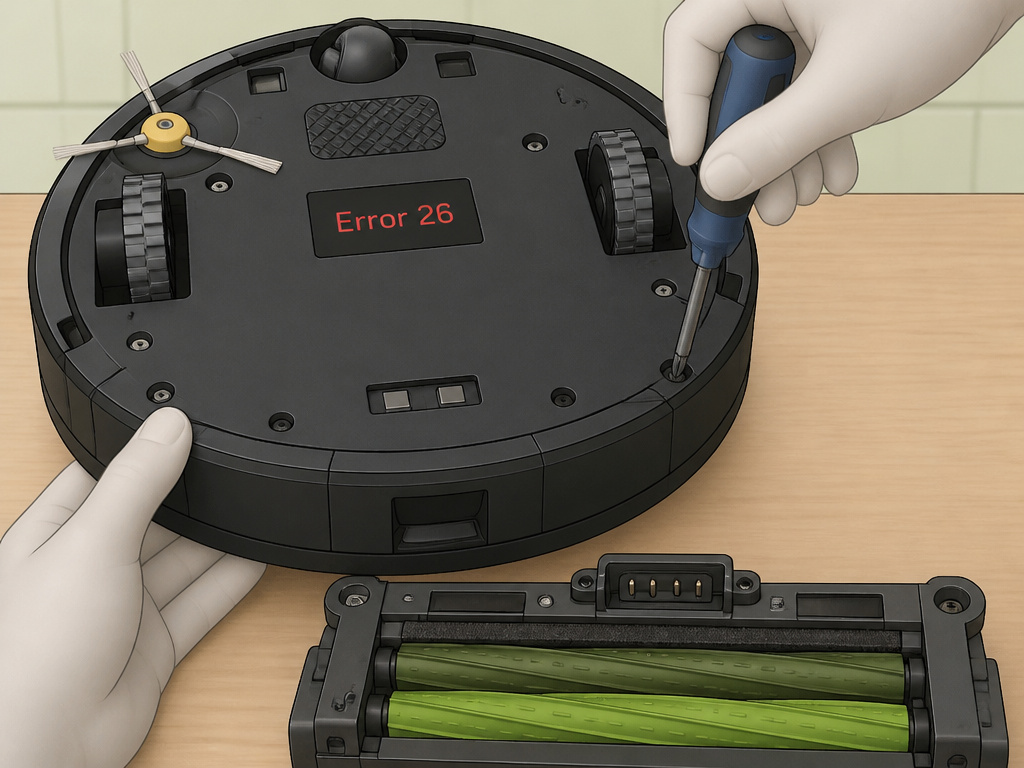
For persistent Error 26 that survives a filter change and a deep airway cleaning, iRobot’s official escalation is to replace the Cleaning Head Module. This is the entire assembly containing the vacuum motor, fan, and mounting frame.
First, identify if your robot is modular. Newer i1, i3, and i5 models are often non-modular. Check the serial number inside the bin cavity—if the eighth digit is an ‘N’ or a ‘Z’, the CHM cannot be replaced. A simpler tell: if your Roomba has a battery door on its top, the bottom cover is sealed. You cannot perform this repair.
For modular i7, i8, i9, j7, j8, and s9 models: 1. Remove the bin and filter. 2. Turn the robot over and remove the main roller frame and side brush. 3. Using a Phillips screwdriver (not a power drill), remove the five screws securing the bottom cover. 4. Lift the cover to reveal the CHM, held by four more screws. 5. Disconnect the electrical connector, remove the screws, and lift the old module out. 6. Seat the new module, reconnect the connector, and screw it in place.
The OEM part from iRobot often costs less than Amazon and includes a fresh set of rollers. A full swap takes about fifteen minutes if you’re organized.
The Non-Modular Model Problem
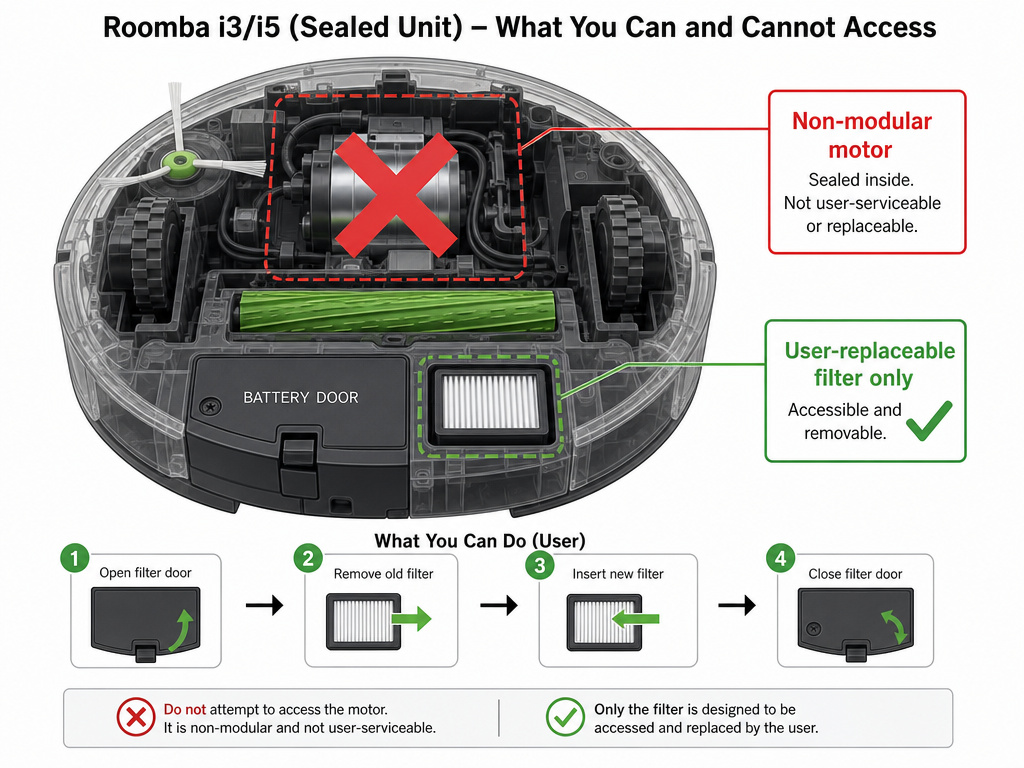
The industry shift is toward sealed units. IRobot’s i1, i3, and i5 are the frontline examples. The design saves manufacturing cost but turns a routine motor replacement into an impossible task for the owner.
If your robot has a battery door, the repair path for Error 26 ends at the filter and airway cleaning. You cannot access the motor. This turns a $70 fix into a potential robot replacement. When diagnosing, check for that door first. It changes the entire cost-benefit analysis of troubleshooting.
For these models, meticulous filter maintenance is your only defense. That means weekly checks for pet owners, not bi-monthly. The Roomba high-efficiency filter with OEM number 4640212 is your best bet. Aftermarket filters sometimes use denser material that triggers airflow errors faster.
Why Reboots Are a Temporary Fix
Holding the CLEAN button for 20 seconds forces a hard reboot. This clears the error code from the robot’s active memory and resets the motor protection circuit. It does not delete your maps or schedules.
The reboot is useful for one thing: testing. If you clean the filter and airway, then reboot, and the error stays gone, you solved it. If Error 26 reappears the moment the motor spins up, you know the physical blockage remains. The reboot is a diagnostic tool, not a repair.
Common mistake: Rebooting repeatedly without cleaning anything. Each time the motor starts against a full blockage, it surges and heats up. Do this five or six times and you’ll likely need a new motor module even after you finally clear the clog.
Frequently Asked Questions
Can I wash my Roomba filter to clear Error 26?
It depends on the filter type. The standard gray high-efficiency filters (OEM 4640212) that ship with i and j series are not washable. The filter media disintegrates when wet. If you have a filter specifically labeled as washable, rinse it under cold water only. Then let it air dry for a full 24 hours—not overnight. Putting a damp filter back in creates a paste that permanently blocks airflow and can short the motor electronics. When in doubt, tap it clean or replace it.
How often should I replace the filter to prevent Error 26?
IRobot’s standard two-month guideline is too long for homes with shedding pets. For dog or cat owners, check the filter every weekend. Hold it to a light. If the pleats are opaque, swap it. A three-pack of filters costs about the same as a coffee, and it’s far cheaper than a motor. For homes with no pets and mostly hard floors, six to eight weeks is fine.
Error 26 came back two days after I cleaned the filter. What now?
This usually means one of two things. Either the filter is old and the media itself is breaking down, so it clogs almost immediately even when it looks clean. Replace it with a fresh one. Or, there’s a packed debris blockage deeper in the airway that you missed. Shine a light into the intake port and inspect the brush chamber tunnels. A blockage there creates backpressure that a spotless filter can’t solve.
Is the vacuum motor replaceable on all Roomba models?
No. On modular i, e, j, and s series models, the motor is a replaceable module. On non-modular models like the i1, i3, and i5, the motor is integrated into a sealed chassis. You can identify non-modular units by the battery door on the top shell. For older 600 series robots, the motor is replaceable but requires extensive disassembly—it’s a 45-minute job versus a 20-minute module swap.
My Roomba also has other issues. Could they be related?
Error 26 is specifically an airflow problem. However, a robot struggling with other sensor errors may have been neglected. A chronically clogged unit often has a stuck side brush (Error 11) from wrapped hair, or it might show bumper sensor issues (Error 5) from bumping into furniture due to poor navigation. If your robot has multiple faults, start with the physical clean-out. Often, fixing the core maintenance issue resolves other Roomba errors.
Before You Go
Error 26 is a maintenance alert, not a death sentence. Start with the filter—it’s the fix 40% of the time. Then dig deeper into the airways before you assume the motor is dead. Remember the split: clogged filter, failing impeller, or packed debris. Your diagnosis depends on which one you find.
For pet owners, this error is a scheduled event. Buy filters in three-packs and check them weekly. For owners of newer non-modular models, that regular check is your entire defense. The goal is to keep the air moving freely so the motor never has to strain. Do that, and your Roomba will clean for years without a hiccup.