
Stop Your Dyson Vacuum Saying Airway Blocked With This Guide
This post contains affiliate links. As an Amazon Associate, we earn from qualifying purchases.
Your Dyson vacuum keeps saying airway blocked because the airflow sensor detects a restriction, even if you can’t see it. The three most common hidden culprits are compacted dust inside the cyclone assembly, a filter that’s still damp from washing, or a small obstruction lodged deep in a tool or the wand’s “long neck” connector. A full disassembly and dry filter are mandatory.
That sensor is precise. It measures airflow, not just the presence of a visible clog. When the flow drops below a threshold, whether from a chunk of debris or from the increased resistance of a wet filter, the alert triggers. The motor will often pulse as a warning.
What follows is the diagnostic sequence repair shops use when the obvious spots are clean. We’ll cover the five less-obvious checkpoints, the critical 24-hour filter dry time, and how to know when the problem is the sensor itself.
Key Takeaways
- The airway blocked alert is triggered by an airflow sensor, not a visual check. Hidden dust in the cyclone or a damp filter can restrict airflow without a visible clog.
- A filter needs a full 24 hours to dry in a warm, ventilated spot. Using it damp can damage the motor and consistently trigger false blockage alerts.
- If the motor pulses seven times and stops, that’s a specific error code from the vacuum’s software, often pointing to a persistent sensor reading.
- For V11, V12, and V15 models, tap the empty bin assembly firmly over a trash can to dislodge packed dust from the internal cyclone channels, a common fix official guides miss.
- When every physical check passes, the issue can be a faulty airflow sensor or main board, which requires professional service.
Why Your Dyson Thinks It’s Blocked (The Sensor Doesn’t Lie)
Your Dyson isn’t guessing. A built-in airflow sensor constantly monitors the pull from the motor. This is a safety and performance feature. If the suction path gets restricted, the motor works harder, risks overheating, and performance plummets.
The sensor doesn’t care if the blockage is a Lego or a layer of packed dust. It only knows airflow is too low. That’s why you can empty the bin, check the head, and still see the alert. The restriction is elsewhere in the system.
The machine will pulse when a blockage is detected. On some models, the motor will pulse seven times and a blockage icon will light up on the screen. Dyson620_EN_OnlineUserGuide.pdf
That pulsing is your first clue. A steady pulse usually means “check now.” A specific pattern, like seven pulses then a shutdown, can indicate the sensor still detects a problem after you’ve cleared the obvious spots.
The 5-Step Blockage Hunt (When the Usual Spots Are Clear)
Start with the machine off and the battery removed if possible. The official manual says to check the cleaner head, the wand, and the bin. When that fails, go deeper.
- The Cleaner Head & Brush Bar. Remove the head. Shine a flashlight into the suction opening. Turn the brush bar by hand. Look for wound hair, string, or debris jammed under the bar or inside the chamber. A single thread wrapped tight can act as a valve.
- The Wand. Detach it from the main body. Look through it from both ends toward a light. Check the quick-release connector ends, the “long neck” parts that click into the bin and head. A small object like a pebble or coin can lodge right at the bend.
- The Bin and Cyclone. This is where most hidden blockages live. Empty the bin. Now, look up into the cyclone shroud from the bottom. See those spiral channels? Fine dust compacts there. The fix is simple: hold the empty bin assembly over a trash can and tap the side firmly with your hand. You’ll often see a puff of dust fall out.
- The Main Body Suction Inlet. With the bin removed, look into the dark hole on the main body where the bin attaches. Use a flashlight. A large clump of dust or a forgotten piece of packing material can get sucked right to this grate.
- Every Tool and Attachment. Attach the hose directly to the main body and turn on the vacuum. Feel for strong suction at the hose end. Then, test each tool individually. A clogged crevice tool or a mini motorized tool full of hair will kill airflow.
Where this goes sideways: Skipping the bin tap. On V11 and V15 models, compacted dust in the cyclone channels is the most common cause of a persistent alert after a visual all-clear. That dust doesn’t fall out during normal emptying.
If all five points are clear, the problem isn’t a physical blockage. The next two sections cover the other likely causes.
Why a Damp Filter Triggers the Blockage Alert
This is the number one mistake after routine maintenance. You wash the filter, shake it out, and put it back in after a few hours. The vacuum turns on, runs for a minute, then flashes the airway blocked warning.
A wet HEPA filter is incredibly dense to air. The pores are clogged with water, not dust. The airflow sensor reads this as a severe restriction, because it is. The machine is trying to suck air through a wet sponge.
Important: your filter must be completely dry before putting it back into your machine. Your machine could be damaged if used with a damp filter. N418_OUG_PH.pdf
The manual mandates at least 24 hours of drying time in a warm, well-ventilated area. Not on a radiator, not in the sun, and never in a dryer. Stand it on its end, foam side up, and let air circulate.
If you use a damp filter repeatedly, you do two things. You constantly trigger false alerts, and you force the motor to strain against high resistance. That strain can lead to an overheating vacuum or contribute to a loss of suction over time.
| Filter State | Airflow Resistance | Likely Result |
|---|---|---|
| Clean & Dry | Normal | Optimal performance |
| Dirty & Dry | High | Weak suction, possible alert |
| Clean & Damp | Very High | Airway blocked alert, motor strain |
| Dirty & Damp | Extreme | Immediate alert, risk of motor damage |
The Hidden Internal Blockage: Cyclone and Sensor
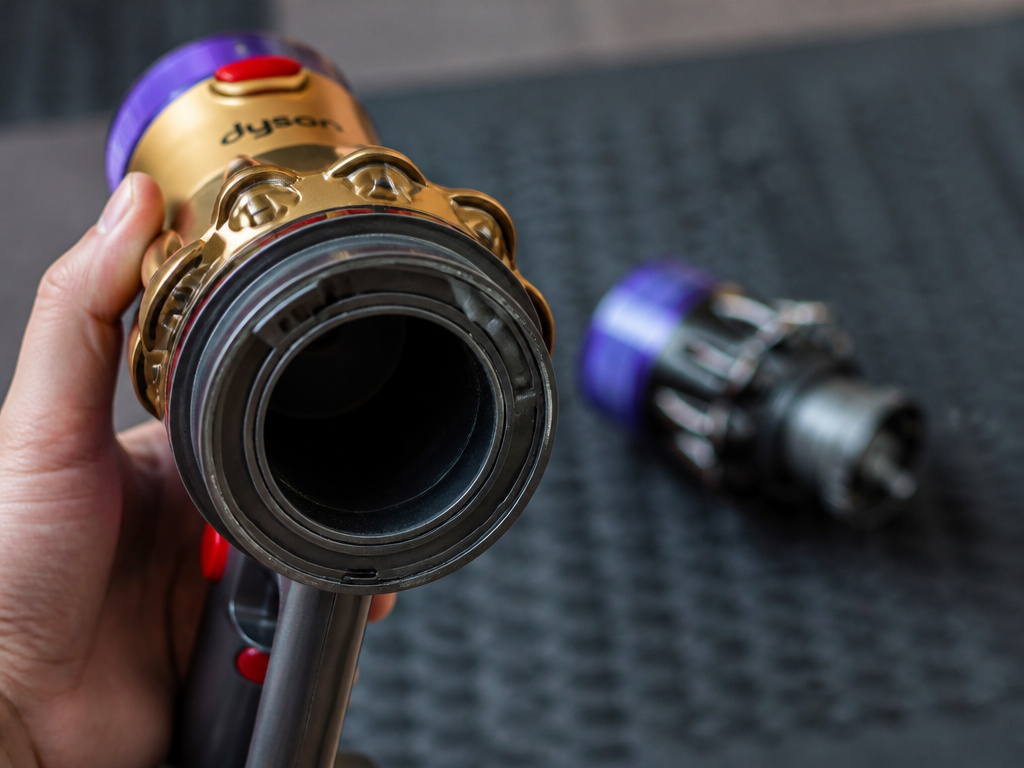
When the filter is bone-dry and every tube is clear, the blockage might be internal to the cyclone pack or the sensor itself.
For the Dyson V12 Detect Slim™, V15, and similar models, the cyclone assembly is a sealed unit. Fine dust, especially from plaster, drywall, or baking flour, can bypass the bin and pack into the fine channels around the cyclone. This isn’t user-serviceable without special tools.
Here’s the test: Remove the filter and the bin. Look into the filter housing and the bin housing. If they look clear, reassemble everything except the filter. Turn the vacuum on (point it into an empty trash can). If it runs without pulsing or an alert, the filter was the issue. If it still triggers the alert without any filter installed, the problem is almost certainly inside the cyclone or the sensor.
A faulty airflow sensor will give a false reading. So will a damaged seal or gasket that’s letting air leak in after the sensor, confusing it. This is when DIY typically ends. Forcing the cyclone apart can break plastic clips and void any remaining warranty.
When to Suspect an Electrical or Sensor Fault
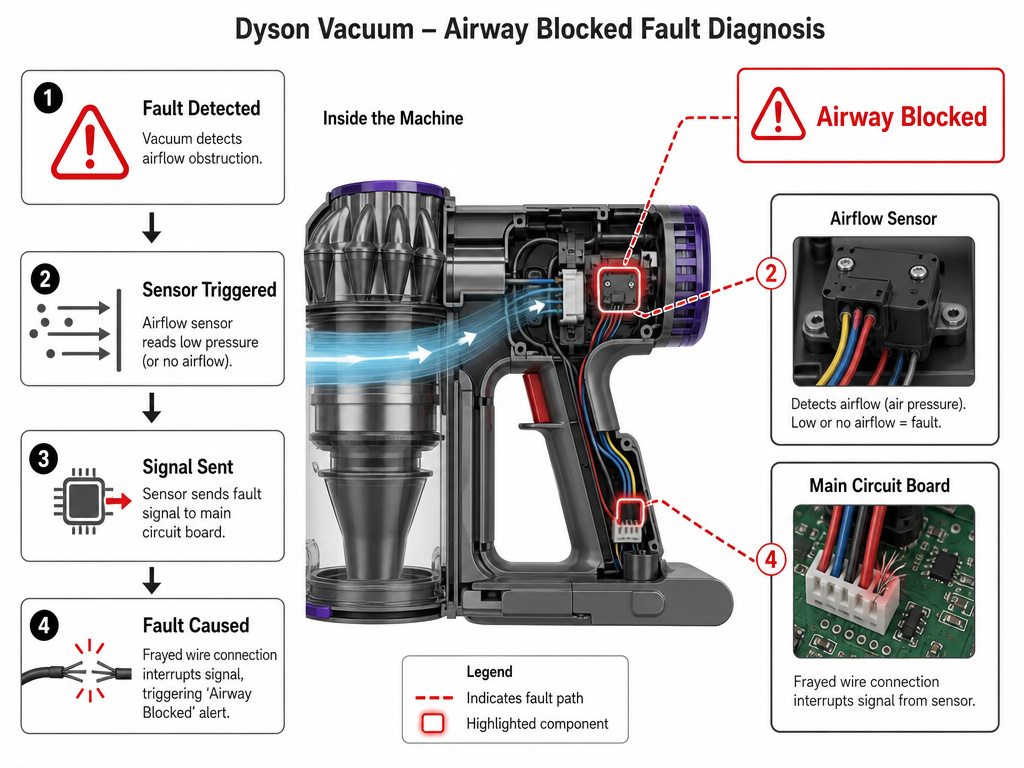
Sometimes the machine isn’t blocked. It’s confused. Distinguishing this saves hours of fruitless cleaning.
Signs of a sensor or electrical fault:
- The alert appears immediately on startup, even with the machine fully disassembled.
- The motor pulses in a very specific, repeating pattern (like the seven-pulse code).
- You’ve cleared a minor clog, but the alert returns instantly every time.
- The machine has a history of intermittent power or loses power unrelated to blockages.
These symptoms point to a deeper issue. It could be a wire dislodged from the sensor, a cracked sensor housing, or a fault on the main control board. For cordless models, also consider if a weak or faulty battery is causing power loss that the system misinterprets.
Common mistake: Assuming a persistent alert always means a bigger physical clog. On older models, internal wire fatigue or board corrosion can send false signals. Professional diagnosis is cheaper than a new motor.
How to Prevent the “Airway Blocked” Message For Good
Prevention is easier than the cure. These habits keep the airflow path clear and the sensor happy.
- Empty the Bin Before It’s Full. Don’t wait for the max line. A overfull bin lets dust get sucked into the cyclone channels. Empty it after every major cleaning session.
- Wash the Filter on Schedule, Dry It Completely. Mark your calendar: once a month. When you wash it, start the 24-hour dry clock and don’t cheat. Keep a spare filter if you clean often.
- Mind What You Vacuum. Avoid large quantities of fine powders (ashes, flour, drywall dust). These are cyclone killers. Use a shop vac for construction debris.
- Tap the Bin. Make it a ritual. After emptying the bin, give it a few firm taps over the trash can to dislodge clinging dust from the cyclone.
- Inspect Tools Regularly. Clear hair from brush rolls after vacuuming carpets. Check the hose for small objects.
Following these steps drastically reduces false alerts. It also preserves your vacuum’s suction power and extends the life of the motor.
Frequently Asked Questions
Why does my Dyson keep saying airway blocked after I cleaned it?
You likely missed a hidden blockage in the cyclone channels, or you put a damp filter back in. The filter needs a full 24 hours to air-dry completely. Also, tap the empty bin assembly firmly to dislodge packed dust.
Can a dirty filter cause an airway blockage?
Yes. A clogged filter restricts airflow just like a physical blockage. The sensor detects the drop in airflow and triggers the alert. Wash your filter monthly with cold water and let it dry for 24 hours.
What does it mean when my Dyson vacuum motor pulses?
The motor pulses to alert you of a detected blockage. It’s a warning to stop and check the machine. On some models, a specific pattern (like seven pulses) can indicate the type or location of the error.
Is it bad to use my Dyson with a damp filter?
Yes. Using a damp filter forces the motor to work against high resistance, which can cause overheating and potentially damage the motor over time. Always ensure the filter is completely dry before reinstallation.
The Bottom Line
A Dyson vacuum keeps saying airway blocked because its sensor is doing its job. The fix is almost always physical: a deep clean of the cyclone, a bone-dry filter, or a hidden clog in a tool. Start with the full five-point check, respect the 24-hour dry time, and tap that bin.
When every physical part is verified clear and dry, the problem shifts to the sensor or internal electronics. That’s your cue to contact Dyson support or a reputable repair shop. Don’t force it. Chasing a ghost blockage for weeks is more frustrating than a single professional diagnosis.