
How to Empty Your Henry Hoover Vacuum in Two Simple Phases
This post contains affiliate links. As an Amazon Associate, we earn from qualifying purchases.
To empty a Henry Hoover vacuum, you perform a two-phase clean: remove the full bag, then clean the internal filter. Unclip the head, lift out the large cylindrical filter, gently pull the bag off its holder, seal it, and fit a new one. Before reassembly, tap the filter over a bin to dislodge fine dust. Skipping the filter clean reduces suction by half within three uses.
That filter is the whole game. A Henry moves air through the bag, then through that foam cylinder before it reaches the motor. Dust bypasses a worn bag and coats the filter pores, which is why your vacuum sounds strained on a fresh bag if you haven’t cleaned the filter in months.
What follows: the specific two-step sequence, the one tool that makes it clean, what happens when you skip the filter, and the thermal safety feature that kicks in if you ignore both.
Key Takeaways
- Emptying a Henry is a two-phase job: replace the bag, then clean the filter. Doing only one halves suction.
- Never run a Henry Hoover without its bag. Dust clogs the filter directly, overheating the motor and shortening its life.
- Clean the internal foam filter by tapping it over a bin every time you change the bag. Wash it with water only every 3-5 changes.
- If the vacuum overheats from a full bag or dirty filter, a thermal cut-out will switch it off for about 30 minutes.
- For bagless Hoover models like the Blaze or Hurricane, empty the dust container at the max level line and wash the blue filter pack every five empties.
The Two-Phase Process Explained
Most guides treat bag replacement as the only step. That’s how you end up with a vacuum that has a fresh bag but weak suction. The Henry’s design uses the bag as a primary filter and the large cylindrical foam block as a final guard for the motor.
When you pull a full bag, micro-fine dust that slipped through the paper remains in the filter chamber. If you just clip a new bag on top of that dust layer, the motor must pull air through the clog. You lose airflow immediately.
The part nobody mentions: That foam filter should be tapped clean over a bin every single time you change the bag. A full bag change takes 90 seconds; adding the 10-second filter tap prevents the next bag from underperforming from the start.
The official Hoover manuals for bagless models specify washing intervals for their filters, every five container empties. The principle is identical for a Henry: the filter is a wear item that needs regular attention, not an install-and-forget part.
Step-by-Step: Emptying the Bag and Cleaning the Filter
You need a new replacement bag (Type A for most Henry models) and a household bin. Do this on a hard floor, not carpet.
- Unclip and remove the head. Press the two red release clips on the sides of Henry’s dome and lift the entire top section off by its handle. Set it aside.
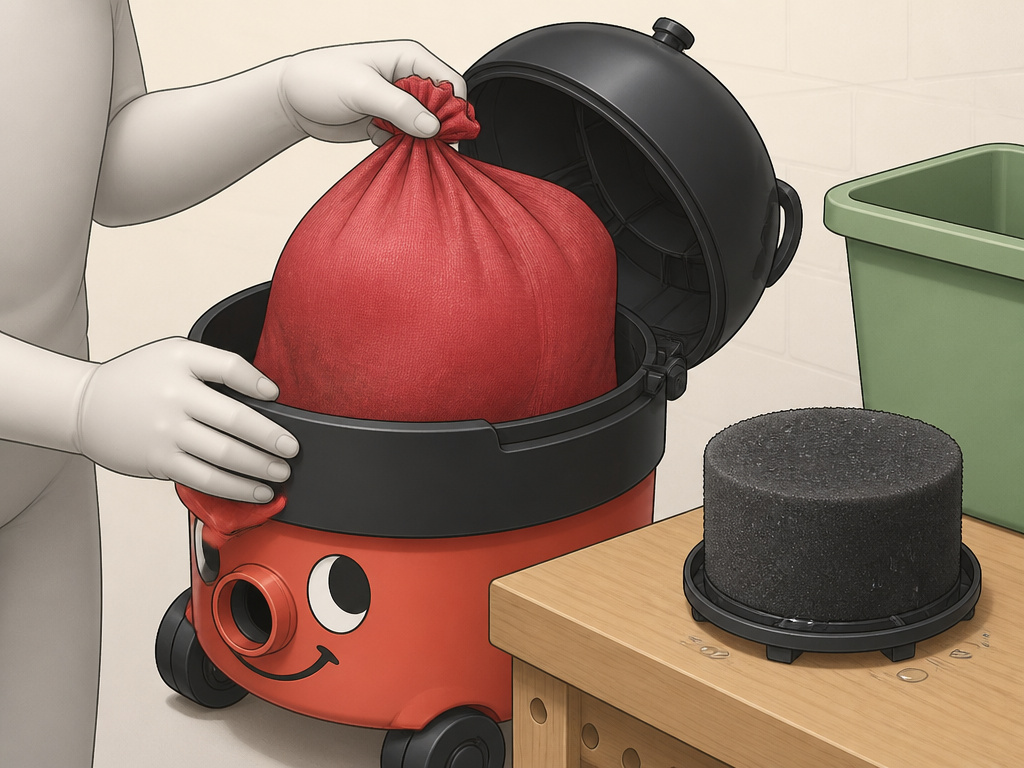
- Lift out the filter. Reach in and pull up the large, round foam filter cylinder. This exposes the bag holder.
- Remove the full bag. Find the black plastic bag holder behind the front “nose.” Gently pull the bag’s collar off this holder. Avoid shaking the bag to limit dust escape.
- Seal and dispose. Twist the top of the bag closed or use the bag’s built-in tie. Place it in your external bin.
- Clean the filter. Hold the foam filter over your bin and tap it firmly against the inside edge. You’ll see a small cloud of fine grey dust dislodge. This is the dust that would choke your next vacuum session.
- Fit the new bag. Take a new bag, open its collar, and stretch it over the black bag holder. Ensure it’s seated evenly.
- Reassemble. Place the clean filter back into its chamber. Align the head and press down until both side clips click into place.
Where this goes sideways: Discarding the bag without tapping the filter. The next bag will seem to fill impossibly fast because the motor is straining against a pre-clogged filter, pulling less dirt from your floor and more from the chamber.
The Tools You Actually Need
You can manage with just a new bag, but one tool changes this from a messy chore to a clean routine.
A long-reach dustpan and brush is the upgrade. After removing the bag and filter, use the brush to sweep any spilled dust from the cleaner’s body into the dustpan. This catches the debris that otherwise falls back into the machine or onto your floor when you reassemble.
For a deep clean every few months, you’ll also need lukewarm water. Never use detergents or hot water on the foam filter, it can degrade the material. The Hoover Blaze manual explicitly warns against detergents for its washable filters, and the same rule applies to Henry’s foam.
| Tool | Purpose | If You Skip It |
|---|---|---|
| Replacement Bag (Type A) | Primary dust collection | Cannot vacuum—running without a bag damages the motor. |
| Dustpan & Brush | Clean up spilled dust during change | Dust falls back into the machine, re-clogging the filter faster. |
| Lukewarm Water | Deep-wash the filter every 3-5 changes | Filter pores stay clogged with oily dust, permanently reducing airflow. |
What Happens If You Run a Henry Hoover Without a Bag?
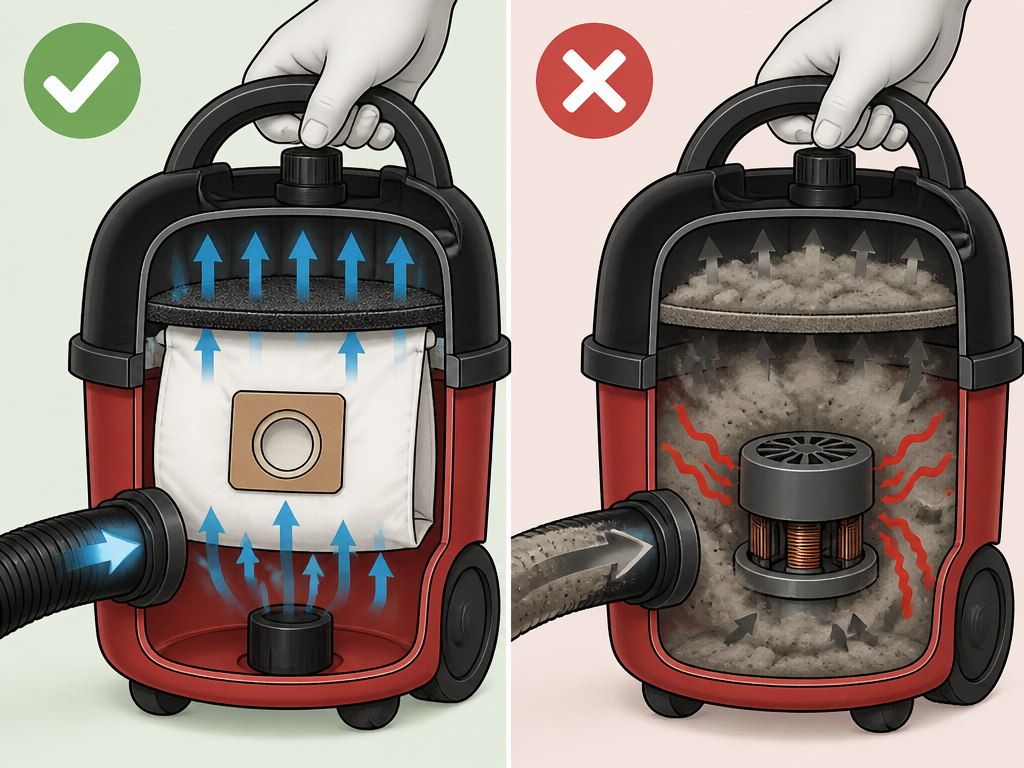 The motor burns out. This isn’t scare talk, it’s the direct result of the design.
A Henry is a bagged vacuum. The bag is a critical part of the filtration system. Without it, all the dust and debris sucked up goes directly into the foam filter. That filter is not designed to handle that volume or particle size. It clogs within minutes.
Never run a Henry Hoover without its bag. Dust clogs the filter immediately, causing the motor to overheat. Sustained overheating shortens the motor’s lifespan, often irreparably.
When the filter clogs, airflow stops. The motor, still trying to spin, has no cooling air moving over it. It overheats. In bagless Hoover models like the Blaze, this triggers a thermal cut-out safety switch that powers the unit down for about 30 minutes to cool. Henry models have similar protection, but repeatedly tripping it stresses the motor windings.
The fix is simple: never turn it on without a bag installed. If you suspect damage from past runs, listen for a high-pitched whine or burning smell during use, those are late-stage warnings.
How Often to Empty and Clean
 Empty the bag when it’s full. The rule of thumb is when dirt reaches the top of the bag or suction noticeably drops. Don’t pack it solid; an overfull bag strains the motor.
Clean the foam filter in two stages: 1. Dry clean every time: Tap the filter over a bin at every bag change. 2. Wash every 3-5 bag changes: Rinse it under lukewarm water, squeeze out excess water (don’t wring), and let it air-dry completely for 24 hours before reusing.
This matches the maintenance rhythm for a modern bagless vacuum. The principle is identical: regular filter care is non-negotiable.
For other Hoover types, the intervals are specified. The Hoover Velocity manual states its blue filter pack should be washed every five dust container empties. If you have a Hoover pet vacuum or a Hoover stick vacuum, the same logic applies, check the dust level and clean filters on a schedule.
Troubleshooting: Weak Suction After Emptying
You changed the bag, but the Henry still has no power. Here’s how to diagnose it, step by step.
- Check the filter. Did you tap it clean during the change? If not, remove it now and tap it. This is the most common fix.
- Inspect the bag seal. Is the new bag properly seated on the holder? A loose collar lets air bypass the bag, killing suction.
- Look for blockages. Disconnect the hose from the main body. Check the hose, wand, and cleaner head for clogs. A common culprit is a hair-and-string ball jammed in the cleaner neck.
- Listen to the motor. If the motor runs loudly but suction is weak, the issue is almost certainly a blockage or a clogged filter. If the motor sounds strained or sluggish, it may be overheating due to a clog.
If these steps don’t work, and the vacuum simply won’t power on, the thermal cut-out may be engaged. Unplug the vacuum and wait 30 minutes for it to reset, as specified in the Hoover Blaze manual. Then check the bag and filter before trying again.
This diagnostic approach works for most Hoover cordless and Hoover handheld models too, blockages and dirty filters are universal problems.
Henry Hoover vs. Bagless Hoover Maintenance
The core task is the same: remove dirt, clean the filter. The difference is the container.
| Aspect | Henry Hoover (Bagged) | Bagless Hoover (e.g., Blaze, Hurricane) |
|---|---|---|
| Emptying | Replace sealed paper bag. | Press button, remove dust container, dump into bin. |
| Filter Care | Clean internal foam filter. | Wash pre-motor and exhaust filters. |
| Primary Risk | Running without a bag. | Not emptying before the max line. |
| Mess Factor | Contained (if careful). | Potential dust cloud when dumping. |
| Ongoing Cost | Price of replacement bags. | No bag cost, but filters wear out. |
The bagless process is detailed for models like the Hoover upright: empty the container at the max line, then service the vacuum filter. For a Henry, you trade the potential mess of dumping a bin for the cost of bags. Both systems fail if you neglect the post-emptying filter clean.
Frequently Asked Questions
Can you wash a Henry Hoover filter?
Yes, but only with lukewarm water. Never use detergents or hot water. Wash the foam filter every 3-5 bag changes, or when tapping it no longer dislodges dust. Squeeze out water and let it air-dry completely for at least 24 hours before reusing.
How do you know when the Henry bag is full?
Suction will drop noticeably. Visually, the bag will look full and rounded, and dirt may be near the top. Don’t wait until it’s packed solid; change it when it’s about three-quarters full for best performance.
What happens if you don’t change the Henry filter?
The filter becomes clogged with fine dust. Airflow to the motor is restricted, causing the motor to overheat and work harder. Suction drops permanently, and you risk triggering the thermal cut-out or burning out the motor over time.
Can you use a Henry without a bag once?
No. Even once sends a large volume of debris directly into the foam filter, clogging it instantly. This can cause immediate overheating and potentially trip the thermal safety cut-out. Always use a bag.
Where should you empty a Henry Hoover bag?
Empty it into your general household waste bin. Do not empty into toilet or sink, vacuum dust can contain allergens, microplastics, and other debris that clogs plumbing and is unsuitable for sewage systems.
The Bottom Line
Emptying a Henry Hoover is a two-minute, two-part job: bag out, filter tapped. The bag gets the credit, but the filter does the work of protecting the motor. Keep a dustpan handy, change the bag before it’s stuffed, and never, ever run it without a bag installed. That routine keeps a Henry running for years on the original motor.
When you move to a bagless model like a Hoover, the rhythm shifts, watch the max fill line and wash the HEPA filter on schedule. The principle is constant. The vacuum needs a clear path for air. Your job is to keep that path open.