
Learn How to Charge a Dyson Vacuum & Its 41°F Safety Rule
This post contains affiliate links. As an Amazon Associate, we earn from qualifying purchases.
To charge a Dyson cordless vacuum, plug its charger directly into the battery port or seat it in its wall dock. The blue LEDs on the battery will flash; when fully charged, both LEDs stay lit for five seconds and the LCD shows 100%. The machine will not charge or operate below 41°F (5°C) to protect the battery, and fully charging it after each use trains the battery’s internal algorithm for more accurate run-time estimates.
That last clause about the algorithm is the part most guides skip. It’s not just a battery; it’s a monitoring system that adapts. If you treat it like a simple power cell, your run-time display will be off by 20% within a month, and you’ll never know why the vacuum died with 15% still showing.
What follows: the exact steps for direct and dock charging, the science behind the 41°F lockout, how to read every light and error code your machine throws, and the two maintenance habits that add years to your battery’s life.
Key Takeaways
- Dyson cordless vacuums will not charge or operate if the ambient temperature is below 41°F (5°C), a hardwired safety feature.
- Fully charge the machine after every clean to train its battery-monitoring algorithm; this improves the remaining run-time display accuracy.
- For models with multiple click-in batteries (like the V12 Detect Slim), alternate between them to maintain even long-term performance.
- A blockage or a damp filter will prevent operation and can trigger error pulses; clear them before attempting to charge.
- Use Eco or Auto/Med mode for daily cleaning to maximize battery lifespan and avoid unnecessary strain from constant Boost mode.
The Critical Temperature Rule Every Owner Misses
Your Dyson has a built-in thermostat. If the room or garage where you try to charge it dips below 5°C (41°F), the charger and the motor both shut down. This isn’t a suggestion. It’s a circuit-level lockout printed in every user manual from the SV23 to the V12 Detect Slim.
The machine won’t operate or charge if the ambient temperature is below 5°C (41°F). This is designed to protect both the motor and battery. – Dyson SV24 User Manual
Lithium-ion batteries cannot safely accept a charge when cold. The chemical reactions inside slow down, and forcing current through can cause permanent damage or create internal short circuits. The motor’s bearings also contract, and running it frozen risks seizing. So the machine simply refuses.
Move it to a warmer environment. Let it sit for an hour. Then plug it in. The same rule applies if the machine is too hot from extended use—it needs to cool down before charging resumes.
This single spec explains half the “my Dyson won’t charge” posts online. A vacuum left in an unheated garage overnight in October will be stone dead by morning, not from a faulty battery, but from a correctly functioning safety switch.
Step-by-Step: Charging Your Dyson (With or Without a Dock)
The process splits into two paths: using the included wall dock or plugging the charger directly into the machine. Both work. The dock is for permanent storage; the direct method is for a quick top-up anywhere.
Charging With a Wall Dock
- Mount the dock securely on a wall near an outlet, using the provided screws. Ensure the dock’s charging pins are clean and unobstructed.
- Align the vacuum. For most models, you slide the main body onto the dock’s rail until it clicks and seats fully. The charging pins on the dock must connect with the port on the vacuum’s battery.
- Listen for the click. A firm seat is non-negotiable. A half-docked vacuum won’t charge and may drain the battery trying to make a connection.
- Watch the lights. Blue LEDs on either side of the battery will begin flashing. If no lights come on, check the dock’s power connection and the room temperature.
Charging Directly (Without a Dock)
- Locate the charging port. It’s a circular socket on the main body of the vacuum, usually near the battery or handle.
- Plug in the charger. Connect the charger’s round connector to the port. It only fits one way. Push until it seats firmly.
- Connect to power. Plug the charger’s AC adapter into a wall outlet.
- Confirm connection. The same blue LEDs on the battery will flash. No flash means no connection—check the plug seating and port for debris.
The part nobody mentions: Always use the official Dyson charger that came with your model. Third-party chargers often lack the proper communication chip to handshake with the battery’s management system. Using one can void your warranty and, in worst cases, fry the battery controller.
Reading the Lights: From Flashing Blue to Solid
Dyson uses a simple but specific light language. Misreading it leads to unplugging a vacuum that’s still charging or missing a critical error.
| Light Pattern | What It Means | What to Do |
|---|---|---|
| Blue LEDs flashing alternately | Charging in progress. | Leave it connected. A full charge takes 3.5 to 5 hours depending on model. |
| Both blue LEDs solid for 5 seconds, LCD shows 100% | Fully charged. | You can disconnect it. The machine is ready for use. |
| No lights at all | No power connection. | Check wall outlet, charger connections, docking, and room temperature (above 41°F). |
| Red light or red icon on LCD | Battery empty or critical fault. | Connect to charger. If red persists after 10 minutes, a deeper battery problem may exist. |
| Amber/Red pulsing, motor pulses 3x | Low run-time warning. | Not a charging error—this happens during use. Switch to Eco mode or recharge soon. |
| Motor pulses 6x, machine cuts out | Blockage detected. | Charging is disabled. You must clear the blockage before the machine will operate or charge again. |
Common mistake: Unplugging as soon as the blue lights go steady. Wait for the full five-second solid display and the 100% readout on the LCD. Pulling the plug early interrupts the balancing cycle for the battery’s individual cells.
Why Your Dyson’s Battery Needs to “Learn”
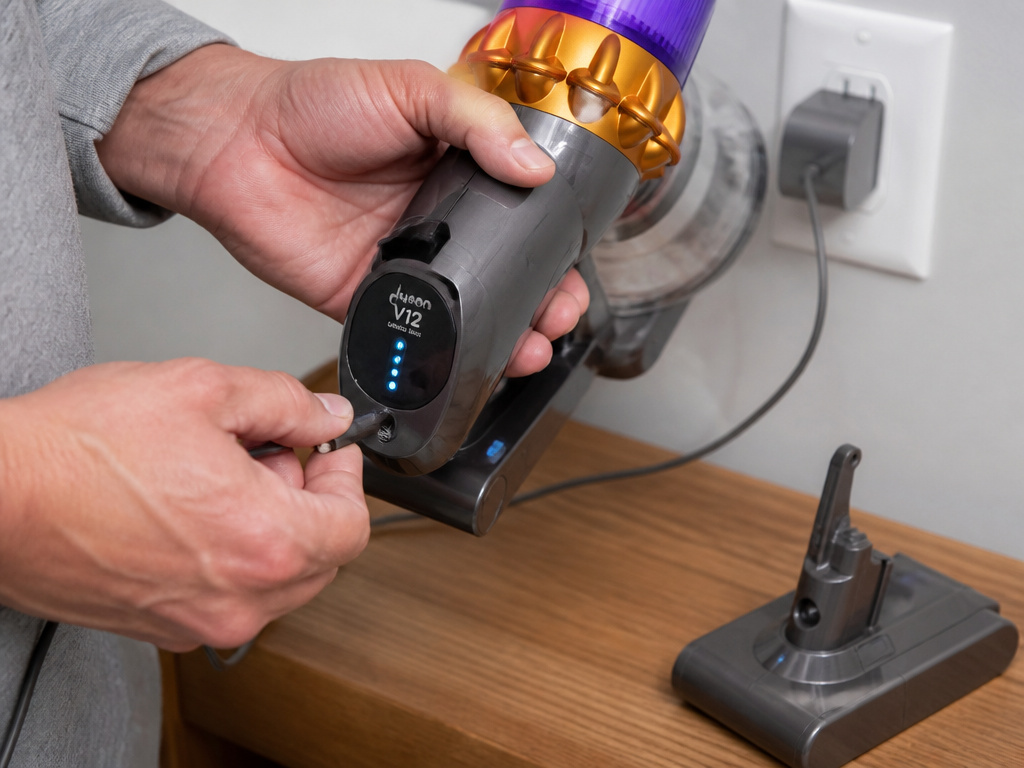
Newer models like the V9 and V12 Detect Slim have a smart battery system. It doesn’t just measure voltage; it runs an algorithm that predicts remaining run-time based on your usage patterns.
Fully charging the machine after every clean trains this algorithm. The manual for the V12 Detect Slim states this explicitly. If you consistently do partial top-ups, the algorithm’s prediction drifts. Your display might show 30% charge left when the battery is actually at 5%, leading to a sudden, unexpected shutoff.
This is also why letting the battery run completely flat is bad. It corrupts the algorithm’s baseline data. For the most accurate minutes-remaining display, follow this cycle: use it, then charge it fully.
If you own a model with additional click-in batteries, rotate them. Using the same battery every time while the spare sits on a shelf leads to uneven aging. The Dyson V12 Detect Slim manual recommends alternating them to maintain even performance. One battery wears out faster otherwise.
Troubleshooting: When Your Dyson Won’t Charge
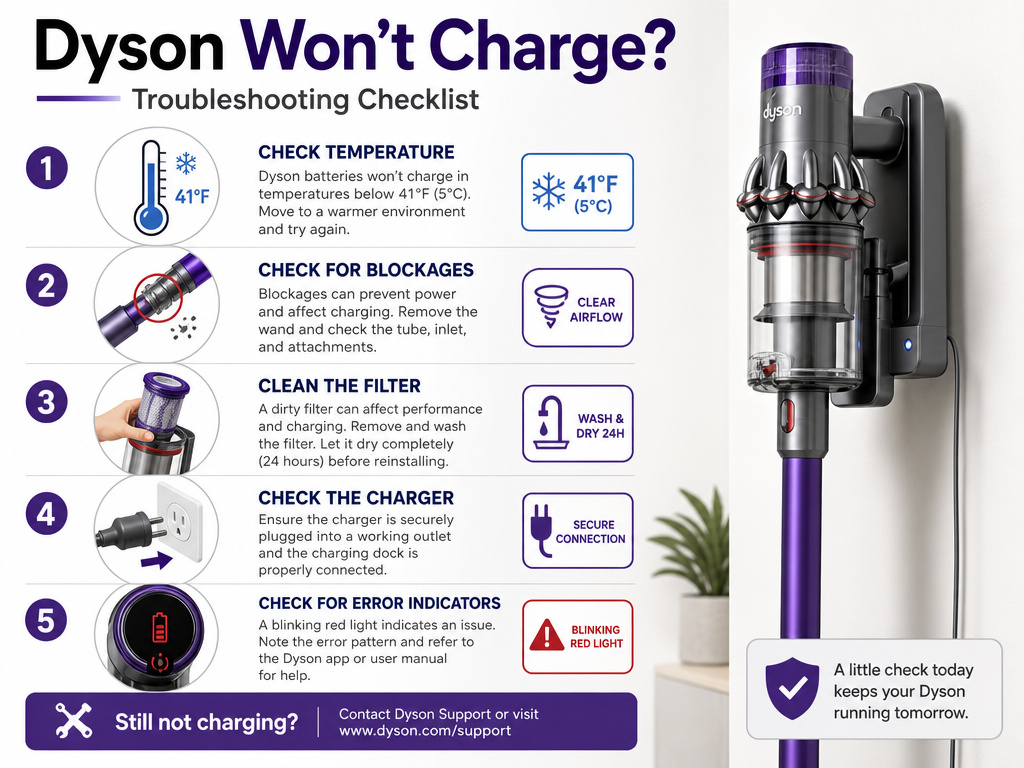
Sometimes the lights don’t come on. Before you assume a dead battery or a broken charger, run through this checklist. Nine times out of ten, the fix is here.
- Check the temperature. Is the room or garage below 41°F? This is the most common culprit. Move the vacuum to a warmer spot for an hour.
- Inspect for blockages. A full blockage triggers a safety lockout. The motor will pulse six times and refuse to start. Disconnect from the charger, allow the machine to cool, and check the wand, hose, and cleaner head for obstructions.
- Ensure the filter is dry and seated. A damp filter can cause a fault. Remove it, confirm it’s bone-dry (24-hour air dry minimum), and reseat it by twisting clockwise until it locks. An unsealed filter triggers an alert on some models.
- Verify all connections. Is the wall outlet live? Is the charger firmly clicked into the vacuum’s port or the dock fully seated? Unplug and replug everything.
- Look for error codes. A sequence of blinking lights or specific error codes on the LCD points to a specific component failure.
If the vacuum still shows no signs of life after these steps, you may be facing a failed battery or a faulty charger. At this point, contacting Dyson support is the next logical step.
Maximizing Battery Life and Performance
Charging is just one part of the equation. How you use the vacuum determines how long the battery lasts before it needs replacement.
- Prefer Eco or Auto/Med mode. The manuals for the SV24 and V10 state this clearly: using the lower-power mode delivers the best battery life and performance. Save Boost mode for high-pile rugs or quick, intense messes.
- Store it half-charged. If you won’t use the vacuum for a month or more (like seasonal storage), charge it to about 50% before storing it in a cool, dry place. Storing a lithium-ion battery fully charged or fully dead accelerates its degradation.
- Clean the filters monthly. A clogged filter makes the motor work harder, draining the battery faster and causing overheating. Wash the filter with warm water, shake it out thoroughly, and let it dry for a full 24 hours before reinstalling.
- Avoid continuous extreme discharge. Don’t run the vacuum on Boost mode until it dies every single time. This creates excessive heat and stress. Let it cool down between extended cleaning sessions.
These habits can stretch a battery’s usable lifespan from two years to four or more. The battery is the most expensive wearable part on a cordless vacuum. Treating it right saves real money.
Frequently Asked Questions
Why does my Dyson pulse and not charge?
If the motor pulses six times and then cuts out, the machine has detected a blockage. Charging is disabled until you clear the obstruction from the wand, hose, or cleaner head. Unplug it, let it cool, and perform a thorough check.
How long does a Dyson battery take to charge fully?
Most Dyson cordless vacuums take between 3.5 and 5 hours for a full charge from empty. The exact time depends on the model and the battery’s capacity. The blue flashing LEDs will go steady, and the LCD will show 100% when complete.
Can I use my Dyson while it’s charging?
No. Dyson cordless vacuums are designed not to operate while plugged into the charger. The charging circuit and the motor circuit are separate for safety reasons. You must disconnect it from the charger to use it.
Is it bad to leave my Dyson on the charger all the time?
For daily use, leaving it on the dock between cleans is fine and recommended. The built-in battery management system prevents overcharging. However, for long-term storage exceeding a month, it’s better to store it half-charged and disconnected.
What does a red light mean on my Dyson vacuum?
Solid red light or a red battery icon on the LCD typically means the battery is critically low or has a fault. Connect it to the charger. If the red light persists after 10-15 minutes of charging, there may be a deeper issue with the battery or its connections, warranting a look at guides on Dyson vacuum battery problems.
Before You Go
Charging a Dyson isn’t complicated, but it has rules. Plug it in, watch for the blue flashes, and wait for the solid lights and 100% display. Respect the 41°F lockout—it’s there to protect a $100+ battery. Charge it fully after each session to keep its internal brain calibrated. And if the lights don’t come on, check for blockages, a loose filter, or a tripped temperature guard before you panic. Do those things, and the machine will run for years without a hiccup.