
Dyson Vacuum Keeps Stopping on Carpet? Top Causes & Solutions
This post contains affiliate links. As an Amazon Associate, we earn from qualifying purchases.
Your Dyson vacuum keeps stopping on carpet because of one of three mechanical failures: a jammed brush bar, a blocked airway from a full bin or clog, or an overheated motor caused by a dirty filter. The machine’s thermal protection cuts power to prevent damage, and it won’t restart until you clear the specific obstruction and let it cool.
That thermal cut-out is the machine protecting itself, not a design flaw. The problem is finding which of the three triggers is the real one on your model, a DC14 with a foot pedal, a DC24 with a button, or a cordless V10.
What follows is the diagnostic sequence that works for all of them. We’ll walk through the three main failure points, the step-by-step reset that the manuals assume you know, and the one maintenance task most people postpone until it’s too late.
Key Takeaways
- A jammed brush bar is the top cause, especially in homes with pets or long hair. The machine will make a loud ratcheting noise before it stops.
- A full bin or blockage disrupts airflow, triggering the thermal cut-out within minutes. The vacuum may pulse or stop abruptly.
- Dirty filters are a slow-burn failure. The motor overheats trying to pull air through clogged pleats, causing the vacuum to shut off after 5–10 minutes of use.
- The thermal cut-out requires a full 60-minute cool-down before the vacuum will reset, even if you clear the blockage immediately.
- On certain delicate rugs, the rotating brush bar can cause fuzzing. Dyson’s official advice is to switch to hard floor mode to avoid damage.
The 3 Main Reasons Your Dyson Stops on Carpet (And How to Fix Each)
Your Dyson isn’t broken. It’s stuck. The difference is everything. A broken motor needs a repair shop; a stuck brush bar needs a pair of scissors and two minutes.
The machine’s design includes a safety system that shuts down the motor when it detects excessive strain or heat. This happens three ways, and each has a distinct symptom.
The Dyson DC14 manual states: “This vacuum is fitted with a thermal cut-out. If any part of your vacuum becomes blocked, it may overheat and automatically shut off. Switch ‘OFF’ and unplug the vacuum and leave to cool down for at least 60 minutes before attempting to check filters or for blockages.”
1. A Jammed or Obstructed Brush Bar
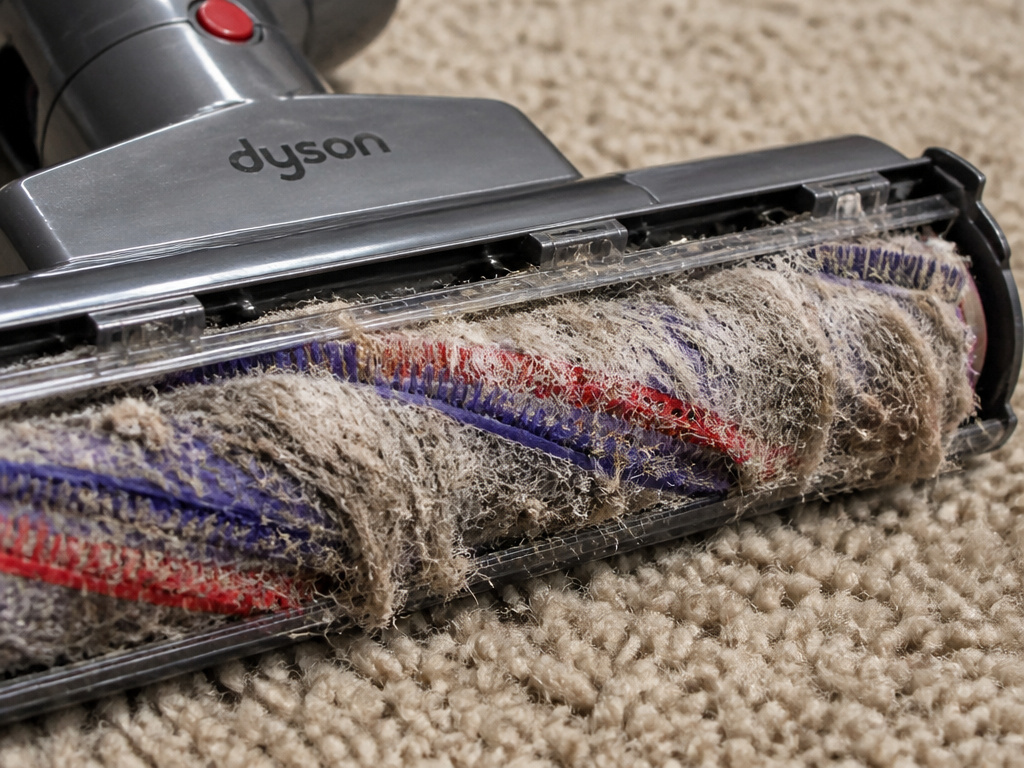
This is the most common culprit, full stop. The brush bar, the rotating cylinder with bristles inside the cleaner head, wraps hair and string until it can’t turn. The motor strains, the thermal sensor trips, and the vacuum stops.
On older uprights like the DC14, you’ll hear a loud ratcheting noise first. The manual is clear: “This noise does not hurt the machine.” It’s a clutch protecting the drive belt. Ignore it, and the machine stops.
How to fix it:
- Unplug the vacuum.
- Turn the cleaner head over and remove the soleplate (usually with a coin or screwdriver).
- Cut away all wrapped debris from the brush bar ends and central shaft.
- Manually spin the brush bar to ensure it moves freely.
- Replace the soleplate, ensuring it clicks flush. A gap here will cause immediate failure.
2. Blocked Airflow from a Full Bin or Clog
Dyson vacuums need constant, clear airflow. A bin filled past the MAX line, or a clump of debris lodged in the hose, wand, or cyclone inlet, chokes the motor. It’s like trying to breathe through a straw.
The symptom here is often a loss of suction before the complete stop, or a pulsing action as the motor struggles. Cordless models like the V10 are especially sensitive to this.
How to fix it:
- Empty the bin completely, even if it looks only half-full.
- Detach the hose and wand. Shine a flashlight and look for blockages.
- Check the airway where the bin attaches to the cyclone. A compressed lump of dust here is a classic hidden clog.
- Reassemble, ensuring every click connection is secure. An unsealed hose causes immediate losing power.
3. Overheating from Dirty Filters
This is the silent failure. The pre-motor and HEPA filters catch fine dust. Over months, the pleats clog. The motor works harder to pull air through, generating excess heat. The thermal cut-out engages, and the vacuum shuts off, often after a normal cleaning session has started.
The timeline is key. If your Dyson runs for 5–10 minutes on carpet then dies, think filters. If it stops in the first 30 seconds, think brush bar or blockage.
How to fix it:
- Locate all filters (check your manual; most have at least two).
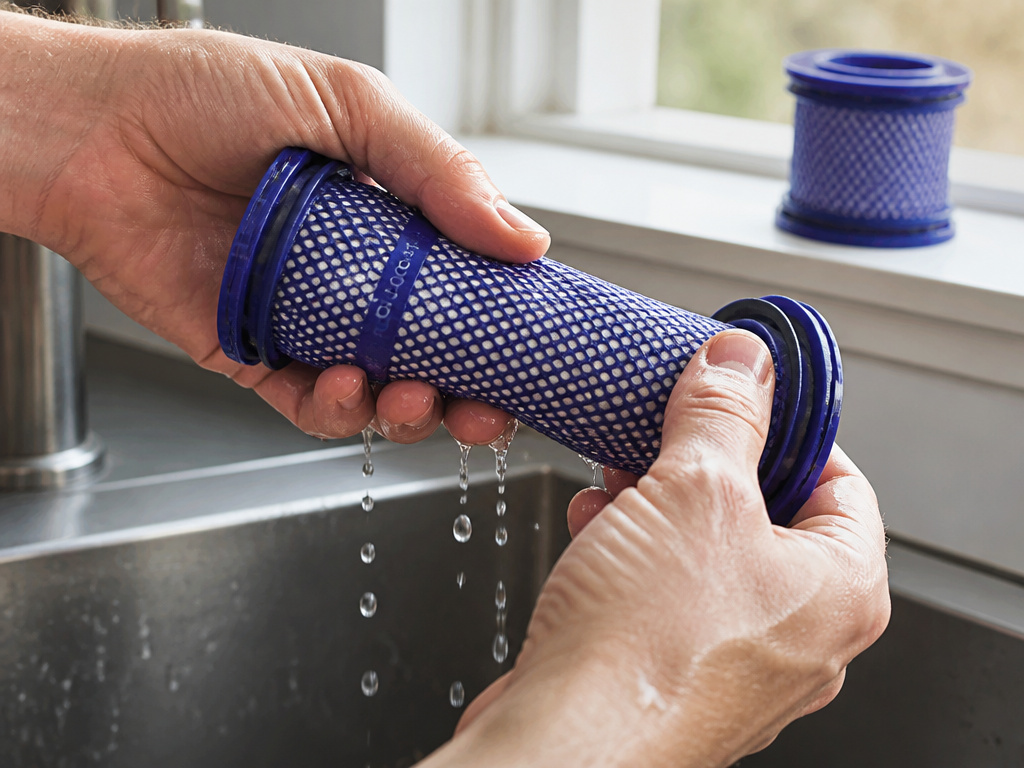
- Wash them in cold water only, without detergent, until the water runs clear.
- Squeeze gently, don’t crush the HEPA pleats.
- Air dry for a full 24 hours. Any dampness left will be sucked into the motor and cause immediate overheating.
- Reinstall completely dry filters.
| Symptom | Most Likely Cause | Immediate Action |
|---|---|---|
| Loud ratcheting, then stop | Jammed brush bar | Clear hair/debris from brush bar |
| Loss of suction, then stop | Full bin or airway clog | Empty bin, check hose & wand |
| Runs 5-10 min, then stops | Dirty, clogged filters | Remove, wash, and dry all filters |
| Cuts out instantly, won’t restart | Thermal cut-out active | Unplug, wait 60+ minutes to cool |
Step-by-Step Troubleshooting When It Just Quit
Follow this sequence. It’s the order of operations from Dyson’s own support logic.
Before you start: Unplug the vacuum if it’s corded. For cordless, remove the battery pack. You will be handling sharp objects like staples or pins wrapped in the brush bar.
- Let it cool. If the machine just stopped, the thermal cut-out is active. Unplug it and walk away for 60 minutes. No exceptions. Trying to restart it now will do nothing.
- Empty the bin. Do this over a trash can, and tap the bin to dislodge compacted dust. Check the cyclone inlet for a clog.
- Inspect the brush bar. Flip the machine. Can you spin the brush bar by hand? If not, remove the soleplate and clear it. This fixes most brush bar stuck issues.
- Check for hose and wand blockages. Disassemble the vacuum’s airflow path. A kid’s sock or a large wad of hair is often lodged just out of sight.
- Remove and inspect the filters. Are they grey or black? Do they smell? If yes, wash them. Remember: 24-hour dry time.
- Reassemble and test. Plug in the vacuum or reinsert the battery. Recline the handle on carpet. Does the brush bar spin? If yes, you’re done. If not, the motor or switch may be faulty.
Where this goes sideways: Reassembling the soleplate incorrectly. If it isn’t perfectly flush with the cleaner head, the brush bar will rub and stop instantly. You’ll think you didn’t fix it, but it’s just a misaligned panel.
Model-Specific Notes: From the DC14 to the V10
Not all Dysons are the same. The fix depends on your model’s design.
Dyson DC14, DC25, DC33 (Uprights with Foot Pedal):
These have a brush control pedal on the cleaner head. Carpet mode spins the brush bar; Bare floors mode locks it. If your vacuum stops on carpet, make sure the pedal is firmly set to “Carpets.” The brush bar only engages when the handle is reclined.
Dyson DC24, DC27 (Uprights with Brush Bar ON/OFF Button):
These models default to brush bar “ON” every time you start. To turn it off for hard floors, you must recline the handle, then press the button. If the button is stuck or unresponsive, the brush bar may not be getting power.
Dyson V8, V10, V11 (Cordless Stick Vacuums):
The cordless vacuum stopping problem is often battery or filter related. The MAX mode drains the battery fast, which can feel like the machine is cutting out. First, ensure a full charge. Second, wash the filters monthly. The V10 has a filter light for a reason.
For all cordless models: They will not operate while plugged into the charger. You must unplug them to use them.
Preventive Maintenance: The Schedule That Actually Works
 Reactive fixes are fine. Not needing a fix is better. This isn’t a complicated regimen; it’s three calendar reminders.
- After every use: Empty the bin. Never let it hit the MAX line. Tap out the fine dust.
- Every month: Check the brush bar for wrap. Run scissors along the ends. Do a visual check of the hose for blockages.
- Every 3 months: Wash all filters. This is Dyson’s official recommendation for models like the DC27. For homes with pets or high dust, make it every 6-8 weeks.
Common mistake: Washing filters and putting them back in damp. The moisture gets sucked into the motor assembly. That’s a one-way ticket to a corroded thermal fuse and a permanent stop. Dry them for a day, not an hour.
The single biggest factor in frequent clogs is not the vacuum, it’s what you pick up. Be ruthless about picking up loose strings, hair ties, and shredded paper before you vacuum.
When It’s Not a Fix: Carpet Fuzzing and Design Limits
 Sometimes, the vacuum is working as designed, but your carpet isn’t compatible. Dyson manuals carry a specific warning.
The Dyson DC33 manual notes: “The brush bar on your machine can damage certain flooring. Some rug materials may fuzz if a rotating brush bar is used when vacuuming. If this happens, we recommend vacuuming in hard floors mode and consulting with your flooring manufacturer.”
If you have a delicate, high-pile, or antique rug, the rotating brush bar can literally tear fibers. The resulting fuzz can then jam the brush bar, causing a stop. The fix is to switch to hard floor mode (brush bar off) when cleaning that specific rug. This is a carpet problem, not a vacuum problem.
Similarly, a rug with loose tassels or a carpet not fully secured to the floor can trigger the protective ratcheting noise. The machine interprets the tassels as constant obstruction.
| Scenario | Is it a Vacuum Problem? | Solution |
|---|---|---|
| Delicate rug fuzzes when vacuumed | No | Use hard floor mode (brush bar off) |
| Loose carpet or rug tassels cause ratcheting | No | Secure the rug; vacuum slowly over edges |
| Brush bar stops on thick shag carpet | Possibly | Machine may be underpowered for the pile |
| All carpets, machine consistently stops | Yes | Proceed with full troubleshooting |
If you’ve tried all fixes and the machine still fails, the issue may be a worn drive belt (on uprights) or a failing thermal cut-out switch. These are repair-level items. For most users, sticking to the maintenance schedule prevents ever getting to that point.
Frequently Asked Questions
Why does my Dyson vacuum run for a minute then stop on carpet?
This is the classic symptom of a dirty filter. The motor overheats trying to pull air through clogged filter pleats. The thermal cut-out engages, shutting the machine down. Wash and thoroughly dry all filters.
Is the loud ratcheting noise from the cleaner head bad?
No. Per the Dyson DC14 manual, the ratcheting noise is a protective clutch meant to save the drive belt from damage. It indicates an obstruction in the brush bar or that you’re vacuuming a loose rug. Clear the brush bar; the noise will stop.
How do I reset the thermal cut-out on my Dyson?
Unplug the vacuum and let it sit for at least 60 minutes in a cool, dry place. This allows the internal thermal fuse to reset. You cannot bypass it by holding buttons. If it trips repeatedly, you have a persistent blockage or a failing motor.
Can I use my Dyson on thick shag carpet?
It depends on the model. High-pile shag can overwhelm the brush bar motor and airflow of some models, causing frequent stops. For thick carpet, ensure you’re using a Dyson designed for it and keep the filters exceptionally clean to maintain maximum suction.
Before You Go
A Dyson stopping on carpet is almost always a maintenance alert, not a death sentence. The sequence is reliable: clear the brush bar, empty everything, wash the filters. Remember the 60-minute cooldown rule, it’s the most skipped step.
For the majority of homes, the fix is in the first five minutes of checking the brush bar for wrapped hair. Make that a monthly habit, and you’ll likely never see the thermal cut-out engage again. If your machine is older and you’re facing persistent intermittent power, it might be time to evaluate newer carpet models designed for your specific floor type.